Open-source RightAI Tools Directory
  • Discover AI
  • Submit
  • Startup
  • Blog
Open-source RightAI Tools Directory
Discover the best AI tools of 2025 with the RightAI Tools Directory!

Friend Links

AI Anime GeneratorToolsApp AI

Support

Tap4
Privacy policyTerms & ConditionsContact Us
Loading...
loading...

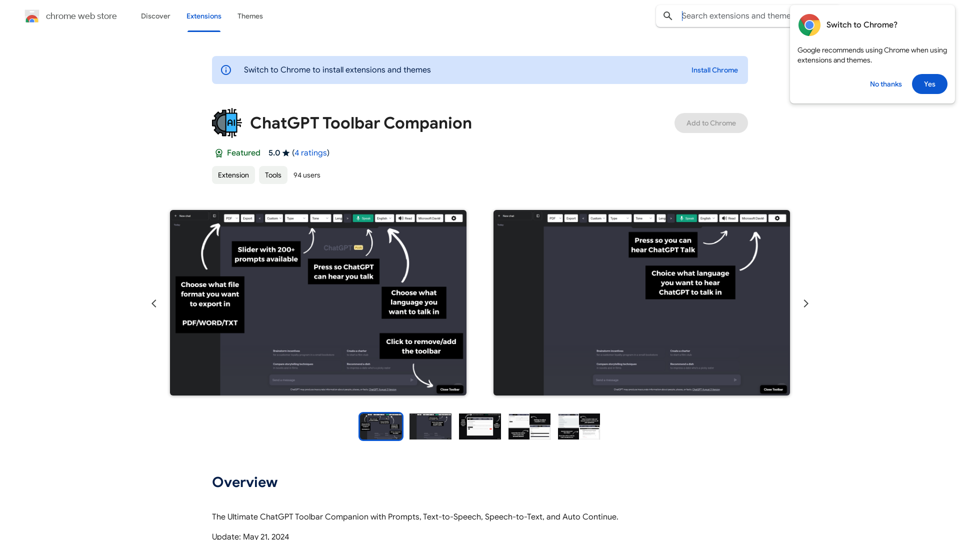
ChatGPT Toolbar Companion

The Ultimate ChatGPT Toolbar Companion with Prompts, Text-to-Speech, Speech-to-Text, and Auto Continue.
Visit Website
ChatGPT Toolbar Companion
Visit Website

Introduction

ChatGPT Toolbar Companion is a powerful browser extension that enhances the capabilities of ChatGPT, an AI-powered chatbot. It offers features like seamless conversations, customization options, and realistic AI voices. The extension aims to improve user interaction with ChatGPT, making it more efficient, accessible, and versatile for various tasks.

Feature

200+ Powerful Prompts

  • Vast array of prompts including "Act As," "Tone," "Creativity," "Programming," and more
  • Enables dynamic and engaging conversations

Two-Way Conversations

  • Engage in real dialogues with ChatGPT
  • Creates lifelike interactions that feel genuinely conversational

Deep Customization

  • Advanced customization features
  • Tailor chat experience to user preferences

Realistic AI Voices

  • Enhances authenticity of interactions
  • Immersive conversation experience

Export ChatGPT

  • Download ChatGPT chats in different formats

Instantaneous Access

  • Quick access to ChatGPT prompts via dedicated toolbar
  • Seamless chatting experience

Custom Prompt Creation

  • Craft and save custom prompts
  • Suits specific needs and preferences

Advanced Speech-to-Text

  • Engage with ChatGPT through voice input
  • Effortless communication

Text-to-Speech

  • Listen to ChatGPT's responses
  • Enhances communication experience

Auto-Continuation

  • Uninterrupted chat flow
  • Smoother conversations

Toolbar Modification

  • Personalize toolbar to match preferences and workflow

FAQ

What is ChatGPT Toolbar Companion?

ChatGPT Toolbar Companion is a powerful browser extension that enhances the capabilities of ChatGPT, offering features like seamless conversations, customization options, and realistic AI voices.

What are the key features of ChatGPT Toolbar Companion?

Key features include 200+ powerful prompts, two-way conversations, deep customization, realistic AI voices, and the ability to export ChatGPT chats.

Why should I choose ChatGPT Toolbar Companion?

ChatGPT Toolbar Companion offers peak efficiency, universal accessibility, multitasking capabilities, immersive learning experiences, creativity enhancement, and represents the future of communication.

How do I get started with ChatGPT Toolbar Companion?

To get started, ensure compatibility with a supported browser on a desktop or PC, download the ChatGPT Toolbar Companion, and launch it to begin engaging with ChatGPT. If the toolbar doesn't appear, refresh your browser page.

Are there any compatibility issues I should be aware of?

Realistic AI Voices are only compatible with certain browsers. All browsers will have access to basic voices. The extension is designed for use on desktop or PC browsers.

Latest Traffic Insights

  • Monthly Visits

    193.90 M

  • Bounce Rate

    56.27%

  • Pages Per Visit

    2.71

  • Time on Site(s)

    115.91

  • Global Rank

    -

  • Country Rank

    -

Recent Visits

Traffic Sources

  • Social Media:
    0.48%
  • Paid Referrals:
    0.55%
  • Email:
    0.15%
  • Referrals:
    12.81%
  • Search Engines:
    16.21%
  • Direct:
    69.81%
More Data

Related Websites

AI Describe Picture & Image | Free AI-generated image description
View Detail

AI Describe Picture & Image | Free AI-generated image description

AI Describe Picture & Image | Free AI-generated image description

AI picture & image description generator, helping you quickly generate image descriptions.

7.04 K
AVCLabs AI: Enhance Your Video and Photo Quality with AI
View Detail

AVCLabs AI: Enhance Your Video and Photo Quality with AI

AVCLabs AI: Enhance Your Video and Photo Quality with AI

AVCLabs is an AI products provider, which is dedicated to serving customers with products including Video Enhancer, Photo Editor, Photo Enhancer, and Video Blur AI.

356.07 K
The #1 YouTube Thumbnails Generator for Viral Videos
View Detail

The #1 YouTube Thumbnails Generator for Viral Videos

The #1 YouTube Thumbnails Generator for Viral Videos

The AI thumbnail generator used by the top YouTube content creators. Create viral thumbnails with ThumbnailPro. Ideal for YouTube thumbnails.

0
AI Girlfriend Builder - Chat and Generate Images
View Detail

AI Girlfriend Builder - Chat and Generate Images

AI Girlfriend Builder - Chat and Generate Images

Create Your Dream AI Girlfriend! Customize her look and personality, and bring her to life in one click. 100% powered by Artificial Intelligence.

868.33 K
Text to Voice Generator
==========================

A text-to-voice generator, also known as a text-to-speech (TTS) system, is a software that converts written text into a spoken voice output. This technology has been widely used in various applications, including virtual assistants, audiobooks, and language learning platforms.

How it Works
---------------

The process of generating voice from text involves several steps:

1. Text Analysis: The input text is analyzed to identify the language, syntax, and semantics.
2. Phonetic Transcription: The text is converted into a phonetic transcription, which represents the sounds of the spoken language.
3. Prosody Generation: The phonetic transcription is then used to generate the prosody, or rhythm and intonation, of the spoken voice.
4. Waveform Generation: The prosody and phonetic transcription are combined to generate the audio waveform, which is the final spoken voice output.

Types of Text-to-Voice Generators
-----------------------------------

There are two main types of text-to-voice generators:

Rule-Based Systems

These systems use a set of predefined rules to generate the spoken voice output. They are often limited in their ability to produce natural-sounding voices and may sound robotic.

Machine Learning-Based Systems

These systems use machine learning algorithms to learn from large datasets of spoken voices and generate more natural-sounding voices. They are often more advanced and can produce high-quality voice outputs.

Applications of Text-to-Voice Generators
-----------------------------------------

Text-to-voice generators have a wide range of applications, including:

Virtual Assistants

Virtual assistants, such as Siri and Alexa, use text-to-voice generators to respond to user queries.

Audiobooks

Text-to-voice generators can be used to create audiobooks from written texts, making it easier for people to access written content.

Language Learning

Language learning platforms use text-to-voice generators to provide pronunciation guidance and practice exercises for learners.

Accessibility

Text-to-voice generators can be used to assist people with disabilities, such as visual impairments, by providing an auditory interface to written content.
View Detail

Text to Voice Generator ========================== A text-to-voice generator, also known as a text-to-speech (TTS) system, is a software that converts written text into a spoken voice output. This technology has been widely used in various applications, including virtual assistants, audiobooks, and language learning platforms. How it Works --------------- The process of generating voice from text involves several steps: 1. Text Analysis: The input text is analyzed to identify the language, syntax, and semantics. 2. Phonetic Transcription: The text is converted into a phonetic transcription, which represents the sounds of the spoken language. 3. Prosody Generation: The phonetic transcription is then used to generate the prosody, or rhythm and intonation, of the spoken voice. 4. Waveform Generation: The prosody and phonetic transcription are combined to generate the audio waveform, which is the final spoken voice output. Types of Text-to-Voice Generators ----------------------------------- There are two main types of text-to-voice generators: Rule-Based Systems These systems use a set of predefined rules to generate the spoken voice output. They are often limited in their ability to produce natural-sounding voices and may sound robotic. Machine Learning-Based Systems These systems use machine learning algorithms to learn from large datasets of spoken voices and generate more natural-sounding voices. They are often more advanced and can produce high-quality voice outputs. Applications of Text-to-Voice Generators ----------------------------------------- Text-to-voice generators have a wide range of applications, including: Virtual Assistants Virtual assistants, such as Siri and Alexa, use text-to-voice generators to respond to user queries. Audiobooks Text-to-voice generators can be used to create audiobooks from written texts, making it easier for people to access written content. Language Learning Language learning platforms use text-to-voice generators to provide pronunciation guidance and practice exercises for learners. Accessibility Text-to-voice generators can be used to assist people with disabilities, such as visual impairments, by providing an auditory interface to written content.

Text to Voice Generator ========================== A text-to-voice generator, also known as a text-to-speech (TTS) system, is a software that converts written text into a spoken voice output. This technology has been widely used in various applications, including virtual assistants, audiobooks, and language learning platforms. How it Works --------------- The process of generating voice from text involves several steps: 1. Text Analysis: The input text is analyzed to identify the language, syntax, and semantics. 2. Phonetic Transcription: The text is converted into a phonetic transcription, which represents the sounds of the spoken language. 3. Prosody Generation: The phonetic transcription is then used to generate the prosody, or rhythm and intonation, of the spoken voice. 4. Waveform Generation: The prosody and phonetic transcription are combined to generate the audio waveform, which is the final spoken voice output. Types of Text-to-Voice Generators ----------------------------------- There are two main types of text-to-voice generators: Rule-Based Systems These systems use a set of predefined rules to generate the spoken voice output. They are often limited in their ability to produce natural-sounding voices and may sound robotic. Machine Learning-Based Systems These systems use machine learning algorithms to learn from large datasets of spoken voices and generate more natural-sounding voices. They are often more advanced and can produce high-quality voice outputs. Applications of Text-to-Voice Generators ----------------------------------------- Text-to-voice generators have a wide range of applications, including: Virtual Assistants Virtual assistants, such as Siri and Alexa, use text-to-voice generators to respond to user queries. Audiobooks Text-to-voice generators can be used to create audiobooks from written texts, making it easier for people to access written content. Language Learning Language learning platforms use text-to-voice generators to provide pronunciation guidance and practice exercises for learners. Accessibility Text-to-voice generators can be used to assist people with disabilities, such as visual impairments, by providing an auditory interface to written content.

Generate Voice from Text on Any Web Page With the advancement of technology, it is now possible to generate voice from text on any web page. This feature is particularly useful for people who prefer listening to content rather than reading it. Here's how you can do it: #Method 1: Using Browser Extension You can use a browser extension like Read Aloud or SpeakIt! to generate voice from text on any web page. These extensions are available for both Google Chrome and Mozilla Firefox browsers. #Method 2: Using Online Tools There are several online tools available that can convert text to speech. Some popular tools include NaturalReader, Voice Dream Reader, and Google Text-to-Speech. You can copy and paste the text from any web page into these tools to generate voice. #Method 3: Using Screen Reader If you are using a Windows operating system, you can use the built-in Narrator screen reader to generate voice from text on any web page. For Mac users, you can use VoiceOver. By using any of these methods, you can easily generate voice from text on any web page and enjoy a more convenient and accessible reading experience.

193.90 M
AI Infographic Generator
View Detail

AI Infographic Generator

AI Infographic Generator

Discover our AI-powered Infographic maker, infographic generator online ,infographics,infographic of infographics, infographic, infographic examples,piktochart, text to infographic,infographic of infographics

3.33 K
Free AI Photo Editor: Edit and Create Images Online
View Detail

Free AI Photo Editor: Edit and Create Images Online

Free AI Photo Editor: Edit and Create Images Online

Pokecut is an AI-powered photo editor that transforms ordinary images into stunning masterpieces effortlessly. Remove backgrounds, enhance photos, and generate images online without signing up.

772.96 K
UniOne AI
View Detail

UniOne AI

UniOne AI

UniOne AI is an AI assistant that integrates several AI services such as GPT3.5, GPT4, Claude 3, Gemini Pro and more!

193.90 M