Open-source RightAI Tools Directory
  • Discover AI
  • Submit
  • Startup
  • Blog
Open-source RightAI Tools Directory
Discover the best AI tools of 2025 with the RightAI Tools Directory!

Friend Links

AI Anime GeneratorToolsApp AI

Support

Tap4
Privacy policyTerms & ConditionsContact Us
Loading...
loading...

Chat AI

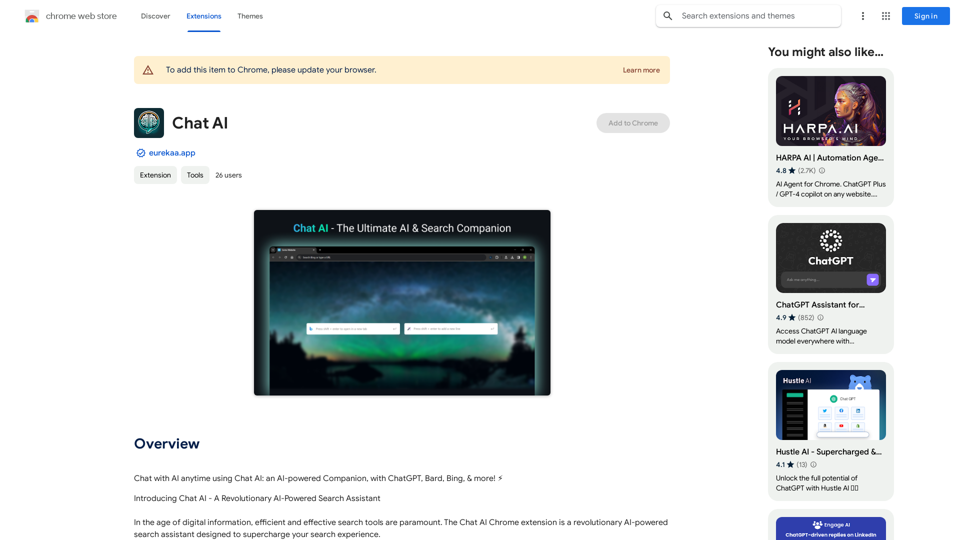
Talk to AI whenever you want with Chat AI: an AI-powered friend, featuring ChatGPT, Bard, Bing, and more! ⚡
Visit Website
Chat AI
Visit Website

Introduction

Chat AI is an AI-powered search assistant that enhances your search experience by integrating powerful tools like GPT-4 powered Bing, ChatGPT, and Bard. This comprehensive AI and Search Companion streamlines online searches and improves user satisfaction by catering to specific needs and intents.

Feature

Dual Search Bar Capability

Chat AI offers a unique dual search bar feature, allowing users to choose the most appropriate solution for their query based on specific needs, context, and use cases.

Holistic View with Multiple Outputs

The assistant generates multiple outputs from various sources simultaneously, enabling users to compare different results, gain diverse perspectives, and achieve a more comprehensive understanding of their search topic.

Deep Browser Integration for Quick Actions

Chat AI seamlessly integrates with your browser, allowing users to perform quick actions via the right-click menu, simplifying processes and saving time.

Context-Switching Prevention

By displaying outputs in a quick-access side panel interface, Chat AI eliminates the need to open new tab pages, maintaining user focus and workflow continuity.

Free Basic Features

Chat AI offers its basic features at no cost, with the option to upgrade to a paid subscription for advanced functionalities.

FAQ

Is Chat AI free to use?

Yes, Chat AI is a free extension with basic features available at no cost. Advanced features are accessible through a paid subscription.

What are the advanced features of Chat AI?

Chat AI's advanced features include:

  • Holistic view with multiple outputs
  • Deep browser integration for quick actions
  • Context-switching prevention

How do I install Chat AI?

To install Chat AI, simply click the "Add to Chrome" button on the Chrome Web Store page.

Related Websites
Converting JPG Images to Text

Converting a JPG image to text is a process known as Optical Character Recognition (OCR). This technology enables you to extract text from images, scanned documents, and photos. Here's how to do it:

Method 1: Online OCR Tools

You can use online OCR tools to convert JPG images to text. Here are the steps:

1. Upload your JPG image: Go to an online OCR tool website, such as Online OCR Tools or OCR.space, and upload your JPG image.
2. Select the language: Choose the language of the text in your image.
3. Click on "Convert": The tool will convert the image to text.
4. Download the text: You can download the extracted text as a Word document, PDF, or plain text file.

Method 2: Google Drive

You can also use Google Drive to convert JPG images to text. Here's how:

1. Upload your JPG image: Upload your JPG image to Google Drive.
2. Right-click on the image: Right-click on the uploaded image and select "Open with" > "Google Docs".
3. The image will be converted: Google Docs will automatically convert the image to text.
4. Edit and download: You can edit the extracted text and download it as a Word document or PDF.

Method 3: Adobe Acrobat

If you have Adobe Acrobat installed on your computer, you can use it to convert JPG images to text. Here's how:

1. Open Adobe Acrobat: Open Adobe Acrobat on your computer.
2. Create a new document: Create a new document and click on "Tools" > "Recognize Text".
3. Select the image: Select the JPG image you want to convert.
4. Click on "Recognize": Adobe Acrobat will convert the image to text.
5. Edit and save: You can edit the extracted text and save it as a Word document or PDF.

These are the three methods to convert JPG images to text. Choose the method that works best for you!
View Detail

Converting JPG Images to Text Converting a JPG image to text is a process known as Optical Character Recognition (OCR). This technology enables you to extract text from images, scanned documents, and photos. Here's how to do it: Method 1: Online OCR Tools You can use online OCR tools to convert JPG images to text. Here are the steps: 1. Upload your JPG image: Go to an online OCR tool website, such as Online OCR Tools or OCR.space, and upload your JPG image. 2. Select the language: Choose the language of the text in your image. 3. Click on "Convert": The tool will convert the image to text. 4. Download the text: You can download the extracted text as a Word document, PDF, or plain text file. Method 2: Google Drive You can also use Google Drive to convert JPG images to text. Here's how: 1. Upload your JPG image: Upload your JPG image to Google Drive. 2. Right-click on the image: Right-click on the uploaded image and select "Open with" > "Google Docs". 3. The image will be converted: Google Docs will automatically convert the image to text. 4. Edit and download: You can edit the extracted text and download it as a Word document or PDF. Method 3: Adobe Acrobat If you have Adobe Acrobat installed on your computer, you can use it to convert JPG images to text. Here's how: 1. Open Adobe Acrobat: Open Adobe Acrobat on your computer. 2. Create a new document: Create a new document and click on "Tools" > "Recognize Text". 3. Select the image: Select the JPG image you want to convert. 4. Click on "Recognize": Adobe Acrobat will convert the image to text. 5. Edit and save: You can edit the extracted text and save it as a Word document or PDF. These are the three methods to convert JPG images to text. Choose the method that works best for you!

Converting JPG Images to Text Converting a JPG image to text is a process known as Optical Character Recognition (OCR). This technology enables you to extract text from images, scanned documents, and photos. Here's how to do it: Method 1: Online OCR Tools You can use online OCR tools to convert JPG images to text. Here are the steps: 1. Upload your JPG image: Go to an online OCR tool website, such as Online OCR Tools or OCR.space, and upload your JPG image. 2. Select the language: Choose the language of the text in your image. 3. Click on "Convert": The tool will convert the image to text. 4. Download the text: You can download the extracted text as a Word document, PDF, or plain text file. Method 2: Google Drive You can also use Google Drive to convert JPG images to text. Here's how: 1. Upload your JPG image: Upload your JPG image to Google Drive. 2. Right-click on the image: Right-click on the uploaded image and select "Open with" > "Google Docs". 3. The image will be converted: Google Docs will automatically convert the image to text. 4. Edit and download: You can edit the extracted text and download it as a Word document or PDF. Method 3: Adobe Acrobat If you have Adobe Acrobat installed on your computer, you can use it to convert JPG images to text. Here's how: 1. Open Adobe Acrobat: Open Adobe Acrobat on your computer. 2. Create a new document: Create a new document and click on "Tools" > "Recognize Text". 3. Select the image: Select the JPG image you want to convert. 4. Click on "Recognize": Adobe Acrobat will convert the image to text. 5. Edit and save: You can edit the extracted text and save it as a Word document or PDF. These are the three methods to convert JPG images to text. Choose the method that works best for you!

It is an online tool that uses Optical Character Recognition (OCR) to make it possible to extract text from images in JPG format.

193.90 M
Note AI Tools 

This is a placeholder for a list of AI tools related to note-taking. 

Please provide me with the content you'd like me to translate.
View Detail

Note AI Tools This is a placeholder for a list of AI tools related to note-taking. Please provide me with the content you'd like me to translate.

Note AI Tools This is a placeholder for a list of AI tools related to note-taking. Please provide me with the content you'd like me to translate.

AI Tools

193.90 M
Chrome Web Store
View Detail

Chrome Web Store

Chrome Web Store

Enhance your browser with new features and customize your browsing experience.

193.90 M
SkillSpot.ai
View Detail

SkillSpot.ai

SkillSpot.ai

Discover SkillSpot.ai, an AI-driven recruitment solution transforming the hiring landscape. Experience AI-guided job listings, intelligent AI Powered candidate screening, and detailed virtual interviews. Embrace efficiency and precision in talent acquisition with our advanced AI tools. Book a demo today!

1.24 K
ChatShelf - Save ChatGPT to Notion

ChatShelf is a tool that lets you save your ChatGPT conversations directly into Notion. 

It's a simple way to keep track of your AI interactions and use them later. 

Just copy the link to your ChatGPT conversation and paste it into ChatShelf. 

It will then extract the conversation and create a Notion page for you.
View Detail

ChatShelf - Save ChatGPT to Notion ChatShelf is a tool that lets you save your ChatGPT conversations directly into Notion. It's a simple way to keep track of your AI interactions and use them later. Just copy the link to your ChatGPT conversation and paste it into ChatShelf. It will then extract the conversation and create a Notion page for you.

ChatShelf - Save ChatGPT to Notion ChatShelf is a tool that lets you save your ChatGPT conversations directly into Notion. It's a simple way to keep track of your AI interactions and use them later. Just copy the link to your ChatGPT conversation and paste it into ChatShelf. It will then extract the conversation and create a Notion page for you.

It's fast, stable, beautiful, and free.

193.90 M
Print Perfect AI Text Editor
View Detail

Print Perfect AI Text Editor

Print Perfect AI Text Editor

Print Perfect helps you correct and edit your text to make it sound like it was written by a native English speaker.

193.90 M
Free AI Face Swap - Photo & Video
View Detail

Free AI Face Swap - Photo & Video

Free AI Face Swap - Photo & Video

Free AI Face Swapper supports single photo face swaps, multiple photo face swaps, and video face swaps!

193.90 M
Trovy for Threads
View Detail

Trovy for Threads

Trovy for Threads

Manage your content creation and Track your Threads statistics.

193.90 M