Open-source RightAI Tools Directory
  • Discover AI
  • Submit
  • Startup
  • Blog
Open-source RightAI Tools Directory
Discover the best AI tools of 2025 with the RightAI Tools Directory!

Friend Links

AI Anime GeneratorToolsApp AI

Support

Tap4
Privacy policyTerms & ConditionsContact Us
Loading...
loading...

Chatgpt PDF =============== Ask your PDF ----------------

Ask Your PDF AI Chapdf: Best AI Summarizer Plugin Powered by GPT Summarize Text and Have a Chat with Any PDF Pro Summary Generator
Visit Website
Chatgpt PDF
===============

Ask your PDF
----------------
Visit Website

Introduction

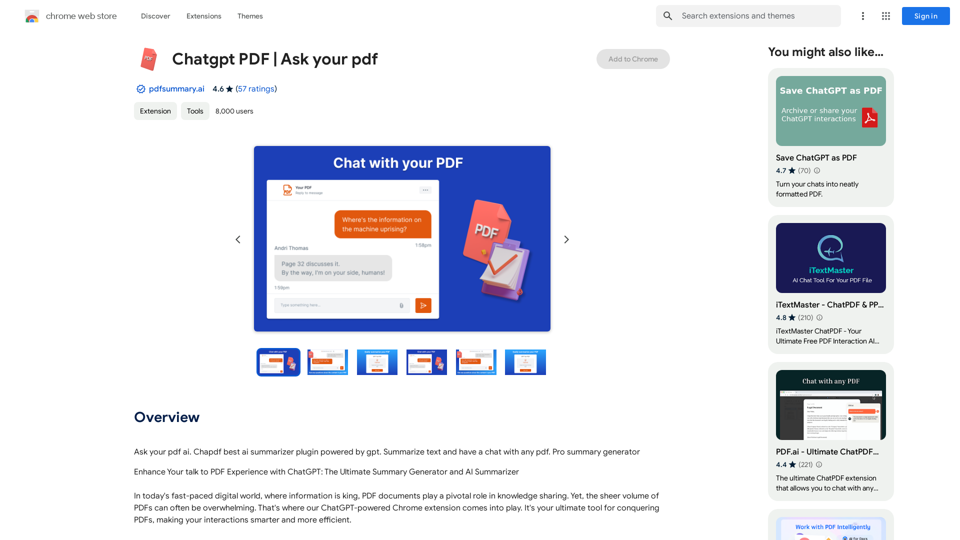
ChatGPT PDF is a Chrome extension that enhances PDF interactions using ChatGPT's AI capabilities. It offers features like document summarization, AI-assisted chat, and improved navigation, making it easier for users to extract key information from PDFs quickly and efficiently.

Feature

AI PDF Summarizer

Quickly distills critical insights from lengthy documents, eliminating the need for extensive scrolling and reading.

ChatGPT Integration

Seamlessly integrates ChatGPT's powerful capabilities, allowing users to query documents using natural language for instant and accurate answers.

Intelligent Annotation

Provides smart annotations of key points within documents, facilitating quicker comprehension of core concepts.

Seamless Document Navigation

Offers an intuitive interface for effortless navigation between sections, keyword searches, and AI-assisted information retrieval.

Simple Installation and Usage

Easy one-click installation process and straightforward usage steps:

  1. Install the extension
  2. Open a PDF in the browser
  3. Interact with the AI assistant
  4. Request summaries or ask questions
  5. Receive instant, precise information

Time-Saving

Significantly reduces the time needed to summarize various document types, including PDFs, webpages, and YouTube content.

Accuracy and Customization

Leverages ChatGPT's natural language understanding for precise summaries, with options to tailor summarization requests to specific needs.

Versatility

Handles various document formats, making it suitable for professionals, students, and researchers across different fields.

Intelligent Integration

Seamlessly connects with preferred PDF readers, enhancing workflow across different platforms.

FAQ

How to feed a document to the AI?

After installing the extension, click on the icon and select the option to upload or open a file.

How to use the 'Ask Your Document' feature?

Upload the document, click on the extension icon, and type your question in the provided chat interface.

How to upload a document for interaction?

Click on the extension icon after installation and select the option to upload a document.

How to get the AI to summarize a document?

Upload the document, click on the extension icon, and request a summary by typing "Summarize this document" or specifying sections in the chat interface.

Can the AI summarize a document?

Yes, the AI can effectively summarize documents once they are uploaded through the extension. Users can request summaries via the chat interface.

Related Websites
Annotation Chrome Plugin
View Detail

Annotation Chrome Plugin

Annotation Chrome Plugin

This extension helps to validate annotations.

193.90 M
CrackerJack Resume 

Objective: To obtain a challenging and rewarding position in a fast-paced environment where I can utilize my skills and experience to contribute to the success of a dynamic team.

Summary of Qualifications:

* Highly motivated and results-oriented individual with a proven track record of success in [mention your field].
* Excellent communication, interpersonal, and problem-solving skills.
* Strong analytical and critical thinking abilities.
* Proficient in [list your relevant skills].
* Adaptable and eager to learn new technologies and processes.

Experience:

* [Job Title], [Company Name], [City, State] - [Dates of Employment]
    * [List your responsibilities and achievements using action verbs]
* [Job Title], [Company Name], [City, State] - [Dates of Employment]
    * [List your responsibilities and achievements using action verbs]

Education:

* [Degree Name], [Major], [University Name], [City, State] - [Year of Graduation]
    * [List any relevant coursework, honors, or awards]

Skills:

* [List your hard and soft skills]

Projects:

* [List any relevant projects you have worked on, including a brief description and your role]

Awards and Recognition:

* [List any awards or recognition you have received]

Volunteer Experience:

* [List any volunteer experience you have]

References:

* Available upon request.
View Detail

CrackerJack Resume Objective: To obtain a challenging and rewarding position in a fast-paced environment where I can utilize my skills and experience to contribute to the success of a dynamic team. Summary of Qualifications: * Highly motivated and results-oriented individual with a proven track record of success in [mention your field]. * Excellent communication, interpersonal, and problem-solving skills. * Strong analytical and critical thinking abilities. * Proficient in [list your relevant skills]. * Adaptable and eager to learn new technologies and processes. Experience: * [Job Title], [Company Name], [City, State] - [Dates of Employment] * [List your responsibilities and achievements using action verbs] * [Job Title], [Company Name], [City, State] - [Dates of Employment] * [List your responsibilities and achievements using action verbs] Education: * [Degree Name], [Major], [University Name], [City, State] - [Year of Graduation] * [List any relevant coursework, honors, or awards] Skills: * [List your hard and soft skills] Projects: * [List any relevant projects you have worked on, including a brief description and your role] Awards and Recognition: * [List any awards or recognition you have received] Volunteer Experience: * [List any volunteer experience you have] References: * Available upon request.

CrackerJack Resume Objective: To obtain a challenging and rewarding position in a fast-paced environment where I can utilize my skills and experience to contribute to the success of a dynamic team. Summary of Qualifications: * Highly motivated and results-oriented individual with a proven track record of success in [mention your field]. * Excellent communication, interpersonal, and problem-solving skills. * Strong analytical and critical thinking abilities. * Proficient in [list your relevant skills]. * Adaptable and eager to learn new technologies and processes. Experience: * [Job Title], [Company Name], [City, State] - [Dates of Employment] * [List your responsibilities and achievements using action verbs] * [Job Title], [Company Name], [City, State] - [Dates of Employment] * [List your responsibilities and achievements using action verbs] Education: * [Degree Name], [Major], [University Name], [City, State] - [Year of Graduation] * [List any relevant coursework, honors, or awards] Skills: * [List your hard and soft skills] Projects: * [List any relevant projects you have worked on, including a brief description and your role] Awards and Recognition: * [List any awards or recognition you have received] Volunteer Experience: * [List any volunteer experience you have] References: * Available upon request.

Are you frustrated by the lack of response to your job applications? The secret may lie within your resume. Stop getting rejected…

193.90 M
Discord Translator
View Detail

Discord Translator

Discord Translator

Translate Messages in Discord ============================= What is the "Translate" feature in Discord? The "Translate" feature in Discord allows users to translate messages in real-time, making it easier for people who speak different languages to communicate with each other. How to use the "Translate" feature in Discord? #1. Enable the "Translate" feature To enable the "Translate" feature, you need to go to the "User Settings" and click on the "Language" tab. Then, toggle the switch next to "Translator" to the "On" position. #2. Set your preferred language After enabling the "Translate" feature, you need to set your preferred language. You can do this by clicking on the "Language" dropdown menu and selecting your preferred language from the list. #3. Translate messages Once you've set your preferred language, you can start translating messages. To translate a message, simply hover over the message and click on the "Translate" button that appears. #4. View translated messages After clicking the "Translate" button, the message will be translated into your preferred language. You can view the translated message below the original message. Benefits of the "Translate" feature in Discord The "Translate" feature in Discord has several benefits, including: * Improved communication: The "Translate" feature helps to break down language barriers, making it easier for people who speak different languages to communicate with each other. * Increased accessibility: The "Translate" feature makes Discord more accessible to people who may not speak the dominant language of a server or community. * Enhanced collaboration: The "Translate" feature enables people to collaborate more effectively, even if they speak different languages.

193.90 M
Luma Dream Machine
View Detail

Luma Dream Machine

Luma Dream Machine

Dream Machine is an AI model that generates high-quality, realistic videos quickly from text and images using Luma AI.

1.87 M
corrAI - Correct and Translate
View Detail

corrAI - Correct and Translate

corrAI - Correct and Translate

Allows you to correct or translate text without changing the meaning, style, and original ideas.

193.90 M
Spot Translator 

This is a simple tool to translate text from one language to another. 

How to use:

1. Enter the text you want to translate in the input box.
2. Choose the source language from the dropdown menu.
3. Choose the target language from the dropdown menu.
4. Click the "Translate" button.

The translated text will appear in the output box.
View Detail

Spot Translator This is a simple tool to translate text from one language to another. How to use: 1. Enter the text you want to translate in the input box. 2. Choose the source language from the dropdown menu. 3. Choose the target language from the dropdown menu. 4. Click the "Translate" button. The translated text will appear in the output box.

Spot Translator This is a simple tool to translate text from one language to another. How to use: 1. Enter the text you want to translate in the input box. 2. Choose the source language from the dropdown menu. 3. Choose the target language from the dropdown menu. 4. Click the "Translate" button. The translated text will appear in the output box.

Just click and get the translation right below.

193.90 M
Sales Booster
View Detail

Sales Booster

Sales Booster

AI Descriptions for Online Marketplaces: eBay: * The global marketplace where anyone can buy and sell almost anything. Discover unique items, bid on auctions, and find great deals from individuals and businesses worldwide. Amazon: * Your one-stop shop for millions of products, from everyday essentials to the latest gadgets. Enjoy fast shipping, convenient shopping, and a vast selection across all categories. Etsy: * A vibrant community of creative entrepreneurs selling handmade, vintage, and unique goods. Find one-of-a-kind treasures, support small businesses, and discover unique gifts for every occasion.

193.90 M
ChatGPT Everywhere
View Detail

ChatGPT Everywhere

ChatGPT Everywhere

ChatGPT-based Chrome extension

193.90 M