Open-source RightAI Tools Directory
  • Discover AI
  • Submit
  • Startup
  • Blog
Open-source RightAI Tools Directory
Discover the best AI tools of 2025 with the RightAI Tools Directory!

Friend Links

AI Anime GeneratorToolsApp AI

Support

Tap4
Privacy policyTerms & ConditionsContact Us
Loading...
loading...

GrammaticGenius™

Your English Co-Pilot, Right in Your Browser
Visit Website
GrammaticGenius™
Visit Website

Introduction

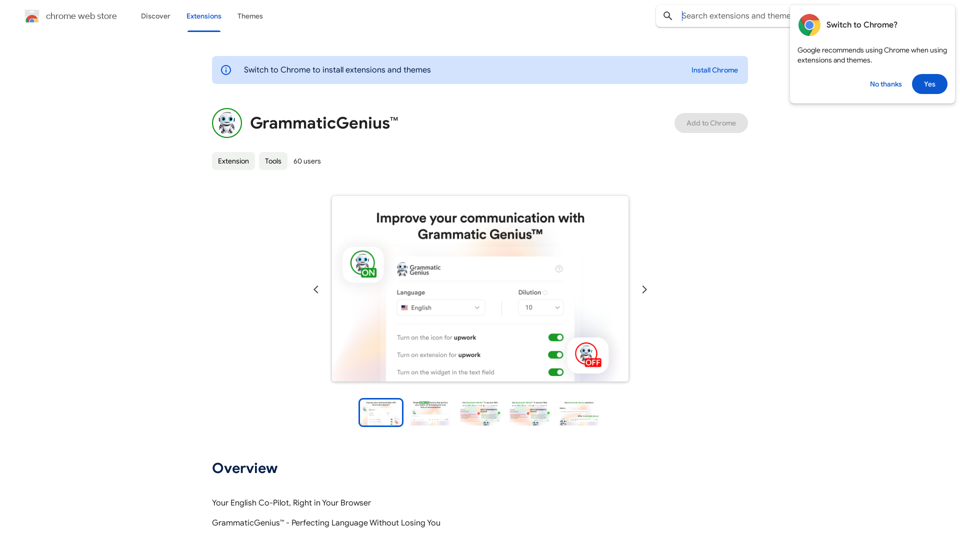
GrammaticGenius™ is an innovative Chrome extension designed to enhance your writing experience. It seamlessly integrates into any text-input field, allowing users to improve their text quality with a simple keyboard shortcut. The tool goes beyond basic error correction, focusing on amplifying the user's authentic voice and ensuring impactful communication.

Feature

Instant Text Enhancement

GrammaticGenius™ elevates your writing from good to outstanding with a simple 'ctrl + y' keyboard shortcut, integrating directly within any text-input field.

Native-Level Communication

Helps users communicate with the proficiency of a native English speaker, boosting credibility and opening up new opportunities in professional settings.

Streamlined Workflow

Eliminates the need for copy-pasting from ChatGPT, offering a dedicated button within every text field for quick and efficient writing improvement.

Customizable Formality

Users can adjust the level of formality on a scale of 1-10, allowing for supreme accuracy and formality or preserving more of the user's inherent style.

Voice Preservation

Powered by the GPT API, GrammaticGenius™ refines text while maintaining the user's unique voice and style.

Flexible Usage

Offers customization options, including the ability to enable or disable the extension on specific platforms like Upwork.

Multilingual Support

While primarily designed for English, the tool caters to writers worldwide.

FAQ

What is GrammaticGenius™?

GrammaticGenius™ is a Chrome extension that integrates into text-input fields, enhancing writing quality with a simple keyboard shortcut. It focuses on amplifying the user's authentic voice and ensuring impactful communication.

What are the main features of GrammaticGenius™?

The main features include:

  • Native-level communication enhancement
  • Direct integration with text fields
  • Customizable formality levels
  • Preservation of the user's authentic voice
  • User-centric interface with platform-specific customization

How can I maximize my use of GrammaticGenius™?

To maximize use, leverage the GPT API-powered fine-tuning while preserving your unique voice. Take advantage of the free access during the beta test period to explore all features and improve your writing across various platforms.

How much does GrammaticGenius™ cost?

GrammaticGenius™ is currently free to use as part of a limited-time lifetime free access beta test offer.

Latest Traffic Insights

  • Monthly Visits

    193.90 M

  • Bounce Rate

    56.27%

  • Pages Per Visit

    2.71

  • Time on Site(s)

    115.91

  • Global Rank

    -

  • Country Rank

    -

Recent Visits

Traffic Sources

  • Social Media:
    0.48%
  • Paid Referrals:
    0.55%
  • Email:
    0.15%
  • Referrals:
    12.81%
  • Search Engines:
    16.21%
  • Direct:
    69.81%
More Data

Related Websites

ChatGPT & YouTube Summary by Glasp
View Detail

ChatGPT & YouTube Summary by Glasp

ChatGPT & YouTube Summary by Glasp

Access ChatGPT from the Chrome toolbar and get transcripts and summaries of YouTube videos. Powered by ChatGPT & Claude.

193.90 M
Claude to Notion

This is a guide on how to connect Claude, an AI assistant, with Notion, a note-taking and workspace app. 

Why connect Claude and Notion?

* Boost your productivity: Use Claude to generate content, summarize information, and automate tasks directly within Notion.
* Enhance your research: Ask Claude questions about your Notion notes and get insightful answers.
* Unlock new creative possibilities: Leverage Claude's generative capabilities to brainstorm ideas, write stories, or compose emails within your Notion workspace.

How to connect Claude and Notion:

1. API Keys: Obtain an API key for both Claude and Notion. 
2. Integration Tool: Explore integration tools like Zapier or Integromat to connect Claude and Notion. These platforms allow you to create workflows that trigger actions in one app based on events in the other.
3. Custom Development: For advanced users, you can develop your own custom integration using the Claude and Notion APIs. This gives you the most flexibility but requires coding knowledge.

Example Use Cases:

* Meeting Summarization: After a meeting, paste the transcript into Notion and use Claude to generate a concise summary.
* Content Creation:  Use Claude to write blog posts, articles, or social media captions directly within your Notion pages.
* Idea Generation: Brainstorm new ideas for projects or tasks by prompting Claude with specific questions within your Notion workspace.


Remember to review the documentation and terms of service for both Claude and Notion to ensure proper usage and security.
View Detail

Claude to Notion This is a guide on how to connect Claude, an AI assistant, with Notion, a note-taking and workspace app. Why connect Claude and Notion? * Boost your productivity: Use Claude to generate content, summarize information, and automate tasks directly within Notion. * Enhance your research: Ask Claude questions about your Notion notes and get insightful answers. * Unlock new creative possibilities: Leverage Claude's generative capabilities to brainstorm ideas, write stories, or compose emails within your Notion workspace. How to connect Claude and Notion: 1. API Keys: Obtain an API key for both Claude and Notion. 2. Integration Tool: Explore integration tools like Zapier or Integromat to connect Claude and Notion. These platforms allow you to create workflows that trigger actions in one app based on events in the other. 3. Custom Development: For advanced users, you can develop your own custom integration using the Claude and Notion APIs. This gives you the most flexibility but requires coding knowledge. Example Use Cases: * Meeting Summarization: After a meeting, paste the transcript into Notion and use Claude to generate a concise summary. * Content Creation: Use Claude to write blog posts, articles, or social media captions directly within your Notion pages. * Idea Generation: Brainstorm new ideas for projects or tasks by prompting Claude with specific questions within your Notion workspace. Remember to review the documentation and terms of service for both Claude and Notion to ensure proper usage and security.

Claude to Notion This is a guide on how to connect Claude, an AI assistant, with Notion, a note-taking and workspace app. Why connect Claude and Notion? * Boost your productivity: Use Claude to generate content, summarize information, and automate tasks directly within Notion. * Enhance your research: Ask Claude questions about your Notion notes and get insightful answers. * Unlock new creative possibilities: Leverage Claude's generative capabilities to brainstorm ideas, write stories, or compose emails within your Notion workspace. How to connect Claude and Notion: 1. API Keys: Obtain an API key for both Claude and Notion. 2. Integration Tool: Explore integration tools like Zapier or Integromat to connect Claude and Notion. These platforms allow you to create workflows that trigger actions in one app based on events in the other. 3. Custom Development: For advanced users, you can develop your own custom integration using the Claude and Notion APIs. This gives you the most flexibility but requires coding knowledge. Example Use Cases: * Meeting Summarization: After a meeting, paste the transcript into Notion and use Claude to generate a concise summary. * Content Creation: Use Claude to write blog posts, articles, or social media captions directly within your Notion pages. * Idea Generation: Brainstorm new ideas for projects or tasks by prompting Claude with specific questions within your Notion workspace. Remember to review the documentation and terms of service for both Claude and Notion to ensure proper usage and security.

Save Claude conversations to Notion with one click. Export Claude conversations.

193.90 M
BEXI.ai - Humanize AI Text | Free AI Humanizer Tool for Natural Language
View Detail

BEXI.ai - Humanize AI Text | Free AI Humanizer Tool for Natural Language

BEXI.ai - Humanize AI Text | Free AI Humanizer Tool for Natural Language

BEXI.ai is a free tool for making AI-generated text more natural and undetectable. With support for multiple languages and customizable styles, BEXI.ai helps you easily create engaging, human-like content.

33.18 K
SpeechGenius — Best Speech to Text
View Detail

SpeechGenius — Best Speech to Text

SpeechGenius — Best Speech to Text

AI-powered speech-to-text for faster, easier writing

193.90 M
Translation Methods: Comparative Translation & Immersive AI Translation
View Detail

Translation Methods: Comparative Translation & Immersive AI Translation

Translation Methods: Comparative Translation & Immersive AI Translation

Provide users with better AI translation and a more fluent reading experience.

193.90 M
I Listen AI
View Detail

I Listen AI

I Listen AI

I Listen AI

193.90 M
Kaspian
View Detail

Kaspian

Kaspian

Kaspian searches through all your apps to help you find exactly what you need and discover things you should know.

193.90 M
WallySmarter
View Detail

WallySmarter

WallySmarter

WallySmarter is groundbreaking software for selling on Walmart. Grow your business on walmart.com.

193.90 M