Open-source RightAI Tools Directory
  • Discover AI
  • Submit
  • Startup
  • Blog
Open-source RightAI Tools Directory
Discover the best AI tools of 2025 with the RightAI Tools Directory!

Friend Links

AI Anime GeneratorToolsApp AI

Support

Tap4
Privacy policyTerms & ConditionsContact Us
Loading...
loading...

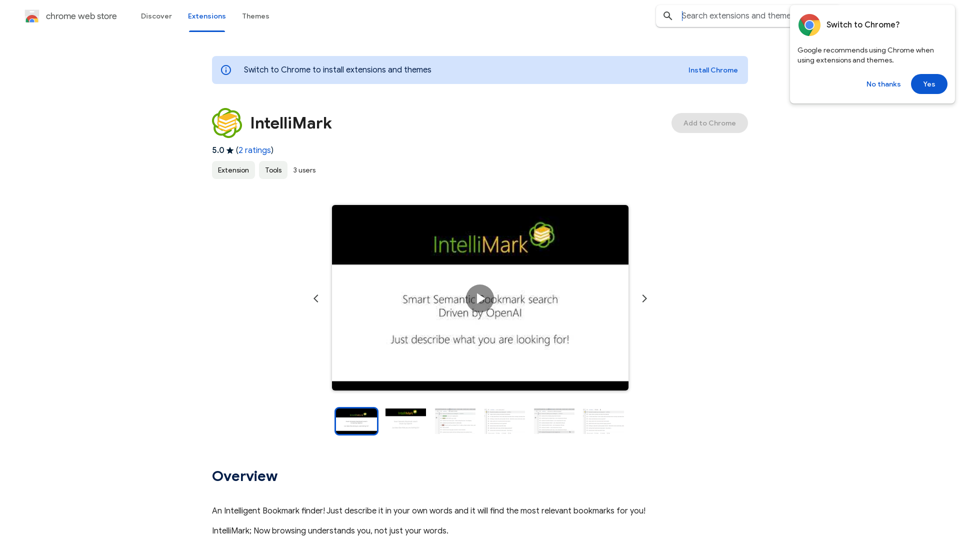
IntelliMark

An intelligent bookmark finder! Just tell it what you're looking for in your own words, and it will find the most useful bookmarks for you!
Visit Website
IntelliMark
Visit Website

Introduction

IntelliMark is an intelligent bookmark finder that leverages AI technology to search and retrieve relevant bookmarks based on user descriptions. It offers multilingual support, allowing users to search in any language, even with typos. The extension provides a clean, intuitive interface and can be used with personal OpenAI API keys or Azure deployments for advanced features.

Feature

AI-Powered Bookmark Search

IntelliMark utilizes artificial intelligence to search and retrieve relevant bookmarks based on user descriptions, enabling quick and accurate results.

Multilingual Support

Users can search for bookmarks in any language, making it a versatile tool for international users or those working with multilingual content.

Typo-Tolerant Search

The AI-powered search engine can understand and process search queries even with typos or misspellings, ensuring accurate results regardless of input errors.

Omnibox Integration

By typing "aim" in the address bar, users can quickly access IntelliMark's search functionality, finding bookmarks within seconds.

Clean and Intuitive Interface

IntelliMark offers a user-friendly interface, making it easy for users to navigate and utilize its features effectively.

Customizable API Integration

Users have the option to use their own OpenAI API key or Azure deployment for access to more advanced features, providing flexibility and customization.

Free Basic Version

IntelliMark is available as a free extension, making it accessible to a wide range of users.

FAQ

How does IntelliMark work?

IntelliMark uses an AI-powered search engine to analyze user descriptions and retrieve relevant bookmarks. It processes queries in any language and can understand searches even with typos or misspellings.

Is IntelliMark free to use?

Yes, IntelliMark is available as a free extension. However, users can opt to use their own OpenAI API key or Azure deployment for access to more advanced features.

Can I use IntelliMark with my personal API key?

Yes, IntelliMark supports the use of personal OpenAI API keys or Azure deployments, allowing for more advanced functionality and customization.

How do I start a search with IntelliMark?

To use IntelliMark, simply type "aim" in the address bar of your browser, followed by a description of what you're looking for. The AI-powered search engine will then retrieve relevant bookmarks based on your input.

Related Websites

Transcript Helper for Chorus.ai 

This is a tool designed to help you work with transcripts generated by Chorus.ai. 


Let me know what you need help with! For example, you can ask me to:

* Summarize a transcript: Give me a transcript and I'll provide a concise summary of the main points.
* Find specific information: Tell me what you're looking for (e.g., "find all mentions of product X") and I'll search the transcript for relevant text.
* Identify key speakers: I can analyze the transcript and tell you who the main speakers are.
* Generate action items: Based on the transcript, I can help you identify tasks that need to be completed.
* Translate the transcript: I can translate the transcript into another language.


What can I do for you today?
View Detail

Transcript Helper for Chorus.ai This is a tool designed to help you work with transcripts generated by Chorus.ai. Let me know what you need help with! For example, you can ask me to: * Summarize a transcript: Give me a transcript and I'll provide a concise summary of the main points. * Find specific information: Tell me what you're looking for (e.g., "find all mentions of product X") and I'll search the transcript for relevant text. * Identify key speakers: I can analyze the transcript and tell you who the main speakers are. * Generate action items: Based on the transcript, I can help you identify tasks that need to be completed. * Translate the transcript: I can translate the transcript into another language. What can I do for you today?

Transcript Helper for Chorus.ai This is a tool designed to help you work with transcripts generated by Chorus.ai. Let me know what you need help with! For example, you can ask me to: * Summarize a transcript: Give me a transcript and I'll provide a concise summary of the main points. * Find specific information: Tell me what you're looking for (e.g., "find all mentions of product X") and I'll search the transcript for relevant text. * Identify key speakers: I can analyze the transcript and tell you who the main speakers are. * Generate action items: Based on the transcript, I can help you identify tasks that need to be completed. * Translate the transcript: I can translate the transcript into another language. What can I do for you today?

This extension finds chorus.ai transcripts and lets you copy them to your clipboard.

193.90 M
ReplyGO - AI for Customer Service
View Detail

ReplyGO - AI for Customer Service

ReplyGO - AI for Customer Service

AI Agent for e-commerce and ticketing platforms powered by ChatGPT

193.90 M
AI Quick Links
View Detail

AI Quick Links

AI Quick Links

Ai Quick Links is a collection of AI tools for your new tab page, which also includes a Bing search bar.

193.90 M
Chat-GPT PDF

What is Chat-GPT PDF?

Chat-GPT PDF is a tool that allows users to generate PDF files from Chat-GPT conversations. This innovative tool enables users to save and share their conversations in a more organized and visually appealing format.

How does Chat-GPT PDF work?

The process is simple and straightforward. Here's a step-by-step guide:

1. Copy the conversation: Copy the entire conversation from the Chat-GPT platform.
2. Paste the conversation: Paste the copied conversation into the Chat-GPT PDF tool.
3. Customize the layout: Customize the layout, font, and design of the PDF file according to your preferences.
4. Generate the PDF: Click the "Generate PDF" button to create a downloadable PDF file.

Features of Chat-GPT PDF

Chat-GPT PDF offers several features that make it an essential tool for users:

* Customizable layout: Customize the layout, font, and design of the PDF file to suit your needs.
* Easy sharing: Share the PDF file with others via email, social media, or messaging apps.
* Offline access: Access your conversations offline, even without an internet connection.
* Organization: Organize your conversations in a neat and tidy format, making it easier to review and reference.

Benefits of Chat-GPT PDF

The benefits of using Chat-GPT PDF are numerous:

* Improved productivity: Save time and increase productivity by having all your conversations in one place.
* Enhanced collaboration: Collaborate with others more effectively by sharing conversations in a clear and concise format.
* Better organization: Keep your conversations organized, making it easier to review and reference them later.

Conclusion

Chat-GPT PDF is a game-changer for anyone who uses Chat-GPT regularly. With its ease of use, customization options, and benefits, it's an essential tool for anyone looking to get the most out of their conversations.
View Detail

Chat-GPT PDF What is Chat-GPT PDF? Chat-GPT PDF is a tool that allows users to generate PDF files from Chat-GPT conversations. This innovative tool enables users to save and share their conversations in a more organized and visually appealing format. How does Chat-GPT PDF work? The process is simple and straightforward. Here's a step-by-step guide: 1. Copy the conversation: Copy the entire conversation from the Chat-GPT platform. 2. Paste the conversation: Paste the copied conversation into the Chat-GPT PDF tool. 3. Customize the layout: Customize the layout, font, and design of the PDF file according to your preferences. 4. Generate the PDF: Click the "Generate PDF" button to create a downloadable PDF file. Features of Chat-GPT PDF Chat-GPT PDF offers several features that make it an essential tool for users: * Customizable layout: Customize the layout, font, and design of the PDF file to suit your needs. * Easy sharing: Share the PDF file with others via email, social media, or messaging apps. * Offline access: Access your conversations offline, even without an internet connection. * Organization: Organize your conversations in a neat and tidy format, making it easier to review and reference. Benefits of Chat-GPT PDF The benefits of using Chat-GPT PDF are numerous: * Improved productivity: Save time and increase productivity by having all your conversations in one place. * Enhanced collaboration: Collaborate with others more effectively by sharing conversations in a clear and concise format. * Better organization: Keep your conversations organized, making it easier to review and reference them later. Conclusion Chat-GPT PDF is a game-changer for anyone who uses Chat-GPT regularly. With its ease of use, customization options, and benefits, it's an essential tool for anyone looking to get the most out of their conversations.

Chat-GPT PDF What is Chat-GPT PDF? Chat-GPT PDF is a tool that allows users to generate PDF files from Chat-GPT conversations. This innovative tool enables users to save and share their conversations in a more organized and visually appealing format. How does Chat-GPT PDF work? The process is simple and straightforward. Here's a step-by-step guide: 1. Copy the conversation: Copy the entire conversation from the Chat-GPT platform. 2. Paste the conversation: Paste the copied conversation into the Chat-GPT PDF tool. 3. Customize the layout: Customize the layout, font, and design of the PDF file according to your preferences. 4. Generate the PDF: Click the "Generate PDF" button to create a downloadable PDF file. Features of Chat-GPT PDF Chat-GPT PDF offers several features that make it an essential tool for users: * Customizable layout: Customize the layout, font, and design of the PDF file to suit your needs. * Easy sharing: Share the PDF file with others via email, social media, or messaging apps. * Offline access: Access your conversations offline, even without an internet connection. * Organization: Organize your conversations in a neat and tidy format, making it easier to review and reference. Benefits of Chat-GPT PDF The benefits of using Chat-GPT PDF are numerous: * Improved productivity: Save time and increase productivity by having all your conversations in one place. * Enhanced collaboration: Collaborate with others more effectively by sharing conversations in a clear and concise format. * Better organization: Keep your conversations organized, making it easier to review and reference them later. Conclusion Chat-GPT PDF is a game-changer for anyone who uses Chat-GPT regularly. With its ease of use, customization options, and benefits, it's an essential tool for anyone looking to get the most out of their conversations.

Exporting Chat History to PDF You can export your chat history with Chat-GPT to a PDF file using the following methods: #Method 1: Browser Print Function 1. Open your chat conversation with Chat-GPT in a web browser. 2. Press `Ctrl + P` (Windows) or `Cmd + P` (Mac) to open the print dialog box. 3. Select "Save as PDF" as the printer destination. 4. Choose a location to save the PDF file and set the file name. 5. Click "Save" to export the chat history to a PDF file. #Method 2: Online PDF Conversion Tools 1. Copy the entire chat conversation by pressing `Ctrl + A` (Windows) or `Cmd + A` (Mac) and then `Ctrl + C` (Windows) or `Cmd + C` (Mac). 2. Go to an online PDF conversion tool, such as SmallPDF or Convertio. 3. Paste the chat conversation into the conversion tool's text box. 4. Select the PDF format and click "Convert" to generate the PDF file. 5. Download the PDF file to your computer. #Method 3: Browser Extensions 1. Install a browser extension, such as Print Friendly & PDF or FireShot, that allows you to save web pages as PDF files. 2. Open your chat conversation with Chat-GPT in a web browser. 3. Click the browser extension's icon in the toolbar. 4. Select the "Save as PDF" option and choose a location to save the file. 5. Click "Save" to export the chat history to a PDF file. By following these methods, you can easily export your chat history with Chat-GPT to a PDF file for future reference or sharing.

193.90 M
Chart GPT
View Detail

Chart GPT

Chart GPT

AI-Powered Trading Companion

193.90 M
Distribution
View Detail

Distribution

Distribution

Become a content creator in seconds

8.60 K
Copilot for Tinder & Bumble

Tired of swiping endlessly? Let Copilot handle your dating app game!

* Craft irresistible bios:  Copilot helps you write witty and engaging bios that highlight your best qualities.
* Spark conversations:  Struggling to come up with opening lines? Copilot suggests clever and personalized messages to break the ice.
* Navigate tricky situations:  Copilot offers advice and guidance on handling awkward moments or difficult conversations.
* Boost your matches:  With Copilot's help, you'll stand out from the crowd and attract more matches.
* Save time and energy:  Let Copilot do the heavy lifting so you can focus on enjoying the dating experience. 


Start swiping smarter, not harder. Get Copilot today!
View Detail

Copilot for Tinder & Bumble Tired of swiping endlessly? Let Copilot handle your dating app game! * Craft irresistible bios: Copilot helps you write witty and engaging bios that highlight your best qualities. * Spark conversations: Struggling to come up with opening lines? Copilot suggests clever and personalized messages to break the ice. * Navigate tricky situations: Copilot offers advice and guidance on handling awkward moments or difficult conversations. * Boost your matches: With Copilot's help, you'll stand out from the crowd and attract more matches. * Save time and energy: Let Copilot do the heavy lifting so you can focus on enjoying the dating experience. Start swiping smarter, not harder. Get Copilot today!

Copilot for Tinder & Bumble Tired of swiping endlessly? Let Copilot handle your dating app game! * Craft irresistible bios: Copilot helps you write witty and engaging bios that highlight your best qualities. * Spark conversations: Struggling to come up with opening lines? Copilot suggests clever and personalized messages to break the ice. * Navigate tricky situations: Copilot offers advice and guidance on handling awkward moments or difficult conversations. * Boost your matches: With Copilot's help, you'll stand out from the crowd and attract more matches. * Save time and energy: Let Copilot do the heavy lifting so you can focus on enjoying the dating experience. Start swiping smarter, not harder. Get Copilot today!

Have meaningful conversations and go on more dates with the help of a collection of AI tools.

193.90 M
aireply: Your Personalized Email Writing Assistant
View Detail

aireply: Your Personalized Email Writing Assistant

aireply: Your Personalized Email Writing Assistant

AI Email Reply and Writing Assistant

193.90 M