Open-source RightAI Tools Directory
  • Discover AI
  • Submit
  • Startup
  • Blog
Open-source RightAI Tools Directory
Discover the best AI tools of 2025 with the RightAI Tools Directory!

Friend Links

AI Anime GeneratorToolsApp AI

Support

Tap4
Privacy policyTerms & ConditionsContact Us
Loading...
loading...

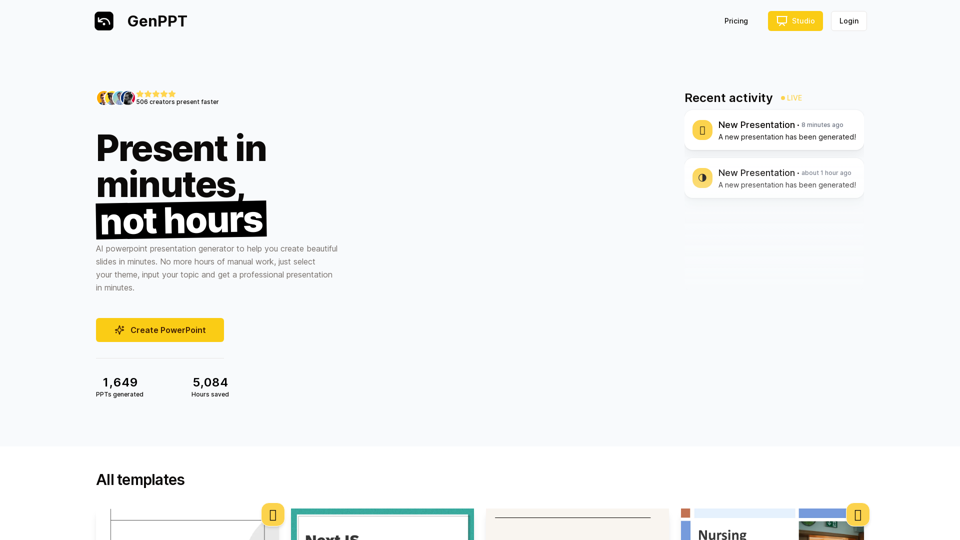
AI Presentation Generator | GenPPT.com

Generate beautiful presentations in minutes with GenPPT. Choose from a variety of themes and let GenPPT's PowerPoint presentation AI do the rest.
Visit Website
AI Presentation Generator | GenPPT.com
Visit Website

Introduction

GenPPT is an AI-powered presentation generator that revolutionizes the way you create slides. With its intuitive interface, users can effortlessly produce professional presentations in minutes. By selecting a theme and inputting a topic, GenPPT's AI technology swiftly generates stunning slides, eliminating hours of manual work. This tool caters to various presentation needs, offering a range of templates and customization options to ensure your slides are both visually appealing and content-rich.

Feature

AI-Powered Presentation Generation

GenPPT utilizes advanced AI technology to create PowerPoint presentations quickly and efficiently. Its extensive library of templates and design elements enables users to produce high-quality presentations in a fraction of the time compared to traditional methods.

Diverse Template Selection

Users can choose from a wide variety of templates to match different presentation styles and needs. Whether you prefer elegant and sophisticated or minimalist and playful designs, GenPPT has options to suit every preference.

User-Friendly Interface

The platform is designed with simplicity in mind, making it accessible to users of all skill levels. The straightforward process involves selecting a theme, inputting a topic, and letting the AI handle the rest.

Customization Options

While GenPPT automates the initial creation process, users have the flexibility to customize their presentations. Add personal content, images, and design elements to tailor the slides to your specific requirements.

Flexible Pricing Plans

GenPPT offers various pricing options to accommodate different needs and budgets:

PlanPrice
Monthly$9/month
Yearly$90/year
Lifetime$47 (limited offer)

Security and Privacy

GenPPT prioritizes the security and privacy of its users, ensuring that all data is kept safe and secure.

FAQ

How do I get started with GenPPT?

To begin using GenPPT, simply sign up for an account on the platform. Once registered, you can immediately start generating presentations.

Can I customize the AI-generated presentations?

Yes, GenPPT allows for extensive customization. After the AI generates your initial presentation, you can add your own content, images, and design elements to personalize it further.

What types of presentations can I create with GenPPT?

GenPPT is versatile and can be used for various presentation types, including business proposals, educational lectures, marketing pitches, and more. The diverse template selection caters to different styles and purposes.

Latest Traffic Insights

  • Monthly Visits

    41.71 K

  • Bounce Rate

    40.77%

  • Pages Per Visit

    2.71

  • Time on Site(s)

    50.44

  • Global Rank

    641952

  • Country Rank

    United States 393103

Recent Visits

Traffic Sources

  • Social Media:
    19.55%
  • Paid Referrals:
    1.04%
  • Email:
    0.11%
  • Referrals:
    9.31%
  • Search Engines:
    32.69%
  • Direct:
    37.11%
More Data

Related Websites

Page Assist - A Web UI for Local AI Models
View Detail

Page Assist - A Web UI for Local AI Models

Page Assist - A Web UI for Local AI Models

Use your computer's own AI programs to help you explore the internet.

193.90 M
Get ChatGPT for Free with Google

You can now access ChatGPT, a powerful language model, for free with Google. Here's how:

Method 1: Google Colab

* Open Google Colab ([colab.research.google.com](http://colab.research.google.com))
* Create a new notebook
* Install the `transformers` library by running `!pip install transformers`
* Import the `transformers` library and load the ChatGPT model using `from transformers import AutoModelForCausalLM, AutoTokenizer; model = AutoModelForCausalLM.from_pretrained('chatgpt'); tokenizer = AutoTokenizer.from_pretrained('chatgpt')`
* Use the model to generate text using `input_text = "Your input here"; inputs = tokenizer.encode_plus(input_text, return_tensors='pt', max_length=1024, padding='max_length', truncation=True); output = model(inputs['input_ids'], attention_mask=inputs['attention_mask']); print(tokenizer.decode(output.logits[0], skip_special_tokens=True))`

Method 2: Google Apps Script

* Open Google Apps Script ([script.google.com](http://script.google.com))
* Create a new project
* Install the `transformers` library by running `npm install transformers`
* Import the `transformers` library and load the ChatGPT model using `const { AutoModelForCausalLM, AutoTokenizer } = require('transformers'); const model = new AutoModelForCausalLM('chatgpt'); const tokenizer = new AutoTokenizer('chatgpt');`
* Use the model to generate text using `const inputText = "Your input here"; const inputs = tokenizer.encodePlus(inputText, { return_tensors: 'pt', max_length: 1024, padding: 'max_length', truncation: true }); const output = model(inputs.inputIds, inputs.attentionMask); console.log(tokenizer.decode(output.logits[0], { skipSpecialTokens: true }));`

Note: These methods require some technical knowledge and may have limitations compared to the original ChatGPT model.
View Detail

Get ChatGPT for Free with Google You can now access ChatGPT, a powerful language model, for free with Google. Here's how: Method 1: Google Colab * Open Google Colab ([colab.research.google.com](http://colab.research.google.com)) * Create a new notebook * Install the `transformers` library by running `!pip install transformers` * Import the `transformers` library and load the ChatGPT model using `from transformers import AutoModelForCausalLM, AutoTokenizer; model = AutoModelForCausalLM.from_pretrained('chatgpt'); tokenizer = AutoTokenizer.from_pretrained('chatgpt')` * Use the model to generate text using `input_text = "Your input here"; inputs = tokenizer.encode_plus(input_text, return_tensors='pt', max_length=1024, padding='max_length', truncation=True); output = model(inputs['input_ids'], attention_mask=inputs['attention_mask']); print(tokenizer.decode(output.logits[0], skip_special_tokens=True))` Method 2: Google Apps Script * Open Google Apps Script ([script.google.com](http://script.google.com)) * Create a new project * Install the `transformers` library by running `npm install transformers` * Import the `transformers` library and load the ChatGPT model using `const { AutoModelForCausalLM, AutoTokenizer } = require('transformers'); const model = new AutoModelForCausalLM('chatgpt'); const tokenizer = new AutoTokenizer('chatgpt');` * Use the model to generate text using `const inputText = "Your input here"; const inputs = tokenizer.encodePlus(inputText, { return_tensors: 'pt', max_length: 1024, padding: 'max_length', truncation: true }); const output = model(inputs.inputIds, inputs.attentionMask); console.log(tokenizer.decode(output.logits[0], { skipSpecialTokens: true }));` Note: These methods require some technical knowledge and may have limitations compared to the original ChatGPT model.

Get ChatGPT for Free with Google You can now access ChatGPT, a powerful language model, for free with Google. Here's how: Method 1: Google Colab * Open Google Colab ([colab.research.google.com](http://colab.research.google.com)) * Create a new notebook * Install the `transformers` library by running `!pip install transformers` * Import the `transformers` library and load the ChatGPT model using `from transformers import AutoModelForCausalLM, AutoTokenizer; model = AutoModelForCausalLM.from_pretrained('chatgpt'); tokenizer = AutoTokenizer.from_pretrained('chatgpt')` * Use the model to generate text using `input_text = "Your input here"; inputs = tokenizer.encode_plus(input_text, return_tensors='pt', max_length=1024, padding='max_length', truncation=True); output = model(inputs['input_ids'], attention_mask=inputs['attention_mask']); print(tokenizer.decode(output.logits[0], skip_special_tokens=True))` Method 2: Google Apps Script * Open Google Apps Script ([script.google.com](http://script.google.com)) * Create a new project * Install the `transformers` library by running `npm install transformers` * Import the `transformers` library and load the ChatGPT model using `const { AutoModelForCausalLM, AutoTokenizer } = require('transformers'); const model = new AutoModelForCausalLM('chatgpt'); const tokenizer = new AutoTokenizer('chatgpt');` * Use the model to generate text using `const inputText = "Your input here"; const inputs = tokenizer.encodePlus(inputText, { return_tensors: 'pt', max_length: 1024, padding: 'max_length', truncation: true }); const output = model(inputs.inputIds, inputs.attentionMask); console.log(tokenizer.decode(output.logits[0], { skipSpecialTokens: true }));` Note: These methods require some technical knowledge and may have limitations compared to the original ChatGPT model.

How to Add ChatGPT to All Google Searches ===================================================== Step 1: Create a Custom Search Engine -------------------------------------- * Go to the [Google Custom Search Engine](https://cse.google.com/) website and sign in with your Google account. * Click on the "New Search Engine" button. * Fill in the required information, such as the name and description of your search engine. * Click on the "Create" button. Step 2: Add ChatGPT to the Search Engine ----------------------------------------- * In the "Setup" tab, click on the "Add" button next to "Sites to search". * Enter the following URL: `https://chat.openai.com/` * Click on the "Add" button. Step 3: Configure the Search Engine -------------------------------------- * In the "Setup" tab, click on the "Edit" button next to "Search engine keywords". * Add the following keywords: `ChatGPT` * Click on the "Save" button. Step 4: Get the Search Engine Code ------------------------------------- * In the "Setup" tab, click on the "Get code" button. * Copy the HTML code provided. Step 5: Add the Search Engine to Your Browser ------------------------------------------------ * Open your browser and go to the "Settings" or "Options" page. * Look for the "Search engine" or "Default search engine" option. * Click on the "Add" or "Manage search engines" button. * Paste the HTML code you copied earlier. * Click on the "Add" or "Save" button. You're Done! =============== Now, whenever you search on Google, ChatGPT will be included in the search results. You can also use the custom search engine URL provided by Google to search directly.

193.90 M
Quest
View Detail

Quest

Quest

Find information fast.

193.90 M
Homeworkify.im: The GPT-4o Powered Homeworkify Alternative
View Detail

Homeworkify.im: The GPT-4o Powered Homeworkify Alternative

Homeworkify.im: The GPT-4o Powered Homeworkify Alternative

Discover Homeworkify.im, the top homeworkify alternative offering free online AI-powered solutions. Upload text, images, or files for accurate and instant homework help across all subjects.

10.90 K
Siuuu.ai: Your Most Powerful AI Writing Copilot
View Detail

Siuuu.ai: Your Most Powerful AI Writing Copilot

Siuuu.ai: Your Most Powerful AI Writing Copilot

Siuuu.ai provides personalized writing tools for writers, students, educators, marketing professionals, and others. Our goal is to support and enhance your writing experience across a wide range of content types, including novels, research papers, marketing emails, blogs, and more.

0
Talk GPT
View Detail

Talk GPT

Talk GPT

Use ChatGPT in a different way.

193.90 M
RESIPT.AI
View Detail

RESIPT.AI

RESIPT.AI

Integrated solution for automated invoice management.

193.90 M
Deploy GPTsDeploying GPTs
View Detail

Deploy GPTsDeploying GPTs

Deploy GPTsDeploying GPTs

This extension deploys your OpenAI GPTs to places like websites, WhatsApp, Telegram, and more.

193.90 M