Open-source RightAI Tools Directory
  • Discover AI
  • Submit
  • Startup
  • Blog
Open-source RightAI Tools Directory
Discover the best AI tools of 2025 with the RightAI Tools Directory!

Friend Links

AI Anime GeneratorToolsApp AI

Support

Tap4
Privacy policyTerms & ConditionsContact Us
Loading...
loading...

PrepBuddy

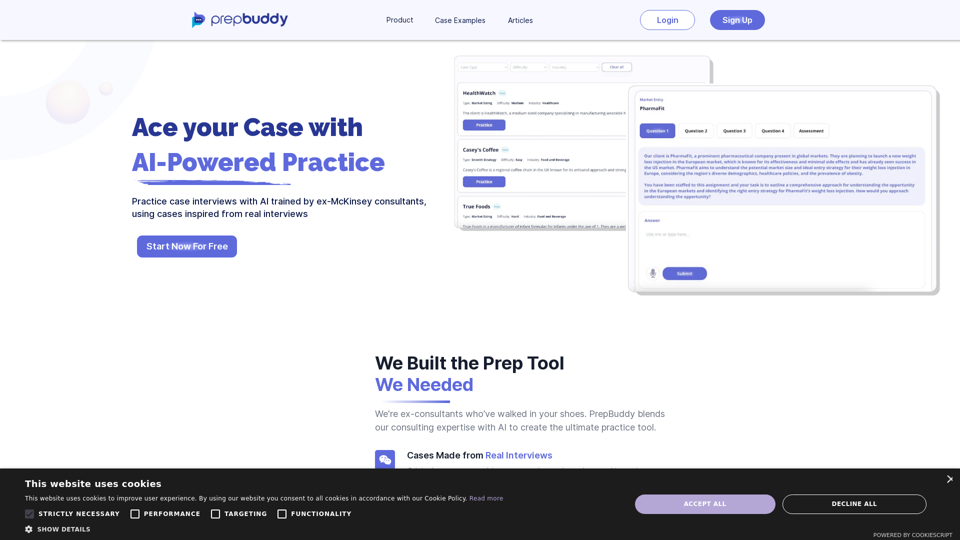
PrepBuddy offers AI-powered practice for consulting case interviews. Learn with materials from former McKinsey consultants and get instant feedback. Start your free trial today!
Visit Website
PrepBuddy
Visit Website

Introduction

PrepBuddy is an AI-powered practice tool designed to help users excel in case interviews. It offers AI-generated cases inspired by real interviews, providing evaluation and constructive feedback based on training from ex-McKinsey consultants. The platform allows for unlimited and flexible practice, making it an invaluable resource for those preparing for consulting interviews.

Feature

AI Trained by Ex-McKinsey Consultants

PrepBuddy's AI is trained using knowledge from former McKinsey consultants, ensuring high-quality evaluation and feedback for users' interview responses.

Unlimited and Flexible Practice

Users can practice anytime and as frequently as they want, eliminating the need to schedule with a case prep partner.

Original Cases from Real Interviews

The platform offers cases created by ex-consultants, based on real interviews across six categories, preparing users for various scenarios.

Free Trial and Subscription Options

Users can start with two free cases and receive feedback on their responses. Subscription plans are available for extended access and additional benefits.

Extensive Case Library

PrepBuddy provides a wide range of cases, with new ones added monthly, accessible upon sign-up.

Privacy Protection

User information is not used for training data, and account deletion removes all associated data.

FAQ

How many free cases does PrepBuddy offer?

PrepBuddy provides 2 free cases per day for users to practice and receive constructive feedback.

Is PrepBuddy capable of generating images?

No, PrepBuddy is a text-based tool focused on verbal communication and problem-solving skills for case interviews.

What are the subscription options for PrepBuddy?

PrepBuddy offers three plans:

PlanDurationPrice
Free Trial-Free
Monthly Plan1 month€29
6 Month Plan6 months€169

How often are new cases added to PrepBuddy?

New cases are added to PrepBuddy's library every month, continuously expanding the available practice material.

Can I delete my account and data from PrepBuddy?

Yes, users can delete their accounts at any time, and all associated data will be removed from the platform.

Related Websites
Paraphrasing Tool - Free AI Paraphraser
View Detail

Paraphrasing Tool - Free AI Paraphraser

Paraphrasing Tool - Free AI Paraphraser

Paraphraser is a complimentary rephrasing tool that utilizes AI algorithms to assist you in rewording text, sentences, and paragraphs, enabling you to convey ideas using your own language.

1.18 M
Talkative
View Detail

Talkative

Talkative

Chat with Web-LLM Models in the Browser You can interact with Web-LLM models directly in your web browser without requiring any additional setup or installation. This allows you to easily experiment with and explore the capabilities of these models. Getting Started To get started, simply open a web browser and navigate to the Web-LLM model's website or platform. Once you're on the website, you can usually find a chat interface or text input field where you can enter your prompts or questions. How it Works When you enter a prompt or question, the Web-LLM model processes your input and generates a response. This response is then displayed in the chat interface or output field, allowing you to read and interact with the model's output. Benefits The benefits of chatting with Web-LLM models in the browser include: * Convenience: No need to install any software or set up any development environments. * Accessibility: Anyone with a web browser can interact with the model, regardless of their technical expertise. * Ease of use: The chat interface provides a user-friendly way to interact with the model, making it easy to experiment and explore its capabilities. Use Cases Some potential use cases for chatting with Web-LLM models in the browser include: * Research and development: Quickly experiment with different models and prompts to explore their capabilities and limitations. * Education and learning: Use the chat interface to teach students about AI and language models, or to provide interactive learning experiences. * Creative writing and ideation: Use the model as a tool to generate ideas, write stories, or create poetry. Overall, chatting with Web-LLM models in the browser provides a convenient and accessible way to interact with these powerful language models, and can be a valuable tool for a wide range of applications.

2.59 K
Tubelator: AI YouTube Subtitles and Chapters
View Detail

Tubelator: AI YouTube Subtitles and Chapters

Tubelator: AI YouTube Subtitles and Chapters

AI subtitles in 98 languages, generate chapters or a summary, customize subtitles and generate AI art from the current scene!

193.90 M
Ikigai Ads Companion
View Detail

Ikigai Ads Companion

Ikigai Ads Companion

Track the success of your TikTok ads as they run and get helpful tips to improve them.

193.90 M
Ama POPSO AI — Free Marketplace Analytics
View Detail

Ama POPSO AI — Free Marketplace Analytics

Ama POPSO AI — Free Marketplace Analytics

Analysis of product cards and product reviews on marketplaces using POPSO AI

193.90 M
Discord Translator
View Detail

Discord Translator

Discord Translator

Translate Messages in Discord ============================= What is the "Translate" feature in Discord? The "Translate" feature in Discord allows users to translate messages in real-time, making it easier for people who speak different languages to communicate with each other. How to use the "Translate" feature in Discord? #1. Enable the "Translate" feature To enable the "Translate" feature, you need to go to the "User Settings" and click on the "Language" tab. Then, toggle the switch next to "Translator" to the "On" position. #2. Set your preferred language After enabling the "Translate" feature, you need to set your preferred language. You can do this by clicking on the "Language" dropdown menu and selecting your preferred language from the list. #3. Translate messages Once you've set your preferred language, you can start translating messages. To translate a message, simply hover over the message and click on the "Translate" button that appears. #4. View translated messages After clicking the "Translate" button, the message will be translated into your preferred language. You can view the translated message below the original message. Benefits of the "Translate" feature in Discord The "Translate" feature in Discord has several benefits, including: * Improved communication: The "Translate" feature helps to break down language barriers, making it easier for people who speak different languages to communicate with each other. * Increased accessibility: The "Translate" feature makes Discord more accessible to people who may not speak the dominant language of a server or community. * Enhanced collaboration: The "Translate" feature enables people to collaborate more effectively, even if they speak different languages.

193.90 M
Free AI Song Generator | Song.do
View Detail

Free AI Song Generator | Song.do

Free AI Song Generator | Song.do

The best free AI song generator: create songs and make music in the simplest way possible.

427.38 K
Octane AI | Intelligent Quizzes That Boost Sales for Shopify Stores
View Detail

Octane AI | Intelligent Quizzes That Boost Sales for Shopify Stores

Octane AI | Intelligent Quizzes That Boost Sales for Shopify Stores

You can't afford to have leaks in your customer journey. Plug the leak with product quizzes that sell like crazy. No coding required (unless you want to!).

136.30 K