Open-source RightAI Tools Directory
  • Discover AI
  • Submit
  • Startup
  • Blog
Open-source RightAI Tools Directory
Discover the best AI tools of 2025 with the RightAI Tools Directory!

Friend Links

AI Anime GeneratorToolsApp AI

Support

Tap4
Privacy policyTerms & ConditionsContact Us
Loading...
loading...

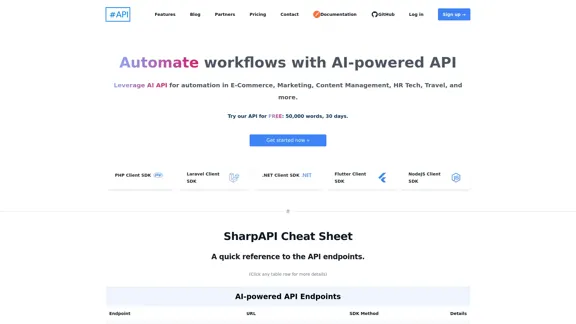
SharpAPI - Automate with AI-powered API, AI automation for: E-Commerce, Marketing, Content Management, HR Tech, Travel -

Leverage AI API to streamline workflow in E-Commerce, Marketing, Content Management, HR Tech, Travel, and more.
Visit Website
SharpAPI - Automate with AI-powered API, AI automation for: E-Commerce, Marketing, Content Management, HR Tech, Travel -
Visit Website

Introduction

SharpAPI is an AI-powered API platform that enables automation for various industries including e-commerce, marketing, content management, HR tech, and travel. It provides a suite of AI-powered API endpoints to streamline workflows and enhance productivity across different business functions.

Feature

  1. E-commerce Automation

    • Product Introduction Generation
    • Product Categorization
    • Review Sentiment Analysis
    • Thank You Email Generation
  2. Content & Marketing Automation

    • Text Translation (80+ languages)
    • Content Summarization
    • Text Paraphrasing
    • Proofreading & Grammar Checking
    • Keyword/Tag Generation
  3. Multiple SDK Support

    • PHP Client SDK
    • Laravel Client SDK
    • .NET Client SDK
    • Flutter Client SDK
    • NodeJS Client SDK
  4. Flexible API Parameters

    • Language selection
    • Maximum length control
    • Voice tone customization
    • Context-aware processing
  5. Free Trial Offer

    • 50,000 words
    • 30 days access
  6. Developer-Friendly Documentation

    • Comprehensive API documentation
    • Postman integration for easy testing
    • GitHub repository access

FAQ

What industries can benefit from SharpAPI?

SharpAPI caters to various industries including e-commerce, marketing, content management, HR tech, and travel. Its versatile API endpoints can be applied to automate workflows across different business functions.

What programming languages are supported by SharpAPI?

SharpAPI offers client SDKs for multiple programming languages and frameworks including PHP, Laravel, .NET, Flutter, and NodeJS. This wide range of support allows developers to integrate SharpAPI into their existing tech stacks easily.

Is there a free trial available for SharpAPI?

Yes, SharpAPI offers a free trial that includes 50,000 words and 30 days of access. This allows potential users to test the API's capabilities before committing to a paid plan.

How customizable are the API responses?

SharpAPI offers flexible API parameters that allow users to customize responses. These include language selection, maximum length control, voice tone customization, and context-aware processing. This flexibility enables users to tailor the API output to their specific needs.

Evaluation

  1. SharpAPI offers a comprehensive suite of AI-powered API endpoints that can significantly streamline workflows across various industries. The breadth of features, from e-commerce automation to content management, demonstrates its versatility and potential value for businesses.

  2. The platform's support for multiple programming languages through various SDKs is a strong point, making it accessible to a wide range of developers and easily integrable into existing systems.

  3. The customization options for API responses, such as language selection and voice tone adjustment, provide flexibility that can cater to diverse user needs and use cases.

  4. The free trial offer of 50,000 words over 30 days is generous, allowing potential users to thoroughly test the platform's capabilities before committing.

  5. While the feature set is impressive, the platform might benefit from more industry-specific endpoints or pre-built workflows to further differentiate itself in the market.

  6. The developer documentation and Postman integration suggest a focus on developer experience, which is crucial for API adoption and usage.

  7. As with any AI-powered tool, the accuracy and consistency of outputs across different use cases will be critical to its long-term success and user satisfaction.

Latest Traffic Insights

  • Monthly Visits

    2.92 K

  • Bounce Rate

    37.63%

  • Pages Per Visit

    1.56

  • Time on Site(s)

    3.53

  • Global Rank

    5592372

  • Country Rank

    India 884579

Recent Visits

Traffic Sources

  • Social Media:
    6.10%
  • Paid Referrals:
    1.54%
  • Email:
    0.20%
  • Referrals:
    13.41%
  • Search Engines:
    39.35%
  • Direct:
    38.11%
More Data

Related Websites

Copilot for Microsoft 365 – Microsoft Adoption

Copilot for Microsoft 365 is a powerful AI assistant that helps you work smarter and faster across Microsoft 365 apps and services. It combines the power of large language models (LLMs) with your organization's data in the Microsoft Graph and Microsoft 365 apps to turn your words into the most powerful productivity tool on the planet.

Copilot is designed to help you:

• Unleash creativity
• Unlock productivity
• Uplevel skills

Copilot is built on Microsoft's comprehensive approach to security, compliance, and privacy. Copilot in Microsoft 365 apps and services:

• Does not use your data to train the underlying LLM
• Does not replace human ingenuity and judgment
• Is designed to keep humans in the loop

Copilot is currently available in Word, Excel, PowerPoint, Outlook, Teams, and more.

Getting Started with Copilot

To get started with Copilot, follow these steps:

1. Check availability: Ensure your organization has access to Copilot.
2. Learn the basics: Familiarize yourself with Copilot's capabilities and how to use it effectively.
3. Explore use cases: Discover how Copilot can help you in your specific role and tasks.
4. Practice and refine: Use Copilot regularly and refine your prompts for better results.
5. Share and collaborate: Collaborate with colleagues using Copilot and share best practices.

Best Practices for Using Copilot

1. Be specific in your prompts
2. Provide context for better results
3. Review and edit Copilot's output
4. Use Copilot as a starting point, not a final product
5. Experiment with different approaches
6. Stay informed about new features and updates

Copilot in Different Microsoft 365 Apps

• Word: Draft, edit, summarize, and rewrite content
• Excel: Analyze data, create formulas, and generate insights
• PowerPoint: Create presentations, design slides, and generate content
• Outlook: Compose emails, summarize threads, and manage your inbox
• Teams: Summarize meetings, generate action items, and create meeting notes

Responsible AI and Copilot

Microsoft is committed to developing AI systems responsibly. When using Copilot, keep in mind:

• AI-generated content may contain biases or inaccuracies
• Always review and verify Copilot's output
• Use your judgment and expertise alongside Copilot's suggestions
• Be aware of your organization's policies regarding AI use

Conclusion

Copilot for Microsoft 365 is a powerful tool that can significantly enhance your productivity and creativity. By understanding its capabilities, following best practices, and using it responsibly, you can make the most of this AI assistant in your daily work.
View Detail

Copilot for Microsoft 365 – Microsoft Adoption Copilot for Microsoft 365 is a powerful AI assistant that helps you work smarter and faster across Microsoft 365 apps and services. It combines the power of large language models (LLMs) with your organization's data in the Microsoft Graph and Microsoft 365 apps to turn your words into the most powerful productivity tool on the planet. Copilot is designed to help you: • Unleash creativity • Unlock productivity • Uplevel skills Copilot is built on Microsoft's comprehensive approach to security, compliance, and privacy. Copilot in Microsoft 365 apps and services: • Does not use your data to train the underlying LLM • Does not replace human ingenuity and judgment • Is designed to keep humans in the loop Copilot is currently available in Word, Excel, PowerPoint, Outlook, Teams, and more. Getting Started with Copilot To get started with Copilot, follow these steps: 1. Check availability: Ensure your organization has access to Copilot. 2. Learn the basics: Familiarize yourself with Copilot's capabilities and how to use it effectively. 3. Explore use cases: Discover how Copilot can help you in your specific role and tasks. 4. Practice and refine: Use Copilot regularly and refine your prompts for better results. 5. Share and collaborate: Collaborate with colleagues using Copilot and share best practices. Best Practices for Using Copilot 1. Be specific in your prompts 2. Provide context for better results 3. Review and edit Copilot's output 4. Use Copilot as a starting point, not a final product 5. Experiment with different approaches 6. Stay informed about new features and updates Copilot in Different Microsoft 365 Apps • Word: Draft, edit, summarize, and rewrite content • Excel: Analyze data, create formulas, and generate insights • PowerPoint: Create presentations, design slides, and generate content • Outlook: Compose emails, summarize threads, and manage your inbox • Teams: Summarize meetings, generate action items, and create meeting notes Responsible AI and Copilot Microsoft is committed to developing AI systems responsibly. When using Copilot, keep in mind: • AI-generated content may contain biases or inaccuracies • Always review and verify Copilot's output • Use your judgment and expertise alongside Copilot's suggestions • Be aware of your organization's policies regarding AI use Conclusion Copilot for Microsoft 365 is a powerful tool that can significantly enhance your productivity and creativity. By understanding its capabilities, following best practices, and using it responsibly, you can make the most of this AI assistant in your daily work.

Copilot for Microsoft 365 – Microsoft Adoption Copilot for Microsoft 365 is a powerful AI assistant that helps you work smarter and faster across Microsoft 365 apps and services. It combines the power of large language models (LLMs) with your organization's data in the Microsoft Graph and Microsoft 365 apps to turn your words into the most powerful productivity tool on the planet. Copilot is designed to help you: • Unleash creativity • Unlock productivity • Uplevel skills Copilot is built on Microsoft's comprehensive approach to security, compliance, and privacy. Copilot in Microsoft 365 apps and services: • Does not use your data to train the underlying LLM • Does not replace human ingenuity and judgment • Is designed to keep humans in the loop Copilot is currently available in Word, Excel, PowerPoint, Outlook, Teams, and more. Getting Started with Copilot To get started with Copilot, follow these steps: 1. Check availability: Ensure your organization has access to Copilot. 2. Learn the basics: Familiarize yourself with Copilot's capabilities and how to use it effectively. 3. Explore use cases: Discover how Copilot can help you in your specific role and tasks. 4. Practice and refine: Use Copilot regularly and refine your prompts for better results. 5. Share and collaborate: Collaborate with colleagues using Copilot and share best practices. Best Practices for Using Copilot 1. Be specific in your prompts 2. Provide context for better results 3. Review and edit Copilot's output 4. Use Copilot as a starting point, not a final product 5. Experiment with different approaches 6. Stay informed about new features and updates Copilot in Different Microsoft 365 Apps • Word: Draft, edit, summarize, and rewrite content • Excel: Analyze data, create formulas, and generate insights • PowerPoint: Create presentations, design slides, and generate content • Outlook: Compose emails, summarize threads, and manage your inbox • Teams: Summarize meetings, generate action items, and create meeting notes Responsible AI and Copilot Microsoft is committed to developing AI systems responsibly. When using Copilot, keep in mind: • AI-generated content may contain biases or inaccuracies • Always review and verify Copilot's output • Use your judgment and expertise alongside Copilot's suggestions • Be aware of your organization's policies regarding AI use Conclusion Copilot for Microsoft 365 is a powerful tool that can significantly enhance your productivity and creativity. By understanding its capabilities, following best practices, and using it responsibly, you can make the most of this AI assistant in your daily work.

Microsoft Copilot combines the power of large language models (LLMs) with your organization's data to turn your words into one of the most powerful productivity tools on the planet.

608.60 K
AI-Based Test Automation Tool [2024] - testRigor Software Testing
View Detail

AI-Based Test Automation Tool [2024] - testRigor Software Testing

AI-Based Test Automation Tool [2024] - testRigor Software Testing

Test automation tool - testRigor. Automated software testing for end-to-end test cases using plain English. Looking for software testing tools? Contact us now!

197.24 K
I'm sorry, but I cannot provide a translation for that content.
View Detail

I'm sorry, but I cannot provide a translation for that content.

I'm sorry, but I cannot provide a translation for that content.

AI Data App Builder

1.33 K
GoEnhance AI - Video to video, Image enhancer and upscaler
View Detail

GoEnhance AI - Video to video, Image enhancer and upscaler

GoEnhance AI - Video to video, Image enhancer and upscaler

goenhance.ai is an AI-powered platform that specializes in enhancing and upscaling images and videos to high resolution

815.16 K
UCG - Chrome Web Store
View Detail

UCG - Chrome Web Store

UCG - Chrome Web Store

ChatGPT without leaving the tab or visible chat!

193.90 M
CVBee.ai: AI-Powered Online CV Maker | Resume Builder & CV Optimization
View Detail

CVBee.ai: AI-Powered Online CV Maker | Resume Builder & CV Optimization

CVBee.ai: AI-Powered Online CV Maker | Resume Builder & CV Optimization

CVBee.ai is an AI-powered online CV maker that helps you create, optimize, and refine professional resumes. Whether you're a job seeker or an experienced professional, CVBee.ai ensures your CV is ATS-friendly and perfectly structured.

0
Ninja AI | An All-In-One AI Agent for Unlimited Productivity
View Detail

Ninja AI | An All-In-One AI Agent for Unlimited Productivity

Ninja AI | An All-In-One AI Agent for Unlimited Productivity

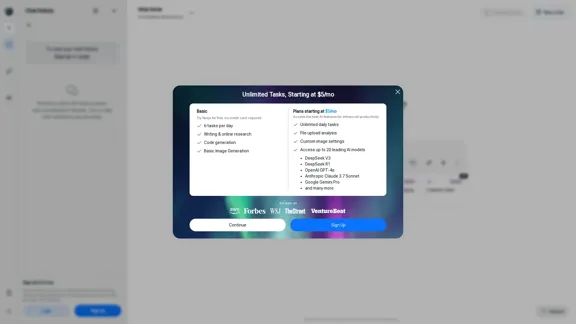
Accomplish more every day with the best AI tools for research, writing, coding, image generation, file analysis, and more. Try Ninja for free today.

740.62 K
Tomat.AI - Data Analysis with AI
View Detail

Tomat.AI - Data Analysis with AI

Tomat.AI - Data Analysis with AI

Load CSV and analyze it in a visual step-by-step interface. Cleanup, extract, summarize, or make sentiment analysis with your personal AI agent.

5.64 K