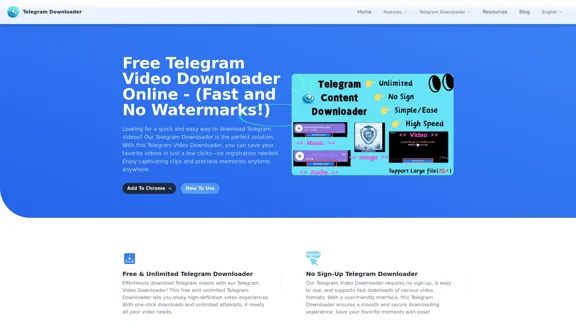
Free Telegram Video Downloader Online offers a fast and efficient way to download videos from Telegram without any watermarks. Users can save their favorite videos in just a few clicks, with no registration required. The tool is designed for ease of use, allowing access to captivating clips and precious memories anytime, anywhere.
Free Telegram Video Downloader Online - (Quick and No Watermarks!)
The best Free Telegram Video Downloader for downloading high-quality videos from Telegram channels and groups—no watermarks, no sign-up, no limits. Enjoy seamless, user-friendly downloads with our Telegram Downloader. Get it now!
Introduction
Feature
-
Free & Unlimited Downloads
The Telegram Video Downloader provides unlimited download freedom, allowing users to download videos without any restrictions.
-
No Sign-Up Required
Users can enjoy the service without the need for registration, making the process quick and hassle-free.
-
High-Speed Downloads
The downloader supports fast download speeds, ensuring that users can save their favorite videos quickly.
-
User-Friendly Interface
Designed with simplicity in mind, the intuitive interface allows for easy navigation and a smooth downloading experience.
-
Wide Format Support
The tool supports various video formats, including MP4, AVI, and MKV, as well as audio formats like MP3 and WAV.
-
Batch Downloading
Users can select multiple files for download at once, improving efficiency and saving time.
-
Secure and Reliable
The downloader ensures user privacy and security, with no data collection and rigorous testing against malware.
How to Use?
- Navigate to the Telegram video you wish to download.
- Copy the video link from Telegram.
- Paste the link into the Telegram Video Downloader input field.
- Click the download button to start the process.
- Choose your preferred video format if prompted.
- Wait for the download to complete and enjoy your video.
FAQ
What is the Telegram Video Downloader?
The Telegram Video Downloader is a tool that allows users to download various types of content from Telegram, including videos, audio, and images.
Do I need to register to use the Telegram Downloader?
No, registration is not required. The service is completely free and can be used without creating an account.
What types of files are supported by the Telegram Downloader?
Supported file types include:
-
Photos: JPEG, PNG, GIF
-
Videos: MP4, AVI, MKV
-
Audio: MP3, WAV, AAC
-
Documents: PDF, DOCX, XLSX, PPTX
How fast are the downloads with the Telegram Downloader?
The downloader supports high-speed downloads, but actual speeds may vary based on network conditions and file sizes.
Is the Telegram Downloader safe and reliable?
Yes, it is safe and reliable. The downloader does not collect user data and has been tested to be free of viruses and ads.
Price
- Free plan: $0/month
The price is for reference only, please refer to the latest official data for actual information.
Evaluation
- The Telegram Video Downloader excels in providing a user-friendly experience with no registration required, making it accessible for all users.
- High-speed downloads and support for various formats enhance its functionality, catering to diverse user needs.
- However, while the tool is effective for downloading content, it lacks advanced features such as editing capabilities or integration with other platforms.
- Overall, it serves as a reliable solution for users looking to download videos from Telegram quickly and efficiently, but may not meet the needs of those seeking more comprehensive media management tools.
Related Websites
building models & products for text-to-speech, avatars, lip synchronization and conversational speech!
112.54 K
Magic Light AI - Free AI Art Generator, Text to Image to Video! AI Studio School
Magic Light AI - Free AI Art Generator, Text to Image to Video! AI Studio SchoolMagicLight AI is an innovative AI text-to-image-to-video platform that easily transforms your written content into engaging, professional-quality videos. Ideal for marketers, school educators, and content creator studios, our tool enables you to produce dynamic video content in minutes—Free AI Art Generator enhancing your digital storytelling and marketing initiatives.
822.97 K
AI Face Swap Online – Instantly Exchange Faces in Photos and Videos
AI Face Swap Online – Instantly Exchange Faces in Photos and VideosSwap faces in photos, videos, and GIFs with AI. Try face swap, gender swap, celebrity swap, and more for fun, realistic results. No watermarks, fast, and high-quality. Start now!
797.14 K
Create short AI videos that expand your faceless channel.
Create short AI videos that expand your faceless channel.Create short AI videos that expand your faceless channel.
264.02 K

Wan 2.1: The Leading Model for AI Video Generation
Wan 2.1: The Leading Model for AI Video GenerationWan is an AI creative platform from Alibaba. It aims to reduce the barriers to creative work using artificial intelligence, providing features such as text-to-image, image-to-image, text-to-video, image-to-video, and image editing.
3.94 M
Transform text into stunning videos with Ray2. Create professional-quality content using advanced AI technology.
134