Open-source RightAI Tools Directory
  • Discover AI
  • Submit
  • Startup
  • Blog
Open-source RightAI Tools Directory
Discover the best AI tools of 2025 with the RightAI Tools Directory!

Friend Links

AI Anime GeneratorToolsApp AI

Support

Tap4
Privacy policyTerms & ConditionsContact Us
Loading...
loading...

AI Book Creator

Write with AI!
Visit Website
AI Book Creator
Visit Website

Introduction

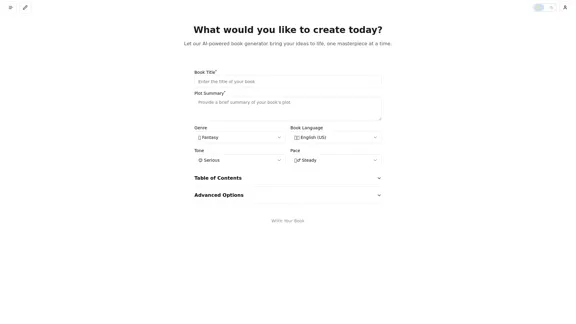
AI Book Generator is an innovative tool designed to help users create books effortlessly. By simply providing a title, plot summary, and selecting a genre, users can generate a complete book tailored to their ideas. The platform supports a wide range of genres and tones, making it suitable for various writing styles and preferences.

Feature

  1. Diverse Genre Selection

    Users can choose from an extensive list of genres, including Fantasy, Science Fiction, Mystery, Romance, and many more, allowing for a personalized writing experience.

  2. Customizable Tone and Pace

    The tool offers options to select the tone (e.g., serious, humorous, dramatic) and pace (e.g., steady, fast, slow) of the book, enabling users to shape the narrative style to their liking.

  3. User-Friendly Interface

    The AI Book Generator features a straightforward interface where users can easily input their book title and plot summary, making the book creation process seamless.

  4. Advanced Options

    Users can access advanced options to further refine their book's content, ensuring that the generated material aligns with their vision.

  5. Multi-Language Support

    Currently supporting English (US and UK) with plans for additional languages, the tool aims to cater to a global audience.

  6. Table of Contents Generation

    The tool can automatically generate a table of contents, helping users organize their book structure efficiently.

How to Use?

  1. Start by brainstorming your book title and plot summary to have a clear direction.
  2. Explore different genres to find the best fit for your story.
  3. Experiment with various tones and paces to see how they affect the narrative.
  4. Utilize the advanced options to customize your book further.
  5. Review the generated content and make any necessary adjustments to align with your vision.

FAQ

What is AI Book Generator?

AI Book Generator is an AI-driven tool that assists users in creating books by generating content based on provided titles, plot summaries, and genre selections.

How does the AI Book Generator work?

Users input a book title and plot summary, select a genre, tone, and pace, and the AI generates a complete book based on these parameters.

Can I edit the generated content?

Yes, users can review and edit the generated content to better fit their ideas and writing style.

Is there a limit to the genres I can choose from?

No, the AI Book Generator offers a wide variety of genres, allowing users to explore different styles and themes for their books.

How do I get started with AI Book Generator?

Simply visit the website, input your book title and plot summary, select your preferred genre, tone, and pace, and let the AI generate your book.

Price

  • Free plan: $0/month
  • Basic plan: $9.99/month
  • Standard plan: $19.99/month
  • Professional plan: $49.99/month
The price is for reference only, please refer to the latest official data for actual information.

Evaluation

  1. The AI Book Generator excels in providing a user-friendly experience, making book creation accessible to everyone, regardless of writing skill level.
  2. The extensive genre and tone options allow for a high degree of customization, catering to diverse writing styles.
  3. However, the quality of the generated content may vary, and users might need to invest time in editing and refining the output to meet their standards.
  4. The tool could benefit from additional features, such as collaborative writing options or integration with other writing software, to enhance its functionality.
  5. Overall, while the AI Book Generator is a valuable resource for aspiring authors, it may not fully replace the creative process involved in traditional writing.

Latest Traffic Insights

  • Monthly Visits

    3.11 K

  • Bounce Rate

    95.47%

  • Pages Per Visit

    1.00

  • Time on Site(s)

    0.00

  • Global Rank

    6388405

  • Country Rank

    United States 1948345

Recent Visits

Traffic Sources

  • Social Media:
    9.80%
  • Paid Referrals:
    1.51%
  • Email:
    0.20%
  • Referrals:
    12.75%
  • Search Engines:
    33.18%
  • Direct:
    41.71%
More Data

Related Websites

Artificial intelligence-powered software platform for aneurysms, pulmonary embolisms, and strokes
View Detail

Artificial intelligence-powered software platform for aneurysms, pulmonary embolisms, and strokes

Artificial intelligence-powered software platform for aneurysms, pulmonary embolisms, and strokes

RapidAI empowers neurovascular and vascular clinical teams to push the limits of care, decreasing treatment time and enhancing patient outcomes.

20.57 K
Cove
View Detail

Cove

Cove

Visual workspace for thinking with AI

21.16 K
Free iPear PDF Tool
View Detail

Free iPear PDF Tool

Free iPear PDF Tool

Free iPear PDF Tool

0
Beyz AI | AI Interview Assistant
View Detail

Beyz AI | AI Interview Assistant

Beyz AI | AI Interview Assistant

Beyz AI listens to interviewer questions and delivers concise, accurate answers tailored to your background in real-time, boosting your interview success.

0
Automated Predictive Analytics Software
View Detail

Automated Predictive Analytics Software

Automated Predictive Analytics Software

Plat.AI is predictive analytics software for building and deploying custom models using machine learning and deep learning algorithms for real-time predictions.

10.79 K
Copilot for Microsoft 365 – Microsoft Adoption

Copilot for Microsoft 365 is a powerful AI assistant that helps you work smarter and faster across Microsoft 365 apps and services. It combines the power of large language models (LLMs) with your organization's data in the Microsoft Graph and Microsoft 365 apps to turn your words into the most powerful productivity tool on the planet.

Copilot is designed to help you:

• Unleash creativity
• Unlock productivity
• Uplevel skills

Copilot is built on Microsoft's comprehensive approach to security, compliance, and privacy. Copilot in Microsoft 365 apps and services:

• Does not use your data to train the underlying LLM
• Does not replace human ingenuity and judgment
• Is designed to keep humans in the loop

Copilot is currently available in Word, Excel, PowerPoint, Outlook, Teams, and more.

Getting Started with Copilot

To get started with Copilot, follow these steps:

1. Check availability: Ensure your organization has access to Copilot.
2. Learn the basics: Familiarize yourself with Copilot's capabilities and how to use it effectively.
3. Explore use cases: Discover how Copilot can help you in your specific role and tasks.
4. Practice and refine: Use Copilot regularly and refine your prompts for better results.
5. Share and collaborate: Collaborate with colleagues using Copilot and share best practices.

Best Practices for Using Copilot

1. Be specific in your prompts
2. Provide context for better results
3. Review and edit Copilot's output
4. Use Copilot as a starting point, not a final product
5. Experiment with different approaches
6. Stay informed about new features and updates

Copilot in Different Microsoft 365 Apps

• Word: Draft, edit, summarize, and rewrite content
• Excel: Analyze data, create formulas, and generate insights
• PowerPoint: Create presentations, design slides, and generate content
• Outlook: Compose emails, summarize threads, and manage your inbox
• Teams: Summarize meetings, generate action items, and create meeting notes

Responsible AI and Copilot

Microsoft is committed to developing AI systems responsibly. When using Copilot, keep in mind:

• AI-generated content may contain biases or inaccuracies
• Always review and verify Copilot's output
• Use your judgment and expertise alongside Copilot's suggestions
• Be aware of your organization's policies regarding AI use

Conclusion

Copilot for Microsoft 365 is a powerful tool that can significantly enhance your productivity and creativity. By understanding its capabilities, following best practices, and using it responsibly, you can make the most of this AI assistant in your daily work.
View Detail

Copilot for Microsoft 365 – Microsoft Adoption Copilot for Microsoft 365 is a powerful AI assistant that helps you work smarter and faster across Microsoft 365 apps and services. It combines the power of large language models (LLMs) with your organization's data in the Microsoft Graph and Microsoft 365 apps to turn your words into the most powerful productivity tool on the planet. Copilot is designed to help you: • Unleash creativity • Unlock productivity • Uplevel skills Copilot is built on Microsoft's comprehensive approach to security, compliance, and privacy. Copilot in Microsoft 365 apps and services: • Does not use your data to train the underlying LLM • Does not replace human ingenuity and judgment • Is designed to keep humans in the loop Copilot is currently available in Word, Excel, PowerPoint, Outlook, Teams, and more. Getting Started with Copilot To get started with Copilot, follow these steps: 1. Check availability: Ensure your organization has access to Copilot. 2. Learn the basics: Familiarize yourself with Copilot's capabilities and how to use it effectively. 3. Explore use cases: Discover how Copilot can help you in your specific role and tasks. 4. Practice and refine: Use Copilot regularly and refine your prompts for better results. 5. Share and collaborate: Collaborate with colleagues using Copilot and share best practices. Best Practices for Using Copilot 1. Be specific in your prompts 2. Provide context for better results 3. Review and edit Copilot's output 4. Use Copilot as a starting point, not a final product 5. Experiment with different approaches 6. Stay informed about new features and updates Copilot in Different Microsoft 365 Apps • Word: Draft, edit, summarize, and rewrite content • Excel: Analyze data, create formulas, and generate insights • PowerPoint: Create presentations, design slides, and generate content • Outlook: Compose emails, summarize threads, and manage your inbox • Teams: Summarize meetings, generate action items, and create meeting notes Responsible AI and Copilot Microsoft is committed to developing AI systems responsibly. When using Copilot, keep in mind: • AI-generated content may contain biases or inaccuracies • Always review and verify Copilot's output • Use your judgment and expertise alongside Copilot's suggestions • Be aware of your organization's policies regarding AI use Conclusion Copilot for Microsoft 365 is a powerful tool that can significantly enhance your productivity and creativity. By understanding its capabilities, following best practices, and using it responsibly, you can make the most of this AI assistant in your daily work.

Copilot for Microsoft 365 – Microsoft Adoption Copilot for Microsoft 365 is a powerful AI assistant that helps you work smarter and faster across Microsoft 365 apps and services. It combines the power of large language models (LLMs) with your organization's data in the Microsoft Graph and Microsoft 365 apps to turn your words into the most powerful productivity tool on the planet. Copilot is designed to help you: • Unleash creativity • Unlock productivity • Uplevel skills Copilot is built on Microsoft's comprehensive approach to security, compliance, and privacy. Copilot in Microsoft 365 apps and services: • Does not use your data to train the underlying LLM • Does not replace human ingenuity and judgment • Is designed to keep humans in the loop Copilot is currently available in Word, Excel, PowerPoint, Outlook, Teams, and more. Getting Started with Copilot To get started with Copilot, follow these steps: 1. Check availability: Ensure your organization has access to Copilot. 2. Learn the basics: Familiarize yourself with Copilot's capabilities and how to use it effectively. 3. Explore use cases: Discover how Copilot can help you in your specific role and tasks. 4. Practice and refine: Use Copilot regularly and refine your prompts for better results. 5. Share and collaborate: Collaborate with colleagues using Copilot and share best practices. Best Practices for Using Copilot 1. Be specific in your prompts 2. Provide context for better results 3. Review and edit Copilot's output 4. Use Copilot as a starting point, not a final product 5. Experiment with different approaches 6. Stay informed about new features and updates Copilot in Different Microsoft 365 Apps • Word: Draft, edit, summarize, and rewrite content • Excel: Analyze data, create formulas, and generate insights • PowerPoint: Create presentations, design slides, and generate content • Outlook: Compose emails, summarize threads, and manage your inbox • Teams: Summarize meetings, generate action items, and create meeting notes Responsible AI and Copilot Microsoft is committed to developing AI systems responsibly. When using Copilot, keep in mind: • AI-generated content may contain biases or inaccuracies • Always review and verify Copilot's output • Use your judgment and expertise alongside Copilot's suggestions • Be aware of your organization's policies regarding AI use Conclusion Copilot for Microsoft 365 is a powerful tool that can significantly enhance your productivity and creativity. By understanding its capabilities, following best practices, and using it responsibly, you can make the most of this AI assistant in your daily work.

Microsoft Copilot combines the power of large language models (LLMs) with your organization's data to turn your words into one of the most powerful productivity tools on the planet.

608.60 K
The Best Project Management Software - Tools, Reviews and More
View Detail

The Best Project Management Software - Tools, Reviews and More

The Best Project Management Software - Tools, Reviews and More

Our team is passionate about testing Project Management Software based on practical experience. Take advantage of our honest reviews, read more here!

0
Storytell.ai SmartChat™
View Detail

Storytell.ai SmartChat™

Storytell.ai SmartChat™

Enhance team efficiency with enterprise-level intelligence throughout your data. Empower employees to generate superior ideas and achieve quicker outcomes using top-tier AI models. Implement data security measures and LLM routing for businesses to maintain control.

55.32 K