Open-source RightAI Tools Directory
  • Discover AI
  • Submit
  • Startup
  • Blog
Open-source RightAI Tools Directory
Discover the best AI tools of 2025 with the RightAI Tools Directory!

Friend Links

AI Anime GeneratorToolsApp AI

Support

Tap4
Privacy policyTerms & ConditionsContact Us
Loading...
loading...

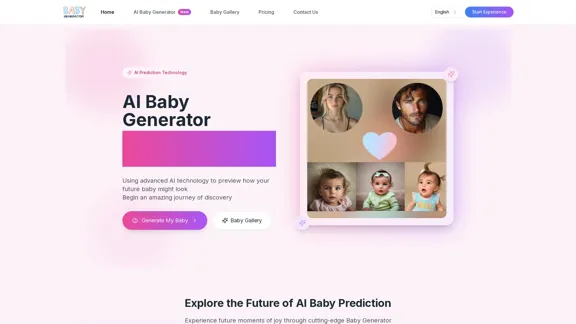
Baby Generator | AI Future Baby Prediction | Free Trial

Create realistic AI predictions of your future baby with Baby Generator. Free trial for new users! Advanced technology transforms parents' photos into lifelike baby images.
Visit Website
Baby Generator | AI Future Baby Prediction | Free Trial
Visit Website

Introduction

The AI Baby Generator offers a unique experience for future parents by predicting how their future baby might look using advanced AI technology. By uploading photos and selecting preferences, users can generate realistic images of their potential child, exploring the joy of family life before it happens.

Feature

  1. High-Quality AI Model Prediction

    Utilizes advanced AI models and facial recognition technology to provide accurate predictions of a future baby's appearance.

  2. Dual Model Selection

    Offers two AI models, each with unique advantages, allowing users to choose between realistic or artistic styles for their baby predictions.

  3. Multi-Age Prediction

    Not only predicts infant appearance but also showcases potential looks during toddler and teenage years, providing a glimpse into different growth stages.

  4. Feature Blending

    Smart analysis of both parents' features to blend genetic characteristics naturally, creating a more personalized image.

  5. Privacy Protection

    Implements strict privacy measures to ensure the security of uploaded photos, with automatic deletion within 24 hours.

  6. HD Watermark-Free Download

    Users can download original images without watermarks, making it easy to share with family and friends.

How to Use?

  1. Upload clear front-facing photos of both parents for optimal results.
  2. Select your baby's gender and choose from over 10 artistic styles.
  3. Click 'Generate Baby' to activate the AI and see the blended features.
  4. Expect results within 30 to 90 seconds, depending on network speed.

FAQ

What are the requirements for the photos I upload?

Clear front-facing photos showing facial features are required. Avoid side profiles, sunglasses, or exaggerated expressions for the best results.

How long does it take to generate a baby photo?

Typically, results are produced within 30 to 90 seconds, though it may take longer during busy times.

Are the images I upload safe?

Yes, uploaded photos are automatically deleted within 24 hours to ensure privacy.

Can I delete my data?

Users can delete generated photos at any time, though shared photos will be permanently saved.

Is my privacy protected?

The Baby Generator employs strict privacy measures, including encrypted data transmission and automatic deletion of uploaded photos.

Price

  • Free Trial: $0
  • Basic Plan: $9.99/month
  • Standard Plan: $19.99/month
  • Professional Plan: $49.99/month
The price is for reference only, please refer to the latest official data for actual information.

Evaluation

The AI Baby Generator excels in providing a fun and engaging way for couples to visualize their future family. The dual model selection and multi-age prediction features enhance user experience by offering personalized options. However, the reliance on clear photos may limit usability for some users. Additionally, while the technology is impressive, it may not fully replace the emotional aspect of family planning. Overall, it serves as an entertaining tool but may not be a necessity for everyone.

Related Websites
ChatGPT Online for Google
View Detail

ChatGPT Online for Google

ChatGPT Online for Google

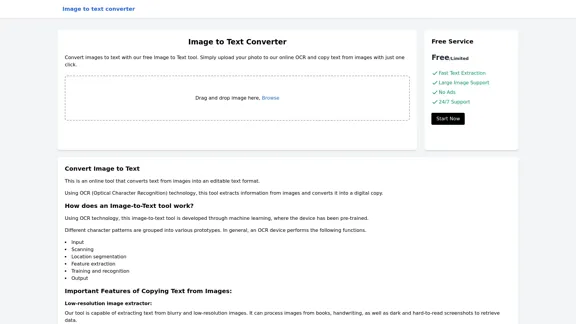
I can't actually display real-time search engine results. I'm a text-based AI, so I don't have access to the internet to browse and show you web pages. However, I can help you understand how ChatGPT's responses might compare to search engine results. Imagine you ask a search engine "What is the capital of France?". * Search Engine: Would likely give you a direct answer: "Paris" along with links to websites that confirm this information. * ChatGPT: Might also say "The capital of France is Paris." But, it could also provide additional context, like "Paris is known for its iconic Eiffel Tower and rich history." Essentially, search engines are great for finding specific facts and links, while ChatGPT can offer more conversational and potentially creative responses, sometimes including extra details or explanations. Let me know if you have any other questions!

193.90 M
Image Enhancer
View Detail

Image Enhancer

Image Enhancer

Enhance photos effortlessly with AI photo enhancer. Increase image resolution, improve colors, and make photo clear with just a click!

193.90 M
My AI
View Detail

My AI

My AI

AI enables all social media platforms, e-commerce platforms, and websites that you visit.

193.90 M
SellingPilot - Your AI-powered assistant for e-commerce.
View Detail

SellingPilot - Your AI-powered assistant for e-commerce.

SellingPilot - Your AI-powered assistant for e-commerce.

SellingPilot is your AI-powered assistant for e-commerce. It helps you streamline your operations and accelerate your e-commerce business.

193.90 M
Stock Images, Photos, Vectors, Video, and Music | Shutterstock
View Detail

Stock Images, Photos, Vectors, Video, and Music | Shutterstock

Stock Images, Photos, Vectors, Video, and Music | Shutterstock

Download the best royalty free images from Shutterstock, including photos, vectors, and illustrations. Enjoy straightforward pricing and simple licensing.

71.43 M
FlyMSG: AI Writer & Autofill Text Expander
View Detail

FlyMSG: AI Writer & Autofill Text Expander

FlyMSG: AI Writer & Autofill Text Expander

AI Writer & Autofill Text Expander App. Write, Expand, & Engage Everywhere!

193.90 M
Text to Voice Generator
==========================

A text-to-voice generator, also known as a text-to-speech (TTS) system, is a software that converts written text into a spoken voice output. This technology has been widely used in various applications, including virtual assistants, audiobooks, and language learning platforms.

How it Works
---------------

The process of generating voice from text involves several steps:

1. Text Analysis: The input text is analyzed to identify the language, syntax, and semantics.
2. Phonetic Transcription: The text is converted into a phonetic transcription, which represents the sounds of the spoken language.
3. Prosody Generation: The phonetic transcription is then used to generate the prosody, or rhythm and intonation, of the spoken voice.
4. Waveform Generation: The prosody and phonetic transcription are combined to generate the audio waveform, which is the final spoken voice output.

Types of Text-to-Voice Generators
-----------------------------------

There are two main types of text-to-voice generators:

Rule-Based Systems

These systems use a set of predefined rules to generate the spoken voice output. They are often limited in their ability to produce natural-sounding voices and may sound robotic.

Machine Learning-Based Systems

These systems use machine learning algorithms to learn from large datasets of spoken voices and generate more natural-sounding voices. They are often more advanced and can produce high-quality voice outputs.

Applications of Text-to-Voice Generators
-----------------------------------------

Text-to-voice generators have a wide range of applications, including:

Virtual Assistants

Virtual assistants, such as Siri and Alexa, use text-to-voice generators to respond to user queries.

Audiobooks

Text-to-voice generators can be used to create audiobooks from written texts, making it easier for people to access written content.

Language Learning

Language learning platforms use text-to-voice generators to provide pronunciation guidance and practice exercises for learners.

Accessibility

Text-to-voice generators can be used to assist people with disabilities, such as visual impairments, by providing an auditory interface to written content.
View Detail

Text to Voice Generator ========================== A text-to-voice generator, also known as a text-to-speech (TTS) system, is a software that converts written text into a spoken voice output. This technology has been widely used in various applications, including virtual assistants, audiobooks, and language learning platforms. How it Works --------------- The process of generating voice from text involves several steps: 1. Text Analysis: The input text is analyzed to identify the language, syntax, and semantics. 2. Phonetic Transcription: The text is converted into a phonetic transcription, which represents the sounds of the spoken language. 3. Prosody Generation: The phonetic transcription is then used to generate the prosody, or rhythm and intonation, of the spoken voice. 4. Waveform Generation: The prosody and phonetic transcription are combined to generate the audio waveform, which is the final spoken voice output. Types of Text-to-Voice Generators ----------------------------------- There are two main types of text-to-voice generators: Rule-Based Systems These systems use a set of predefined rules to generate the spoken voice output. They are often limited in their ability to produce natural-sounding voices and may sound robotic. Machine Learning-Based Systems These systems use machine learning algorithms to learn from large datasets of spoken voices and generate more natural-sounding voices. They are often more advanced and can produce high-quality voice outputs. Applications of Text-to-Voice Generators ----------------------------------------- Text-to-voice generators have a wide range of applications, including: Virtual Assistants Virtual assistants, such as Siri and Alexa, use text-to-voice generators to respond to user queries. Audiobooks Text-to-voice generators can be used to create audiobooks from written texts, making it easier for people to access written content. Language Learning Language learning platforms use text-to-voice generators to provide pronunciation guidance and practice exercises for learners. Accessibility Text-to-voice generators can be used to assist people with disabilities, such as visual impairments, by providing an auditory interface to written content.

Text to Voice Generator ========================== A text-to-voice generator, also known as a text-to-speech (TTS) system, is a software that converts written text into a spoken voice output. This technology has been widely used in various applications, including virtual assistants, audiobooks, and language learning platforms. How it Works --------------- The process of generating voice from text involves several steps: 1. Text Analysis: The input text is analyzed to identify the language, syntax, and semantics. 2. Phonetic Transcription: The text is converted into a phonetic transcription, which represents the sounds of the spoken language. 3. Prosody Generation: The phonetic transcription is then used to generate the prosody, or rhythm and intonation, of the spoken voice. 4. Waveform Generation: The prosody and phonetic transcription are combined to generate the audio waveform, which is the final spoken voice output. Types of Text-to-Voice Generators ----------------------------------- There are two main types of text-to-voice generators: Rule-Based Systems These systems use a set of predefined rules to generate the spoken voice output. They are often limited in their ability to produce natural-sounding voices and may sound robotic. Machine Learning-Based Systems These systems use machine learning algorithms to learn from large datasets of spoken voices and generate more natural-sounding voices. They are often more advanced and can produce high-quality voice outputs. Applications of Text-to-Voice Generators ----------------------------------------- Text-to-voice generators have a wide range of applications, including: Virtual Assistants Virtual assistants, such as Siri and Alexa, use text-to-voice generators to respond to user queries. Audiobooks Text-to-voice generators can be used to create audiobooks from written texts, making it easier for people to access written content. Language Learning Language learning platforms use text-to-voice generators to provide pronunciation guidance and practice exercises for learners. Accessibility Text-to-voice generators can be used to assist people with disabilities, such as visual impairments, by providing an auditory interface to written content.

Generate Voice from Text on Any Web Page With the advancement of technology, it is now possible to generate voice from text on any web page. This feature is particularly useful for people who prefer listening to content rather than reading it. Here's how you can do it: #Method 1: Using Browser Extension You can use a browser extension like Read Aloud or SpeakIt! to generate voice from text on any web page. These extensions are available for both Google Chrome and Mozilla Firefox browsers. #Method 2: Using Online Tools There are several online tools available that can convert text to speech. Some popular tools include NaturalReader, Voice Dream Reader, and Google Text-to-Speech. You can copy and paste the text from any web page into these tools to generate voice. #Method 3: Using Screen Reader If you are using a Windows operating system, you can use the built-in Narrator screen reader to generate voice from text on any web page. For Mac users, you can use VoiceOver. By using any of these methods, you can easily generate voice from text on any web page and enjoy a more convenient and accessible reading experience.

193.90 M
Imagine Anything | Free AI Image Generator
View Detail

Imagine Anything | Free AI Image Generator

Imagine Anything | Free AI Image Generator

Generate Free AI Images with Imagine Anything. Easily create Photos, Clipart, Graphics and more with our AI Generator.

56.84 K