Open-source RightAI Tools Directory
  • Discover AI
  • Submit
  • Startup
  • Blog
Open-source RightAI Tools Directory
Discover the best AI tools of 2025 with the RightAI Tools Directory!

Friend Links

AI Anime GeneratorToolsApp AI

Support

Tap4
Privacy policyTerms & ConditionsContact Us
Loading...
loading...

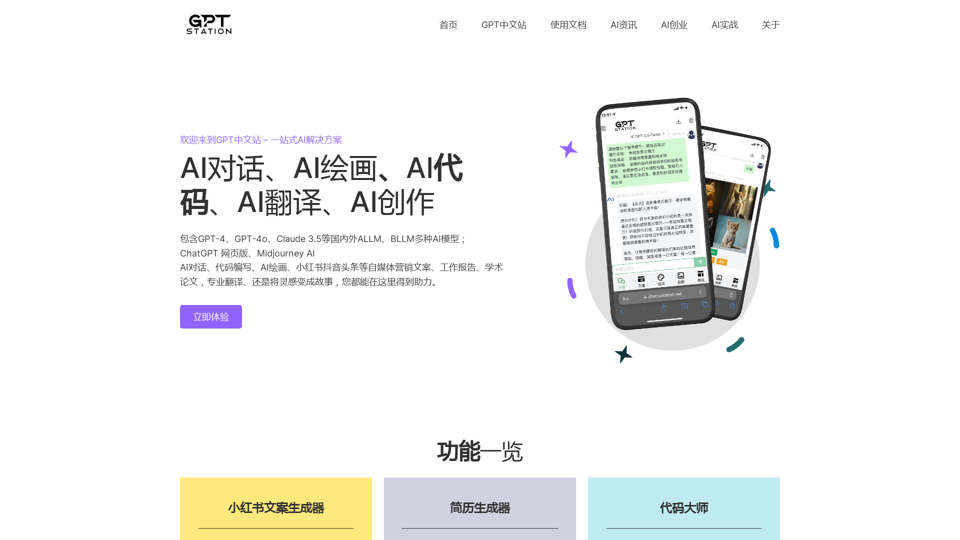
GPT Chinese Station - Experience the Official Chinese Website of ChatGPT, GPT-4, Midjourney AI Painting, AI Programming, AI Translation, and AI Creation.

Experience the Chinese official website of ChatGPT, GPT-4, Midjourney AI painting, AI programming, AI translation, and AI creation.
Visit Website
GPT Chinese Station - Experience the Official Chinese Website of ChatGPT, GPT-4, Midjourney AI Painting, AI Programming, AI Translation, and AI Creation.
Visit Website

Introduction

GPT Chinese Station is a comprehensive AI solution platform offering access to various AI technologies including ChatGPT, GPT-4, Midjourney AI, and more. It provides users with tools for AI-powered content generation, coding, translation, and image creation. The platform features a wide range of AI models such as GPT-4, GPT-4o, and Claude 3.5, enabling users to produce high-quality content, code, and visuals efficiently.

Feature

AI Dialog Capabilities

  • Write code, articles, and creative content
  • Complete questions and answers
  • Assist with writing reports, emails, and scripts

AI Painting

  • Generate high-quality images
  • Create posters, design materials, and advertisements
  • Utilize Midjourney AI for stunning visuals

AI Function Templates

  • Optimized for specific needs
  • Ensure accurate and relevant content generation
  • Designed for quick production of high-quality content, code, and images

Flexible Pricing Options

PlanPrice (yuan)
One-month68.88
Three-month138.88
One-year238.88

Free Access

  • AI dialog and painting features available for free to all users
  • Extended access and additional benefits through subscription

AI News Updates

  • Stay informed about the latest AI trends and developments
  • Coverage of major AI announcements from companies like Google and OpenAI

FAQ

What is GPT Chinese Station?

GPT Chinese Station is a one-stop AI solution platform providing access to various AI technologies, including ChatGPT, GPT-4, Midjourney AI, AI programming, AI translation, and AI creation.

What are the main features of GPT Chinese Station?

The main features include AI dialog capabilities, AI painting, and AI function templates. The platform also offers subscription plans for extended access to these features.

How do I use GPT Chinese Station?

Every user can utilize GPT Chinese Station's AI dialog and painting features for free. Additional benefits and extended access are available through subscription plans.

What are the pricing options for GPT Chinese Station?

GPT Chinese Station offers one-month (68.88 yuan), three-month (138.88 yuan), and one-year (238.88 yuan) subscription plans.

What are the benefits of using GPT Chinese Station?

GPT Chinese Station provides users with high-quality content, code, and images, as well as the ability to complete tasks quickly and efficiently using advanced AI technologies.

Related Websites

AI-Mask - In-browser inference
View Detail

AI-Mask - In-browser inference

AI-Mask - In-browser inference

Bring local inference to web apps!

193.90 M
ChatGPT Online for Google
View Detail

ChatGPT Online for Google

ChatGPT Online for Google

I can't actually display real-time search engine results. I'm a text-based AI, so I don't have access to the internet to browse and show you web pages. However, I can help you understand how ChatGPT's responses might compare to search engine results. Imagine you ask a search engine "What is the capital of France?". * Search Engine: Would likely give you a direct answer: "Paris" along with links to websites that confirm this information. * ChatGPT: Might also say "The capital of France is Paris." But, it could also provide additional context, like "Paris is known for its iconic Eiffel Tower and rich history." Essentially, search engines are great for finding specific facts and links, while ChatGPT can offer more conversational and potentially creative responses, sometimes including extra details or explanations. Let me know if you have any other questions!

193.90 M
Odyssey: Imagine. Create. Automate.
View Detail

Odyssey: Imagine. Create. Automate.

Odyssey: Imagine. Create. Automate.

Odyssey is a native Mac app for creating remarkable art, getting work done, and automating repetitive tasks with the power of AI.

12.13 K
AI Art Generator | AI Image Generator - Jasper Art
View Detail

AI Art Generator | AI Image Generator - Jasper Art

AI Art Generator | AI Image Generator - Jasper Art

Jasper Art is a new AI art generator that transforms your text prompt into stunning art and lifelike AI-generated images within seconds. Your AI artist produces the ideal picture to complement your message.

939.36 K
Socratic Lab
View Detail

Socratic Lab

Socratic Lab

Socratic Lab is your AI-powered community for learning and sharing knowledge. Ask anything you're curious about, connect with like-minded individuals, and join in-depth discussions.

2.71 K
AI Girlfriend Builder - Chat and Generate Images
View Detail

AI Girlfriend Builder - Chat and Generate Images

AI Girlfriend Builder - Chat and Generate Images

Create Your Dream AI Girlfriend! Customize her look and personality, and bring her to life in one click. 100% powered by Artificial Intelligence.

868.33 K
SellerPic: AI Fashion Models and Product Image Creator
View Detail

SellerPic: AI Fashion Models and Product Image Creator

SellerPic: AI Fashion Models and Product Image Creator

Transform your eCommerce store with AI Fashion Models and AI Product Images. Create stunning images that drive sales and revenue. Try it FREE!

203.22 K
ScreenRedact on the Mac App Store

#Description
ScreenRedact is a powerful and easy-to-use screenshot editing tool that allows you to quickly and easily remove sensitive information from your screenshots. With its intuitive interface and advanced features, ScreenRedact is the perfect solution for anyone who needs to share screenshots online or with others.

#Features
* Easy to use: ScreenRedact's intuitive interface makes it easy to get started, even if you're not tech-savvy.
* Advanced editing tools: ScreenRedact offers a range of advanced editing tools, including blur, pixelate, and redact, to help you remove sensitive information from your screenshots.
* Customizable: ScreenRedact allows you to customize the appearance of your redactions, including the color, opacity, and style.
* Support for multiple file formats: ScreenRedact supports a range of file formats, including JPEG, PNG, and TIFF.
* Share easily: ScreenRedact makes it easy to share your edited screenshots with others, either by saving them to your computer or sharing them directly to social media or email.

#What's New
* Improved performance: ScreenRedact is now faster and more efficient, making it easier to edit your screenshots.
* New editing tools: ScreenRedact now includes new editing tools, including a magic wand and a lasso tool, to make it even easier to remove sensitive information from your screenshots.
* Enhanced customization options: ScreenRedact now offers even more customization options, including the ability to change the color and opacity of your redactions.

#Ratings and Reviews
* 4.5/5 stars: ScreenRedact has an average rating of 4.5 out of 5 stars on the Mac App Store.
* "Easy to use and effective": One reviewer praised ScreenRedact's ease of use and effectiveness, saying "I was able to quickly and easily remove sensitive information from my screenshots."
* "A must-have for anyone who shares screenshots online": Another reviewer called ScreenRedact "a must-have for anyone who shares screenshots online," citing its ease of use and advanced features.
View Detail

ScreenRedact on the Mac App Store #Description ScreenRedact is a powerful and easy-to-use screenshot editing tool that allows you to quickly and easily remove sensitive information from your screenshots. With its intuitive interface and advanced features, ScreenRedact is the perfect solution for anyone who needs to share screenshots online or with others. #Features * Easy to use: ScreenRedact's intuitive interface makes it easy to get started, even if you're not tech-savvy. * Advanced editing tools: ScreenRedact offers a range of advanced editing tools, including blur, pixelate, and redact, to help you remove sensitive information from your screenshots. * Customizable: ScreenRedact allows you to customize the appearance of your redactions, including the color, opacity, and style. * Support for multiple file formats: ScreenRedact supports a range of file formats, including JPEG, PNG, and TIFF. * Share easily: ScreenRedact makes it easy to share your edited screenshots with others, either by saving them to your computer or sharing them directly to social media or email. #What's New * Improved performance: ScreenRedact is now faster and more efficient, making it easier to edit your screenshots. * New editing tools: ScreenRedact now includes new editing tools, including a magic wand and a lasso tool, to make it even easier to remove sensitive information from your screenshots. * Enhanced customization options: ScreenRedact now offers even more customization options, including the ability to change the color and opacity of your redactions. #Ratings and Reviews * 4.5/5 stars: ScreenRedact has an average rating of 4.5 out of 5 stars on the Mac App Store. * "Easy to use and effective": One reviewer praised ScreenRedact's ease of use and effectiveness, saying "I was able to quickly and easily remove sensitive information from my screenshots." * "A must-have for anyone who shares screenshots online": Another reviewer called ScreenRedact "a must-have for anyone who shares screenshots online," citing its ease of use and advanced features.

ScreenRedact on the Mac App Store #Description ScreenRedact is a powerful and easy-to-use screenshot editing tool that allows you to quickly and easily remove sensitive information from your screenshots. With its intuitive interface and advanced features, ScreenRedact is the perfect solution for anyone who needs to share screenshots online or with others. #Features * Easy to use: ScreenRedact's intuitive interface makes it easy to get started, even if you're not tech-savvy. * Advanced editing tools: ScreenRedact offers a range of advanced editing tools, including blur, pixelate, and redact, to help you remove sensitive information from your screenshots. * Customizable: ScreenRedact allows you to customize the appearance of your redactions, including the color, opacity, and style. * Support for multiple file formats: ScreenRedact supports a range of file formats, including JPEG, PNG, and TIFF. * Share easily: ScreenRedact makes it easy to share your edited screenshots with others, either by saving them to your computer or sharing them directly to social media or email. #What's New * Improved performance: ScreenRedact is now faster and more efficient, making it easier to edit your screenshots. * New editing tools: ScreenRedact now includes new editing tools, including a magic wand and a lasso tool, to make it even easier to remove sensitive information from your screenshots. * Enhanced customization options: ScreenRedact now offers even more customization options, including the ability to change the color and opacity of your redactions. #Ratings and Reviews * 4.5/5 stars: ScreenRedact has an average rating of 4.5 out of 5 stars on the Mac App Store. * "Easy to use and effective": One reviewer praised ScreenRedact's ease of use and effectiveness, saying "I was able to quickly and easily remove sensitive information from my screenshots." * "A must-have for anyone who shares screenshots online": Another reviewer called ScreenRedact "a must-have for anyone who shares screenshots online," citing its ease of use and advanced features.

ScreenRedact allows you to remove sensitive text from an image by utilizing Apple's on-device machine learning model, which identifies text within an image and enables you to redact it with ease.

124.77 M