Open-source RightAI Tools Directory
  • Discover AI
  • Submit
  • Startup
  • Blog
Open-source RightAI Tools Directory
Discover the best AI tools of 2025 with the RightAI Tools Directory!

Friend Links

AI Anime GeneratorToolsApp AI

Support

Tap4
Privacy policyTerms & ConditionsContact Us
Loading...
loading...

2 Minute Warning - Hudl Extension

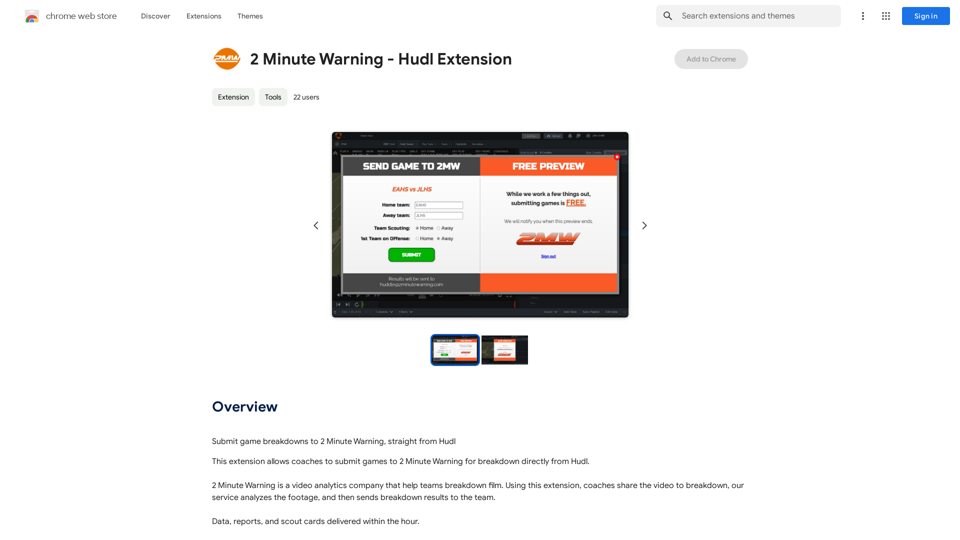
Send game analyses to 2 Minute Warning directly from Hudl.
Visit Website
2 Minute Warning - Hudl Extension
Visit Website

Introduction

Hudl Extension is a Chrome extension designed for coaches to streamline their video analysis process. It integrates with Hudl, a popular sports performance analysis platform, and 2 Minute Warning, a video analytics company. This extension enables coaches to submit game footage directly from Hudl to 2 Minute Warning, allowing for rapid film breakdown and data analysis. Within an hour, teams can receive comprehensive data, reports, and scout cards, significantly enhancing their game preparation and strategy development.

Feature

Submit Games to 2 Minute Warning

  • Seamless integration with Hudl platform
  • Direct submission of game footage to 2 Minute Warning
  • Rapid turnaround: receive analysis within an hour
  • Comprehensive output: data, reports, and scout cards

In-App Purchases

  • Access to additional features and services
  • Customizable options for enhanced analysis

Report a Concern

  • User-friendly interface for reporting issues
  • Ensures continuous improvement of the extension

Easy Installation and Use

  • Available on Chrome Web Store
  • Simple login process with Hudl account
  • Intuitive interface for game submission

FAQ

What is Hudl Extension?

Hudl Extension is a Chrome extension that bridges Hudl and 2 Minute Warning platforms. It allows coaches to submit game footage directly from Hudl to 2 Minute Warning for quick and comprehensive video analysis.

How do I use Hudl Extension?

To use Hudl Extension:

  1. Install the extension from the Chrome Web Store
  2. Log in to your Hudl account
  3. Use the extension to submit games to 2 Minute Warning
  4. Receive analysis results within an hour

Is there a cost associated with Hudl Extension?

The extension itself is free to install and use. However, it offers in-app purchases for additional features and services, allowing users to customize their experience based on their needs.

What kind of analysis can I expect from using Hudl Extension?

After submitting game footage through Hudl Extension, you can expect to receive:

  • Detailed data analysis
  • Comprehensive reports
  • Scout cards These materials are typically delivered within an hour, providing quick insights for game preparation and strategy development.

Latest Traffic Insights

  • Monthly Visits

    193.90 M

  • Bounce Rate

    56.27%

  • Pages Per Visit

    2.71

  • Time on Site(s)

    115.91

  • Global Rank

    -

  • Country Rank

    -

Recent Visits

Traffic Sources

  • Social Media:
    0.48%
  • Paid Referrals:
    0.55%
  • Email:
    0.15%
  • Referrals:
    12.81%
  • Search Engines:
    16.21%
  • Direct:
    69.81%
More Data

Related Websites

TurboLearn AI
View Detail

TurboLearn AI

TurboLearn AI

TurboLearn AI quickly makes complete notes, interactive flashcards, and custom quizzes from your lectures. Made to help you learn better and remember more, TurboLearn AI changes to fit your specific learning needs. Make the most of your study time today!

292.80 K
AI Writer for Realtors 

This AI-powered writing tool is designed to help real estate agents save time and create compelling content. 

Here's what it can do:

* Generate property descriptions: Craft engaging and informative descriptions that highlight key features and benefits.
* Write listing headlines:  Create attention-grabbing headlines that attract potential buyers.
* Compose social media posts:  Share property updates, market insights, and client testimonials in a concise and engaging way.
* Draft email campaigns:  Automate email marketing efforts with personalized messages to potential clients.
* Summarize property reports:  Quickly understand key information from property reports and market analyses.

Benefits for Realtors:

* Save time and effort:  Automate repetitive writing tasks and focus on client interactions.
* Improve content quality:  Generate high-quality, engaging content that resonates with target audiences.
* Boost marketing effectiveness:  Create compelling content that drives leads and increases sales.
* Stay ahead of the competition:  Leverage AI technology to streamline your workflow and deliver exceptional service.
View Detail

AI Writer for Realtors This AI-powered writing tool is designed to help real estate agents save time and create compelling content. Here's what it can do: * Generate property descriptions: Craft engaging and informative descriptions that highlight key features and benefits. * Write listing headlines: Create attention-grabbing headlines that attract potential buyers. * Compose social media posts: Share property updates, market insights, and client testimonials in a concise and engaging way. * Draft email campaigns: Automate email marketing efforts with personalized messages to potential clients. * Summarize property reports: Quickly understand key information from property reports and market analyses. Benefits for Realtors: * Save time and effort: Automate repetitive writing tasks and focus on client interactions. * Improve content quality: Generate high-quality, engaging content that resonates with target audiences. * Boost marketing effectiveness: Create compelling content that drives leads and increases sales. * Stay ahead of the competition: Leverage AI technology to streamline your workflow and deliver exceptional service.

AI Writer for Realtors This AI-powered writing tool is designed to help real estate agents save time and create compelling content. Here's what it can do: * Generate property descriptions: Craft engaging and informative descriptions that highlight key features and benefits. * Write listing headlines: Create attention-grabbing headlines that attract potential buyers. * Compose social media posts: Share property updates, market insights, and client testimonials in a concise and engaging way. * Draft email campaigns: Automate email marketing efforts with personalized messages to potential clients. * Summarize property reports: Quickly understand key information from property reports and market analyses. Benefits for Realtors: * Save time and effort: Automate repetitive writing tasks and focus on client interactions. * Improve content quality: Generate high-quality, engaging content that resonates with target audiences. * Boost marketing effectiveness: Create compelling content that drives leads and increases sales. * Stay ahead of the competition: Leverage AI technology to streamline your workflow and deliver exceptional service.

Unlock the Power of AI for Captivating Real Estate Listings Tired of crafting bland, forgettable property descriptions? Let AI revolutionize your listings and attract more potential buyers! Here's how AI can elevate your real estate game: * Craft Compelling Narratives: AI can weave engaging stories around your properties, highlighting their unique features and benefits in a way that resonates with buyers. * Optimize for Search Engines: AI-powered tools can analyze market trends and keywords to ensure your listings rank higher in search results, boosting visibility and attracting more clicks. * Personalize the Experience: AI can tailor descriptions to specific buyer demographics, creating a more personalized and impactful connection. * Generate Stunning Visuals: From virtual tours to 3D floor plans, AI can enhance your listings with captivating visuals that showcase your properties in their best light. Stop settling for ordinary listings. Embrace the future of real estate with AI-powered descriptions that captivate, convert, and close deals.

193.90 M
Coursera Summary with ChatGPT and Take Notes
=====================================================

What is Coursera?

Coursera is an online learning platform that partners with top universities and organizations to offer courses and degree programs in a wide range of fields.

What is ChatGPT?

ChatGPT is a conversational AI tool that can understand and respond to human input in a human-like way. It can be used to generate text, answer questions, and even create content.

How to Use ChatGPT for Coursera Summary?

You can use ChatGPT to summarize Coursera courses by:

* Providing the course material or lecture notes to ChatGPT
* Asking ChatGPT to summarize the key points or main ideas
* Reviewing and editing the summary generated by ChatGPT

Benefits of Using ChatGPT for Coursera Summary

Using ChatGPT for Coursera summary can help you:

* Save time by automating the summarization process
* Improve understanding and retention of course material
* Focus on key concepts and ideas
* Enhance learning experience

How to Take Notes with ChatGPT?

You can use ChatGPT to take notes by:

* Providing the course material or lecture notes to ChatGPT
* Asking ChatGPT to generate notes or key points
* Reviewing and editing the notes generated by ChatGPT
* Organizing and structuring the notes for easy reference

Benefits of Using ChatGPT for Taking Notes

Using ChatGPT for taking notes can help you:

* Save time by automating the note-taking process
* Improve organization and structure of notes
* Enhance understanding and retention of course material
* Focus on key concepts and ideas
View Detail

Coursera Summary with ChatGPT and Take Notes ===================================================== What is Coursera? Coursera is an online learning platform that partners with top universities and organizations to offer courses and degree programs in a wide range of fields. What is ChatGPT? ChatGPT is a conversational AI tool that can understand and respond to human input in a human-like way. It can be used to generate text, answer questions, and even create content. How to Use ChatGPT for Coursera Summary? You can use ChatGPT to summarize Coursera courses by: * Providing the course material or lecture notes to ChatGPT * Asking ChatGPT to summarize the key points or main ideas * Reviewing and editing the summary generated by ChatGPT Benefits of Using ChatGPT for Coursera Summary Using ChatGPT for Coursera summary can help you: * Save time by automating the summarization process * Improve understanding and retention of course material * Focus on key concepts and ideas * Enhance learning experience How to Take Notes with ChatGPT? You can use ChatGPT to take notes by: * Providing the course material or lecture notes to ChatGPT * Asking ChatGPT to generate notes or key points * Reviewing and editing the notes generated by ChatGPT * Organizing and structuring the notes for easy reference Benefits of Using ChatGPT for Taking Notes Using ChatGPT for taking notes can help you: * Save time by automating the note-taking process * Improve organization and structure of notes * Enhance understanding and retention of course material * Focus on key concepts and ideas

Coursera Summary with ChatGPT and Take Notes ===================================================== What is Coursera? Coursera is an online learning platform that partners with top universities and organizations to offer courses and degree programs in a wide range of fields. What is ChatGPT? ChatGPT is a conversational AI tool that can understand and respond to human input in a human-like way. It can be used to generate text, answer questions, and even create content. How to Use ChatGPT for Coursera Summary? You can use ChatGPT to summarize Coursera courses by: * Providing the course material or lecture notes to ChatGPT * Asking ChatGPT to summarize the key points or main ideas * Reviewing and editing the summary generated by ChatGPT Benefits of Using ChatGPT for Coursera Summary Using ChatGPT for Coursera summary can help you: * Save time by automating the summarization process * Improve understanding and retention of course material * Focus on key concepts and ideas * Enhance learning experience How to Take Notes with ChatGPT? You can use ChatGPT to take notes by: * Providing the course material or lecture notes to ChatGPT * Asking ChatGPT to generate notes or key points * Reviewing and editing the notes generated by ChatGPT * Organizing and structuring the notes for easy reference Benefits of Using ChatGPT for Taking Notes Using ChatGPT for taking notes can help you: * Save time by automating the note-taking process * Improve organization and structure of notes * Enhance understanding and retention of course material * Focus on key concepts and ideas

Automate Your Learning: Coursera Videos Transcript and Summary with ChatGPT ============================================================ Are you tired of manually taking notes while watching Coursera videos? Do you wish you had a summary of the video to review later? Look no further! With the power of ChatGPT, you can now generate transcripts and summaries of Coursera videos with ease. How it Works --------------- 1. Transcribe the Video: Use a transcription tool to convert the audio from the Coursera video into text. 2. Feed it to ChatGPT: Input the transcript into ChatGPT, and it will generate a concise summary of the video. 3. Review and Refine: Review the summary, refine it as needed, and you're good to go! Benefits ------------ * Save Time: No more manual note-taking or re-watching videos to understand the content. * Improve Retention: A summary of the video helps you retain information better and review it quickly. * Enhance Learning: Focus on understanding the concepts rather than taking notes. Get Started -------------- Try it out today and take your learning to the next level!

193.90 M
TableSherpa: Web to Sheets Exporter
View Detail

TableSherpa: Web to Sheets Exporter

TableSherpa: Web to Sheets Exporter

Export tables from websites to Google Sheets with one click.

193.90 M
AIChatOne: AI ChatGPT Copilot, Web Summary, Twitter Writer, ChatHub, ChatBot
View Detail

AIChatOne: AI ChatGPT Copilot, Web Summary, Twitter Writer, ChatHub, ChatBot

AIChatOne: AI ChatGPT Copilot, Web Summary, Twitter Writer, ChatHub, ChatBot

Your AI Copilot powered by ChatGPT. Answers complex questions. Writes emails. Reads articles. Searches smartly. Usable everywhere.

193.90 M
Arvin: 1-Click to Use AI Copilot Anywhere
View Detail

Arvin: 1-Click to Use AI Copilot Anywhere

Arvin: 1-Click to Use AI Copilot Anywhere

The Arvin ChatGPT extension is a versatile tool that can be used on any website, offering a range of features to enhance your online experience. These features include an AI writer for crafting emails, Twitter posts, and LinkedIn updates, as well as a summarizer for blogs and YouTube videos.

193.90 M
Please provide the text you want to translate into English.
View Detail

Please provide the text you want to translate into English.

Please provide the text you want to translate into English.

This extension empowers users with AI, swiftly producing answers, replies, and essays on any topic.

193.90 M
Video Summarizer
View Detail

Video Summarizer

Video Summarizer

Youtube Video Summarizer: Get Summaries and Transcripts for YouTube Videos with ChatGPT This tool helps you quickly understand YouTube videos by providing: * Summaries: Concise overviews of the video's main points. * Transcripts: Full text versions of what is spoken in the video. Both summaries and transcripts are powered by ChatGPT, allowing for accurate and insightful analysis.

193.90 M