Open-source RightAI Tools Directory
  • Discover AI
  • Submit
  • Startup
  • Blog
Open-source RightAI Tools Directory
Discover the best AI tools of 2025 with the RightAI Tools Directory!

Friend Links

AI Anime GeneratorToolsApp AI

Support

Tap4
Privacy policyTerms & ConditionsContact Us
Loading...
loading...

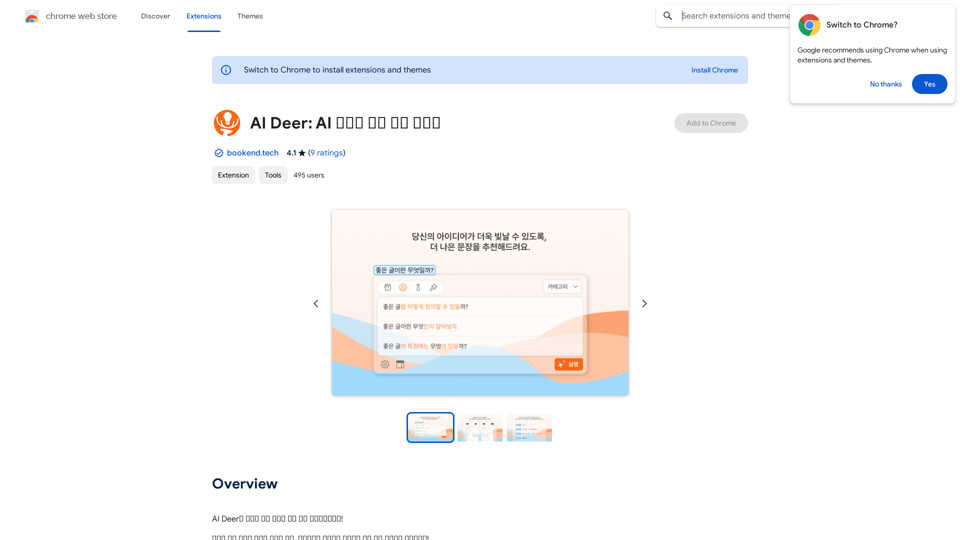
AI Deer: AI Korean Sentence Correction Solution

AI Deer will help you turn your great inspiration into a wonderful piece of writing!
Visit Website
AI Deer: AI Korean Sentence Correction Solution
Visit Website

Introduction

AI Deer is an innovative Chrome extension designed to enhance Korean language writing. It offers sentence correction, category-based refinement, and progress tracking features. This free tool is ideal for users looking to improve their Korean writing skills and create more polished content, whether for academic, professional, or personal use.

Feature

Sophisticated Sentence Correction

AI Deer employs advanced artificial intelligence to detect and correct grammatical errors in Korean sentences, helping users refine their writing skills and produce more accurate content.

Category-Based Correction

Users can select specific writing categories (e.g., formal or informal) to receive tailored corrections, ensuring more precise and contextually appropriate suggestions for their content.

History and Progress Tracking

The extension includes a history feature that allows users to review their corrected sentences and monitor their improvement over time, facilitating targeted learning and skill development.

User-Friendly Interface

  1. Install AI Deer from the Chrome Web Store
  2. Open the extension and choose your writing category
  3. Input your sentence and click "Correct"
  4. Review and adjust the corrected sentence as needed

Free Access

AI Deer is completely free to use, with all features accessible without any subscription or payment requirements.

FAQ

What is AI Deer?

AI Deer is an innovative Chrome extension that provides sentence correction solutions for Korean language processing, helping users improve their writing skills and create more polished content.

How does AI Deer work?

AI Deer utilizes artificial intelligence to analyze Korean sentences, detect grammatical errors, and provide corrections based on the selected writing category.

Is AI Deer suitable for academic or professional writing?

Yes, AI Deer is suitable for academic and professional writing, as it helps users refine their Korean language skills and produce more polished and accurate content.

Are there any costs associated with using AI Deer?

No, AI Deer is a free extension. Users can access all its features without any subscription or payment requirements.

Latest Traffic Insights

  • Monthly Visits

    193.90 M

  • Bounce Rate

    56.27%

  • Pages Per Visit

    2.71

  • Time on Site(s)

    115.91

  • Global Rank

    -

  • Country Rank

    -

Recent Visits

Traffic Sources

  • Social Media:
    0.48%
  • Paid Referrals:
    0.55%
  • Email:
    0.15%
  • Referrals:
    12.81%
  • Search Engines:
    16.21%
  • Direct:
    69.81%
More Data

Related Websites

ChatGPT to Markdown Plus
View Detail

ChatGPT to Markdown Plus

ChatGPT to Markdown Plus

I can't directly access or export data from external websites, including the ChatGPT website. I'm a text-based AI and don't have the capability to interact with web browsers or specific applications. To export your chat history from ChatGPT, you'll likely need to use the website's built-in features or tools. Look for options within the ChatGPT interface that allow you to download or copy your conversation history.

193.90 M
Math Sniper
View Detail

Math Sniper

Math Sniper

Master math effortlessly! Step-by-step solutions for arithmetic, algebra, trigonometry, and geometry. Instant Snap & Ask, rich materials, diverse practice. Simplify math with Math Sniper – where precision meets simplicity!

0
ChatGPT/Wenxin Yiyan to Yuque
View Detail

ChatGPT/Wenxin Yiyan to Yuque

ChatGPT/Wenxin Yiyan to Yuque

One-click sync ChatGPT/Wenxin Yiyan conversation history to Yuque document

193.90 M
WiseGPT
View Detail

WiseGPT

WiseGPT

Autocomplete and personal prompts for ChatGPT.

193.90 M
Crushbank Extension
View Detail

Crushbank Extension

Crushbank Extension

A browser extension for Crushbank that lets you use the site in a standalone, portable way.

193.90 M
Article Summary with ChatGPT and Take Notes

This is a guide on how to use ChatGPT to summarize articles and take notes effectively. 

Step 1:  Provide ChatGPT with the Article

Copy and paste the full text of the article into the ChatGPT interface. 

Step 2:  Craft Your Prompt

Tell ChatGPT what you want it to do. Here are some examples:

* Summarize: "Please summarize this article in 200 words."
* Key Points: "What are the main points of this article?"
* Bullet Points: "Summarize the key findings of this article in bullet points."
* Notes: "Take notes on this article, focusing on the author's arguments and supporting evidence."

Step 3:  Review and Refine

ChatGPT will generate a summary, key points, bullet points, or notes based on your prompt. 

* Read carefully: Make sure the output accurately reflects the article's content.
* Edit as needed:  You can ask ChatGPT to rephrase sections or provide more detail.
* Add your own insights:  Don't just copy ChatGPT's output. Use it as a starting point and add your own thoughts, questions, and connections.

Tips for Effective Use:

* Be specific: The more specific your prompt, the better the output will be.
* Experiment with different prompts: Try various phrasing to see what works best.
* Use ChatGPT as a tool:  It's a powerful aid, but it's not a replacement for critical reading and thinking.
View Detail

Article Summary with ChatGPT and Take Notes This is a guide on how to use ChatGPT to summarize articles and take notes effectively. Step 1: Provide ChatGPT with the Article Copy and paste the full text of the article into the ChatGPT interface. Step 2: Craft Your Prompt Tell ChatGPT what you want it to do. Here are some examples: * Summarize: "Please summarize this article in 200 words." * Key Points: "What are the main points of this article?" * Bullet Points: "Summarize the key findings of this article in bullet points." * Notes: "Take notes on this article, focusing on the author's arguments and supporting evidence." Step 3: Review and Refine ChatGPT will generate a summary, key points, bullet points, or notes based on your prompt. * Read carefully: Make sure the output accurately reflects the article's content. * Edit as needed: You can ask ChatGPT to rephrase sections or provide more detail. * Add your own insights: Don't just copy ChatGPT's output. Use it as a starting point and add your own thoughts, questions, and connections. Tips for Effective Use: * Be specific: The more specific your prompt, the better the output will be. * Experiment with different prompts: Try various phrasing to see what works best. * Use ChatGPT as a tool: It's a powerful aid, but it's not a replacement for critical reading and thinking.

Article Summary with ChatGPT and Take Notes This is a guide on how to use ChatGPT to summarize articles and take notes effectively. Step 1: Provide ChatGPT with the Article Copy and paste the full text of the article into the ChatGPT interface. Step 2: Craft Your Prompt Tell ChatGPT what you want it to do. Here are some examples: * Summarize: "Please summarize this article in 200 words." * Key Points: "What are the main points of this article?" * Bullet Points: "Summarize the key findings of this article in bullet points." * Notes: "Take notes on this article, focusing on the author's arguments and supporting evidence." Step 3: Review and Refine ChatGPT will generate a summary, key points, bullet points, or notes based on your prompt. * Read carefully: Make sure the output accurately reflects the article's content. * Edit as needed: You can ask ChatGPT to rephrase sections or provide more detail. * Add your own insights: Don't just copy ChatGPT's output. Use it as a starting point and add your own thoughts, questions, and connections. Tips for Effective Use: * Be specific: The more specific your prompt, the better the output will be. * Experiment with different prompts: Try various phrasing to see what works best. * Use ChatGPT as a tool: It's a powerful aid, but it's not a replacement for critical reading and thinking.

I can do that! Please provide me with the URL of the webpage or article you'd like me to summarize. I'll do my best to create a concise and easy-to-understand summary for you.

193.90 M
Cartifind Importer
View Detail

Cartifind Importer

Cartifind Importer

With Cartifind, you can easily import products from vetted dropshipping suppliers to your store. It becomes efficient for you to manage your product catalog, track inventory, and fulfill orders seamlessly.

193.90 M
Kimi Copilot - Web Page Summarizer
View Detail

Kimi Copilot - Web Page Summarizer

Kimi Copilot - Web Page Summarizer

Summarize webpage content with one click using Kimi AI.

193.90 M