Open-source RightAI Tools Directory
  • Discover AI
  • Submit
  • Startup
  • Blog
Open-source RightAI Tools Directory
Discover the best AI tools of 2025 with the RightAI Tools Directory!

Friend Links

AI Anime GeneratorToolsApp AI

Support

Tap4
Privacy policyTerms & ConditionsContact Us
Loading...
loading...

EclecticIQ Threat Scout

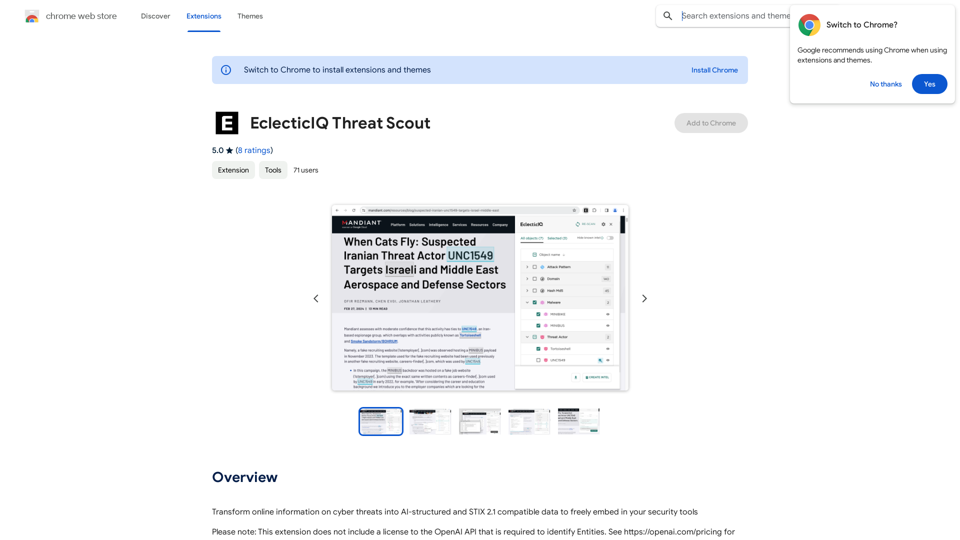
Turn information about online dangers into data that artificial intelligence can understand and use. This data will follow the STIX 2.1 standard, so you can easily include it in your security programs.
Visit Website
EclecticIQ Threat Scout
Visit Website

Introduction

EclecticIQ Threat Scout is a browser extension designed to transform online cyber threat information into structured STIX 2.1 threat data. It leverages OpenAI's NLP technology and powerful regex to analyze webpages and online documents, providing users with comprehensive threat intelligence that can be easily integrated into their security tools.

Feature

Seamless Web Scanning and Analysis

  • Effortlessly scan and analyze webpages and online PDF, TXT, and DOC documents within your browser
  • Discover STIX 2.1 compatible Entities using cutting-edge NLP from OpenAI

Advanced Entity Management

  • Manually verify identified Entities
  • Override incorrect types for improved accuracy

Powerful Cyber Observable Extraction

  • Extract Cyber Observables using predefined regular expressions

Flexible Threat Data Handling

  • Meticulously filter and group identified threat data
  • Select specific types or individual objects for focused action

STIX 2.1 Compatible Export

  • Easily export threat data in structured CSV format
  • Enable further mapping, analysis, and actioning inside your tooling

Extended Features for Subscribers

  • Automatic lookup of Entities & Observables
  • Highlighted matches on-page
  • Ingestion of scanned documents as a Report Entity

FAQ

What is EclecticIQ Threat Scout?

EclecticIQ Threat Scout is a browser extension that converts online cyber threat information into structured STIX 2.1 threat data using OpenAI's NLP technology and regex.

How can I use EclecticIQ Threat Scout?

Install the browser extension to scan webpages and online documents. Subscribing grants additional benefits and extended access beyond free usage limits.

Does EclecticIQ Threat Scout generate images?

No, it focuses on converting cyber threat information into structured STIX 2.1 threat data, not generating images.

Are GPTs available on EclecticIQ Threat Scout?

No, EclecticIQ Threat Scout doesn't offer GPTs. It uses OpenAI's NLP technology and regex for threat data conversion.

How can I maximize my use of EclecticIQ Threat Scout?

Leverage daily free uses and explore AI-powered tools. Exclusive features are available for EclecticIQ Intelligence Center users.

Is my information used for training data?

No, EclecticIQ Threat Scout does not collect or use your data for training purposes.

When should I consider a subscription?

Consider subscribing if the 20 free GPT-4o conversations per day don't meet your needs and you heavily rely on GPT-4o.

Latest Traffic Insights

  • Monthly Visits

    193.90 M

  • Bounce Rate

    56.27%

  • Pages Per Visit

    2.71

  • Time on Site(s)

    115.91

  • Global Rank

    -

  • Country Rank

    -

Recent Visits

Traffic Sources

  • Social Media:
    0.48%
  • Paid Referrals:
    0.55%
  • Email:
    0.15%
  • Referrals:
    12.81%
  • Search Engines:
    16.21%
  • Direct:
    69.81%
More Data

Related Websites

AiReelGenerator.com | Faceless Videos on Autopilot.
View Detail

AiReelGenerator.com | Faceless Videos on Autopilot.

AiReelGenerator.com | Faceless Videos on Autopilot.

Discover AiReelGenerator, the newest app that automatically makes videos without faces. Just pick a subject, and our AI will make and upload fresh videos to your YouTube, TikTok, Instagram, or Facebook account every day.

196
ChatGPT Plus
View Detail

ChatGPT Plus

ChatGPT Plus

Bringing the ChatGPT app's features to the browser

193.90 M
PromptFolder - ChatGPT Prompt Manager
View Detail

PromptFolder - ChatGPT Prompt Manager

PromptFolder - ChatGPT Prompt Manager

Save, share, and discover prompts for ChatGPT, Midjourney, and other AI tools.

193.90 M
Choice AI
View Detail

Choice AI

Choice AI

Choice AI: Choice AI is an AI-powered tool that offers personalized controls to specifically watch and skip specific content/scenes on OTT platforms.

83
TEE Buddy Free
View Detail

TEE Buddy Free

TEE Buddy Free

Helps you reserve a tee time at your favorite golf course.

193.90 M
Claude to Notion

This is a guide on how to connect Claude, an AI assistant, with Notion, a note-taking and workspace app. 

Why connect Claude and Notion?

* Boost your productivity: Use Claude to generate content, summarize information, and automate tasks directly within Notion.
* Enhance your research: Ask Claude questions about your Notion notes and get insightful answers.
* Unlock new creative possibilities: Leverage Claude's generative capabilities to brainstorm ideas, write stories, or compose emails within your Notion workspace.

How to connect Claude and Notion:

1. API Keys: Obtain an API key for both Claude and Notion. 
2. Integration Tool: Explore integration tools like Zapier or Integromat to connect Claude and Notion. These platforms allow you to create workflows that trigger actions in one app based on events in the other.
3. Custom Development: For advanced users, you can develop your own custom integration using the Claude and Notion APIs. This gives you the most flexibility but requires coding knowledge.

Example Use Cases:

* Meeting Summarization: After a meeting, paste the transcript into Notion and use Claude to generate a concise summary.
* Content Creation:  Use Claude to write blog posts, articles, or social media captions directly within your Notion pages.
* Idea Generation: Brainstorm new ideas for projects or tasks by prompting Claude with specific questions within your Notion workspace.


Remember to review the documentation and terms of service for both Claude and Notion to ensure proper usage and security.
View Detail

Claude to Notion This is a guide on how to connect Claude, an AI assistant, with Notion, a note-taking and workspace app. Why connect Claude and Notion? * Boost your productivity: Use Claude to generate content, summarize information, and automate tasks directly within Notion. * Enhance your research: Ask Claude questions about your Notion notes and get insightful answers. * Unlock new creative possibilities: Leverage Claude's generative capabilities to brainstorm ideas, write stories, or compose emails within your Notion workspace. How to connect Claude and Notion: 1. API Keys: Obtain an API key for both Claude and Notion. 2. Integration Tool: Explore integration tools like Zapier or Integromat to connect Claude and Notion. These platforms allow you to create workflows that trigger actions in one app based on events in the other. 3. Custom Development: For advanced users, you can develop your own custom integration using the Claude and Notion APIs. This gives you the most flexibility but requires coding knowledge. Example Use Cases: * Meeting Summarization: After a meeting, paste the transcript into Notion and use Claude to generate a concise summary. * Content Creation: Use Claude to write blog posts, articles, or social media captions directly within your Notion pages. * Idea Generation: Brainstorm new ideas for projects or tasks by prompting Claude with specific questions within your Notion workspace. Remember to review the documentation and terms of service for both Claude and Notion to ensure proper usage and security.

Claude to Notion This is a guide on how to connect Claude, an AI assistant, with Notion, a note-taking and workspace app. Why connect Claude and Notion? * Boost your productivity: Use Claude to generate content, summarize information, and automate tasks directly within Notion. * Enhance your research: Ask Claude questions about your Notion notes and get insightful answers. * Unlock new creative possibilities: Leverage Claude's generative capabilities to brainstorm ideas, write stories, or compose emails within your Notion workspace. How to connect Claude and Notion: 1. API Keys: Obtain an API key for both Claude and Notion. 2. Integration Tool: Explore integration tools like Zapier or Integromat to connect Claude and Notion. These platforms allow you to create workflows that trigger actions in one app based on events in the other. 3. Custom Development: For advanced users, you can develop your own custom integration using the Claude and Notion APIs. This gives you the most flexibility but requires coding knowledge. Example Use Cases: * Meeting Summarization: After a meeting, paste the transcript into Notion and use Claude to generate a concise summary. * Content Creation: Use Claude to write blog posts, articles, or social media captions directly within your Notion pages. * Idea Generation: Brainstorm new ideas for projects or tasks by prompting Claude with specific questions within your Notion workspace. Remember to review the documentation and terms of service for both Claude and Notion to ensure proper usage and security.

Save Claude conversations to Notion with one click. Export Claude conversations.

193.90 M
AI Summary Pro: Instant Text & Page Insights
View Detail

AI Summary Pro: Instant Text & Page Insights

AI Summary Pro: Instant Text & Page Insights

Use advanced AI to get short summaries of articles, texts, and websites.

193.90 M
MagicReply - AI Replies for Twitter
View Detail

MagicReply - AI Replies for Twitter

MagicReply - AI Replies for Twitter

Grow Your Twitter Account by Replying Using AI Are you tired of manually responding to tweets and struggling to grow your Twitter account? Do you want to increase your online presence and engage with your audience more efficiently? Look no further! This article will show you how to grow your Twitter account by replying using AI. What is AI-powered Twitter reply? AI-powered Twitter reply is a technology that uses artificial intelligence to automatically respond to tweets. This innovative tool analyzes the content of incoming tweets and generates a relevant response based on the context. With AI-powered Twitter reply, you can save time and effort while increasing your online engagement. Benefits of using AI-powered Twitter reply 1. Increased efficiency Manually responding to tweets can be time-consuming, especially if you have a large following. AI-powered Twitter reply automates the process, allowing you to focus on other important tasks. 2. Improved engagement AI-powered Twitter reply helps you respond to tweets quickly, which increases the chances of starting a conversation and building relationships with your followers. 3. Personalized responses AI-powered Twitter reply can be customized to fit your brand's voice and tone, ensuring that your responses are personalized and consistent. 4. Scalability As your Twitter account grows, AI-powered Twitter reply can handle a large volume of tweets, ensuring that you never miss a response. How to use AI-powered Twitter reply 1. Choose an AI-powered Twitter reply tool There are several AI-powered Twitter reply tools available, such as [Tool 1], [Tool 2], and [Tool 3]. Research and choose the one that best fits your needs. 2. Set up your AI-powered Twitter reply Once you've chosen a tool, set it up by connecting your Twitter account and customizing your responses. 3. Monitor and adjust Monitor your AI-powered Twitter reply's performance and adjust the settings as needed to ensure that your responses are relevant and engaging. Conclusion Growing your Twitter account requires consistent engagement and timely responses. AI-powered Twitter reply is a game-changer that can help you achieve this goal. By automating your responses, you can increase efficiency, improve engagement, and personalize your interactions. Try AI-powered Twitter reply today and watch your Twitter account thrive!

193.90 M