Open-source RightAI Tools Directory
  • Discover AI
  • Submit
  • Startup
  • Blog
Open-source RightAI Tools Directory
Discover the best AI tools of 2025 with the RightAI Tools Directory!

Friend Links

AI Anime GeneratorToolsApp AI

Support

Tap4
Privacy policyTerms & ConditionsContact Us
Loading...
loading...

Image and YouTube Video Viewer for GPTs

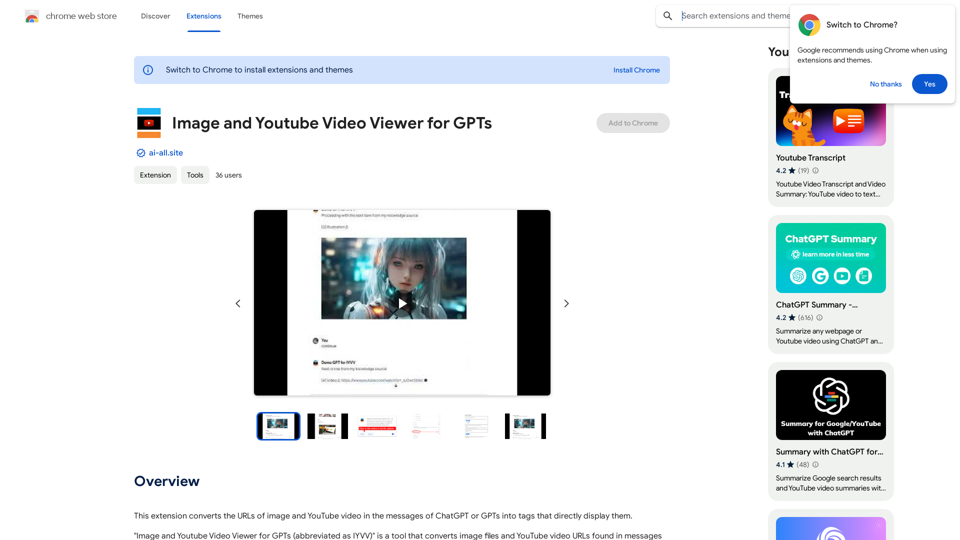
This extension changes the links for images and YouTube videos in ChatGPT or GPT messages into tags that show the images and videos directly.
Visit Website
Image and YouTube Video Viewer for GPTs
Visit Website

Introduction

Image and Youtube Video Viewer for GPTs is an innovative extension that enhances the functionality of ChatGPT and other GPTs by converting image and YouTube video URLs into directly displayable tags within messages. This tool is particularly useful for creating GPTs that can seamlessly integrate visual content with explanatory text, improving the overall user experience and communication effectiveness.

Feature

Convert URLs to Displayable Tags

The extension automatically transforms image file and YouTube video URLs found in GPT messages into HTML tags, enabling inline display of visual content.

GPT-Focused Design

Specifically tailored for GPTs, this extension allows users to create more interactive and visually rich conversational AI experiences by incorporating images and videos alongside explanations.

Real-time Image Integration

While ChatGPT (GPT-4) can generate images in real-time, this extension offers the ability to pre-specify image URLs, ensuring perfect alignment between visual content and explanatory text.

Domain Registration

Users can register specific domain names (hosts) for image display in the optional panel, providing control over the sources of visual content.

YouTube Video Support

Currently, the extension supports the embedding and display of YouTube videos within GPT messages.

Free to Use

The extension is available at no cost, with no subscription or payment required for its functionality.

FAQ

What types of visual content does the extension support?

The extension currently supports the display of image files and YouTube videos within GPT messages.

Can I use this extension with GPTs other than ChatGPT?

Yes, the extension is designed to work with ChatGPT and other GPTs, enhancing their ability to display visual content.

Is there a cost associated with using the extension?

No, the Image and Youtube Video Viewer for GPTs extension is completely free to use, with no subscription or payment required.

How do I set up the extension for use?

To use the extension, you need to register the domain name (host) of the images you want to display in advance through the optional panel.

Are there plans to support video platforms other than YouTube?

While currently only YouTube videos are supported, the developer is working on expanding support to include other video sources in the future.

Related Websites
Overcome Copilot AI Message Limit, Export Chats to JSON File: TopicsGPT

This is a tool to help you work around the message limit in Copilot AI and export your conversations to a JSON file. 

Here's how it works:

* Extend Your Conversations: TopicsGPT allows you to continue your conversations with Copilot AI beyond the usual message limit. 

* Save Your History: Export your entire chat history with Copilot AI as a structured JSON file. This makes it easy to review past interactions, analyze your conversations, or even use the data for other purposes.

Benefits:

* No More Interruptions: Keep your creative flow going without worrying about hitting the message limit.
* Organized Data:  Have a clear and organized record of your conversations with Copilot AI.
* Flexibility: Use the exported JSON data for your own projects or analysis. 


Let me know if you have any questions!
View Detail

Overcome Copilot AI Message Limit, Export Chats to JSON File: TopicsGPT This is a tool to help you work around the message limit in Copilot AI and export your conversations to a JSON file. Here's how it works: * Extend Your Conversations: TopicsGPT allows you to continue your conversations with Copilot AI beyond the usual message limit. * Save Your History: Export your entire chat history with Copilot AI as a structured JSON file. This makes it easy to review past interactions, analyze your conversations, or even use the data for other purposes. Benefits: * No More Interruptions: Keep your creative flow going without worrying about hitting the message limit. * Organized Data: Have a clear and organized record of your conversations with Copilot AI. * Flexibility: Use the exported JSON data for your own projects or analysis. Let me know if you have any questions!

Overcome Copilot AI Message Limit, Export Chats to JSON File: TopicsGPT This is a tool to help you work around the message limit in Copilot AI and export your conversations to a JSON file. Here's how it works: * Extend Your Conversations: TopicsGPT allows you to continue your conversations with Copilot AI beyond the usual message limit. * Save Your History: Export your entire chat history with Copilot AI as a structured JSON file. This makes it easy to review past interactions, analyze your conversations, or even use the data for other purposes. Benefits: * No More Interruptions: Keep your creative flow going without worrying about hitting the message limit. * Organized Data: Have a clear and organized record of your conversations with Copilot AI. * Flexibility: Use the exported JSON data for your own projects or analysis. Let me know if you have any questions!

Bypass Copilot's Message Limit and Move Conversations * Get around the message limit in Microsoft's Copilot: Find ways to exceed the character or message count restrictions within Copilot. * Transfer conversations to new chats: Move existing conversations from one chat space to another. Export AI Chat Histories * Download chat history from any AI platform: Save your conversations with various AI systems as JSON files.

193.90 M
Text to Calendar

Convert text into a calendar format, making it easy to organize and schedule events.
View Detail

Text to Calendar Convert text into a calendar format, making it easy to organize and schedule events.

Text to Calendar Convert text into a calendar format, making it easy to organize and schedule events.

Easily create calendar events from any piece of highlighted text

4.65 K
Youtube Video Summarizer with Mind Map
View Detail

Youtube Video Summarizer with Mind Map

Youtube Video Summarizer with Mind Map

Get YouTube video summaries with visualization mind maps in just one click.

193.90 M
GPT Search Helper
View Detail

GPT Search Helper

GPT Search Helper

A plugin that adds ChatGPT responses to Google and Stack Overflow search results.

193.90 M
Essay Writer Applicant
View Detail

Essay Writer Applicant

Essay Writer Applicant

An extension to bid on jobs from essay writers that is easy to use.

193.90 M
Ask AI Browser
View Detail

Ask AI Browser

Ask AI Browser

Ask AI Browser Extension ========================== Description The Ask AI browser extension is a cutting-edge tool that revolutionizes the way you interact with the internet. This innovative extension harnesses the power of artificial intelligence to provide you with instant answers, suggestions, and insights as you browse the web. Features * Instant Answers: Get quick answers to your questions without leaving the current webpage. * Smart Suggestions: Receive relevant suggestions based on your browsing history and preferences. * AI-driven Insights: Uncover hidden gems and interesting facts about the topics you're interested in. * Personalized Experience: Enjoy a tailored browsing experience that adapts to your needs and preferences. How it Works 1. Install the Extension: Add the Ask AI browser extension to your favorite browser. 2. Ask Your Question: Type your question in the search bar or highlight a phrase on a webpage. 3. Get Instant Answers: Receive accurate and relevant answers, suggestions, and insights in real-time. Benefits * Save Time: Get instant answers and reduce your search time. * Enhance Productivity: Stay focused on your tasks with relevant suggestions and insights. * Improve Knowledge: Expand your knowledge with interesting facts and hidden gems. Get Started Download the Ask AI browser extension today and experience the future of browsing!

193.90 M
Doubao, Browser AI Assistant
View Detail

Doubao, Browser AI Assistant

Doubao, Browser AI Assistant

Beanbag is your AI assistant, residing in the browser sidebar, answering questions, summarizing translations of web pages, papers, and videos, and even helping you write emails quickly.

193.90 M
CozyEQ
View Detail

CozyEQ

CozyEQ

CozyEQ automatically adjusts the volume of media, preventing loud noises and creating a comfortable listening experience for users.

193.90 M