Open-source RightAI Tools Directory
  • Discover AI
  • Submit
  • Startup
  • Blog
Open-source RightAI Tools Directory
Discover the best AI tools of 2025 with the RightAI Tools Directory!

Friend Links

AI Anime GeneratorToolsApp AI

Support

Tap4
Privacy policyTerms & ConditionsContact Us
Loading...
loading...

Ruta - AI Search

Make searching simpler, make discovery deeper.
Visit Website
Ruta - AI Search
Visit Website

Introduction

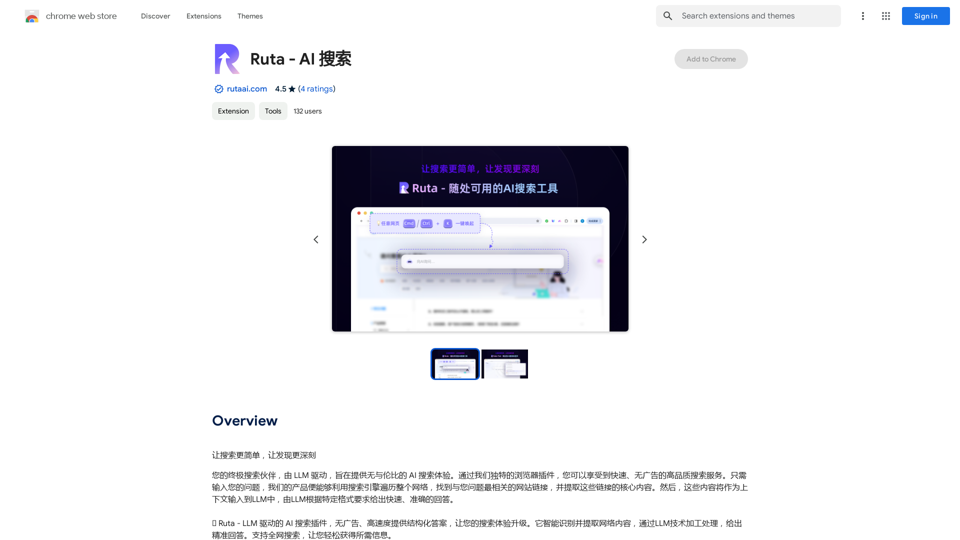
Ruta - AI Search is an innovative AI-powered search extension that offers a unique, ad-free search experience with high-speed performance and structured answers. By leveraging advanced search engine technology and Large Language Model (LLM) processing, Ruta provides in-depth responses to user queries, revolutionizing the way we search for information online.

Feature

Ad-Free and High-Speed Search

Ruta - AI Search prioritizes user experience by eliminating ads and focusing on delivering fast, accurate search results. This feature ensures a clean, distraction-free search environment.

Advanced Technology Integration

The extension combines cutting-edge search engine technology with LLM processing, enabling it to provide comprehensive and relevant answers to complex queries.

Full-Text Search Capability

Ruta supports full-text search, covering a wide range of information sources to ensure users receive the most relevant and up-to-date information.

Rapid Response Time

With its high-speed performance, Ruta significantly reduces user waiting time, making the search process more efficient and productive.

User-Friendly Interface

The extension features an intuitive design that simplifies the search process, making it easy for users to find the information they need quickly.

Multilingual Support

Ruta - AI Search currently supports multiple languages, with plans to expand its language capabilities in the future, making it accessible to a global user base.

Free to Use

As a free extension, Ruta offers its advanced search capabilities without any hidden fees or advertisements, making it accessible to all users.

FAQ

How do I install and use the Ruta - AI Search extension?

To install the extension, search for "Ruta" in the Chrome Web Store and follow the installation instructions. Once installed, simply enter your query in the browser to use the extension.

What is the process of using Ruta - AI Search?

  1. Enter your query in the browser.
  2. The extension performs a full-text search and filters the most relevant links.
  3. Key content is extracted from these links as context for the LLM.
  4. The LLM provides structured, high-quality answers based on your query.

Is Ruta - AI Search available in multiple languages?

Yes, the extension currently supports multiple languages, with plans to expand language support in the future.

How can I contact Ruta - AI Search for support or questions?

For any questions or issues, you can contact the Ruta team at [email protected] or visit their website at https://rutaai.com/.

Related Websites
AI Letter Generator: Free AI Letter Writer, Cover Letter
View Detail

AI Letter Generator: Free AI Letter Writer, Cover Letter

AI Letter Generator: Free AI Letter Writer, Cover Letter

AI Letter Generator helps you create professional letters easily with AI. Try our free letter writer, cover letter generator, and more!

0
Trovy for Threads
View Detail

Trovy for Threads

Trovy for Threads

Manage your content creation and Track your Threads statistics.

193.90 M
AI Book Writer for Non-Fiction and Poetry
View Detail

AI Book Writer for Non-Fiction and Poetry

AI Book Writer for Non-Fiction and Poetry

BookScribi is a platform for creating non-fiction and poetry books. Powered by AI. No writing needed.

445
Claude to Notion

This is a guide on how to connect Claude, an AI assistant, with Notion, a note-taking and workspace app. 

Why connect Claude and Notion?

* Boost your productivity: Use Claude to generate content, summarize information, and automate tasks directly within Notion.
* Enhance your research: Ask Claude questions about your Notion notes and get insightful answers.
* Unlock new creative possibilities: Leverage Claude's generative capabilities to brainstorm ideas, write stories, or compose emails within your Notion workspace.

How to connect Claude and Notion:

1. API Keys: Obtain an API key for both Claude and Notion. 
2. Integration Tool: Explore integration tools like Zapier or Integromat to connect Claude and Notion. These platforms allow you to create workflows that trigger actions in one app based on events in the other.
3. Custom Development: For advanced users, you can develop your own custom integration using the Claude and Notion APIs. This gives you the most flexibility but requires coding knowledge.

Example Use Cases:

* Meeting Summarization: After a meeting, paste the transcript into Notion and use Claude to generate a concise summary.
* Content Creation:  Use Claude to write blog posts, articles, or social media captions directly within your Notion pages.
* Idea Generation: Brainstorm new ideas for projects or tasks by prompting Claude with specific questions within your Notion workspace.


Remember to review the documentation and terms of service for both Claude and Notion to ensure proper usage and security.
View Detail

Claude to Notion This is a guide on how to connect Claude, an AI assistant, with Notion, a note-taking and workspace app. Why connect Claude and Notion? * Boost your productivity: Use Claude to generate content, summarize information, and automate tasks directly within Notion. * Enhance your research: Ask Claude questions about your Notion notes and get insightful answers. * Unlock new creative possibilities: Leverage Claude's generative capabilities to brainstorm ideas, write stories, or compose emails within your Notion workspace. How to connect Claude and Notion: 1. API Keys: Obtain an API key for both Claude and Notion. 2. Integration Tool: Explore integration tools like Zapier or Integromat to connect Claude and Notion. These platforms allow you to create workflows that trigger actions in one app based on events in the other. 3. Custom Development: For advanced users, you can develop your own custom integration using the Claude and Notion APIs. This gives you the most flexibility but requires coding knowledge. Example Use Cases: * Meeting Summarization: After a meeting, paste the transcript into Notion and use Claude to generate a concise summary. * Content Creation: Use Claude to write blog posts, articles, or social media captions directly within your Notion pages. * Idea Generation: Brainstorm new ideas for projects or tasks by prompting Claude with specific questions within your Notion workspace. Remember to review the documentation and terms of service for both Claude and Notion to ensure proper usage and security.

Claude to Notion This is a guide on how to connect Claude, an AI assistant, with Notion, a note-taking and workspace app. Why connect Claude and Notion? * Boost your productivity: Use Claude to generate content, summarize information, and automate tasks directly within Notion. * Enhance your research: Ask Claude questions about your Notion notes and get insightful answers. * Unlock new creative possibilities: Leverage Claude's generative capabilities to brainstorm ideas, write stories, or compose emails within your Notion workspace. How to connect Claude and Notion: 1. API Keys: Obtain an API key for both Claude and Notion. 2. Integration Tool: Explore integration tools like Zapier or Integromat to connect Claude and Notion. These platforms allow you to create workflows that trigger actions in one app based on events in the other. 3. Custom Development: For advanced users, you can develop your own custom integration using the Claude and Notion APIs. This gives you the most flexibility but requires coding knowledge. Example Use Cases: * Meeting Summarization: After a meeting, paste the transcript into Notion and use Claude to generate a concise summary. * Content Creation: Use Claude to write blog posts, articles, or social media captions directly within your Notion pages. * Idea Generation: Brainstorm new ideas for projects or tasks by prompting Claude with specific questions within your Notion workspace. Remember to review the documentation and terms of service for both Claude and Notion to ensure proper usage and security.

Save Claude conversations to Notion with one click. Export Claude conversations.

193.90 M
TeQatlas: Instant Insights for VCs and Angels
View Detail

TeQatlas: Instant Insights for VCs and Angels

TeQatlas: Instant Insights for VCs and Angels

TeQatlas helps venture capital investors make decisions based on data by using complete analysis tools right in your web browser.

193.90 M
Sketch2Code GPT4-128K GPT4-Vision - Sidebar 

This is a simple sidebar for a Sketch2Code application powered by GPT4-128K and GPT4-Vision. 

It likely contains:

* Upload Sketch: A button or area to upload an image sketch.
* Code Generation Options:  Settings to choose the programming language, desired code complexity, or other generation parameters.
* Output Code: A display area to show the generated code.
* Clear Output: A button to clear the generated code.


Let me know if you'd like me to elaborate on any specific aspect of the sidebar!
View Detail

Sketch2Code GPT4-128K GPT4-Vision - Sidebar This is a simple sidebar for a Sketch2Code application powered by GPT4-128K and GPT4-Vision. It likely contains: * Upload Sketch: A button or area to upload an image sketch. * Code Generation Options: Settings to choose the programming language, desired code complexity, or other generation parameters. * Output Code: A display area to show the generated code. * Clear Output: A button to clear the generated code. Let me know if you'd like me to elaborate on any specific aspect of the sidebar!

Sketch2Code GPT4-128K GPT4-Vision - Sidebar This is a simple sidebar for a Sketch2Code application powered by GPT4-128K and GPT4-Vision. It likely contains: * Upload Sketch: A button or area to upload an image sketch. * Code Generation Options: Settings to choose the programming language, desired code complexity, or other generation parameters. * Output Code: A display area to show the generated code. * Clear Output: A button to clear the generated code. Let me know if you'd like me to elaborate on any specific aspect of the sidebar!

Sketch2Code GPT4-128K GPT4-Vision - FREE

193.90 M
OptiMalt
View Detail

OptiMalt

OptiMalt

Turn your Malt profile into a lead-generating machine by optimizing it.

193.90 M
No-Code AI Chatbot for Your Website | Chatling
View Detail

No-Code AI Chatbot for Your Website | Chatling

No-Code AI Chatbot for Your Website | Chatling

Empower your business with a custom AI website chatbot that helps with customer support, lead generation, knowledge base search, and more. It's free to start!

125.24 K