Open-source RightAI Tools Directory
  • Discover AI
  • Submit
  • Startup
  • Blog
Open-source RightAI Tools Directory
Discover the best AI tools of 2025 with the RightAI Tools Directory!

Friend Links

AI Anime GeneratorToolsApp AI

Support

Tap4
Privacy policyTerms & ConditionsContact Us
Loading...
loading...

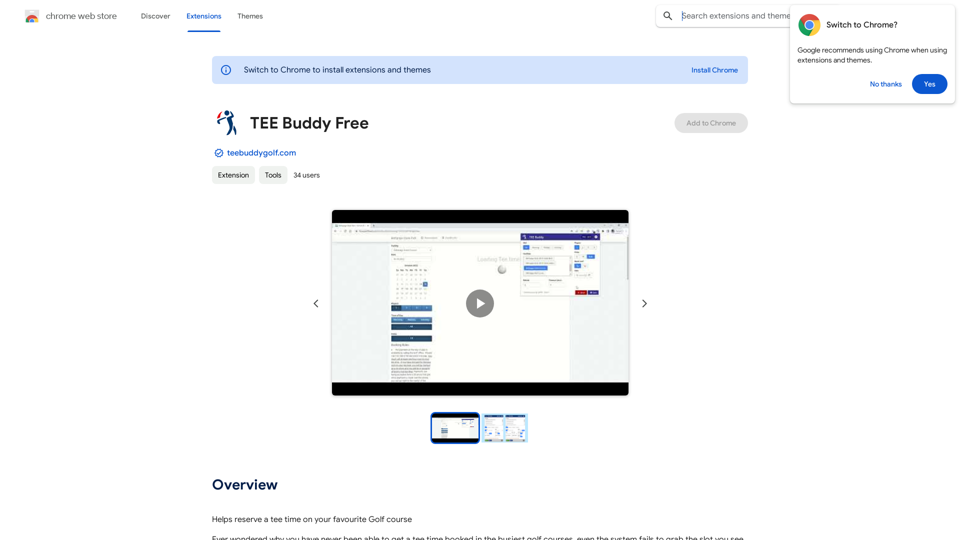
TEE Buddy Free

Helps you reserve a tee time at your favorite golf course.
Visit Website
TEE Buddy Free
Visit Website

Introduction

TEE Buddy is an innovative automation extension designed to simplify the process of reserving tee times at golf courses. By mimicking user actions on reservation pages based on input instructions, it significantly increases the chances of securing hard-to-book slots. This tool is particularly useful for golf enthusiasts who struggle with manual booking processes, offering a time-saving and efficient solution.

Feature

Automated Tee Time Booking

TEE Buddy automates the entire process of reserving tee times on golf course websites, saving users considerable time and effort.

User-Friendly Interface

The extension boasts a simple and intuitive interface, guiding users effortlessly through the booking process.

High Success Rate

With a proven 95% success rate across multiple golf courses, TEE Buddy demonstrates exceptional reliability in securing tee times.

Easy Setup Process

  1. Log in to your preferred golf course booking website
  2. Navigate to the reservations page
  3. Fill in the required information in the extension's form
  4. Click "Run" to initiate the booking process

Cost-Effective Solution

TEE Buddy is offered as a free extension, with no associated costs or subscription fees.

Customizable Parameters

Users can adjust booking parameters to optimize their chances of securing desired tee times.

FAQ

How does TEE Buddy function?

TEE Buddy operates by automating the booking process on golf course websites, mimicking user actions to secure tee times efficiently.

What are the main benefits of using TEE Buddy?

  • Time-saving automation of the booking process
  • Increased chances of securing desired tee times
  • User-friendly interface suitable for all skill levels

Are there any costs associated with TEE Buddy?

No, TEE Buddy is completely free to use, with no hidden costs or subscription fees.

What is the success rate of TEE Buddy?

TEE Buddy has demonstrated a 95% success rate in booking tee times across various golf courses.

Any tips for using TEE Buddy effectively?

  1. Test the extension during non-peak hours to ensure proper functionality
  2. Experiment with different parameters to optimize booking chances
  3. Be patient and persistent, as immediate success is not guaranteed

Latest Traffic Insights

  • Monthly Visits

    193.90 M

  • Bounce Rate

    56.27%

  • Pages Per Visit

    2.71

  • Time on Site(s)

    115.91

  • Global Rank

    -

  • Country Rank

    -

Recent Visits

Traffic Sources

  • Social Media:
    0.48%
  • Paid Referrals:
    0.55%
  • Email:
    0.15%
  • Referrals:
    12.81%
  • Search Engines:
    16.21%
  • Direct:
    69.81%
More Data

Related Websites

Midjourney SREF Codes Library for Style Reference

What are SREF Codes?

SREF codes are special text strings used in Midjourney to quickly and easily apply specific artistic styles to your image generations. 

How to Use SREF Codes:

Simply add an SREF code to your Midjourney prompt. For example:

`/imagine a majestic dragon, SREF:cyberpunk`

SREF Code Library:

This library contains a collection of SREF codes categorized by style. 

* Art Styles:
    * `photorealistic`: Creates images with high levels of realism.
    * `impressionistic`:  Captures the essence of a scene with loose brushstrokes and vibrant colors.
    * `cubist`:  Breaks down objects into geometric shapes.
    * `surrealist`:  Creates dreamlike and fantastical images.
    * `abstract`:  Focuses on form, color, and composition rather than representational imagery.

* Visual Effects:
    * `cinematic`:  Gives images a cinematic look and feel.
    * `HDR`:  Creates images with high dynamic range, resulting in greater detail and contrast.
    * `neon`:  Adds vibrant neon lights to the image.
    * `pixel art`:  Generates images in a retro pixel art style.

* Other Styles:
    * `anime`:  Creates images in the style of Japanese animation.
    * `manga`:  Similar to anime, but with a more comic book aesthetic.
    * `sketch`:  Generates images that resemble pencil sketches.
    * `watercolor`:  Creates images with the look and feel of watercolor paintings.

Note: This is just a small sample of the many SREF codes available. 

Explore and Experiment:

The best way to learn about SREF codes is to experiment with them! Try combining different codes to create unique and interesting styles.
View Detail

Midjourney SREF Codes Library for Style Reference What are SREF Codes? SREF codes are special text strings used in Midjourney to quickly and easily apply specific artistic styles to your image generations. How to Use SREF Codes: Simply add an SREF code to your Midjourney prompt. For example: `/imagine a majestic dragon, SREF:cyberpunk` SREF Code Library: This library contains a collection of SREF codes categorized by style. * Art Styles: * `photorealistic`: Creates images with high levels of realism. * `impressionistic`: Captures the essence of a scene with loose brushstrokes and vibrant colors. * `cubist`: Breaks down objects into geometric shapes. * `surrealist`: Creates dreamlike and fantastical images. * `abstract`: Focuses on form, color, and composition rather than representational imagery. * Visual Effects: * `cinematic`: Gives images a cinematic look and feel. * `HDR`: Creates images with high dynamic range, resulting in greater detail and contrast. * `neon`: Adds vibrant neon lights to the image. * `pixel art`: Generates images in a retro pixel art style. * Other Styles: * `anime`: Creates images in the style of Japanese animation. * `manga`: Similar to anime, but with a more comic book aesthetic. * `sketch`: Generates images that resemble pencil sketches. * `watercolor`: Creates images with the look and feel of watercolor paintings. Note: This is just a small sample of the many SREF codes available. Explore and Experiment: The best way to learn about SREF codes is to experiment with them! Try combining different codes to create unique and interesting styles.

Midjourney SREF Codes Library for Style Reference What are SREF Codes? SREF codes are special text strings used in Midjourney to quickly and easily apply specific artistic styles to your image generations. How to Use SREF Codes: Simply add an SREF code to your Midjourney prompt. For example: `/imagine a majestic dragon, SREF:cyberpunk` SREF Code Library: This library contains a collection of SREF codes categorized by style. * Art Styles: * `photorealistic`: Creates images with high levels of realism. * `impressionistic`: Captures the essence of a scene with loose brushstrokes and vibrant colors. * `cubist`: Breaks down objects into geometric shapes. * `surrealist`: Creates dreamlike and fantastical images. * `abstract`: Focuses on form, color, and composition rather than representational imagery. * Visual Effects: * `cinematic`: Gives images a cinematic look and feel. * `HDR`: Creates images with high dynamic range, resulting in greater detail and contrast. * `neon`: Adds vibrant neon lights to the image. * `pixel art`: Generates images in a retro pixel art style. * Other Styles: * `anime`: Creates images in the style of Japanese animation. * `manga`: Similar to anime, but with a more comic book aesthetic. * `sketch`: Generates images that resemble pencil sketches. * `watercolor`: Creates images with the look and feel of watercolor paintings. Note: This is just a small sample of the many SREF codes available. Explore and Experiment: The best way to learn about SREF codes is to experiment with them! Try combining different codes to create unique and interesting styles.

Explore a list of 177 unique Midjourney sref codes and style references to find your perfect Midjourney sref code effect.

149.96 K
NoteGPT: ChatGPT Summary for Vimeo
===============

What is NoteGPT?

NoteGPT is an AI-powered note-taking tool that utilizes the capabilities of ChatGPT to assist users in summarizing and organizing their video content on Vimeo.

Key Features

* Automatic Summarization: NoteGPT can automatically generate a concise summary of Vimeo videos, saving users time and effort.
* Customizable Notes: Users can add their own notes and tags to the generated summary, making it easy to review and reference later.
* Organization: NoteGPT allows users to organize their video content by categorizing and tagging their notes, making it simple to find specific information.

Benefits

* Time-Saving: NoteGPT's automatic summarization feature saves users time and effort, allowing them to focus on more important tasks.
* Improved Productivity: With NoteGPT, users can quickly review and reference their video content, improving their overall productivity.
* Enhanced Learning: NoteGPT's customizable notes and organization features enable users to engage more effectively with their video content, leading to enhanced learning and retention.

Use Cases

* Education: NoteGPT is ideal for students and educators who need to review and summarize video lectures and online courses.
* Business: NoteGPT can be used by professionals to summarize and organize video content for meetings, training sessions, and presentations.
* Personal Development: Individuals can use NoteGPT to summarize and review video content for personal development, such as language learning or skill-building.
View Detail

NoteGPT: ChatGPT Summary for Vimeo =============== What is NoteGPT? NoteGPT is an AI-powered note-taking tool that utilizes the capabilities of ChatGPT to assist users in summarizing and organizing their video content on Vimeo. Key Features * Automatic Summarization: NoteGPT can automatically generate a concise summary of Vimeo videos, saving users time and effort. * Customizable Notes: Users can add their own notes and tags to the generated summary, making it easy to review and reference later. * Organization: NoteGPT allows users to organize their video content by categorizing and tagging their notes, making it simple to find specific information. Benefits * Time-Saving: NoteGPT's automatic summarization feature saves users time and effort, allowing them to focus on more important tasks. * Improved Productivity: With NoteGPT, users can quickly review and reference their video content, improving their overall productivity. * Enhanced Learning: NoteGPT's customizable notes and organization features enable users to engage more effectively with their video content, leading to enhanced learning and retention. Use Cases * Education: NoteGPT is ideal for students and educators who need to review and summarize video lectures and online courses. * Business: NoteGPT can be used by professionals to summarize and organize video content for meetings, training sessions, and presentations. * Personal Development: Individuals can use NoteGPT to summarize and review video content for personal development, such as language learning or skill-building.

NoteGPT: ChatGPT Summary for Vimeo =============== What is NoteGPT? NoteGPT is an AI-powered note-taking tool that utilizes the capabilities of ChatGPT to assist users in summarizing and organizing their video content on Vimeo. Key Features * Automatic Summarization: NoteGPT can automatically generate a concise summary of Vimeo videos, saving users time and effort. * Customizable Notes: Users can add their own notes and tags to the generated summary, making it easy to review and reference later. * Organization: NoteGPT allows users to organize their video content by categorizing and tagging their notes, making it simple to find specific information. Benefits * Time-Saving: NoteGPT's automatic summarization feature saves users time and effort, allowing them to focus on more important tasks. * Improved Productivity: With NoteGPT, users can quickly review and reference their video content, improving their overall productivity. * Enhanced Learning: NoteGPT's customizable notes and organization features enable users to engage more effectively with their video content, leading to enhanced learning and retention. Use Cases * Education: NoteGPT is ideal for students and educators who need to review and summarize video lectures and online courses. * Business: NoteGPT can be used by professionals to summarize and organize video content for meetings, training sessions, and presentations. * Personal Development: Individuals can use NoteGPT to summarize and review video content for personal development, such as language learning or skill-building.

Vimeo Summary with ChatGPT for Better Learning ===================================================== What is Vimeo? --------------- Vimeo is a video-hosting platform that allows users to upload, share, and view videos. It is popular among creative professionals, businesses, and individuals who want to showcase their videos in a high-quality format. How Can ChatGPT Help with Vimeo Courses? ----------------------------------------- ChatGPT is an AI-powered language model that can assist with summarizing Vimeo courses by: * Identifying key points: ChatGPT can analyze the video content and extract the most important information, making it easier to understand and retain. * Generating summaries: ChatGPT can create concise summaries of the video courses, saving time and effort. * Improving learning: By providing a clear and concise summary, ChatGPT can help learners focus on the essential concepts and improve their understanding of the material. Benefits of Using ChatGPT for Vimeo Courses --------------------------------------------- * Time-saving: ChatGPT can quickly summarize long video courses, saving learners time and effort. * Improved comprehension: ChatGPT's summaries can help learners understand complex concepts more easily. * Enhanced retention: By providing a concise summary, ChatGPT can help learners retain information better. How to Use ChatGPT for Vimeo Courses ----------------------------------------- 1. Upload the video course: Upload the Vimeo course to ChatGPT. 2. Analyze the content: ChatGPT will analyze the video content and extract key points. 3. Generate a summary: ChatGPT will create a concise summary of the video course. 4. Review and learn: Review the summary and use it to learn and retain the information. Conclusion ---------- ChatGPT can be a valuable tool for summarizing Vimeo courses, making it easier to learn and retain information. By using ChatGPT, learners can save time, improve comprehension, and enhance retention.

193.90 M
Buffup - AI Copilot of ChatGPT4 & Claude3 with 1,000+ bots
View Detail

Buffup - AI Copilot of ChatGPT4 & Claude3 with 1,000+ bots

Buffup - AI Copilot of ChatGPT4 & Claude3 with 1,000+ bots

AI Copilot of ChatGPT4 & Claude3 with 1K+ bots, GPTs, Internet Connectivity, Translation, Summarization This AI copilot combines the power of ChatGPT4 and Claude3, along with over 1,000 bots, GPTs, and internet connectivity, to provide advanced features such as translation and summarization.

193.90 M
SpeechGenius — Best Speech to Text
View Detail

SpeechGenius — Best Speech to Text

SpeechGenius — Best Speech to Text

AI-powered speech-to-text for faster, easier writing

193.90 M
IntegraBot - Advanced Agents with AI and Automations
View Detail

IntegraBot - Advanced Agents with AI and Automations

IntegraBot - Advanced Agents with AI and Automations

Create an AI chatbot from your knowledge base and add it to your website or interact with it through our API.

357
AI Text Shortener | Precise Text Adjuster | WordLimiter
View Detail

AI Text Shortener | Precise Text Adjuster | WordLimiter

AI Text Shortener | Precise Text Adjuster | WordLimiter

WordLimit helps you to shorten your text precisely without losing key information and your unique writing style. Feel free to use it because it will never make your Human-Written content become AI-Written!

834
Best Meme Coins with AI Insights at MEME is Game 

Let's explore the top meme coins gaining traction in the crypto space, enhanced by the power of AI insights at MEME is Game.
View Detail

Best Meme Coins with AI Insights at MEME is Game Let's explore the top meme coins gaining traction in the crypto space, enhanced by the power of AI insights at MEME is Game.

Best Meme Coins with AI Insights at MEME is Game Let's explore the top meme coins gaining traction in the crypto space, enhanced by the power of AI insights at MEME is Game.

Discover the newest and best meme coins at MEME is Game, featuring AI-powered insights. Stay informed with the latest trends, reviews, and AI analyses of top meme coins, including Hot New Meme Coins and Best Meme Coins.

0
OpenGPTs
View Detail

OpenGPTs

OpenGPTs

OpenGPTs - Powerful GPTs Manager | Powerful GPT Manager

193.90 M