Open-source RightAI Tools Directory
  • Discover AI
  • Submit
  • Startup
  • Blog
Open-source RightAI Tools Directory
Discover the best AI tools of 2025 with the RightAI Tools Directory!

Friend Links

AI Anime GeneratorToolsApp AI

Support

Tap4
Privacy policyTerms & ConditionsContact Us
Loading...
loading...

Imagine Anything | Free AI Image Generator

Generate Free AI Images with Imagine Anything. Easily create Photos, Clipart, Graphics and more with our AI Generator.
Visit Website
Imagine Anything | Free AI Image Generator
Visit Website

Introduction

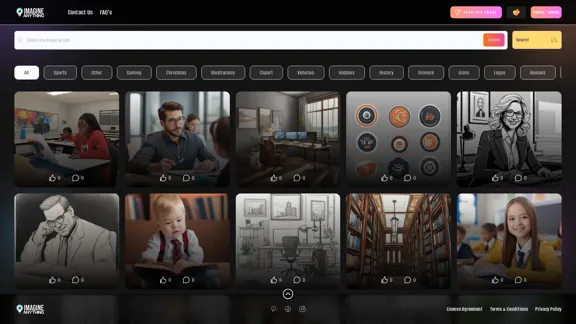
Imagine Anything is a free AI image generator that offers a wide range of image categories and features. It allows users to create custom images across various themes, from popular categories like sports and gaming to specific niches like astrology and warfare. The platform provides an intuitive interface with search functionality, sorting options, and an "Inspire Me" feature for random image generation.

Feature

Diverse Image Categories

Imagine Anything offers an extensive selection of image categories, including:

  • Popular Categories: Sports, Gaming, Christmas, Illustrations, Clipart, Vehicles, Hobbies, History, Science, Icons, Logos
  • Nature and Animals: Animals, Pets, Nature, Travel
  • Food and Drink: Food, Drink
  • People and Lifestyle: People, Fashion, Business, Family, Health, Education
  • Art and Design: Art, Seamless Patterns, Watercolor, Design, Typography
  • Holidays and Celebrations: Easter, Happy Birthday, 4th July, Halloween, St. Patrick's Day, Valentine's Day
  • Technology and Science: Technology, Space, Engineering, Science Fiction
  • Other Categories: Architecture, Fantasy, Entertainment, Music, Mythical, Coloring Pages, Furniture, Toys, Jewelry, Culture, Weapons, Signs, Environment, Weddings, Events, Beauty, Flags, Home, Crime, Children, Medical, Motivational, Astrology, Politics, Finance, Hospitality, Tools, Warfare, Kitchen, Spiritual, Games

User-Friendly Navigation

The platform features a simple navigation menu, including:

  • Contact Us
  • FAQs
  • Generate Image
  • Sign In / Sign Up

Advanced Search and Sort Options

Users can easily find the perfect image with:

  • Search functionality
  • Sorting options: Newest, Popularity, Likes
  • "Inspire Me" feature for random image generation

Free AI-Powered Image Generation

Imagine Anything provides free access to AI-generated images, making it accessible to all users regardless of their budget or design skills.

User Account System

The platform offers a sign-in/sign-up option, allowing users to create accounts and potentially save their generated images or preferences.

Legal and Privacy Considerations

Imagine Anything prioritizes user rights and data protection, providing:

  • License Agreement
  • Terms & Conditions
  • Privacy Policy

FAQ

What is Imagine Anything?

Imagine Anything is a free AI image generator that allows users to create custom images across a wide range of categories and themes. It uses artificial intelligence to generate unique images based on user input and selected categories.

How do I use Imagine Anything?

To use Imagine Anything, simply navigate to the website, choose a category or use the search function to find the type of image you want to create. Click on "Generate Image" to start the AI image generation process. You can also use the "Inspire Me" option for random image ideas.

Is Imagine Anything really free?

Yes, Imagine Anything is advertised as a free AI image generator. However, it's always a good idea to check the terms and conditions for any potential limitations or premium features.

Can I use the generated images for commercial purposes?

The usage rights for generated images may vary. It's essential to review the License Agreement provided on the website to understand how you can use the images created with Imagine Anything.

Do I need to create an account to use Imagine Anything?

While the platform offers a Sign In / Sign Up option, it's not clear if an account is required to generate images. Creating an account might provide additional features or the ability to save your generated images.

Latest Traffic Insights

  • Monthly Visits

    56.84 K

  • Bounce Rate

    38.92%

  • Pages Per Visit

    2.25

  • Time on Site(s)

    21.19

  • Global Rank

    547698

  • Country Rank

    United States 389378

Recent Visits

Traffic Sources

  • Social Media:
    3.99%
  • Paid Referrals:
    0.89%
  • Email:
    0.12%
  • Referrals:
    25.33%
  • Search Engines:
    40.29%
  • Direct:
    29.31%
More Data

Related Websites

Grab 'n Tag
View Detail

Grab 'n Tag

Grab 'n Tag

Download a group of images at once and give each one a name based on what's in the picture.

193.90 M
FreeAI Manga
View Detail

FreeAI Manga

FreeAI Manga

FreeAI Manga is a website that provides free access to a wide variety of manga content, including doujinshi and adult-oriented manga. The site features a regularly updated collection of manga titles across different genres and languages, with a focus on fan-translated works.

0
Professional AI-generated headshots
View Detail

Professional AI-generated headshots

Professional AI-generated headshots

Upload a few selfies, Select your preferred styles, Receive over 100 professional headshots delivered on the same day.

1.05 K
AI Powered Image Generator for Unique and Custom Images
View Detail

AI Powered Image Generator for Unique and Custom Images

AI Powered Image Generator for Unique and Custom Images

Create unique and custom images effortlessly with iPic.Ai - the AI-powered image generator.

68.28 K
Transform Text into Studio Ghibli Art
View Detail

Transform Text into Studio Ghibli Art

Transform Text into Studio Ghibli Art

Create stunning Studio Ghibli style artwork using AI. Our text-to-image generator brings your imagination to life with the magical aesthetic of Ghibli animation.

0
Text to Voice Generator
==========================

A text-to-voice generator, also known as a text-to-speech (TTS) system, is a software that converts written text into a spoken voice output. This technology has been widely used in various applications, including virtual assistants, audiobooks, and language learning platforms.

How it Works
---------------

The process of generating voice from text involves several steps:

1. Text Analysis: The input text is analyzed to identify the language, syntax, and semantics.
2. Phonetic Transcription: The text is converted into a phonetic transcription, which represents the sounds of the spoken language.
3. Prosody Generation: The phonetic transcription is then used to generate the prosody, or rhythm and intonation, of the spoken voice.
4. Waveform Generation: The prosody and phonetic transcription are combined to generate the audio waveform, which is the final spoken voice output.

Types of Text-to-Voice Generators
-----------------------------------

There are two main types of text-to-voice generators:

Rule-Based Systems

These systems use a set of predefined rules to generate the spoken voice output. They are often limited in their ability to produce natural-sounding voices and may sound robotic.

Machine Learning-Based Systems

These systems use machine learning algorithms to learn from large datasets of spoken voices and generate more natural-sounding voices. They are often more advanced and can produce high-quality voice outputs.

Applications of Text-to-Voice Generators
-----------------------------------------

Text-to-voice generators have a wide range of applications, including:

Virtual Assistants

Virtual assistants, such as Siri and Alexa, use text-to-voice generators to respond to user queries.

Audiobooks

Text-to-voice generators can be used to create audiobooks from written texts, making it easier for people to access written content.

Language Learning

Language learning platforms use text-to-voice generators to provide pronunciation guidance and practice exercises for learners.

Accessibility

Text-to-voice generators can be used to assist people with disabilities, such as visual impairments, by providing an auditory interface to written content.
View Detail

Text to Voice Generator ========================== A text-to-voice generator, also known as a text-to-speech (TTS) system, is a software that converts written text into a spoken voice output. This technology has been widely used in various applications, including virtual assistants, audiobooks, and language learning platforms. How it Works --------------- The process of generating voice from text involves several steps: 1. Text Analysis: The input text is analyzed to identify the language, syntax, and semantics. 2. Phonetic Transcription: The text is converted into a phonetic transcription, which represents the sounds of the spoken language. 3. Prosody Generation: The phonetic transcription is then used to generate the prosody, or rhythm and intonation, of the spoken voice. 4. Waveform Generation: The prosody and phonetic transcription are combined to generate the audio waveform, which is the final spoken voice output. Types of Text-to-Voice Generators ----------------------------------- There are two main types of text-to-voice generators: Rule-Based Systems These systems use a set of predefined rules to generate the spoken voice output. They are often limited in their ability to produce natural-sounding voices and may sound robotic. Machine Learning-Based Systems These systems use machine learning algorithms to learn from large datasets of spoken voices and generate more natural-sounding voices. They are often more advanced and can produce high-quality voice outputs. Applications of Text-to-Voice Generators ----------------------------------------- Text-to-voice generators have a wide range of applications, including: Virtual Assistants Virtual assistants, such as Siri and Alexa, use text-to-voice generators to respond to user queries. Audiobooks Text-to-voice generators can be used to create audiobooks from written texts, making it easier for people to access written content. Language Learning Language learning platforms use text-to-voice generators to provide pronunciation guidance and practice exercises for learners. Accessibility Text-to-voice generators can be used to assist people with disabilities, such as visual impairments, by providing an auditory interface to written content.

Text to Voice Generator ========================== A text-to-voice generator, also known as a text-to-speech (TTS) system, is a software that converts written text into a spoken voice output. This technology has been widely used in various applications, including virtual assistants, audiobooks, and language learning platforms. How it Works --------------- The process of generating voice from text involves several steps: 1. Text Analysis: The input text is analyzed to identify the language, syntax, and semantics. 2. Phonetic Transcription: The text is converted into a phonetic transcription, which represents the sounds of the spoken language. 3. Prosody Generation: The phonetic transcription is then used to generate the prosody, or rhythm and intonation, of the spoken voice. 4. Waveform Generation: The prosody and phonetic transcription are combined to generate the audio waveform, which is the final spoken voice output. Types of Text-to-Voice Generators ----------------------------------- There are two main types of text-to-voice generators: Rule-Based Systems These systems use a set of predefined rules to generate the spoken voice output. They are often limited in their ability to produce natural-sounding voices and may sound robotic. Machine Learning-Based Systems These systems use machine learning algorithms to learn from large datasets of spoken voices and generate more natural-sounding voices. They are often more advanced and can produce high-quality voice outputs. Applications of Text-to-Voice Generators ----------------------------------------- Text-to-voice generators have a wide range of applications, including: Virtual Assistants Virtual assistants, such as Siri and Alexa, use text-to-voice generators to respond to user queries. Audiobooks Text-to-voice generators can be used to create audiobooks from written texts, making it easier for people to access written content. Language Learning Language learning platforms use text-to-voice generators to provide pronunciation guidance and practice exercises for learners. Accessibility Text-to-voice generators can be used to assist people with disabilities, such as visual impairments, by providing an auditory interface to written content.

Generate Voice from Text on Any Web Page With the advancement of technology, it is now possible to generate voice from text on any web page. This feature is particularly useful for people who prefer listening to content rather than reading it. Here's how you can do it: #Method 1: Using Browser Extension You can use a browser extension like Read Aloud or SpeakIt! to generate voice from text on any web page. These extensions are available for both Google Chrome and Mozilla Firefox browsers. #Method 2: Using Online Tools There are several online tools available that can convert text to speech. Some popular tools include NaturalReader, Voice Dream Reader, and Google Text-to-Speech. You can copy and paste the text from any web page into these tools to generate voice. #Method 3: Using Screen Reader If you are using a Windows operating system, you can use the built-in Narrator screen reader to generate voice from text on any web page. For Mac users, you can use VoiceOver. By using any of these methods, you can easily generate voice from text on any web page and enjoy a more convenient and accessible reading experience.

193.90 M
Home | Angel AI
View Detail

Home | Angel AI

Home | Angel AI

Angel AI is an innovative platform that offers a unique AI-driven experience, allowing users to interact with AI companions that feel real.

13.97 K
Gtres AI
View Detail

Gtres AI

Gtres AI

Find similar images

193.90 M