Open-source RightAI Tools Directory
  • Discover AI
  • Submit
  • Startup
  • Blog
Open-source RightAI Tools Directory
Discover the best AI tools of 2025 with the RightAI Tools Directory!

Friend Links

AI Anime GeneratorToolsApp AI

Support

Tap4
Privacy policyTerms & ConditionsContact Us
Loading...
loading...

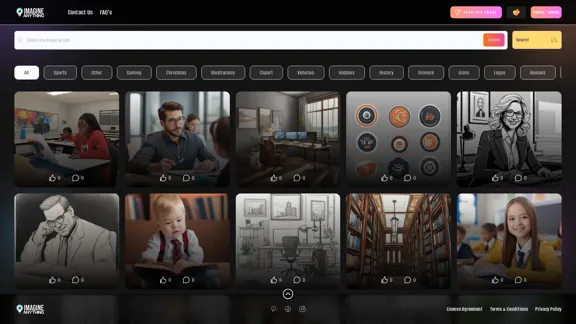
Imagine Anything | Free AI Image Generator

Generate Free AI Images with Imagine Anything. Easily create Photos, Clipart, Graphics and more with our AI Generator.
Visit Website
Imagine Anything | Free AI Image Generator
Visit Website

Introduction

Imagine Anything is a free AI image generator that offers a wide range of image categories and features. It allows users to create custom images across various themes, from popular categories like sports and gaming to specific niches like astrology and warfare. The platform provides an intuitive interface with search functionality, sorting options, and an "Inspire Me" feature for random image generation.

Feature

Diverse Image Categories

Imagine Anything offers an extensive selection of image categories, including:

  • Popular Categories: Sports, Gaming, Christmas, Illustrations, Clipart, Vehicles, Hobbies, History, Science, Icons, Logos
  • Nature and Animals: Animals, Pets, Nature, Travel
  • Food and Drink: Food, Drink
  • People and Lifestyle: People, Fashion, Business, Family, Health, Education
  • Art and Design: Art, Seamless Patterns, Watercolor, Design, Typography
  • Holidays and Celebrations: Easter, Happy Birthday, 4th July, Halloween, St. Patrick's Day, Valentine's Day
  • Technology and Science: Technology, Space, Engineering, Science Fiction
  • Other Categories: Architecture, Fantasy, Entertainment, Music, Mythical, Coloring Pages, Furniture, Toys, Jewelry, Culture, Weapons, Signs, Environment, Weddings, Events, Beauty, Flags, Home, Crime, Children, Medical, Motivational, Astrology, Politics, Finance, Hospitality, Tools, Warfare, Kitchen, Spiritual, Games

User-Friendly Navigation

The platform features a simple navigation menu, including:

  • Contact Us
  • FAQs
  • Generate Image
  • Sign In / Sign Up

Advanced Search and Sort Options

Users can easily find the perfect image with:

  • Search functionality
  • Sorting options: Newest, Popularity, Likes
  • "Inspire Me" feature for random image generation

Free AI-Powered Image Generation

Imagine Anything provides free access to AI-generated images, making it accessible to all users regardless of their budget or design skills.

User Account System

The platform offers a sign-in/sign-up option, allowing users to create accounts and potentially save their generated images or preferences.

Legal and Privacy Considerations

Imagine Anything prioritizes user rights and data protection, providing:

  • License Agreement
  • Terms & Conditions
  • Privacy Policy

FAQ

What is Imagine Anything?

Imagine Anything is a free AI image generator that allows users to create custom images across a wide range of categories and themes. It uses artificial intelligence to generate unique images based on user input and selected categories.

How do I use Imagine Anything?

To use Imagine Anything, simply navigate to the website, choose a category or use the search function to find the type of image you want to create. Click on "Generate Image" to start the AI image generation process. You can also use the "Inspire Me" option for random image ideas.

Is Imagine Anything really free?

Yes, Imagine Anything is advertised as a free AI image generator. However, it's always a good idea to check the terms and conditions for any potential limitations or premium features.

Can I use the generated images for commercial purposes?

The usage rights for generated images may vary. It's essential to review the License Agreement provided on the website to understand how you can use the images created with Imagine Anything.

Do I need to create an account to use Imagine Anything?

While the platform offers a Sign In / Sign Up option, it's not clear if an account is required to generate images. Creating an account might provide additional features or the ability to save your generated images.

Related Websites
Bing AI Image Generator
View Detail

Bing AI Image Generator

Bing AI Image Generator

Bing AI Image Generator: See your ideas come to life with AI. Tell the AI what you want to see, and it will create the image in your browser right away.

193.90 M
FLUX.1 AI: Advanced Text-to-Image Generation Model
View Detail

FLUX.1 AI: Advanced Text-to-Image Generation Model

FLUX.1 AI: Advanced Text-to-Image Generation Model

Experience the next level of image synthesis with FLUX.1 AI. Our cutting-edge AI technology creates stunning, diverse, and highly detailed images from text prompts.

152
Unblur Image

Unblur image refers to the process of removing blur or haze from an image to make it sharper and clearer. This technique is often used to enhance the quality of images that have been affected by camera shake, motion blur, or other factors that cause blur.
View Detail

Unblur Image Unblur image refers to the process of removing blur or haze from an image to make it sharper and clearer. This technique is often used to enhance the quality of images that have been affected by camera shake, motion blur, or other factors that cause blur.

Unblur Image Unblur image refers to the process of removing blur or haze from an image to make it sharper and clearer. This technique is often used to enhance the quality of images that have been affected by camera shake, motion blur, or other factors that cause blur.

Automatically unblur images in one click with our AI photo blur remover.

193.90 M
PicMa Photo Enhancer - One Click AI Photo Quality Enhancer
View Detail

PicMa Photo Enhancer - One Click AI Photo Quality Enhancer

PicMa Photo Enhancer - One Click AI Photo Quality Enhancer

PicMa AI enhances photo resolution and image quality. Unblur, restore old photos, and colorize black and white images instantly. Try our tool for free.

65.77 K
Dream Machine AI: Try Luma AI Video Generator for Free
View Detail

Dream Machine AI: Try Luma AI Video Generator for Free

Dream Machine AI: Try Luma AI Video Generator for Free

Try Dream Machine AI Video Generator for Free Online. Dream Machine is a new text-to-video model by Luma Ai, able to create high-definition videos.

0
Orbitt Pro AI
View Detail

Orbitt Pro AI

Orbitt Pro AI

Orbitt PRO uniquely combines the power of artificial intelligence and a convenient Chrome Extension, redefining the cryptocurrency trading experience.

193.90 M
JumboGPT - Bulk Prompts for ChatGPT

This is a collection of bulk prompts for ChatGPT, designed to help you explore its capabilities and generate diverse creative text formats. 

Instructions:

* Each prompt is designed to be used individually with ChatGPT.
* You can copy and paste the prompts directly into the ChatGPT interface.
* Feel free to modify the prompts to suit your specific needs and interests.

Categories:

* Story Starters:

>  A lone astronaut stumbles upon a derelict spaceship...
>  The old woman sat on the park bench, watching the children play...
>  A mysterious package arrived on her doorstep, addressed simply to "The Keeper"...

* Creative Writing:

> Write a short poem about the feeling of nostalgia.
> Compose a song about a robot who falls in love with a human.
> Describe a world where animals can talk.

* Dialogue Prompts:

> Two friends argue about the best way to spend a weekend.
> A detective interrogates a suspect in a murder case.
> A parent tries to explain a difficult concept to their child.

* Worldbuilding:

> Create a detailed description of a fantasy city.
> Design a new species of creature for a science fiction story.
> Develop a unique magic system for a medieval world.

* Code Generation:

> Write a Python function to calculate the factorial of a number.
> Generate HTML code for a simple webpage.
> Create a SQL query to retrieve data from a database.

* Humor:

> Write a joke about a programmer.
> Create a funny story about a talking cat.
> Generate a list of puns about food.

* Educational:

> Explain the concept of photosynthesis in simple terms.
> Summarize the main events of the American Revolution.
> Provide a brief history of the development of the internet.
View Detail

JumboGPT - Bulk Prompts for ChatGPT This is a collection of bulk prompts for ChatGPT, designed to help you explore its capabilities and generate diverse creative text formats. Instructions: * Each prompt is designed to be used individually with ChatGPT. * You can copy and paste the prompts directly into the ChatGPT interface. * Feel free to modify the prompts to suit your specific needs and interests. Categories: * Story Starters: > A lone astronaut stumbles upon a derelict spaceship... > The old woman sat on the park bench, watching the children play... > A mysterious package arrived on her doorstep, addressed simply to "The Keeper"... * Creative Writing: > Write a short poem about the feeling of nostalgia. > Compose a song about a robot who falls in love with a human. > Describe a world where animals can talk. * Dialogue Prompts: > Two friends argue about the best way to spend a weekend. > A detective interrogates a suspect in a murder case. > A parent tries to explain a difficult concept to their child. * Worldbuilding: > Create a detailed description of a fantasy city. > Design a new species of creature for a science fiction story. > Develop a unique magic system for a medieval world. * Code Generation: > Write a Python function to calculate the factorial of a number. > Generate HTML code for a simple webpage. > Create a SQL query to retrieve data from a database. * Humor: > Write a joke about a programmer. > Create a funny story about a talking cat. > Generate a list of puns about food. * Educational: > Explain the concept of photosynthesis in simple terms. > Summarize the main events of the American Revolution. > Provide a brief history of the development of the internet.

JumboGPT - Bulk Prompts for ChatGPT This is a collection of bulk prompts for ChatGPT, designed to help you explore its capabilities and generate diverse creative text formats. Instructions: * Each prompt is designed to be used individually with ChatGPT. * You can copy and paste the prompts directly into the ChatGPT interface. * Feel free to modify the prompts to suit your specific needs and interests. Categories: * Story Starters: > A lone astronaut stumbles upon a derelict spaceship... > The old woman sat on the park bench, watching the children play... > A mysterious package arrived on her doorstep, addressed simply to "The Keeper"... * Creative Writing: > Write a short poem about the feeling of nostalgia. > Compose a song about a robot who falls in love with a human. > Describe a world where animals can talk. * Dialogue Prompts: > Two friends argue about the best way to spend a weekend. > A detective interrogates a suspect in a murder case. > A parent tries to explain a difficult concept to their child. * Worldbuilding: > Create a detailed description of a fantasy city. > Design a new species of creature for a science fiction story. > Develop a unique magic system for a medieval world. * Code Generation: > Write a Python function to calculate the factorial of a number. > Generate HTML code for a simple webpage. > Create a SQL query to retrieve data from a database. * Humor: > Write a joke about a programmer. > Create a funny story about a talking cat. > Generate a list of puns about food. * Educational: > Explain the concept of photosynthesis in simple terms. > Summarize the main events of the American Revolution. > Provide a brief history of the development of the internet.

Use ChatGPT to process many different questions and save the responses in a spreadsheet format like CSV or Excel.

193.90 M
Batch Save ChatGPT to Notion

This is a guide on how to save multiple ChatGPT responses to Notion in a batch. 

Tools You'll Need:

* ChatGPT: An AI chatbot that can generate text.
* Notion: A note-taking and project management tool.
* Python: A programming language.
* Requests Library: A Python library for making HTTP requests.

Steps:

1. Get Your Notion API Token:
   - Go to your Notion workspace settings.
   - Navigate to the "Integrations" tab.
   - Click "Create new integration" and choose "API Token".
   - Copy your API token.

2. Install Python Libraries:
   - Open your terminal or command prompt.
   - Type `pip install requests` and press Enter.

3. Write Python Script:
   - Create a new Python file (e.g., `save_chatgpt_to_notion.py`).
   - Paste the following code into the file, replacing `YOUR_NOTION_API_TOKEN` with your actual token:

```python
import requests

def save_chatgpt_response_to_notion(response, page_id, token):
  """Saves a ChatGPT response to a Notion page."""
  url = f"https://api.notion.com/v1/pages/{page_id}/children"
  headers = {"Authorization": f"Bearer {token}"}
  data = {
    "parent": {
      "page_id": page_id
    },
    "properties": {
      "title": {
        "title": [
          {
            "text": {
              "content": "ChatGPT Response"
            }
          }
        ]
      },
      "content": {
        "rich_text": [
          {
            "text": {
              "content": response
            }
          }
        ]
      }
    }
  }
  response = requests.post(url, headers=headers, json=data)
  print(response.status_code)

Example usage
page_id = "YOUR_NOTION_PAGE_ID"
token = "YOUR_NOTION_API_TOKEN"

Get ChatGPT responses (replace with your actual ChatGPT interaction)
chatgpt_responses = [
  "This is the first ChatGPT response.",
  "This is the second ChatGPT response.",
  "This is the third ChatGPT response."
]

Save each response to Notion
for response in chatgpt_responses:
  save_chatgpt_response_to_notion(response, page_id, token)
```

4. Run the Script:
   - In your terminal, navigate to the directory where you saved the Python file.
   - Type `python save_chatgpt_to_notion.py` and press Enter.

5. Check Notion:
   - Open your Notion workspace and go to the page specified by `page_id`.
   - You should see your ChatGPT responses saved as separate blocks.
View Detail

Batch Save ChatGPT to Notion This is a guide on how to save multiple ChatGPT responses to Notion in a batch. Tools You'll Need: * ChatGPT: An AI chatbot that can generate text. * Notion: A note-taking and project management tool. * Python: A programming language. * Requests Library: A Python library for making HTTP requests. Steps: 1. Get Your Notion API Token: - Go to your Notion workspace settings. - Navigate to the "Integrations" tab. - Click "Create new integration" and choose "API Token". - Copy your API token. 2. Install Python Libraries: - Open your terminal or command prompt. - Type `pip install requests` and press Enter. 3. Write Python Script: - Create a new Python file (e.g., `save_chatgpt_to_notion.py`). - Paste the following code into the file, replacing `YOUR_NOTION_API_TOKEN` with your actual token: ```python import requests def save_chatgpt_response_to_notion(response, page_id, token): """Saves a ChatGPT response to a Notion page.""" url = f"https://api.notion.com/v1/pages/{page_id}/children" headers = {"Authorization": f"Bearer {token}"} data = { "parent": { "page_id": page_id }, "properties": { "title": { "title": [ { "text": { "content": "ChatGPT Response" } } ] }, "content": { "rich_text": [ { "text": { "content": response } } ] } } } response = requests.post(url, headers=headers, json=data) print(response.status_code) Example usage page_id = "YOUR_NOTION_PAGE_ID" token = "YOUR_NOTION_API_TOKEN" Get ChatGPT responses (replace with your actual ChatGPT interaction) chatgpt_responses = [ "This is the first ChatGPT response.", "This is the second ChatGPT response.", "This is the third ChatGPT response." ] Save each response to Notion for response in chatgpt_responses: save_chatgpt_response_to_notion(response, page_id, token) ``` 4. Run the Script: - In your terminal, navigate to the directory where you saved the Python file. - Type `python save_chatgpt_to_notion.py` and press Enter. 5. Check Notion: - Open your Notion workspace and go to the page specified by `page_id`. - You should see your ChatGPT responses saved as separate blocks.

Batch Save ChatGPT to Notion This is a guide on how to save multiple ChatGPT responses to Notion in a batch. Tools You'll Need: * ChatGPT: An AI chatbot that can generate text. * Notion: A note-taking and project management tool. * Python: A programming language. * Requests Library: A Python library for making HTTP requests. Steps: 1. Get Your Notion API Token: - Go to your Notion workspace settings. - Navigate to the "Integrations" tab. - Click "Create new integration" and choose "API Token". - Copy your API token. 2. Install Python Libraries: - Open your terminal or command prompt. - Type `pip install requests` and press Enter. 3. Write Python Script: - Create a new Python file (e.g., `save_chatgpt_to_notion.py`). - Paste the following code into the file, replacing `YOUR_NOTION_API_TOKEN` with your actual token: ```python import requests def save_chatgpt_response_to_notion(response, page_id, token): """Saves a ChatGPT response to a Notion page.""" url = f"https://api.notion.com/v1/pages/{page_id}/children" headers = {"Authorization": f"Bearer {token}"} data = { "parent": { "page_id": page_id }, "properties": { "title": { "title": [ { "text": { "content": "ChatGPT Response" } } ] }, "content": { "rich_text": [ { "text": { "content": response } } ] } } } response = requests.post(url, headers=headers, json=data) print(response.status_code) Example usage page_id = "YOUR_NOTION_PAGE_ID" token = "YOUR_NOTION_API_TOKEN" Get ChatGPT responses (replace with your actual ChatGPT interaction) chatgpt_responses = [ "This is the first ChatGPT response.", "This is the second ChatGPT response.", "This is the third ChatGPT response." ] Save each response to Notion for response in chatgpt_responses: save_chatgpt_response_to_notion(response, page_id, token) ``` 4. Run the Script: - In your terminal, navigate to the directory where you saved the Python file. - Type `python save_chatgpt_to_notion.py` and press Enter. 5. Check Notion: - Open your Notion workspace and go to the page specified by `page_id`. - You should see your ChatGPT responses saved as separate blocks.

Save ChatGPT Conversations to Notion with One Click Export your ChatGPT conversations directly to Notion with a single click.

193.90 M