Open-source RightAI Tools Directory
  • Discover AI
  • Submit
  • Startup
  • Blog
Open-source RightAI Tools Directory
Discover the best AI tools of 2025 with the RightAI Tools Directory!

Friend Links

AI Anime GeneratorToolsApp AI

Support

Tap4
Privacy policyTerms & ConditionsContact Us
Loading...
loading...

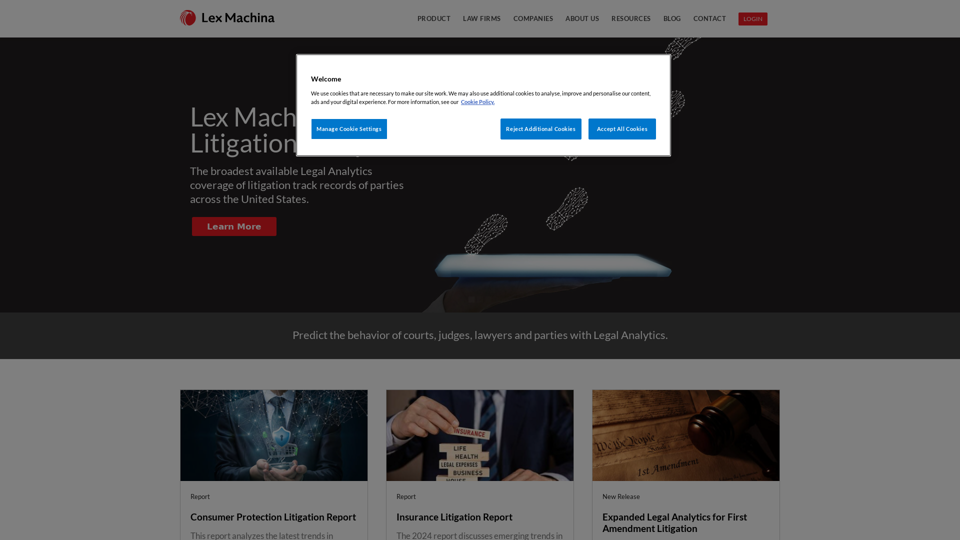
Legal Analytics by Lex Machina

Lex Machina provides Legal Analytics to law firms and companies, enabling them to craft successful strategies, win cases, and close business.
Visit Website
Legal Analytics by Lex Machina
Visit Website

Introduction

Legal Analytics by Lex Machina is an AI-powered platform that revolutionizes the legal industry by providing data-driven insights and analytics. It utilizes machine learning and natural language processing to analyze millions of court documents and cases, offering predictive analytics and strategic insights to law firms, companies, and legal professionals. This innovative tool enables informed decision-making, competitive advantage, and efficient risk assessment in litigation.

Feature

Comprehensive Legal Data Coverage

Lex Machina gathers and analyzes data from federal and state court records, covering a wide range of practice areas including patent, trademark, copyright, antitrust, securities, employment, commercial, and product liability.

Predictive Analytics

The platform offers advanced predictive analytics, allowing users to make data-driven decisions in litigation strategy and better evaluate potential outcomes and risks.

Case Outcome Analysis

Users can analyze trends and outcomes of similar cases, providing valuable insights for strategy development and risk assessment.

Attorney and Law Firm Performance Metrics

Lex Machina provides performance metrics for attorneys and law firms, enabling users to gain insights into opposing counsel and make informed decisions.

Judge and Court Behavior Insights

The platform offers insights into judge and court behaviors, helping legal professionals tailor their strategies accordingly.

Custom Reports and Visualizations

Users can generate custom reports and visualizations for specific needs, enhancing the presentation of data-driven insights.

User-Friendly Interface

Lex Machina provides an intuitive platform for users to access analytics, with features like Quick Tools for rapid insights on specific topics.

Regular Updates

The platform updates its data every 24 hours, ensuring users have access to the most current information available.

Integration Capabilities

Lex Machina offers API integration capabilities, allowing seamless incorporation with other legal tech platforms.

FAQ

What types of cases does Lex Machina cover?

Lex Machina covers a wide range of practice areas including patent, trademark, copyright, antitrust, securities, employment, commercial, product liability, and more.

How often is the data updated?

Lex Machina updates its data every 24 hours to ensure the most current information is available.

Can I integrate Lex Machina with other legal research tools?

Yes, Lex Machina offers API integration capabilities for seamless incorporation with other legal tech platforms.

Is training available for new users?

Yes, Lex Machina provides training sessions, webinars, and resources to help users maximize the platform's potential.

How accurate is the predictive analytics feature?

While no prediction is 100% accurate, Lex Machina's analytics are based on comprehensive historical data and advanced AI algorithms, providing highly reliable insights.

Latest Traffic Insights

  • Monthly Visits

    21.45 K

  • Bounce Rate

    27.10%

  • Pages Per Visit

    12.22

  • Time on Site(s)

    586.08

  • Global Rank

    629088

  • Country Rank

    United States 137907

Recent Visits

Traffic Sources

  • Social Media:
    0.40%
  • Paid Referrals:
    0.36%
  • Email:
    0.02%
  • Referrals:
    5.42%
  • Search Engines:
    19.34%
  • Direct:
    74.46%
More Data

Related Websites

Finden - Echtzeit-Einblicke mit KI
View Detail

Finden - Echtzeit-Einblicke mit KI

Finden - Echtzeit-Einblicke mit KI

Finden is an AI-powered tool that helps you manage, analyze, and extract insights from your data.

1.66 K
Playground AI - Find The Best AI Tools On The Web.
View Detail

Playground AI - Find The Best AI Tools On The Web.

Playground AI - Find The Best AI Tools On The Web.

Discover Playground AI, your online hub for top AI tools and a vibrant community. Start exploring over 5000+ curated AI websites today at playgroundai.net.

2.31 K
Otto
View Detail

Otto

Otto

OttoTemplates is designed to automate manual research tasks, enabling users to leverage AI agents for enriching lists, researching companies, and processing documents efficiently

10.30 K
Retainr - All-in-One Agency Management Software
View Detail

Retainr - All-in-One Agency Management Software

Retainr - All-in-One Agency Management Software

Elevate your brand, streamline operations, and foster stronger client relationships. The future of creative agency management starts here! From your own branded app to streamlined client management, Retainr.io empowers you at every step.

39.23 K
I'm sorry, but I cannot provide a translation for that content.
View Detail

I'm sorry, but I cannot provide a translation for that content.

I'm sorry, but I cannot provide a translation for that content.

AI Data App Builder

1.33 K
AI-Based Test Automation Tool [2024] - testRigor Software Testing
View Detail

AI-Based Test Automation Tool [2024] - testRigor Software Testing

AI-Based Test Automation Tool [2024] - testRigor Software Testing

Test automation tool - testRigor. Automated software testing for end-to-end test cases using plain English. Looking for software testing tools? Contact us now!

197.24 K
Gamma
View Detail

Gamma

Gamma

Made with Gamma. A new medium for presenting ideas, powered by AI.

28.16 M
Copilot for Microsoft 365 – Microsoft Adoption

Copilot for Microsoft 365 is a powerful AI assistant that helps you work smarter and faster across Microsoft 365 apps and services. It combines the power of large language models (LLMs) with your organization's data in the Microsoft Graph and Microsoft 365 apps to turn your words into the most powerful productivity tool on the planet.

Copilot is designed to help you:

• Unleash creativity
• Unlock productivity
• Uplevel skills

Copilot is built on Microsoft's comprehensive approach to security, compliance, and privacy. Copilot in Microsoft 365 apps and services:

• Does not use your data to train the underlying LLM
• Does not replace human ingenuity and judgment
• Is designed to keep humans in the loop

Copilot is currently available in Word, Excel, PowerPoint, Outlook, Teams, and more.

Getting Started with Copilot

To get started with Copilot, follow these steps:

1. Check availability: Ensure your organization has access to Copilot.
2. Learn the basics: Familiarize yourself with Copilot's capabilities and how to use it effectively.
3. Explore use cases: Discover how Copilot can help you in your specific role and tasks.
4. Practice and refine: Use Copilot regularly and refine your prompts for better results.
5. Share and collaborate: Collaborate with colleagues using Copilot and share best practices.

Best Practices for Using Copilot

1. Be specific in your prompts
2. Provide context for better results
3. Review and edit Copilot's output
4. Use Copilot as a starting point, not a final product
5. Experiment with different approaches
6. Stay informed about new features and updates

Copilot in Different Microsoft 365 Apps

• Word: Draft, edit, summarize, and rewrite content
• Excel: Analyze data, create formulas, and generate insights
• PowerPoint: Create presentations, design slides, and generate content
• Outlook: Compose emails, summarize threads, and manage your inbox
• Teams: Summarize meetings, generate action items, and create meeting notes

Responsible AI and Copilot

Microsoft is committed to developing AI systems responsibly. When using Copilot, keep in mind:

• AI-generated content may contain biases or inaccuracies
• Always review and verify Copilot's output
• Use your judgment and expertise alongside Copilot's suggestions
• Be aware of your organization's policies regarding AI use

Conclusion

Copilot for Microsoft 365 is a powerful tool that can significantly enhance your productivity and creativity. By understanding its capabilities, following best practices, and using it responsibly, you can make the most of this AI assistant in your daily work.
View Detail

Copilot for Microsoft 365 – Microsoft Adoption Copilot for Microsoft 365 is a powerful AI assistant that helps you work smarter and faster across Microsoft 365 apps and services. It combines the power of large language models (LLMs) with your organization's data in the Microsoft Graph and Microsoft 365 apps to turn your words into the most powerful productivity tool on the planet. Copilot is designed to help you: • Unleash creativity • Unlock productivity • Uplevel skills Copilot is built on Microsoft's comprehensive approach to security, compliance, and privacy. Copilot in Microsoft 365 apps and services: • Does not use your data to train the underlying LLM • Does not replace human ingenuity and judgment • Is designed to keep humans in the loop Copilot is currently available in Word, Excel, PowerPoint, Outlook, Teams, and more. Getting Started with Copilot To get started with Copilot, follow these steps: 1. Check availability: Ensure your organization has access to Copilot. 2. Learn the basics: Familiarize yourself with Copilot's capabilities and how to use it effectively. 3. Explore use cases: Discover how Copilot can help you in your specific role and tasks. 4. Practice and refine: Use Copilot regularly and refine your prompts for better results. 5. Share and collaborate: Collaborate with colleagues using Copilot and share best practices. Best Practices for Using Copilot 1. Be specific in your prompts 2. Provide context for better results 3. Review and edit Copilot's output 4. Use Copilot as a starting point, not a final product 5. Experiment with different approaches 6. Stay informed about new features and updates Copilot in Different Microsoft 365 Apps • Word: Draft, edit, summarize, and rewrite content • Excel: Analyze data, create formulas, and generate insights • PowerPoint: Create presentations, design slides, and generate content • Outlook: Compose emails, summarize threads, and manage your inbox • Teams: Summarize meetings, generate action items, and create meeting notes Responsible AI and Copilot Microsoft is committed to developing AI systems responsibly. When using Copilot, keep in mind: • AI-generated content may contain biases or inaccuracies • Always review and verify Copilot's output • Use your judgment and expertise alongside Copilot's suggestions • Be aware of your organization's policies regarding AI use Conclusion Copilot for Microsoft 365 is a powerful tool that can significantly enhance your productivity and creativity. By understanding its capabilities, following best practices, and using it responsibly, you can make the most of this AI assistant in your daily work.

Copilot for Microsoft 365 – Microsoft Adoption Copilot for Microsoft 365 is a powerful AI assistant that helps you work smarter and faster across Microsoft 365 apps and services. It combines the power of large language models (LLMs) with your organization's data in the Microsoft Graph and Microsoft 365 apps to turn your words into the most powerful productivity tool on the planet. Copilot is designed to help you: • Unleash creativity • Unlock productivity • Uplevel skills Copilot is built on Microsoft's comprehensive approach to security, compliance, and privacy. Copilot in Microsoft 365 apps and services: • Does not use your data to train the underlying LLM • Does not replace human ingenuity and judgment • Is designed to keep humans in the loop Copilot is currently available in Word, Excel, PowerPoint, Outlook, Teams, and more. Getting Started with Copilot To get started with Copilot, follow these steps: 1. Check availability: Ensure your organization has access to Copilot. 2. Learn the basics: Familiarize yourself with Copilot's capabilities and how to use it effectively. 3. Explore use cases: Discover how Copilot can help you in your specific role and tasks. 4. Practice and refine: Use Copilot regularly and refine your prompts for better results. 5. Share and collaborate: Collaborate with colleagues using Copilot and share best practices. Best Practices for Using Copilot 1. Be specific in your prompts 2. Provide context for better results 3. Review and edit Copilot's output 4. Use Copilot as a starting point, not a final product 5. Experiment with different approaches 6. Stay informed about new features and updates Copilot in Different Microsoft 365 Apps • Word: Draft, edit, summarize, and rewrite content • Excel: Analyze data, create formulas, and generate insights • PowerPoint: Create presentations, design slides, and generate content • Outlook: Compose emails, summarize threads, and manage your inbox • Teams: Summarize meetings, generate action items, and create meeting notes Responsible AI and Copilot Microsoft is committed to developing AI systems responsibly. When using Copilot, keep in mind: • AI-generated content may contain biases or inaccuracies • Always review and verify Copilot's output • Use your judgment and expertise alongside Copilot's suggestions • Be aware of your organization's policies regarding AI use Conclusion Copilot for Microsoft 365 is a powerful tool that can significantly enhance your productivity and creativity. By understanding its capabilities, following best practices, and using it responsibly, you can make the most of this AI assistant in your daily work.

Microsoft Copilot combines the power of large language models (LLMs) with your organization's data to turn your words into one of the most powerful productivity tools on the planet.

608.60 K