Open-source RightAI Tools Directory
  • Discover AI
  • Submit
  • Startup
  • Blog
Open-source RightAI Tools Directory
Discover the best AI tools of 2025 with the RightAI Tools Directory!

Friend Links

AI Anime GeneratorToolsApp AI

Support

Tap4
Privacy policyTerms & ConditionsContact Us
Loading...
loading...

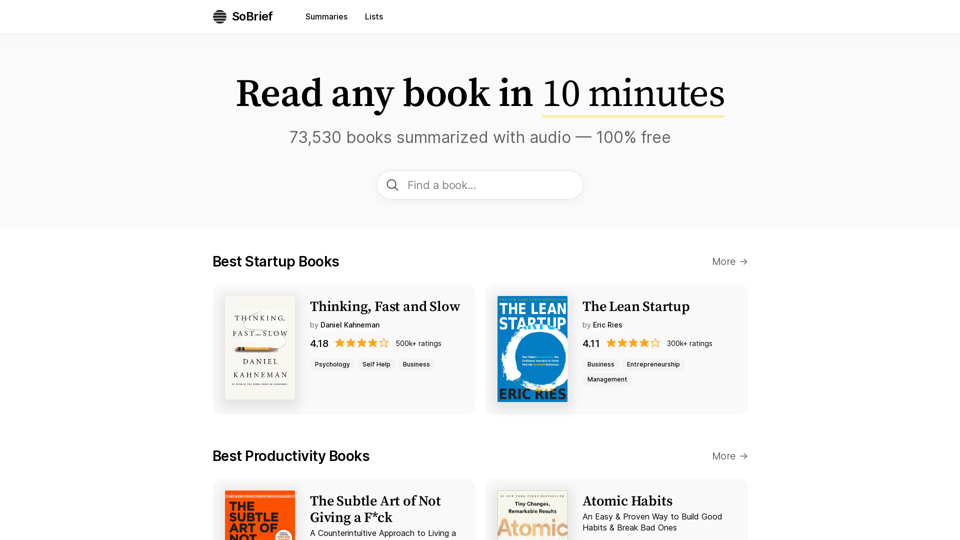
SoBrief.com: World's Largest Book Summary Site

Explore 73,530 free non-fiction book summaries with audio. 12 key takeaways in 10 minutes each. 10x more books than any other site. Every imaginable topic.
Visit Website
SoBrief.com: World's Largest Book Summary Site
Visit Website

Introduction

SoBrief.com is the world's largest book summary platform, offering concise summaries of over 73,000 books across various genres. Users can grasp key concepts of any book in just 10 minutes, with both text and audio formats available. The platform is completely free and covers a wide range of categories, including Startup, Productivity, Relationships, Psychology, Biography, and Self-Help.

Feature

Extensive Library

SoBrief.com boasts an impressive collection of 73,530 summarized books, providing users with a vast selection of knowledge across multiple genres.

Audio Summaries

All book summaries are available in audio format, allowing users to consume content on-the-go or while multitasking.

Free Access

The platform offers 100% free access to all users, making knowledge accessible to everyone without any cost barriers.

Quick Reading

Users can read or listen to any book summary in just 10 minutes, enabling efficient learning and time management.

Diverse Categories

SoBrief.com covers a wide range of genres, including Startup, Productivity, Relationships, Psychology, Biography, and Self-Help, catering to various interests and learning needs.

Rating System

Each book summary includes a rating and the number of ratings, helping users gauge the popularity and quality of the content.

Curated Lists

The platform offers "Best of" lists for different book categories, assisting users in discovering top-rated books in their areas of interest.

FAQ

How accurate are the book summaries?

While SoBrief.com aims to provide accurate summaries, it's important to note that these are condensed versions and may not capture every nuance of the original book.

Can I use SoBrief.com instead of reading full books?

SoBrief.com is an excellent tool for getting the main ideas of a book quickly, but for in-depth understanding, reading the full book is recommended.

Are there any limitations on daily usage?

The website doesn't mention any daily usage limits, suggesting unrestricted access to all summaries.

How often is new content added?

The website doesn't specify the frequency of updates, but with over 73,000 summaries, it likely has a substantial and growing collection.

Is there a mobile app for SoBrief.com?

The provided information doesn't mention a mobile app, but the website appears to be accessible on mobile devices.

Latest Traffic Insights

  • Monthly Visits

    1.14 M

  • Bounce Rate

    54.56%

  • Pages Per Visit

    2.95

  • Time on Site(s)

    97.08

  • Global Rank

    45675

  • Country Rank

    United States 32655

Recent Visits

Traffic Sources

  • Social Media:
    3.48%
  • Paid Referrals:
    0.56%
  • Email:
    0.08%
  • Referrals:
    6.66%
  • Search Engines:
    49.88%
  • Direct:
    39.35%
More Data

Related Websites

ReText
View Detail

ReText

ReText

An AI-powered text processing tool to fix and simplify your text, making your texting experience as easy as possible.

193.90 M
GoldDust
View Detail

GoldDust

GoldDust

What is the founding date of Google?

193.90 M
Chat-GPT PDF

What is Chat-GPT PDF?

Chat-GPT PDF is a tool that allows users to generate PDF files from Chat-GPT conversations. This innovative tool enables users to save and share their conversations in a more organized and visually appealing format.

How does Chat-GPT PDF work?

The process is simple and straightforward. Here's a step-by-step guide:

1. Copy the conversation: Copy the entire conversation from the Chat-GPT platform.
2. Paste the conversation: Paste the copied conversation into the Chat-GPT PDF tool.
3. Customize the layout: Customize the layout, font, and design of the PDF file according to your preferences.
4. Generate the PDF: Click the "Generate PDF" button to create a downloadable PDF file.

Features of Chat-GPT PDF

Chat-GPT PDF offers several features that make it an essential tool for users:

* Customizable layout: Customize the layout, font, and design of the PDF file to suit your needs.
* Easy sharing: Share the PDF file with others via email, social media, or messaging apps.
* Offline access: Access your conversations offline, even without an internet connection.
* Organization: Organize your conversations in a neat and tidy format, making it easier to review and reference.

Benefits of Chat-GPT PDF

The benefits of using Chat-GPT PDF are numerous:

* Improved productivity: Save time and increase productivity by having all your conversations in one place.
* Enhanced collaboration: Collaborate with others more effectively by sharing conversations in a clear and concise format.
* Better organization: Keep your conversations organized, making it easier to review and reference them later.

Conclusion

Chat-GPT PDF is a game-changer for anyone who uses Chat-GPT regularly. With its ease of use, customization options, and benefits, it's an essential tool for anyone looking to get the most out of their conversations.
View Detail

Chat-GPT PDF What is Chat-GPT PDF? Chat-GPT PDF is a tool that allows users to generate PDF files from Chat-GPT conversations. This innovative tool enables users to save and share their conversations in a more organized and visually appealing format. How does Chat-GPT PDF work? The process is simple and straightforward. Here's a step-by-step guide: 1. Copy the conversation: Copy the entire conversation from the Chat-GPT platform. 2. Paste the conversation: Paste the copied conversation into the Chat-GPT PDF tool. 3. Customize the layout: Customize the layout, font, and design of the PDF file according to your preferences. 4. Generate the PDF: Click the "Generate PDF" button to create a downloadable PDF file. Features of Chat-GPT PDF Chat-GPT PDF offers several features that make it an essential tool for users: * Customizable layout: Customize the layout, font, and design of the PDF file to suit your needs. * Easy sharing: Share the PDF file with others via email, social media, or messaging apps. * Offline access: Access your conversations offline, even without an internet connection. * Organization: Organize your conversations in a neat and tidy format, making it easier to review and reference. Benefits of Chat-GPT PDF The benefits of using Chat-GPT PDF are numerous: * Improved productivity: Save time and increase productivity by having all your conversations in one place. * Enhanced collaboration: Collaborate with others more effectively by sharing conversations in a clear and concise format. * Better organization: Keep your conversations organized, making it easier to review and reference them later. Conclusion Chat-GPT PDF is a game-changer for anyone who uses Chat-GPT regularly. With its ease of use, customization options, and benefits, it's an essential tool for anyone looking to get the most out of their conversations.

Chat-GPT PDF What is Chat-GPT PDF? Chat-GPT PDF is a tool that allows users to generate PDF files from Chat-GPT conversations. This innovative tool enables users to save and share their conversations in a more organized and visually appealing format. How does Chat-GPT PDF work? The process is simple and straightforward. Here's a step-by-step guide: 1. Copy the conversation: Copy the entire conversation from the Chat-GPT platform. 2. Paste the conversation: Paste the copied conversation into the Chat-GPT PDF tool. 3. Customize the layout: Customize the layout, font, and design of the PDF file according to your preferences. 4. Generate the PDF: Click the "Generate PDF" button to create a downloadable PDF file. Features of Chat-GPT PDF Chat-GPT PDF offers several features that make it an essential tool for users: * Customizable layout: Customize the layout, font, and design of the PDF file to suit your needs. * Easy sharing: Share the PDF file with others via email, social media, or messaging apps. * Offline access: Access your conversations offline, even without an internet connection. * Organization: Organize your conversations in a neat and tidy format, making it easier to review and reference. Benefits of Chat-GPT PDF The benefits of using Chat-GPT PDF are numerous: * Improved productivity: Save time and increase productivity by having all your conversations in one place. * Enhanced collaboration: Collaborate with others more effectively by sharing conversations in a clear and concise format. * Better organization: Keep your conversations organized, making it easier to review and reference them later. Conclusion Chat-GPT PDF is a game-changer for anyone who uses Chat-GPT regularly. With its ease of use, customization options, and benefits, it's an essential tool for anyone looking to get the most out of their conversations.

Exporting Chat History to PDF You can export your chat history with Chat-GPT to a PDF file using the following methods: #Method 1: Browser Print Function 1. Open your chat conversation with Chat-GPT in a web browser. 2. Press `Ctrl + P` (Windows) or `Cmd + P` (Mac) to open the print dialog box. 3. Select "Save as PDF" as the printer destination. 4. Choose a location to save the PDF file and set the file name. 5. Click "Save" to export the chat history to a PDF file. #Method 2: Online PDF Conversion Tools 1. Copy the entire chat conversation by pressing `Ctrl + A` (Windows) or `Cmd + A` (Mac) and then `Ctrl + C` (Windows) or `Cmd + C` (Mac). 2. Go to an online PDF conversion tool, such as SmallPDF or Convertio. 3. Paste the chat conversation into the conversion tool's text box. 4. Select the PDF format and click "Convert" to generate the PDF file. 5. Download the PDF file to your computer. #Method 3: Browser Extensions 1. Install a browser extension, such as Print Friendly & PDF or FireShot, that allows you to save web pages as PDF files. 2. Open your chat conversation with Chat-GPT in a web browser. 3. Click the browser extension's icon in the toolbar. 4. Select the "Save as PDF" option and choose a location to save the file. 5. Click "Save" to export the chat history to a PDF file. By following these methods, you can easily export your chat history with Chat-GPT to a PDF file for future reference or sharing.

193.90 M
S32 | Your Personal AI Conveyancer for Section 32 and Rental Agreements
View Detail

S32 | Your Personal AI Conveyancer for Section 32 and Rental Agreements

S32 | Your Personal AI Conveyancer for Section 32 and Rental Agreements

The Closest Thing to a Human Conveyancer

69
XOR Extension
View Detail

XOR Extension

XOR Extension

The XOR Extension lets recruiters talk to candidates from their Applicant Tracking System (ATS), job boards, or LinkedIn.

193.90 M
Text Summarizer 

This is a tool that can condense large amounts of text into shorter, more manageable summaries.
View Detail

Text Summarizer This is a tool that can condense large amounts of text into shorter, more manageable summaries.

Text Summarizer This is a tool that can condense large amounts of text into shorter, more manageable summaries.

Instantly summarize text with Text Summarizer: optimize your work using AI-powered text summarization with ChatGPT.

193.90 M
Exchange - Image Converter & Background Remover
View Detail

Exchange - Image Converter & Background Remover

Exchange - Image Converter & Background Remover

Image Converter & Background Remover

193.90 M
SpeedClip
View Detail

SpeedClip

SpeedClip

I can help you with that! Just give me the YouTube video link and I'll do my best to provide a clear and concise summary of its content.

193.90 M