Open-source RightAI Tools Directory
  • Discover AI
  • Submit
  • Startup
  • Blog
Open-source RightAI Tools Directory
Discover the best AI tools of 2025 with the RightAI Tools Directory!

Friend Links

AI Anime GeneratorToolsApp AI

Support

Tap4
Privacy policyTerms & ConditionsContact Us
Loading...
loading...

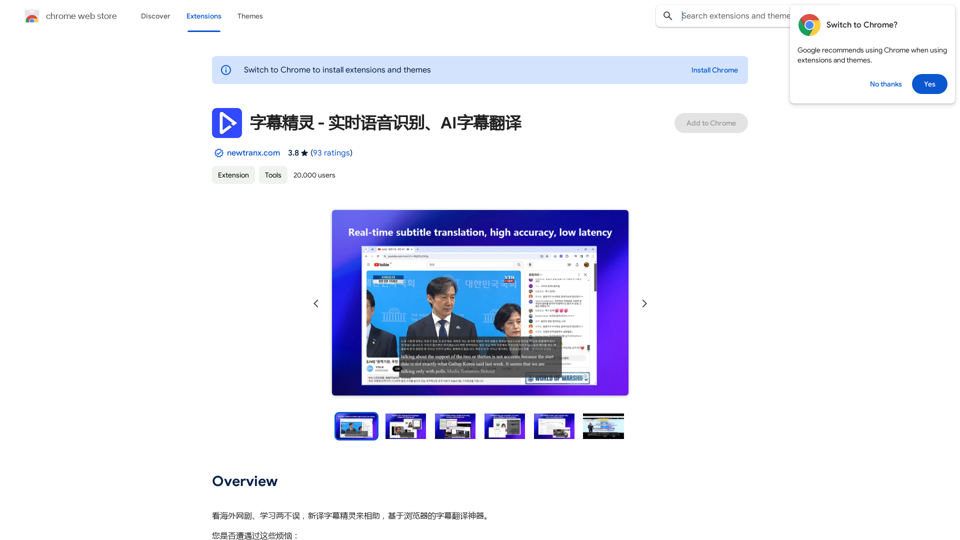
Subtitle Wizard - Real-time Speech Recognition, AI Subtitle Translation

Watch foreign TV series and learn without mistakes, the new subtitle translation elf is here to assist, a browser-based subtitle translation artifact.
Visit Website
Subtitle Wizard - Real-time Speech Recognition, AI Subtitle Translation
Visit Website

Introduction

Subtitle Wizard is a browser-based real-time speech recognition and AI subtitle translation plugin. It can recognize speech in real-time, automatically translate and display bilingual subtitles, support intelligent recognition, export subtitles and audio, as well as online editing of subtitle text. This tool supports recognition and translation of over 130 languages and dialects worldwide, providing users with a convenient subtitle translation solution.

Feature

Multi-language Support

Subtitle Wizard supports recognition and translation of 130+ languages/dialects worldwide, meeting users' diverse language needs.

Real-time Speech Recognition and Translation

The plugin can recognize speech in real-time and automatically translate it into the target language, providing users with instant bilingual subtitles.

Subtitle Export Function

Users can export the recognized and translated text in the current subtitle window, and also view historical subtitles and export subtitles and audio.

Flexible Subtitle Settings

Supports single and bilingual subtitle settings, users can choose to display only "original text" or "translated text" in the subtitle window or personal center.

Customizable Display Style

Users can set the display style of subtitles according to personal preferences, enhancing the viewing experience.

Online Editing Function

Provides online editing function for subtitle text, convenient for users to make modifications and adjustments.

Payment Model

Adopts an in-product purchase model, new users can get a certain amount of free usage, after which they need to purchase credits to continue using.

FAQ

How to set recognition and translation languages?

The default recognition language is English. If the current video uses another language, you can change the original language in the subtitle window. The target language (translation language) can also be set in the subtitle window.

What is the pricing for Subtitle Wizard?

Subtitle Wizard adopts an in-product purchase model. New users can get a certain amount of free usage after installing and logging in to the plugin. After the free credits are used up, users need to purchase credits to continue using.

What are the benefits of using Subtitle Wizard?

  1. Learn cutting-edge international technologies and knowledge
  2. Convenient for watching TV series, anime, and participating in online meetings
  3. Real-time subtitle translation
  4. Automatic speech recognition
  5. Can export subtitles and audio

What are the limitations of Subtitle Wizard?

  1. Only supports browser plugin form
  2. Requires purchasing credits
  3. May have translation errors

What are some alternatives to Subtitle Wizard?

  1. Tongyi Tingwu - Speech to text, bilingual subtitle translation
  2. Lenovo Voice - Audio and video translation, language learning assistance, TV series companion
  3. Smart Translate Web Translation - Automatic translation, bilingual comparison, AI dialogue
  4. YouTube™ dual subtitles
  5. Coursera Dual Subtitles - Subtitle Translator

How do users rate Subtitle Wizard?

Subtitle Wizard has a rating of 3.8/5 with 93 ratings. Users generally appreciate its real-time subtitle translation, automatic speech recognition, and subtitle and audio export functions. However, some users also point out issues such as translation errors and limitations of paid credit purchases.

Related Websites
Readel: AI Text-to-Speech
View Detail

Readel: AI Text-to-Speech

Readel: AI Text-to-Speech

A small program that can read aloud any Reddit posts, audiobooks, or webpages using the highest quality text-to-speech technology.

193.90 M
BNNGPT - Discover the Impossible.
View Detail

BNNGPT - Discover the Impossible.

BNNGPT - Discover the Impossible.

Real-time, accurate responses driven by cutting-edge AI. Enjoy an elegant, visually appealing interface. Experience the future of search with BNNGPT.

0
PromptForge
View Detail

PromptForge

PromptForge

PromptForge offers easy, diverse one-click prompts right inside ChatGPT, Gemini and more.

193.90 M
Lingban AI Assistant - GPT Chat, Web Translation, Bilingual Comparison, Intelligent Writing, AI Full-Network Search, AI Article Reading, Real-Time Internet Connection
View Detail

Lingban AI Assistant - GPT Chat, Web Translation, Bilingual Comparison, Intelligent Writing, AI Full-Network Search, AI Article Reading, Real-Time Internet Connection

Lingban AI Assistant - GPT Chat, Web Translation, Bilingual Comparison, Intelligent Writing, AI Full-Network Search, AI Article Reading, Real-Time Internet Connection

Lingban AI Assistant is your personal AI assistant on any webpage. It can help you translate various webpages, provide bilingual comparisons, offer creative inspiration, and answer your questions in chat conversations.

193.90 M
SearchAISearchAI
View Detail

SearchAISearchAI

SearchAISearchAI

Adds a search function to the start page that incorporates a text-based AI, allowing for instant dialogue and intelligent responses.

193.90 M
What is a Prompster?

A Prompster is a person who assists a speaker, actor, or presenter by providing them with lines or cues, usually in a subtle and discreet manner, during a performance, presentation, or speech.
View Detail

What is a Prompster? A Prompster is a person who assists a speaker, actor, or presenter by providing them with lines or cues, usually in a subtle and discreet manner, during a performance, presentation, or speech.

What is a Prompster? A Prompster is a person who assists a speaker, actor, or presenter by providing them with lines or cues, usually in a subtle and discreet manner, during a performance, presentation, or speech.

Slash Commands for ChatGPT and Bard ===================================== Introduction Slash commands are a convenient way to interact with ChatGPT and Bard, allowing you to perform various tasks and actions within the chat interface. This guide provides an overview of the available slash commands for both ChatGPT and Bard. ChatGPT Slash Commands #General Commands * `/help`: Displays a list of available slash commands and their descriptions. * `/reset`: Resets the conversation, clearing all previous messages and context. #Conversation Management * `/start`: Starts a new conversation, allowing you to begin a fresh topic or task. * `/stop`: Ends the current conversation, stopping any ongoing tasks or topics. #Language and Tone * `/lang <language_code>`: Sets the language for the conversation (e.g., `/lang en` for English). * `/tone <tone>`: Adjusts the tone of the responses (e.g., `/tone formal` for formal tone). #Task Management * `/task <task_name>`: Creates a new task or topic for the conversation (e.g., `/task math problem`). * `/done`: Marks the current task as completed. #Information and Resources * `/define <word>`: Provides the definition of a word or phrase. * `/wiki <topic>`: Displays information about a topic from Wikipedia. Bard Slash Commands #General Commands * `/help`: Displays a list of available slash commands and their descriptions. * `/reset`: Resets the conversation, clearing all previous messages and context. #Conversation Management * `/start`: Starts a new conversation, allowing you to begin a fresh topic or task. * `/stop`: Ends the current conversation, stopping any ongoing tasks or topics. #Language and Tone * `/lang <language_code>`: Sets the language for the conversation (e.g., `/lang en` for English). * `/tone <tone>`: Adjusts the tone of the responses (e.g., `/tone formal` for formal tone). #Task Management * `/task <task_name>`: Creates a new task or topic for the conversation (e.g., `/task math problem`). * `/done`: Marks the current task as completed. #Information and Resources * `/define <word>`: Provides the definition of a word or phrase. * `/wiki <topic>`: Displays information about a topic from Wikipedia. * `/news <topic>`: Displays news articles related to a specific topic. Conclusion Slash commands provide a convenient way to interact with ChatGPT and Bard, allowing you to manage conversations, adjust language and tone, and access various resources. By mastering these commands, you can optimize your experience and get the most out of your interactions with these AI models.

193.90 M
Hashtag Guru: AI Assistant for Instagram on the App Store
View Detail

Hashtag Guru: AI Assistant for Instagram on the App Store

Hashtag Guru: AI Assistant for Instagram on the App Store

Your Ultimate AI-Powered Hashtag and Caption Generator! Unlock the secret to social media success with Hashtag Guru, the ultimate AI-driven hashtag generator and caption creator that helps you increase your online visibility, boost engagement, and grow your followers!

124.77 M
Ikigai Ads Companion
View Detail

Ikigai Ads Companion

Ikigai Ads Companion

Track the success of your TikTok ads as they run and get helpful tips to improve them.

193.90 M