Open-source RightAI Tools Directory
  • Discover AI
  • Submit
  • Startup
  • Blog
Open-source RightAI Tools Directory
Discover the best AI tools of 2025 with the RightAI Tools Directory!

Friend Links

AI Anime GeneratorToolsApp AI

Support

Tap4
Privacy policyTerms & ConditionsContact Us
Loading...
loading...

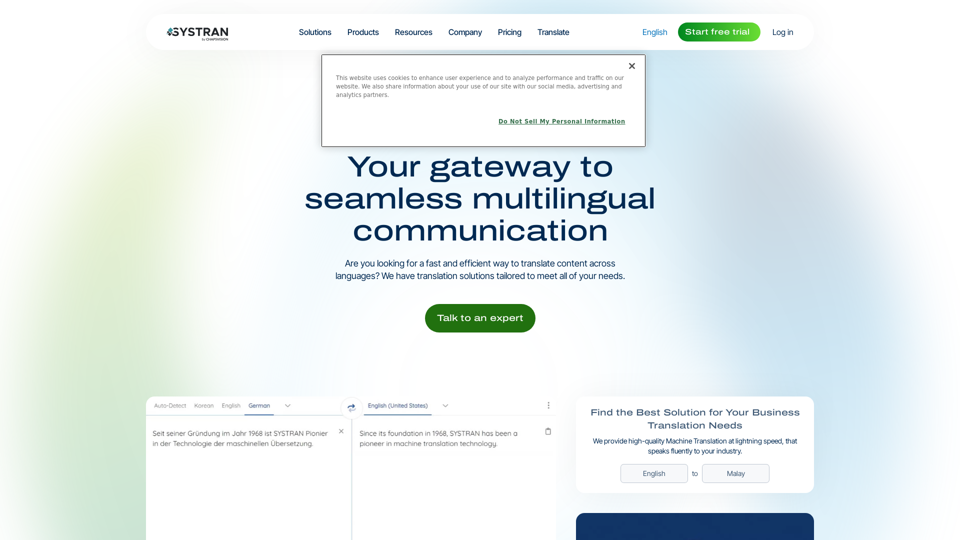
Translation tool for professionals | SYSTRAN

Translate texts, documents and much more in over 55 languages with SYSTRAN's fully secure professional translation solutions. API & CAT Tool integration
Visit Website
Translation tool for professionals | SYSTRAN
Visit Website

Introduction

SYSTRAN is a leading provider of professional translation tools and solutions with over 50 years of experience in machine translation innovation. It offers a range of products designed to break language barriers and facilitate seamless multilingual communication for businesses and organizations worldwide. SYSTRAN leverages advanced AI and machine learning technologies to provide fast, accurate translations across multiple languages, supporting over 50 languages and translating multiple document formats.

Feature

Comprehensive Translation Solutions

SYSTRAN offers machine translation solutions for various industries and use cases, supporting over 50 languages and 30+ file types. It provides on-premise, private cloud, and SaaS deployment options to cater to different organizational needs.

Advanced Integration Capabilities

The platform offers API integration capabilities and a browser extension for webpage translation, allowing seamless incorporation into existing workflows and systems.

Innovative Technology

SYSTRAN utilizes Neural Fuzzy Adaptation (NFA) for improved translation quality and offers a speech-to-text translation add-on, enhancing its versatility and accuracy.

Flexible Deployment Options

Users can choose from various deployment options:

  • SYSTRAN translate Server (On-premise)
  • SYSTRAN translate Private Cloud (Dedicated cloud)
  • SYSTRAN translate Enterprise (Public cloud)
  • SYSTRAN translate PRO (SaaS)
  • SYSTRAN translate API (Cloud API)

Customization and Scalability

The platform allows customization of translation models for specific industry terminology and supports high-volume translation needs, making it suitable for various business sizes and requirements.

FAQ

Is SYSTRAN secure for sensitive information?

Yes, SYSTRAN prioritizes data security and compliance, offering end-to-end encryption and adhering to industry standards like GDPR.

Can SYSTRAN translate specialized industry terminology?

Yes, SYSTRAN's Neural Fuzzy Adaptation (NFA) allows for customization of translation models to handle specific industry terminology accurately.

What file formats does SYSTRAN support?

SYSTRAN supports over 30 file formats, including Office documents, PDFs, XML, and IDML.

Is there a limit to the translation volume with SYSTRAN Server?

No, SYSTRAN Server supports unlimited translation volumes and user access points.

Can SYSTRAN integrate with my existing software?

Yes, SYSTRAN offers API integration capabilities to incorporate translation functions into various applications and workflows.

Related Websites

Pygma – Personal AI social media manager
View Detail

Pygma – Personal AI social media manager

Pygma – Personal AI social media manager

Smart Instagram assistant – create, schedule, engage – all you need to grow on social media

5.70 K
BlacktoothAI - All-in-One AI Assistant
View Detail

BlacktoothAI - All-in-One AI Assistant

BlacktoothAI - All-in-One AI Assistant

Blacktooth is a powerful AI platform for generating text, images, and more. Access ChatGPT, Claude, Gemini, Stable Diffusion, Flux PRO, ElevenLabs, and more.

191
Leadership Coaching App | Create Free Account Today
View Detail

Leadership Coaching App | Create Free Account Today

Leadership Coaching App | Create Free Account Today

Conversational AI leadership tool that is revolutionizing leadership coaching, infinitely scalable and capable of being deployed as a leadership development tool to your entire organization

0
EZPZAI | Home
View Detail

EZPZAI | Home

EZPZAI | Home

0
Recap | AI-Driven Summaries and Visual Insights Instantly
View Detail

Recap | AI-Driven Summaries and Visual Insights Instantly

Recap | AI-Driven Summaries and Visual Insights Instantly

Recap, an AI platform, transforms complex information into concise summaries and intuitive visuals, such as mind maps, timelines, and tables, enhancing productivity and saving time by extracting key details from various sources. |Recap

2.37 K
Accounting AI software for faster invoice processing
View Detail

Accounting AI software for faster invoice processing

Accounting AI software for faster invoice processing

Transform invoice processing and enhance PO matching with Vic.ai's autonomous accounting solutions. Our platform offers robust AI capabilities, ensuring accuracy and speed in your financial operations and elevating your accounts payable process.

79.80 K
Copilot for Microsoft 365 – Microsoft Adoption

Copilot for Microsoft 365 is a powerful AI assistant that helps you work smarter and faster across Microsoft 365 apps and services. It combines the power of large language models (LLMs) with your organization's data in the Microsoft Graph and Microsoft 365 apps to turn your words into the most powerful productivity tool on the planet.

Copilot is designed to help you:

β€’ Unleash creativity
β€’ Unlock productivity
β€’ Uplevel skills

Copilot is built on Microsoft's comprehensive approach to security, compliance, and privacy. Copilot in Microsoft 365 apps and services:

β€’ Does not use your data to train the underlying LLM
β€’ Does not replace human ingenuity and judgment
β€’ Is designed to keep humans in the loop

Copilot is currently available in Word, Excel, PowerPoint, Outlook, Teams, and more.

Getting Started with Copilot

To get started with Copilot, follow these steps:

1. Check availability: Ensure your organization has access to Copilot.
2. Learn the basics: Familiarize yourself with Copilot's capabilities and how to use it effectively.
3. Explore use cases: Discover how Copilot can help you in your specific role and tasks.
4. Practice and refine: Use Copilot regularly and refine your prompts for better results.
5. Share and collaborate: Collaborate with colleagues using Copilot and share best practices.

Best Practices for Using Copilot

1. Be specific in your prompts
2. Provide context for better results
3. Review and edit Copilot's output
4. Use Copilot as a starting point, not a final product
5. Experiment with different approaches
6. Stay informed about new features and updates

Copilot in Different Microsoft 365 Apps

β€’ Word: Draft, edit, summarize, and rewrite content
β€’ Excel: Analyze data, create formulas, and generate insights
β€’ PowerPoint: Create presentations, design slides, and generate content
β€’ Outlook: Compose emails, summarize threads, and manage your inbox
β€’ Teams: Summarize meetings, generate action items, and create meeting notes

Responsible AI and Copilot

Microsoft is committed to developing AI systems responsibly. When using Copilot, keep in mind:

β€’ AI-generated content may contain biases or inaccuracies
β€’ Always review and verify Copilot's output
β€’ Use your judgment and expertise alongside Copilot's suggestions
β€’ Be aware of your organization's policies regarding AI use

Conclusion

Copilot for Microsoft 365 is a powerful tool that can significantly enhance your productivity and creativity. By understanding its capabilities, following best practices, and using it responsibly, you can make the most of this AI assistant in your daily work.
View Detail

Copilot for Microsoft 365 – Microsoft Adoption Copilot for Microsoft 365 is a powerful AI assistant that helps you work smarter and faster across Microsoft 365 apps and services. It combines the power of large language models (LLMs) with your organization's data in the Microsoft Graph and Microsoft 365 apps to turn your words into the most powerful productivity tool on the planet. Copilot is designed to help you: β€’ Unleash creativity β€’ Unlock productivity β€’ Uplevel skills Copilot is built on Microsoft's comprehensive approach to security, compliance, and privacy. Copilot in Microsoft 365 apps and services: β€’ Does not use your data to train the underlying LLM β€’ Does not replace human ingenuity and judgment β€’ Is designed to keep humans in the loop Copilot is currently available in Word, Excel, PowerPoint, Outlook, Teams, and more. Getting Started with Copilot To get started with Copilot, follow these steps: 1. Check availability: Ensure your organization has access to Copilot. 2. Learn the basics: Familiarize yourself with Copilot's capabilities and how to use it effectively. 3. Explore use cases: Discover how Copilot can help you in your specific role and tasks. 4. Practice and refine: Use Copilot regularly and refine your prompts for better results. 5. Share and collaborate: Collaborate with colleagues using Copilot and share best practices. Best Practices for Using Copilot 1. Be specific in your prompts 2. Provide context for better results 3. Review and edit Copilot's output 4. Use Copilot as a starting point, not a final product 5. Experiment with different approaches 6. Stay informed about new features and updates Copilot in Different Microsoft 365 Apps β€’ Word: Draft, edit, summarize, and rewrite content β€’ Excel: Analyze data, create formulas, and generate insights β€’ PowerPoint: Create presentations, design slides, and generate content β€’ Outlook: Compose emails, summarize threads, and manage your inbox β€’ Teams: Summarize meetings, generate action items, and create meeting notes Responsible AI and Copilot Microsoft is committed to developing AI systems responsibly. When using Copilot, keep in mind: β€’ AI-generated content may contain biases or inaccuracies β€’ Always review and verify Copilot's output β€’ Use your judgment and expertise alongside Copilot's suggestions β€’ Be aware of your organization's policies regarding AI use Conclusion Copilot for Microsoft 365 is a powerful tool that can significantly enhance your productivity and creativity. By understanding its capabilities, following best practices, and using it responsibly, you can make the most of this AI assistant in your daily work.

Copilot for Microsoft 365 – Microsoft Adoption Copilot for Microsoft 365 is a powerful AI assistant that helps you work smarter and faster across Microsoft 365 apps and services. It combines the power of large language models (LLMs) with your organization's data in the Microsoft Graph and Microsoft 365 apps to turn your words into the most powerful productivity tool on the planet. Copilot is designed to help you: β€’ Unleash creativity β€’ Unlock productivity β€’ Uplevel skills Copilot is built on Microsoft's comprehensive approach to security, compliance, and privacy. Copilot in Microsoft 365 apps and services: β€’ Does not use your data to train the underlying LLM β€’ Does not replace human ingenuity and judgment β€’ Is designed to keep humans in the loop Copilot is currently available in Word, Excel, PowerPoint, Outlook, Teams, and more. Getting Started with Copilot To get started with Copilot, follow these steps: 1. Check availability: Ensure your organization has access to Copilot. 2. Learn the basics: Familiarize yourself with Copilot's capabilities and how to use it effectively. 3. Explore use cases: Discover how Copilot can help you in your specific role and tasks. 4. Practice and refine: Use Copilot regularly and refine your prompts for better results. 5. Share and collaborate: Collaborate with colleagues using Copilot and share best practices. Best Practices for Using Copilot 1. Be specific in your prompts 2. Provide context for better results 3. Review and edit Copilot's output 4. Use Copilot as a starting point, not a final product 5. Experiment with different approaches 6. Stay informed about new features and updates Copilot in Different Microsoft 365 Apps β€’ Word: Draft, edit, summarize, and rewrite content β€’ Excel: Analyze data, create formulas, and generate insights β€’ PowerPoint: Create presentations, design slides, and generate content β€’ Outlook: Compose emails, summarize threads, and manage your inbox β€’ Teams: Summarize meetings, generate action items, and create meeting notes Responsible AI and Copilot Microsoft is committed to developing AI systems responsibly. When using Copilot, keep in mind: β€’ AI-generated content may contain biases or inaccuracies β€’ Always review and verify Copilot's output β€’ Use your judgment and expertise alongside Copilot's suggestions β€’ Be aware of your organization's policies regarding AI use Conclusion Copilot for Microsoft 365 is a powerful tool that can significantly enhance your productivity and creativity. By understanding its capabilities, following best practices, and using it responsibly, you can make the most of this AI assistant in your daily work.

Microsoft Copilot combines the power of large language models (LLMs) with your organization's data to turn your words into one of the most powerful productivity tools on the planet.

608.60 K
Tomat.AI - Data Analysis with AI
View Detail

Tomat.AI - Data Analysis with AI

Tomat.AI - Data Analysis with AI

Load CSV and analyze it in a visual step-by-step interface. Cleanup, extract, summarize, or make sentiment analysis with your personal AI agent.

5.64 K