Open-source RightAI Tools Directory
  • Discover AI
  • Submit
  • Startup
  • Blog
Open-source RightAI Tools Directory
Discover the best AI tools of 2025 with the RightAI Tools Directory!

Friend Links

AI Anime GeneratorToolsApp AI

Support

Tap4
Privacy policyTerms & ConditionsContact Us
Loading...
loading...

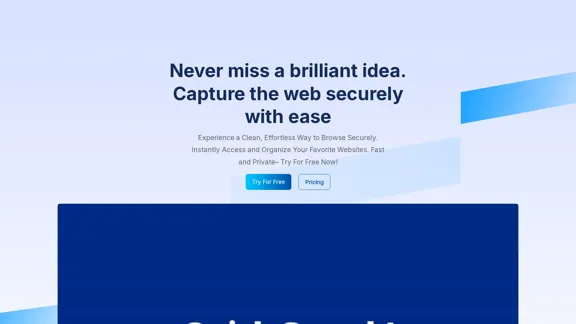
QuickSearchPlus

Browse effortlessly
Visit Website
QuickSearchPlus
Visit Website

Introduction

QuickSearchPlus offers a streamlined and secure way to browse the web, allowing users to capture and organize their favorite websites effortlessly. With features designed for speed and privacy, it caters to users looking for an efficient browsing experience. The platform enables multi-device synchronization, advanced search capabilities, and intuitive bookmark organization, making it a valuable tool for anyone who frequently navigates online.

Feature

  1. Multi-Device Sync

    Your bookmarks sync seamlessly across devices, ensuring access to your favorite sites wherever you are.

  2. Speedy Searching

    QuickSearchPlus utilizes advanced technology to provide lightning-fast search results, eliminating the frustration of slow searches.

  3. Intuitive Bookmark Organization

    The platform features a user-friendly interface for categorizing and tagging bookmarks, making organization simple and efficient.

  4. Advanced Search Capabilities

    Users can easily locate specific bookmarks with advanced search functionality, allowing for quick access to saved links.

  5. Web Portal (Incognito)

    Enjoy private browsing with built-in VPN protection, ensuring your online activities remain anonymous and secure.

  6. File Management

    Users can upload and download files seamlessly, organizing digital resources alongside bookmarks for a comprehensive management solution.

  7. Keyword-Based Search

    The platform supports keyword-based searches, enabling users to find bookmarks quickly and efficiently.

How to Use?

  1. Sign Up: Create an account on QuickSearchPlus to start using its features.

  2. Add Bookmarks: Use the browser extension to add bookmarks easily with just a few clicks.

  3. Organize Bookmarks: Create folders and subfolders to keep your bookmarks organized.

  4. Utilize Advanced Search: Take advantage of the advanced search feature to quickly find specific bookmarks.

  5. Explore File Management: Upload and download files directly within your bookmark collection for better organization.

FAQ

What is QuickSearchPlus?

QuickSearchPlus is a web browsing tool designed to help users capture, organize, and access their favorite websites quickly and securely.

How does QuickSearchPlus enhance browsing?

It offers features like multi-device sync, intuitive bookmark organization, and advanced search capabilities to improve the overall browsing experience.

Is my data secure with QuickSearchPlus?

Yes, QuickSearchPlus prioritizes user privacy with built-in VPN protection for secure and anonymous browsing.

Can I access my bookmarks from multiple devices?

Absolutely, QuickSearchPlus syncs your bookmarks across all devices, allowing for easy access on the go.

What are the file management capabilities?

Users can upload and download files, organizing them alongside bookmarks for a comprehensive digital resource management experience.

Price

PlanMonthly PriceFeatures
Free$0Up to 50 bookmarks, limited web portal access, offline access
Basic$13Unlimited bookmarks, keyword-based search, priority support
Standard$23Unlimited bookmarks, advanced features, full access to web portal
Premium$39Unlimited bookmarks, enhanced features, upload up to 50 GB of files
The price is for reference only, please refer to the latest official data for actual information.

Evaluation

  1. QuickSearchPlus excels in providing a user-friendly interface and efficient bookmark management, making it suitable for users of all levels.
  2. The multi-device sync feature is particularly beneficial for users who switch between devices frequently.
  3. While the platform offers robust features, the pricing may be a consideration for users seeking advanced functionalities.
  4. Improvements could be made in the area of customer support response times and providing more detailed tutorials for new users.
  5. Overall, QuickSearchPlus is a valuable tool for anyone looking to enhance their online browsing and research efficiency.

Related Websites
The AI Cloud for Banks, Insurers and Financial Services
View Detail

The AI Cloud for Banks, Insurers and Financial Services

The AI Cloud for Banks, Insurers and Financial Services

Arya.ai is the 'AI Cloud' for Banks, Insurers and Financial Services to expedite the adoption of AI that is responsible, accurate and auditable.

108.58 K
RehearseNow - AI Scene Partners
View Detail

RehearseNow - AI Scene Partners

RehearseNow - AI Scene Partners

Rehearse with responsive, natural-sounding AI characters anytime, anywhere. Perfect for actors, voice actors, and anyone practicing scripts.

1.91 K
Automate Your Content Strategy and Lead Generation with Captain
View Detail

Automate Your Content Strategy and Lead Generation with Captain

Automate Your Content Strategy and Lead Generation with Captain

Captain's AI-powered platform automatically creates and optimizes data-driven content that generates awareness, engagement, and leads.

23
DeepL Translate: The world's most accurate translator
View Detail

DeepL Translate: The world's most accurate translator

DeepL Translate: The world's most accurate translator

Instantly translate texts and complete document files. Accurate translations for individuals and teams. Millions of people use DeepL for translation every day.

134.30 M
Copilot for Microsoft 365 – Microsoft Adoption

Copilot for Microsoft 365 is a powerful AI assistant that helps you work smarter and faster across Microsoft 365 apps and services. It combines the power of large language models (LLMs) with your organization's data in the Microsoft Graph and Microsoft 365 apps to turn your words into the most powerful productivity tool on the planet.

Copilot is designed to help you:

• Unleash creativity
• Unlock productivity
• Uplevel skills

Copilot is built on Microsoft's comprehensive approach to security, compliance, and privacy. Copilot in Microsoft 365 apps and services:

• Does not use your data to train the underlying LLM
• Does not replace human ingenuity and judgment
• Is designed to keep humans in the loop

Copilot is currently available in Word, Excel, PowerPoint, Outlook, Teams, and more.

Getting Started with Copilot

To get started with Copilot, follow these steps:

1. Check availability: Ensure your organization has access to Copilot.
2. Learn the basics: Familiarize yourself with Copilot's capabilities and how to use it effectively.
3. Explore use cases: Discover how Copilot can help you in your specific role and tasks.
4. Practice and refine: Use Copilot regularly and refine your prompts for better results.
5. Share and collaborate: Collaborate with colleagues using Copilot and share best practices.

Best Practices for Using Copilot

1. Be specific in your prompts
2. Provide context for better results
3. Review and edit Copilot's output
4. Use Copilot as a starting point, not a final product
5. Experiment with different approaches
6. Stay informed about new features and updates

Copilot in Different Microsoft 365 Apps

• Word: Draft, edit, summarize, and rewrite content
• Excel: Analyze data, create formulas, and generate insights
• PowerPoint: Create presentations, design slides, and generate content
• Outlook: Compose emails, summarize threads, and manage your inbox
• Teams: Summarize meetings, generate action items, and create meeting notes

Responsible AI and Copilot

Microsoft is committed to developing AI systems responsibly. When using Copilot, keep in mind:

• AI-generated content may contain biases or inaccuracies
• Always review and verify Copilot's output
• Use your judgment and expertise alongside Copilot's suggestions
• Be aware of your organization's policies regarding AI use

Conclusion

Copilot for Microsoft 365 is a powerful tool that can significantly enhance your productivity and creativity. By understanding its capabilities, following best practices, and using it responsibly, you can make the most of this AI assistant in your daily work.
View Detail

Copilot for Microsoft 365 – Microsoft Adoption Copilot for Microsoft 365 is a powerful AI assistant that helps you work smarter and faster across Microsoft 365 apps and services. It combines the power of large language models (LLMs) with your organization's data in the Microsoft Graph and Microsoft 365 apps to turn your words into the most powerful productivity tool on the planet. Copilot is designed to help you: • Unleash creativity • Unlock productivity • Uplevel skills Copilot is built on Microsoft's comprehensive approach to security, compliance, and privacy. Copilot in Microsoft 365 apps and services: • Does not use your data to train the underlying LLM • Does not replace human ingenuity and judgment • Is designed to keep humans in the loop Copilot is currently available in Word, Excel, PowerPoint, Outlook, Teams, and more. Getting Started with Copilot To get started with Copilot, follow these steps: 1. Check availability: Ensure your organization has access to Copilot. 2. Learn the basics: Familiarize yourself with Copilot's capabilities and how to use it effectively. 3. Explore use cases: Discover how Copilot can help you in your specific role and tasks. 4. Practice and refine: Use Copilot regularly and refine your prompts for better results. 5. Share and collaborate: Collaborate with colleagues using Copilot and share best practices. Best Practices for Using Copilot 1. Be specific in your prompts 2. Provide context for better results 3. Review and edit Copilot's output 4. Use Copilot as a starting point, not a final product 5. Experiment with different approaches 6. Stay informed about new features and updates Copilot in Different Microsoft 365 Apps • Word: Draft, edit, summarize, and rewrite content • Excel: Analyze data, create formulas, and generate insights • PowerPoint: Create presentations, design slides, and generate content • Outlook: Compose emails, summarize threads, and manage your inbox • Teams: Summarize meetings, generate action items, and create meeting notes Responsible AI and Copilot Microsoft is committed to developing AI systems responsibly. When using Copilot, keep in mind: • AI-generated content may contain biases or inaccuracies • Always review and verify Copilot's output • Use your judgment and expertise alongside Copilot's suggestions • Be aware of your organization's policies regarding AI use Conclusion Copilot for Microsoft 365 is a powerful tool that can significantly enhance your productivity and creativity. By understanding its capabilities, following best practices, and using it responsibly, you can make the most of this AI assistant in your daily work.

Copilot for Microsoft 365 – Microsoft Adoption Copilot for Microsoft 365 is a powerful AI assistant that helps you work smarter and faster across Microsoft 365 apps and services. It combines the power of large language models (LLMs) with your organization's data in the Microsoft Graph and Microsoft 365 apps to turn your words into the most powerful productivity tool on the planet. Copilot is designed to help you: • Unleash creativity • Unlock productivity • Uplevel skills Copilot is built on Microsoft's comprehensive approach to security, compliance, and privacy. Copilot in Microsoft 365 apps and services: • Does not use your data to train the underlying LLM • Does not replace human ingenuity and judgment • Is designed to keep humans in the loop Copilot is currently available in Word, Excel, PowerPoint, Outlook, Teams, and more. Getting Started with Copilot To get started with Copilot, follow these steps: 1. Check availability: Ensure your organization has access to Copilot. 2. Learn the basics: Familiarize yourself with Copilot's capabilities and how to use it effectively. 3. Explore use cases: Discover how Copilot can help you in your specific role and tasks. 4. Practice and refine: Use Copilot regularly and refine your prompts for better results. 5. Share and collaborate: Collaborate with colleagues using Copilot and share best practices. Best Practices for Using Copilot 1. Be specific in your prompts 2. Provide context for better results 3. Review and edit Copilot's output 4. Use Copilot as a starting point, not a final product 5. Experiment with different approaches 6. Stay informed about new features and updates Copilot in Different Microsoft 365 Apps • Word: Draft, edit, summarize, and rewrite content • Excel: Analyze data, create formulas, and generate insights • PowerPoint: Create presentations, design slides, and generate content • Outlook: Compose emails, summarize threads, and manage your inbox • Teams: Summarize meetings, generate action items, and create meeting notes Responsible AI and Copilot Microsoft is committed to developing AI systems responsibly. When using Copilot, keep in mind: • AI-generated content may contain biases or inaccuracies • Always review and verify Copilot's output • Use your judgment and expertise alongside Copilot's suggestions • Be aware of your organization's policies regarding AI use Conclusion Copilot for Microsoft 365 is a powerful tool that can significantly enhance your productivity and creativity. By understanding its capabilities, following best practices, and using it responsibly, you can make the most of this AI assistant in your daily work.

Microsoft Copilot combines the power of large language models (LLMs) with your organization's data to turn your words into one of the most powerful productivity tools on the planet.

608.60 K
Relay.app: AI-powered automations with a human in the loop
View Detail

Relay.app: AI-powered automations with a human in the loop

Relay.app: AI-powered automations with a human in the loop

An automation platform you'll love. Relay.app provides deep integrations, AI-powered automations, and human-in-the-loop control.

257.86 K
Automated Predictive Analytics Software
View Detail

Automated Predictive Analytics Software

Automated Predictive Analytics Software

Plat.AI is predictive analytics software for building and deploying custom models using machine learning and deep learning algorithms for real-time predictions.

10.79 K
AI Resume and Cover Letter Builder
View Detail

AI Resume and Cover Letter Builder

AI Resume and Cover Letter Builder

Skip the struggle, concentrate on securing the job you're passionate about

1.35 K