Open-source RightAI Tools Directory
  • Discover AI
  • Submit
  • Startup
  • Blog
Open-source RightAI Tools Directory
Discover the best AI tools of 2025 with the RightAI Tools Directory!

Friend Links

AI Anime GeneratorToolsApp AI

Support

Tap4
Privacy policyTerms & ConditionsContact Us
Loading...
loading...

Yes or No Tarot

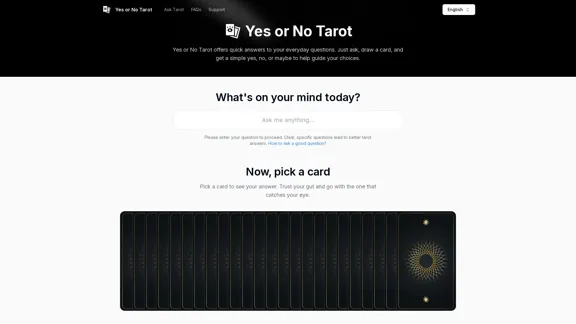
Yes or No Tarot offers quick answers to your everyday questions. Just ask, draw a card, and get a simple yes, no, or maybe to help guide your choices.
Visit Website
Yes or No Tarot
Visit Website

Introduction

Yes or No Tarot is a straightforward online tarot reading tool designed to provide quick answers to everyday questions. Users can ask a question, draw a card, and receive a simple yes, no, or maybe response to guide their choices. This digital platform offers a modern approach to traditional tarot readings, making it accessible and user-friendly for both beginners and experienced tarot enthusiasts.

Feature

  1. Quick and Simple Readings

    • Offers immediate answers to user questions
    • Provides straightforward yes, no, or maybe responses
    • Ideal for everyday decision-making and guidance
  2. User-Friendly Interface

    • Easy-to-use digital card selection process
    • Clear instructions for asking questions and interpreting results
    • Accessible on various devices and platforms
  3. Comprehensive Tarot Deck

    • Utilizes a full 78-card tarot deck for readings
    • Includes both Major and Minor Arcana cards
    • Ensures a wide range of possible interpretations and insights
  4. Customizable Experience

    • Allows users to input specific questions
    • Encourages clear and focused question formulation
    • Provides tips on how to ask effective questions
  5. Educational Resources

    • Offers detailed explanations of tarot card meanings
    • Includes information on both upright and reversed card interpretations
    • Provides insights into the history and symbolism of tarot
  6. Multilingual Support

    • Available in multiple languages including English, German, Spanish, French, Italian, Portuguese, Russian, Arabic, Polish, Chinese, Japanese, and Korean
    • Caters to a global audience
  7. Privacy and Accessibility

    • Free to use without registration
    • Respects user privacy
    • Available 24/7 for on-demand readings

How to Use?

  1. Formulate Clear Questions: Keep your questions simple, direct, and focused on a single issue for the most effective readings.

  2. Focus on Immediate Decisions: Use Yes or No Tarot for guidance on current choices rather than long-term predictions.

  3. Ask About Your Own Actions: Frame questions around your own choices and actions for more empowering guidance.

  4. Maintain an Open Mind: Approach readings with openness to new perspectives and unexpected insights.

  5. Avoid Repetitive Queries: Give time between readings to act on insights before asking the same question again.

  6. Use as a Complementary Tool: Combine Yes or No Tarot insights with personal reflection and other decision-making methods.

  7. Respect the Process: Trust your intuition when selecting cards and interpreting results.

FAQ

What is Yes or No Tarot?

Yes or No Tarot is a simplified tarot reading method that provides quick, straightforward answers to specific questions using a single card draw from a full tarot deck.

How reliable are Yes or No Tarot readings?

While Yes or No Tarot can provide guidance, it's best used as a tool for reflection rather than a definitive answer. The readings reflect current energies and should be considered alongside other factors in decision-making.

Can Yes or No Tarot predict the future?

No, Yes or No Tarot doesn't predict the future with certainty. It offers insights into current energies and potential outcomes based on present circumstances.

How often should I use Yes or No Tarot?

It's best to use Yes or No Tarot sparingly, particularly for significant questions. Overuse can lead to confusion or over-reliance on external guidance.

Why might my readings seem inconsistent?

Readings can vary due to changing circumstances, emotions, or energies. It's important to approach each reading with a clear mind and avoid repeating questions too frequently.

Price

The Yes or No Tarot service appears to be free to use. There is no mention of pricing or subscription plans on the website.

The price is for reference only, please refer to the latest official data for actual information.

Evaluation

Yes or No Tarot offers a user-friendly, accessible approach to tarot readings, making it an excellent tool for quick guidance and self-reflection. Its simplicity and immediacy are particularly appealing in today's fast-paced world, where people often seek quick answers to their questions.

The platform's strengths lie in its straightforward interface, comprehensive tarot deck, and educational resources. The multilingual support and privacy-focused approach also contribute to its broad appeal. The inclusion of detailed card meanings and tips for effective question-asking enhances the user experience and educational value.

However, the simplicity of Yes or No readings may limit the depth of insight compared to traditional tarot spreads. Users should be cautious about over-relying on these quick readings for major life decisions. The platform could benefit from clearer disclaimers about the nature of tarot readings and their limitations in predicting future outcomes.

Overall, Yes or No Tarot serves as a valuable tool for personal reflection and guidance, particularly when used in conjunction with critical thinking and other decision-making methods. Its accessibility and user-friendly approach make it an excellent starting point for those new to tarot, while also offering a quick reference for more experienced practitioners.

Related Websites
ChatGPT Everywhere
View Detail

ChatGPT Everywhere

ChatGPT Everywhere

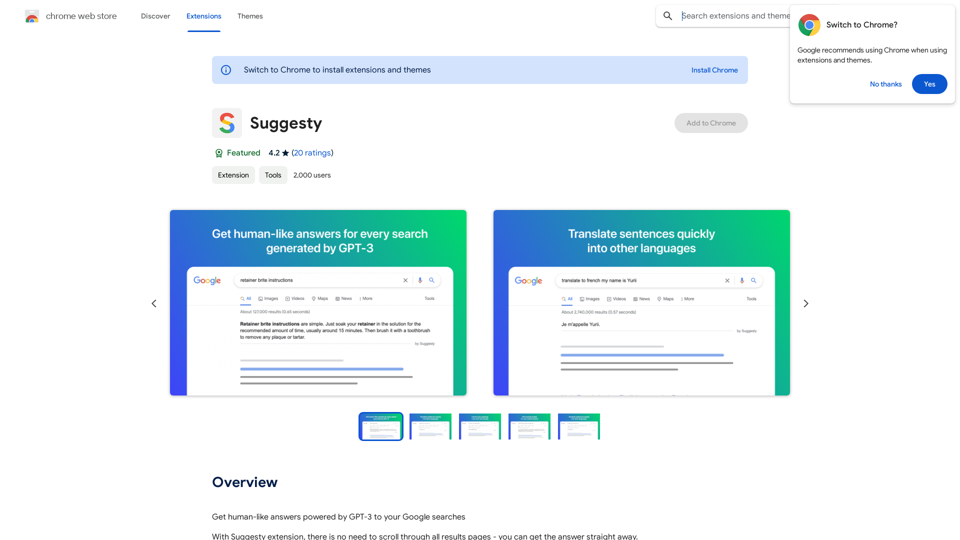
ChatGPT-based Chrome extension

193.90 M
Searching for ChatGPT Plugins

Searching for ChatGPT plugins can be an exciting experience, as it allows you to explore and discover new features and functionalities to enhance your conversational AI model. Here are some ways to search for ChatGPT plugins:

Official Plugin Directory

The official ChatGPT plugin directory is a great place to start your search. This directory provides a curated list of plugins that are compatible with ChatGPT, along with their descriptions, features, and installation instructions.

GitHub and Open-Source Repositories

GitHub and other open-source repositories are treasure troves for ChatGPT plugins. You can search for plugins using keywords like "ChatGPT plugin" or "conversational AI plugin" to find relevant repositories. You can also explore popular open-source repositories like the ChatGPT community repository.

Plugin Marketplaces

Some plugin marketplaces, like the ChatGPT Marketplace, offer a wide range of plugins for ChatGPT. These marketplaces often provide user reviews, ratings, and descriptions to help you make informed decisions.

Forums and Communities

ChatGPT forums and communities are great places to ask for plugin recommendations or search for plugins. You can ask other users about their favorite plugins or search for threads related to specific plugin categories.

Search Engines

Finally, you can use search engines like Google to search for ChatGPT plugins. Use specific keywords like "ChatGPT plugin for [specific feature]" or "best ChatGPT plugins" to get relevant results.

Remember to always evaluate the plugins you find based on their compatibility, features, and user reviews before installing them. Happy searching!
View Detail

Searching for ChatGPT Plugins Searching for ChatGPT plugins can be an exciting experience, as it allows you to explore and discover new features and functionalities to enhance your conversational AI model. Here are some ways to search for ChatGPT plugins: Official Plugin Directory The official ChatGPT plugin directory is a great place to start your search. This directory provides a curated list of plugins that are compatible with ChatGPT, along with their descriptions, features, and installation instructions. GitHub and Open-Source Repositories GitHub and other open-source repositories are treasure troves for ChatGPT plugins. You can search for plugins using keywords like "ChatGPT plugin" or "conversational AI plugin" to find relevant repositories. You can also explore popular open-source repositories like the ChatGPT community repository. Plugin Marketplaces Some plugin marketplaces, like the ChatGPT Marketplace, offer a wide range of plugins for ChatGPT. These marketplaces often provide user reviews, ratings, and descriptions to help you make informed decisions. Forums and Communities ChatGPT forums and communities are great places to ask for plugin recommendations or search for plugins. You can ask other users about their favorite plugins or search for threads related to specific plugin categories. Search Engines Finally, you can use search engines like Google to search for ChatGPT plugins. Use specific keywords like "ChatGPT plugin for [specific feature]" or "best ChatGPT plugins" to get relevant results. Remember to always evaluate the plugins you find based on their compatibility, features, and user reviews before installing them. Happy searching!

Searching for ChatGPT Plugins Searching for ChatGPT plugins can be an exciting experience, as it allows you to explore and discover new features and functionalities to enhance your conversational AI model. Here are some ways to search for ChatGPT plugins: Official Plugin Directory The official ChatGPT plugin directory is a great place to start your search. This directory provides a curated list of plugins that are compatible with ChatGPT, along with their descriptions, features, and installation instructions. GitHub and Open-Source Repositories GitHub and other open-source repositories are treasure troves for ChatGPT plugins. You can search for plugins using keywords like "ChatGPT plugin" or "conversational AI plugin" to find relevant repositories. You can also explore popular open-source repositories like the ChatGPT community repository. Plugin Marketplaces Some plugin marketplaces, like the ChatGPT Marketplace, offer a wide range of plugins for ChatGPT. These marketplaces often provide user reviews, ratings, and descriptions to help you make informed decisions. Forums and Communities ChatGPT forums and communities are great places to ask for plugin recommendations or search for plugins. You can ask other users about their favorite plugins or search for threads related to specific plugin categories. Search Engines Finally, you can use search engines like Google to search for ChatGPT plugins. Use specific keywords like "ChatGPT plugin for [specific feature]" or "best ChatGPT plugins" to get relevant results. Remember to always evaluate the plugins you find based on their compatibility, features, and user reviews before installing them. Happy searching!

Here are some of the best, top, and popular ChatGPT plugins: 1. WebChat: A plugin that allows users to interact with ChatGPT through a web interface. 2. ChatGPT Writer: A plugin that helps users generate high-quality content, such as articles, stories, and emails, using ChatGPT's language generation capabilities. 3. ChatGPT Code Interpreter: A plugin that enables users to write code in various programming languages and have ChatGPT interpret and execute it. 4. ChatGPT Conversational AI: A plugin that allows users to create conversational AI models using ChatGPT's language understanding capabilities. 5. ChatGPT Language Translator: A plugin that enables users to translate text from one language to another using ChatGPT's language translation capabilities. 6. ChatGPT Summarizer: A plugin that helps users summarize long pieces of text, such as articles or documents, into concise summaries using ChatGPT's text summarization capabilities. 7. ChatGPT Q&A: A plugin that enables users to ask questions and receive answers from ChatGPT on a wide range of topics. 8. ChatGPT Creative Writing: A plugin that helps users generate creative writing, such as poetry, stories, and dialogues, using ChatGPT's language generation capabilities. 9. ChatGPT Dialogue System: A plugin that enables users to create conversational dialogue systems using ChatGPT's language understanding capabilities. 10. ChatGPT Sentiment Analyzer: A plugin that helps users analyze the sentiment of text, such as determining whether a piece of text is positive, negative, or neutral, using ChatGPT's sentiment analysis capabilities.

193.90 M
Genji - AI Browser Assistant
View Detail

Genji - AI Browser Assistant

Genji - AI Browser Assistant

Automate the Browser Using a Visual AI Assistant

193.90 M
IMG2HTML: Screenshot Capture to Code
View Detail

IMG2HTML: Screenshot Capture to Code

IMG2HTML: Screenshot Capture to Code

Capture screenshots and get the code of your current webpage.

193.90 M
Suki Assistant
View Detail

Suki Assistant

Suki Assistant

Suki: An AI-powered clinical documentation app for your Chrome browser.

193.90 M
SumMe - AI Article Summarizer
View Detail

SumMe - AI Article Summarizer

SumMe - AI Article Summarizer

I can do that! Just paste the web article text here, and I'll generate a professional and concise summary using OpenAI's powerful GPT-4 model.

193.90 M
ChatBro Treasure
View Detail

ChatBro Treasure

ChatBro Treasure

ChatBao, your AI assistant, works perfectly with search engines to provide more professional answers.

193.90 M
ImagePrompt - Reverse Image To Prompt

This tool takes an image as input and generates a textual description (prompt) that can be used to recreate the image using text-to-image AI models.
View Detail

ImagePrompt - Reverse Image To Prompt This tool takes an image as input and generates a textual description (prompt) that can be used to recreate the image using text-to-image AI models.

ImagePrompt - Reverse Image To Prompt This tool takes an image as input and generates a textual description (prompt) that can be used to recreate the image using text-to-image AI models.

ImagePrompt: The Ultimate Tool for Generating Prompts From Images.

193.90 M