Open-source RightAI Tools Directory
  • Discover AI
  • Submit
  • Startup
  • Blog
Open-source RightAI Tools Directory
Discover the best AI tools of 2025 with the RightAI Tools Directory!

Friend Links

AI Anime GeneratorToolsApp AI

Support

Tap4
Privacy policyTerms & ConditionsContact Us
Loading...
loading...

Rizz Baby - AI Dating Tools on the App Store

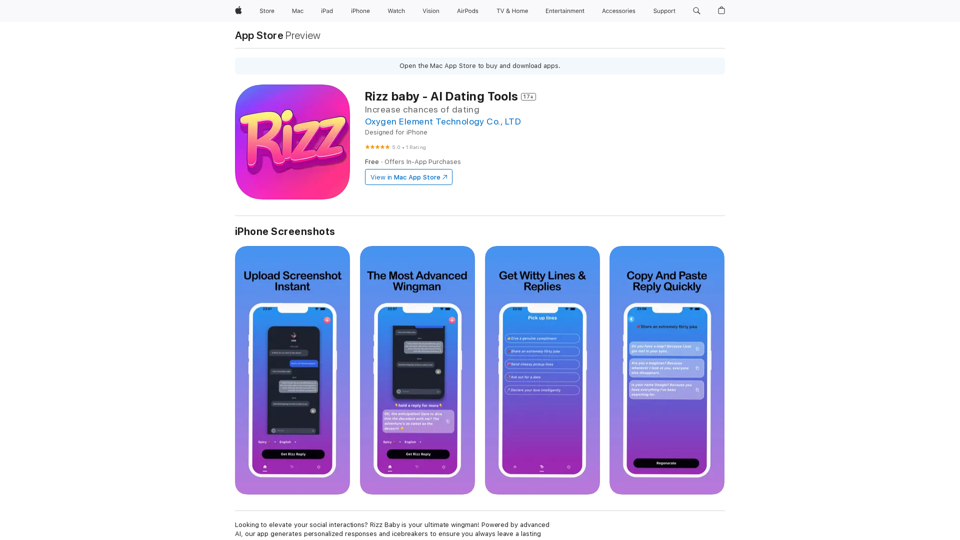
Want to take your social interactions to the next level? Rizz Baby is your perfect partner! Powered by cutting-edge AI, our app creates customized responses and icebreakers that will help you shine in any social situation.
Visit Website
Rizz Baby - AI Dating Tools on the App Store
Visit Website

Introduction

Rizz Baby is an AI-powered dating tool designed to enhance users' social interactions. It generates personalized responses and icebreakers, analyzing communication styles to provide tailored suggestions. This innovative app aims to boost users' confidence and success in the dating world by offering smart, context-aware conversation assistance.

Feature

Screenshot to Response

Upload screenshots of social app conversations and receive perfect, context-appropriate replies generated by AI.

Icebreaker Generator

Create engaging and creative opening lines to start conversations effectively and stand out from other users.

Personalized Conversations

Adapt to each user's unique communication style, providing responses that authentically reflect their personality.

User-Friendly Interface

Easy-to-use design allows quick uploading of profiles, bios, or conversation screenshots for instant, tailored responses.

Platform Availability

Currently available exclusively for iPhone users, with free download option.

Flexible Pricing Options

PlanPrice
Monthly$12.99
Yearly$44.99
Lifetime$69.99

FAQ

Is Rizz Baby available for Android?

No, Rizz Baby is currently only available for iPhone.

Can I use Rizz Baby for free?

Yes, the app offers a free version with in-app purchases for premium features.

How do I cancel my premium subscription?

You can cancel your subscription through the app's settings or by contacting the developer directly.

How can I get support or ask questions?

For assistance or inquiries, contact the support team at [email protected]. Visit the website for more information on terms and privacy policy.

Latest Traffic Insights

  • Monthly Visits

    124.77 M

  • Bounce Rate

    74.15%

  • Pages Per Visit

    1.56

  • Time on Site(s)

    46.64

  • Global Rank

    -

  • Country Rank

    -

Recent Visits

Traffic Sources

  • Social Media:
    2.88%
  • Paid Referrals:
    2.50%
  • Email:
    0.18%
  • Referrals:
    19.65%
  • Search Engines:
    29.02%
  • Direct:
    45.78%
More Data

Related Websites

Claude to Notion

This is a guide on how to connect Claude, an AI assistant, with Notion, a note-taking and workspace app. 

Why connect Claude and Notion?

* Boost your productivity: Use Claude to generate content, summarize information, and automate tasks directly within Notion.
* Enhance your research: Ask Claude questions about your Notion notes and get insightful answers.
* Unlock new creative possibilities: Leverage Claude's generative capabilities to brainstorm ideas, write stories, or compose emails within your Notion workspace.

How to connect Claude and Notion:

1. API Keys: Obtain an API key for both Claude and Notion. 
2. Integration Tool: Explore integration tools like Zapier or Integromat to connect Claude and Notion. These platforms allow you to create workflows that trigger actions in one app based on events in the other.
3. Custom Development: For advanced users, you can develop your own custom integration using the Claude and Notion APIs. This gives you the most flexibility but requires coding knowledge.

Example Use Cases:

* Meeting Summarization: After a meeting, paste the transcript into Notion and use Claude to generate a concise summary.
* Content Creation:  Use Claude to write blog posts, articles, or social media captions directly within your Notion pages.
* Idea Generation: Brainstorm new ideas for projects or tasks by prompting Claude with specific questions within your Notion workspace.


Remember to review the documentation and terms of service for both Claude and Notion to ensure proper usage and security.
View Detail

Claude to Notion This is a guide on how to connect Claude, an AI assistant, with Notion, a note-taking and workspace app. Why connect Claude and Notion? * Boost your productivity: Use Claude to generate content, summarize information, and automate tasks directly within Notion. * Enhance your research: Ask Claude questions about your Notion notes and get insightful answers. * Unlock new creative possibilities: Leverage Claude's generative capabilities to brainstorm ideas, write stories, or compose emails within your Notion workspace. How to connect Claude and Notion: 1. API Keys: Obtain an API key for both Claude and Notion. 2. Integration Tool: Explore integration tools like Zapier or Integromat to connect Claude and Notion. These platforms allow you to create workflows that trigger actions in one app based on events in the other. 3. Custom Development: For advanced users, you can develop your own custom integration using the Claude and Notion APIs. This gives you the most flexibility but requires coding knowledge. Example Use Cases: * Meeting Summarization: After a meeting, paste the transcript into Notion and use Claude to generate a concise summary. * Content Creation: Use Claude to write blog posts, articles, or social media captions directly within your Notion pages. * Idea Generation: Brainstorm new ideas for projects or tasks by prompting Claude with specific questions within your Notion workspace. Remember to review the documentation and terms of service for both Claude and Notion to ensure proper usage and security.

Claude to Notion This is a guide on how to connect Claude, an AI assistant, with Notion, a note-taking and workspace app. Why connect Claude and Notion? * Boost your productivity: Use Claude to generate content, summarize information, and automate tasks directly within Notion. * Enhance your research: Ask Claude questions about your Notion notes and get insightful answers. * Unlock new creative possibilities: Leverage Claude's generative capabilities to brainstorm ideas, write stories, or compose emails within your Notion workspace. How to connect Claude and Notion: 1. API Keys: Obtain an API key for both Claude and Notion. 2. Integration Tool: Explore integration tools like Zapier or Integromat to connect Claude and Notion. These platforms allow you to create workflows that trigger actions in one app based on events in the other. 3. Custom Development: For advanced users, you can develop your own custom integration using the Claude and Notion APIs. This gives you the most flexibility but requires coding knowledge. Example Use Cases: * Meeting Summarization: After a meeting, paste the transcript into Notion and use Claude to generate a concise summary. * Content Creation: Use Claude to write blog posts, articles, or social media captions directly within your Notion pages. * Idea Generation: Brainstorm new ideas for projects or tasks by prompting Claude with specific questions within your Notion workspace. Remember to review the documentation and terms of service for both Claude and Notion to ensure proper usage and security.

Save Claude conversations to Notion with one click. Export Claude conversations.

193.90 M
Save ChatGPT to Feishu
View Detail

Save ChatGPT to Feishu

Save ChatGPT to Feishu

Save ChatGPT conversations to Feishu with one click. Export ChatGPT conversations.

193.90 M
Note AI Tools 

This is a placeholder for a list of AI tools related to note-taking. 

Please provide me with the content you'd like me to translate.
View Detail

Note AI Tools This is a placeholder for a list of AI tools related to note-taking. Please provide me with the content you'd like me to translate.

Note AI Tools This is a placeholder for a list of AI tools related to note-taking. Please provide me with the content you'd like me to translate.

AI Tools

193.90 M
AI Board (GPT Support)
View Detail

AI Board (GPT Support)

AI Board (GPT Support)

This is a service that uses the general ChatGPT API with enhanced security for corporate use.

193.90 M
Youdao Speed Reading Plugin
View Detail

Youdao Speed Reading Plugin

Youdao Speed Reading Plugin

Recognize PDF files on the page, one-click jump to Youdao Speed Reading and upload to open.

193.90 M
Door Insight AI Assistant
View Detail

Door Insight AI Assistant

Door Insight AI Assistant

Analyze rental properties in real time with your personal AI Property Analyst.

193.90 M
TaggingBox
View Detail

TaggingBox

TaggingBox

A new way to manage your knowledge! Just like sticking a sticker on an important note, we recommend the best tags for your information.

193.90 M
Chrome Web Store
View Detail

Chrome Web Store

Chrome Web Store

Enhance your browser with new features and customize your web browsing.

193.90 M