Open-source RightAI Tools Directory
  • Discover AI
  • Submit
  • Startup
  • Blog
Open-source RightAI Tools Directory
Discover the best AI tools of 2025 with the RightAI Tools Directory!

Friend Links

AI Anime GeneratorToolsApp AI

Support

Tap4
Privacy policyTerms & ConditionsContact Us
Loading...
loading...

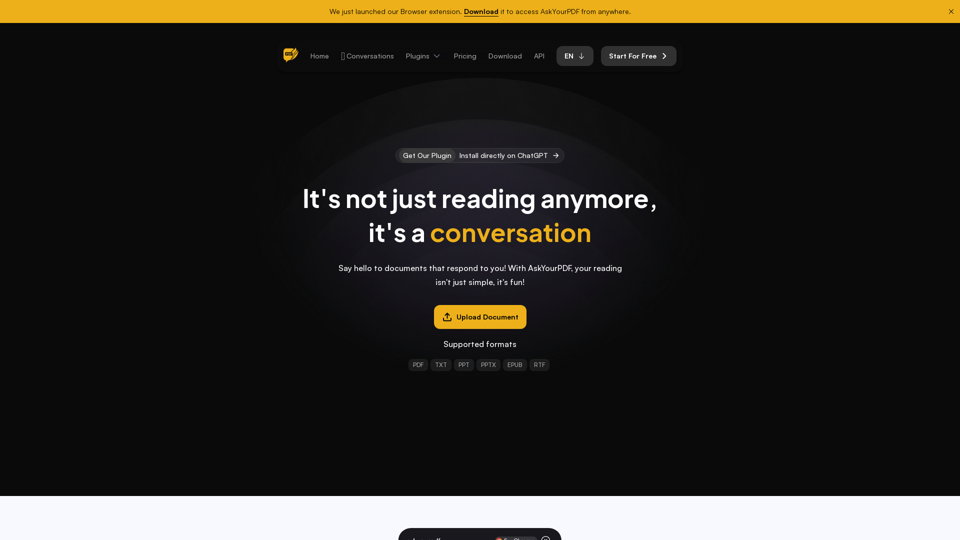
AskYourPDF: The Best PDF AI Chat App

We created AskYourPDF as the ultimate ChatPDF AI App for all your needs. Simply upload your PDF files and interact with our smart chat AI to extract valuable information from your documents.
Visit Website
AskYourPDF: The Best PDF AI Chat App
Visit Website

Introduction

AskYourPDF is an innovative AI-powered chat application that transforms PDF documents into interactive conversational partners. Users can upload PDF files and engage with an intelligent chat AI to extract valuable information, making document interaction more dynamic and efficient.

Feature

Upload and Chat with PDFs

Users can upload PDF documents and engage in interactive conversations with the AI, extracting information directly from the document content.

AI-Powered Chat System

Utilizing ChatGPT technology, AskYourPDF provides accurate information and creates an enjoyable learning environment through intelligent responses.

Conversation Tracking

The platform allows users to track and revisit all their conversations, enhancing the learning experience and information retention.

Smart Navigation

AskYourPDF offers smart navigation features, saving users time when exploring document content.

Multiple Pricing Tiers

The service provides various pricing plans to cater to different user needs:

PlanChatsPages per DocumentQuestions per DayConversations per DayDocuments per Day
Free100/month100 (max 15MB)5031
PremiumUnlimited2500 (max 30MB)12005050
ProUnlimited6000 (max 90MB)UnlimitedUnlimited150
EnterpriseUnlimitedCustomUnlimitedUnlimitedUnlimited

Advanced AI Models

Premium and higher tiers offer access to advanced AI models like GPT-3.5, GPT-4, Claude, and Claude 2 (credits required).

Knowledge Base Feature

Premium users can chat with up to 10 documents simultaneously, while Pro users can interact with 20 documents at once.

Additional Premium Features

  • Summarisation Service
  • Chrome Extension Access
  • OCR Support
  • Priority support and access to new features (Pro and Enterprise)

FAQ

What is AskYourPDF?

AskYourPDF is an AI-powered chat application that transforms PDF documents into interactive conversational partners, allowing users to extract information through engaging dialogue.

How does AskYourPDF work?

The platform uses ChatGPT technology to make documents interactive. Users can upload PDF files, ask questions, and receive accurate answers directly from the document content through an AI-powered chat system.

What features does AskYourPDF offer?

AskYourPDF offers features such as PDF upload and chat, direct answer extraction, conversation tracking, interactive reading experiences, smart navigation, and an AI-powered chat system for playful learning.

What pricing plans are available for AskYourPDF?

AskYourPDF offers four pricing tiers: Free, Premium, Pro, and Enterprise. Each tier provides different levels of access to features such as chat limits, document size restrictions, and advanced AI models.

What advanced features are available in the paid plans?

Paid plans offer features like access to advanced AI models (GPT-3.5, GPT-4, Claude, Claude 2), increased document and question limits, Knowledge Base functionality, Summarisation Service, Chrome Extension access, OCR support, and priority customer support.

Related Websites

Copilot for Microsoft 365 – Microsoft Adoption

Copilot for Microsoft 365 is a powerful AI assistant that helps you work smarter and faster across Microsoft 365 apps and services. It combines the power of large language models (LLMs) with your organization's data in the Microsoft Graph and Microsoft 365 apps to turn your words into the most powerful productivity tool on the planet.

Copilot is designed to help you:

• Unleash creativity
• Unlock productivity
• Uplevel skills

Copilot is built on Microsoft's comprehensive approach to security, compliance, and privacy. Copilot in Microsoft 365 apps and services:

• Does not use your data to train the underlying LLM
• Does not replace human ingenuity and judgment
• Is designed to keep humans in the loop

Copilot is currently available in Word, Excel, PowerPoint, Outlook, Teams, and more.

Getting Started with Copilot

To get started with Copilot, follow these steps:

1. Check availability: Ensure your organization has access to Copilot.
2. Learn the basics: Familiarize yourself with Copilot's capabilities and how to use it effectively.
3. Explore use cases: Discover how Copilot can help you in your specific role and tasks.
4. Practice and refine: Use Copilot regularly and refine your prompts for better results.
5. Share and collaborate: Collaborate with colleagues using Copilot and share best practices.

Best Practices for Using Copilot

1. Be specific in your prompts
2. Provide context for better results
3. Review and edit Copilot's output
4. Use Copilot as a starting point, not a final product
5. Experiment with different approaches
6. Stay informed about new features and updates

Copilot in Different Microsoft 365 Apps

• Word: Draft, edit, summarize, and rewrite content
• Excel: Analyze data, create formulas, and generate insights
• PowerPoint: Create presentations, design slides, and generate content
• Outlook: Compose emails, summarize threads, and manage your inbox
• Teams: Summarize meetings, generate action items, and create meeting notes

Responsible AI and Copilot

Microsoft is committed to developing AI systems responsibly. When using Copilot, keep in mind:

• AI-generated content may contain biases or inaccuracies
• Always review and verify Copilot's output
• Use your judgment and expertise alongside Copilot's suggestions
• Be aware of your organization's policies regarding AI use

Conclusion

Copilot for Microsoft 365 is a powerful tool that can significantly enhance your productivity and creativity. By understanding its capabilities, following best practices, and using it responsibly, you can make the most of this AI assistant in your daily work.
View Detail

Copilot for Microsoft 365 – Microsoft Adoption Copilot for Microsoft 365 is a powerful AI assistant that helps you work smarter and faster across Microsoft 365 apps and services. It combines the power of large language models (LLMs) with your organization's data in the Microsoft Graph and Microsoft 365 apps to turn your words into the most powerful productivity tool on the planet. Copilot is designed to help you: • Unleash creativity • Unlock productivity • Uplevel skills Copilot is built on Microsoft's comprehensive approach to security, compliance, and privacy. Copilot in Microsoft 365 apps and services: • Does not use your data to train the underlying LLM • Does not replace human ingenuity and judgment • Is designed to keep humans in the loop Copilot is currently available in Word, Excel, PowerPoint, Outlook, Teams, and more. Getting Started with Copilot To get started with Copilot, follow these steps: 1. Check availability: Ensure your organization has access to Copilot. 2. Learn the basics: Familiarize yourself with Copilot's capabilities and how to use it effectively. 3. Explore use cases: Discover how Copilot can help you in your specific role and tasks. 4. Practice and refine: Use Copilot regularly and refine your prompts for better results. 5. Share and collaborate: Collaborate with colleagues using Copilot and share best practices. Best Practices for Using Copilot 1. Be specific in your prompts 2. Provide context for better results 3. Review and edit Copilot's output 4. Use Copilot as a starting point, not a final product 5. Experiment with different approaches 6. Stay informed about new features and updates Copilot in Different Microsoft 365 Apps • Word: Draft, edit, summarize, and rewrite content • Excel: Analyze data, create formulas, and generate insights • PowerPoint: Create presentations, design slides, and generate content • Outlook: Compose emails, summarize threads, and manage your inbox • Teams: Summarize meetings, generate action items, and create meeting notes Responsible AI and Copilot Microsoft is committed to developing AI systems responsibly. When using Copilot, keep in mind: • AI-generated content may contain biases or inaccuracies • Always review and verify Copilot's output • Use your judgment and expertise alongside Copilot's suggestions • Be aware of your organization's policies regarding AI use Conclusion Copilot for Microsoft 365 is a powerful tool that can significantly enhance your productivity and creativity. By understanding its capabilities, following best practices, and using it responsibly, you can make the most of this AI assistant in your daily work.

Copilot for Microsoft 365 – Microsoft Adoption Copilot for Microsoft 365 is a powerful AI assistant that helps you work smarter and faster across Microsoft 365 apps and services. It combines the power of large language models (LLMs) with your organization's data in the Microsoft Graph and Microsoft 365 apps to turn your words into the most powerful productivity tool on the planet. Copilot is designed to help you: • Unleash creativity • Unlock productivity • Uplevel skills Copilot is built on Microsoft's comprehensive approach to security, compliance, and privacy. Copilot in Microsoft 365 apps and services: • Does not use your data to train the underlying LLM • Does not replace human ingenuity and judgment • Is designed to keep humans in the loop Copilot is currently available in Word, Excel, PowerPoint, Outlook, Teams, and more. Getting Started with Copilot To get started with Copilot, follow these steps: 1. Check availability: Ensure your organization has access to Copilot. 2. Learn the basics: Familiarize yourself with Copilot's capabilities and how to use it effectively. 3. Explore use cases: Discover how Copilot can help you in your specific role and tasks. 4. Practice and refine: Use Copilot regularly and refine your prompts for better results. 5. Share and collaborate: Collaborate with colleagues using Copilot and share best practices. Best Practices for Using Copilot 1. Be specific in your prompts 2. Provide context for better results 3. Review and edit Copilot's output 4. Use Copilot as a starting point, not a final product 5. Experiment with different approaches 6. Stay informed about new features and updates Copilot in Different Microsoft 365 Apps • Word: Draft, edit, summarize, and rewrite content • Excel: Analyze data, create formulas, and generate insights • PowerPoint: Create presentations, design slides, and generate content • Outlook: Compose emails, summarize threads, and manage your inbox • Teams: Summarize meetings, generate action items, and create meeting notes Responsible AI and Copilot Microsoft is committed to developing AI systems responsibly. When using Copilot, keep in mind: • AI-generated content may contain biases or inaccuracies • Always review and verify Copilot's output • Use your judgment and expertise alongside Copilot's suggestions • Be aware of your organization's policies regarding AI use Conclusion Copilot for Microsoft 365 is a powerful tool that can significantly enhance your productivity and creativity. By understanding its capabilities, following best practices, and using it responsibly, you can make the most of this AI assistant in your daily work.

Microsoft Copilot combines the power of large language models (LLMs) with your organization's data to turn your words into one of the most powerful productivity tools on the planet.

608.60 K
Machine Translation - Amazon Translate - AWS

Amazon Translate is a neural machine translation service that delivers fast, high-quality, and affordable language translation. Amazon Translate allows you to localize content - such as websites and applications - for international users, and to easily translate large volumes of text efficiently.

How it works

1. Input text
2. Amazon Translate
3. Output text

Use cases

• Multilingual user experience
• Cross-lingual communication
• Content analysis in multiple languages

Benefits

• High-quality translations
• Easy to use
• Cost-effective
• Scalable
• Secure and compliant

Features

• Neural machine translation
• Custom terminology
• Batch translation
• Real-time translation
• Language detection
• Profanity filtering
View Detail

Machine Translation - Amazon Translate - AWS Amazon Translate is a neural machine translation service that delivers fast, high-quality, and affordable language translation. Amazon Translate allows you to localize content - such as websites and applications - for international users, and to easily translate large volumes of text efficiently. How it works 1. Input text 2. Amazon Translate 3. Output text Use cases • Multilingual user experience • Cross-lingual communication • Content analysis in multiple languages Benefits • High-quality translations • Easy to use • Cost-effective • Scalable • Secure and compliant Features • Neural machine translation • Custom terminology • Batch translation • Real-time translation • Language detection • Profanity filtering

Machine Translation - Amazon Translate - AWS Amazon Translate is a neural machine translation service that delivers fast, high-quality, and affordable language translation. Amazon Translate allows you to localize content - such as websites and applications - for international users, and to easily translate large volumes of text efficiently. How it works 1. Input text 2. Amazon Translate 3. Output text Use cases • Multilingual user experience • Cross-lingual communication • Content analysis in multiple languages Benefits • High-quality translations • Easy to use • Cost-effective • Scalable • Secure and compliant Features • Neural machine translation • Custom terminology • Batch translation • Real-time translation • Language detection • Profanity filtering

Amazon Translate, a neural machine translation service, uses deep learning to deliver more accurate and natural translation than traditional algorithms.

60.83 M
AI to PDF
View Detail

AI to PDF

AI to PDF

AI to PDF Converter is a free and fast online file conversion service.

0
CVBee.ai: AI-Powered Online CV Maker | Resume Builder & CV Optimization
View Detail

CVBee.ai: AI-Powered Online CV Maker | Resume Builder & CV Optimization

CVBee.ai: AI-Powered Online CV Maker | Resume Builder & CV Optimization

CVBee.ai is an AI-powered online CV maker that helps you create, optimize, and refine professional resumes. Whether you're a job seeker or an experienced professional, CVBee.ai ensures your CV is ATS-friendly and perfectly structured.

0
Relay.app: AI-powered automations with a human in the loop
View Detail

Relay.app: AI-powered automations with a human in the loop

Relay.app: AI-powered automations with a human in the loop

An automation platform you'll love. Relay.app provides deep integrations, AI-powered automations, and human-in-the-loop control.

257.86 K
Gong - Revenue Intelligence Platform
View Detail

Gong - Revenue Intelligence Platform

Gong - Revenue Intelligence Platform

Gong captures customer interactions and then delivers insights at scale, enabling teams to make decisions based on data rather than opinions.

1.95 M
RehearseNow - AI Scene Partners
View Detail

RehearseNow - AI Scene Partners

RehearseNow - AI Scene Partners

Rehearse with responsive, natural-sounding AI characters anytime, anywhere. Perfect for actors, voice actors, and anyone practicing scripts.

1.91 K
Lookie: YouTube AI - Make YouTube your brain 🧠
View Detail

Lookie: YouTube AI - Make YouTube your brain 🧠

Lookie: YouTube AI - Make YouTube your brain 🧠

Lookie is the Global standard YouTube AI. Boost your learning with Lookie, the ultimate YouTube summarizer! Instantly transform long videos into concise, easy-to-digest summaries. Make YouTube your personal knowledge space with Lookie's AI-driven insights, available in 200 languages.

0