Open-source RightAI Tools Directory
  • Discover AI
  • Submit
  • Startup
  • Blog
Open-source RightAI Tools Directory
Discover the best AI tools of 2025 with the RightAI Tools Directory!

Friend Links

AI Anime GeneratorToolsApp AI

Support

Tap4
Privacy policyTerms & ConditionsContact Us
Loading...
loading...

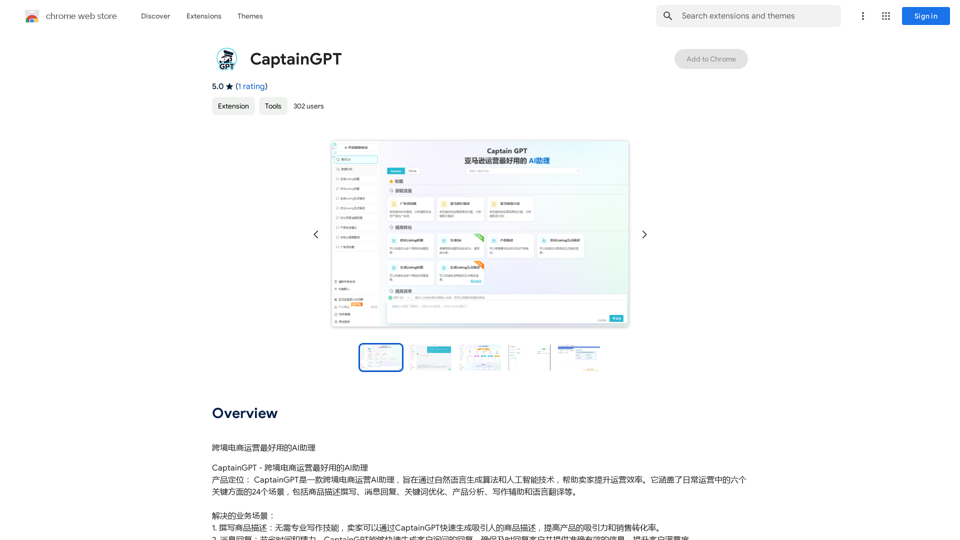
CaptainGPT

Best AI Assistant for Cross-Border E-commerce Operations
Visit Website
CaptainGPT
Visit Website

Introduction

CaptainGPT is an AI-powered platform designed to assist e-commerce sellers in optimizing their operations. It leverages natural language generation algorithms and artificial intelligence to streamline daily tasks, improve efficiency, and increase sales for online merchants. The platform offers a range of features to help sellers enhance their product listings, customer communication, and overall market competitiveness.

Feature

Product Description Writing

CaptainGPT generates attractive product descriptions quickly, enhancing product appeal and improving conversion rates.

Message Response

Automatically generates customer inquiry responses, ensuring timely and accurate information delivery while saving time.

Keyword Optimization

Analyzes keyword data to provide targeted recommendations, helping sellers optimize product titles and content for better search rankings.

Product Analysis

Offers comprehensive product analysis, comparing with competitors and providing key competitive advantage suggestions for effective marketing strategies.

Writing Assistance

Provides writing inspiration and tools, including generated headings, conclusions, and keyword reminders for high-quality content creation.

Language Translation

Supports multilingual translation services, enabling easy translation of product descriptions, reviews, and other content to expand global market reach.

FAQ

What is CaptainGPT?

CaptainGPT is an AI-powered platform designed to assist e-commerce sellers in optimizing their operations through various features like product description writing, message response, and keyword optimization.

What features does CaptainGPT offer?

CaptainGPT offers features such as product description writing, message response, keyword optimization, product analysis, writing assistance, and language translation.

How do I use CaptainGPT?

CaptainGPT is designed to be user-friendly, with an intuitive interface that allows sellers to easily access and utilize its features for streamlining daily operations, improving efficiency, and increasing sales.

What is the pricing plan for CaptainGPT?

CaptainGPT offers an affordable pricing plan with flexible subscription options to suit different business needs.

Related Websites
Xiaoqiu Search - Tab Page
View Detail

Xiaoqiu Search - Tab Page

Xiaoqiu Search - Tab Page

Xiaoqiu Search provides multiple types of aggregated searches, enabling more precise resource searching and saving cross-platform search time. Simultaneously, the [Xiaoqiu Search - Tab Page] mimics a mobile desktop, allowing for multi-desktop switching and setting quick menus for each website, making it a very useful browser homepage as well.

193.90 M
Monica - Your ChatGPT AI Assistant for Anywhere
View Detail

Monica - Your ChatGPT AI Assistant for Anywhere

Monica - Your ChatGPT AI Assistant for Anywhere

Monica integrates leading AI models (GPT-4, Claude 3, Gemini) for one-click chat, search, writing, coding and more. Try it on Chrome, Edge, or our APP.

9.55 M
AI Voice Over for YouTube 

This is a guide to using AI voice over for your YouTube videos. 

Why Use AI Voice Over?

* Cost-Effective: AI voice over is much cheaper than hiring a professional voice actor.
* Time-Saving: You can generate voice over quickly and easily, without needing to schedule recording sessions.
* Variety of Voices: Choose from a wide range of AI voices, including male, female, and even robotic voices.
* Accessibility: Make your videos accessible to viewers who are deaf or hard of hearing by adding captions generated by AI.

How to Use AI Voice Over

1. Choose a Platform: There are many different platforms that offer AI voice over services, such as:
    * Google Cloud Text-to-Speech
    * Amazon Polly
    * Microsoft Azure Text to Speech
    * Murf.ai
    * NaturalReader
2. Write Your Script:  Write a clear and concise script for your video.
3. Upload Your Script:  Upload your script to the chosen platform.
4. Select a Voice: Choose the voice that best suits your video.
5. Adjust Settings:  Adjust settings such as speed, pitch, and volume.
6. Generate Voice Over:  Click the "Generate" button to create your voice over.
7. Download and Edit: Download the generated voice over file and edit it as needed.
8. Add to Your Video:  Add the voice over to your YouTube video.

Tips for Using AI Voice Over

* Use Natural Language:  Write your script as if you were speaking naturally.
* Vary Your Tone:  Use different tones of voice to keep your viewers engaged.
* Add Pauses:  Include pauses in your script to allow viewers to process information.
* Proofread Carefully:  Always proofread your script before generating the voice over.
* Experiment:  Try different voices, settings, and styles to find what works best for you.
View Detail

AI Voice Over for YouTube This is a guide to using AI voice over for your YouTube videos. Why Use AI Voice Over? * Cost-Effective: AI voice over is much cheaper than hiring a professional voice actor. * Time-Saving: You can generate voice over quickly and easily, without needing to schedule recording sessions. * Variety of Voices: Choose from a wide range of AI voices, including male, female, and even robotic voices. * Accessibility: Make your videos accessible to viewers who are deaf or hard of hearing by adding captions generated by AI. How to Use AI Voice Over 1. Choose a Platform: There are many different platforms that offer AI voice over services, such as: * Google Cloud Text-to-Speech * Amazon Polly * Microsoft Azure Text to Speech * Murf.ai * NaturalReader 2. Write Your Script: Write a clear and concise script for your video. 3. Upload Your Script: Upload your script to the chosen platform. 4. Select a Voice: Choose the voice that best suits your video. 5. Adjust Settings: Adjust settings such as speed, pitch, and volume. 6. Generate Voice Over: Click the "Generate" button to create your voice over. 7. Download and Edit: Download the generated voice over file and edit it as needed. 8. Add to Your Video: Add the voice over to your YouTube video. Tips for Using AI Voice Over * Use Natural Language: Write your script as if you were speaking naturally. * Vary Your Tone: Use different tones of voice to keep your viewers engaged. * Add Pauses: Include pauses in your script to allow viewers to process information. * Proofread Carefully: Always proofread your script before generating the voice over. * Experiment: Try different voices, settings, and styles to find what works best for you.

AI Voice Over for YouTube This is a guide to using AI voice over for your YouTube videos. Why Use AI Voice Over? * Cost-Effective: AI voice over is much cheaper than hiring a professional voice actor. * Time-Saving: You can generate voice over quickly and easily, without needing to schedule recording sessions. * Variety of Voices: Choose from a wide range of AI voices, including male, female, and even robotic voices. * Accessibility: Make your videos accessible to viewers who are deaf or hard of hearing by adding captions generated by AI. How to Use AI Voice Over 1. Choose a Platform: There are many different platforms that offer AI voice over services, such as: * Google Cloud Text-to-Speech * Amazon Polly * Microsoft Azure Text to Speech * Murf.ai * NaturalReader 2. Write Your Script: Write a clear and concise script for your video. 3. Upload Your Script: Upload your script to the chosen platform. 4. Select a Voice: Choose the voice that best suits your video. 5. Adjust Settings: Adjust settings such as speed, pitch, and volume. 6. Generate Voice Over: Click the "Generate" button to create your voice over. 7. Download and Edit: Download the generated voice over file and edit it as needed. 8. Add to Your Video: Add the voice over to your YouTube video. Tips for Using AI Voice Over * Use Natural Language: Write your script as if you were speaking naturally. * Vary Your Tone: Use different tones of voice to keep your viewers engaged. * Add Pauses: Include pauses in your script to allow viewers to process information. * Proofread Carefully: Always proofread your script before generating the voice over. * Experiment: Try different voices, settings, and styles to find what works best for you.

Watch foreign language YouTube videos in your own language.

193.90 M
ChatGPT TextCheck - analyze any text for Influence & Propaganda with AI
View Detail

ChatGPT TextCheck - analyze any text for Influence & Propaganda with AI

ChatGPT TextCheck - analyze any text for Influence & Propaganda with AI

An extension to help you avoid misinformation

193.90 M
Transcript Helper for Chorus.ai 

This is a tool designed to help you work with transcripts generated by Chorus.ai. 


Let me know what you need help with! For example, you can ask me to:

* Summarize a transcript: Give me a transcript and I'll provide a concise summary of the main points.
* Find specific information: Tell me what you're looking for (e.g., "find all mentions of product X") and I'll search the transcript for relevant text.
* Identify key speakers: I can analyze the transcript and tell you who the main speakers are.
* Generate action items: Based on the transcript, I can help you identify tasks that need to be completed.
* Translate the transcript: I can translate the transcript into another language.


What can I do for you today?
View Detail

Transcript Helper for Chorus.ai This is a tool designed to help you work with transcripts generated by Chorus.ai. Let me know what you need help with! For example, you can ask me to: * Summarize a transcript: Give me a transcript and I'll provide a concise summary of the main points. * Find specific information: Tell me what you're looking for (e.g., "find all mentions of product X") and I'll search the transcript for relevant text. * Identify key speakers: I can analyze the transcript and tell you who the main speakers are. * Generate action items: Based on the transcript, I can help you identify tasks that need to be completed. * Translate the transcript: I can translate the transcript into another language. What can I do for you today?

Transcript Helper for Chorus.ai This is a tool designed to help you work with transcripts generated by Chorus.ai. Let me know what you need help with! For example, you can ask me to: * Summarize a transcript: Give me a transcript and I'll provide a concise summary of the main points. * Find specific information: Tell me what you're looking for (e.g., "find all mentions of product X") and I'll search the transcript for relevant text. * Identify key speakers: I can analyze the transcript and tell you who the main speakers are. * Generate action items: Based on the transcript, I can help you identify tasks that need to be completed. * Translate the transcript: I can translate the transcript into another language. What can I do for you today?

This extension finds chorus.ai transcripts and lets you copy them to your clipboard.

193.90 M
JustRecap
View Detail

JustRecap

JustRecap

JustRecap extracts summaries and key moments from videos so you can learn more in less time.

193.90 M
Adinspiration | Discover your Competitors' Winning Ads from Facebook Ad Library
View Detail

Adinspiration | Discover your Competitors' Winning Ads from Facebook Ad Library

Adinspiration | Discover your Competitors' Winning Ads from Facebook Ad Library

Boost your Return on Ad Spend (ROAS) with proven Ad Inspiration and winning Facebook & Instagram ad creatives from top brands and your Competitors. Meta Ad library with superpowers

0
Lexicore - AI for Legal Practices
View Detail

Lexicore - AI for Legal Practices

Lexicore - AI for Legal Practices

Lexicore is an AI-powered chatbot designed to be a virtual legal assistant. It can give you quick answers and accurate information to help you with your legal questions.

0