Open-source RightAI Tools Directory
  • Discover AI
  • Submit
  • Startup
  • Blog
Open-source RightAI Tools Directory
Discover the best AI tools of 2025 with the RightAI Tools Directory!

Friend Links

AI Anime GeneratorToolsApp AI

Support

Tap4
Privacy policyTerms & ConditionsContact Us
Loading...
loading...

ChatGPT Email

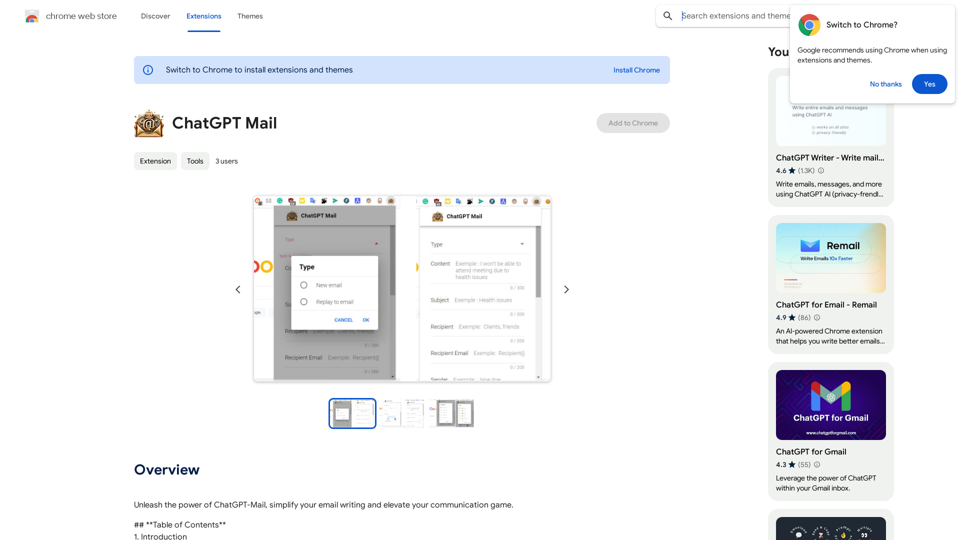
Unleash the power of ChatGPT-Mail, simplify your email writing, and elevate your communication.
Visit Website
ChatGPT Email
Visit Website

Introduction

ChatGPT Mail is a Chrome extension that revolutionizes email writing by leveraging advanced AI capabilities. It helps users create professional, error-free emails that make a lasting impression. The extension offers features like tone selection, language flexibility, and content generation, making it an invaluable tool for both personal and business communication.

Feature

Tone Selection

Choose the appropriate tone for your emails, ensuring they resonate with your recipients effectively.

Language Flexibility

Supports multiple languages, breaking down communication barriers effortlessly.

Email Type Customization

Specify the type of email you're sending for tailored content generation.

Content Generation

Overcome writer's block with AI-powered content generation for a seamless writing experience.

Subject Line Creation

Craft engaging subject lines that capture recipients' attention instantly.

Personalization Options

Customize recipient and sender information for a personal touch in your emails.

Email Length Control

Adjust the length of your emails to ensure concise and effective communication.

Powered by GPT-3.5-turbo

Utilizes one of the most sophisticated AI models available for high-quality email generation.

Daily Free Uses

Offers daily free uses of GPT-4o document reading and Dalle's image generation.

FAQ

Is ChatGPT Mail suitable for personal use?

Yes, ChatGPT Mail is versatile and caters to both personal and business email needs.

How does ChatGPT Mail handle language barriers?

It supports multiple languages, breaking down language barriers effortlessly.

Can ChatGPT Mail generate email content for marketing campaigns?

Yes, it allows you to generate persuasive email content, making your email marketing campaigns more effective.

Is ChatGPT Mail easy to use?

Yes, it's user-friendly and designed to make email writing hassle-free.

What sets ChatGPT Mail apart from other email extensions?

ChatGPT Mail's integration with GPT-3.5-turbo sets it apart, ensuring high-quality email generation.

Is my information used for training data?

No, user privacy is highly valued. Your data will not be used for any training purposes, and you can delete your account and all associated data at any time.

When would I need a ChatGPT Mail subscription?

If the 20 free GPT-4o conversations per day do not meet your needs and you heavily rely on GPT-4o, a subscription to affordable products is available.

Related Websites
IntegraBot - Advanced Agents with AI and Automations
View Detail

IntegraBot - Advanced Agents with AI and Automations

IntegraBot - Advanced Agents with AI and Automations

Create an AI chatbot from your knowledge base and add it to your website or interact with it through our API.

357
Stability Matrix CivitAI Integration 

This document outlines the integration of Stability Matrix into Civitai. 

What is Stability Matrix?

Stability Matrix is a powerful tool for evaluating and comparing different AI models. It provides a comprehensive set of metrics to assess model performance across various tasks, including text generation, image generation, and code generation.

Benefits of Integrating Stability Matrix into Civitai:

* Enhanced Model Discovery: Users can easily identify high-performing models based on their desired tasks and preferences.
* Improved Model Selection: The detailed metrics provided by Stability Matrix allow for informed decision-making when choosing a model for a specific project.
* Community-Driven Evaluation: By leveraging the collective wisdom of the Civitai community, Stability Matrix fosters a transparent and collaborative approach to model evaluation.
* Accelerated Model Development: Developers can use Stability Matrix to track the progress of their models and identify areas for improvement.

Implementation Details:

* Stability Matrix scores will be displayed alongside model descriptions on Civitai.
* Users will be able to filter models based on their Stability Matrix scores.
* The integration will initially focus on text generation and image generation models.

Future Enhancements:

* Expand support for additional model types, such as code generation models.
* Implement interactive visualizations of Stability Matrix data.
* Allow users to contribute their own model evaluations to the platform.
View Detail

Stability Matrix CivitAI Integration This document outlines the integration of Stability Matrix into Civitai. What is Stability Matrix? Stability Matrix is a powerful tool for evaluating and comparing different AI models. It provides a comprehensive set of metrics to assess model performance across various tasks, including text generation, image generation, and code generation. Benefits of Integrating Stability Matrix into Civitai: * Enhanced Model Discovery: Users can easily identify high-performing models based on their desired tasks and preferences. * Improved Model Selection: The detailed metrics provided by Stability Matrix allow for informed decision-making when choosing a model for a specific project. * Community-Driven Evaluation: By leveraging the collective wisdom of the Civitai community, Stability Matrix fosters a transparent and collaborative approach to model evaluation. * Accelerated Model Development: Developers can use Stability Matrix to track the progress of their models and identify areas for improvement. Implementation Details: * Stability Matrix scores will be displayed alongside model descriptions on Civitai. * Users will be able to filter models based on their Stability Matrix scores. * The integration will initially focus on text generation and image generation models. Future Enhancements: * Expand support for additional model types, such as code generation models. * Implement interactive visualizations of Stability Matrix data. * Allow users to contribute their own model evaluations to the platform.

Stability Matrix CivitAI Integration This document outlines the integration of Stability Matrix into Civitai. What is Stability Matrix? Stability Matrix is a powerful tool for evaluating and comparing different AI models. It provides a comprehensive set of metrics to assess model performance across various tasks, including text generation, image generation, and code generation. Benefits of Integrating Stability Matrix into Civitai: * Enhanced Model Discovery: Users can easily identify high-performing models based on their desired tasks and preferences. * Improved Model Selection: The detailed metrics provided by Stability Matrix allow for informed decision-making when choosing a model for a specific project. * Community-Driven Evaluation: By leveraging the collective wisdom of the Civitai community, Stability Matrix fosters a transparent and collaborative approach to model evaluation. * Accelerated Model Development: Developers can use Stability Matrix to track the progress of their models and identify areas for improvement. Implementation Details: * Stability Matrix scores will be displayed alongside model descriptions on Civitai. * Users will be able to filter models based on their Stability Matrix scores. * The integration will initially focus on text generation and image generation models. Future Enhancements: * Expand support for additional model types, such as code generation models. * Implement interactive visualizations of Stability Matrix data. * Allow users to contribute their own model evaluations to the platform.

This extension adds a button to the CivitAI interface that allows you to download a given model with Stability Matrix.

193.90 M
Midjourney SREF Codes Library for Style Reference

What are SREF Codes?

SREF codes are special text strings used in Midjourney to quickly and easily apply specific artistic styles to your image generations. 

How to Use SREF Codes:

Simply add an SREF code to your Midjourney prompt. For example:

`/imagine a majestic dragon, SREF:cyberpunk`

SREF Code Library:

This library contains a collection of SREF codes categorized by style. 

* Art Styles:
    * `photorealistic`: Creates images with high levels of realism.
    * `impressionistic`:  Captures the essence of a scene with loose brushstrokes and vibrant colors.
    * `cubist`:  Breaks down objects into geometric shapes.
    * `surrealist`:  Creates dreamlike and fantastical images.
    * `abstract`:  Focuses on form, color, and composition rather than representational imagery.

* Visual Effects:
    * `cinematic`:  Gives images a cinematic look and feel.
    * `HDR`:  Creates images with high dynamic range, resulting in greater detail and contrast.
    * `neon`:  Adds vibrant neon lights to the image.
    * `pixel art`:  Generates images in a retro pixel art style.

* Other Styles:
    * `anime`:  Creates images in the style of Japanese animation.
    * `manga`:  Similar to anime, but with a more comic book aesthetic.
    * `sketch`:  Generates images that resemble pencil sketches.
    * `watercolor`:  Creates images with the look and feel of watercolor paintings.

Note: This is just a small sample of the many SREF codes available. 

Explore and Experiment:

The best way to learn about SREF codes is to experiment with them! Try combining different codes to create unique and interesting styles.
View Detail

Midjourney SREF Codes Library for Style Reference What are SREF Codes? SREF codes are special text strings used in Midjourney to quickly and easily apply specific artistic styles to your image generations. How to Use SREF Codes: Simply add an SREF code to your Midjourney prompt. For example: `/imagine a majestic dragon, SREF:cyberpunk` SREF Code Library: This library contains a collection of SREF codes categorized by style. * Art Styles: * `photorealistic`: Creates images with high levels of realism. * `impressionistic`: Captures the essence of a scene with loose brushstrokes and vibrant colors. * `cubist`: Breaks down objects into geometric shapes. * `surrealist`: Creates dreamlike and fantastical images. * `abstract`: Focuses on form, color, and composition rather than representational imagery. * Visual Effects: * `cinematic`: Gives images a cinematic look and feel. * `HDR`: Creates images with high dynamic range, resulting in greater detail and contrast. * `neon`: Adds vibrant neon lights to the image. * `pixel art`: Generates images in a retro pixel art style. * Other Styles: * `anime`: Creates images in the style of Japanese animation. * `manga`: Similar to anime, but with a more comic book aesthetic. * `sketch`: Generates images that resemble pencil sketches. * `watercolor`: Creates images with the look and feel of watercolor paintings. Note: This is just a small sample of the many SREF codes available. Explore and Experiment: The best way to learn about SREF codes is to experiment with them! Try combining different codes to create unique and interesting styles.

Midjourney SREF Codes Library for Style Reference What are SREF Codes? SREF codes are special text strings used in Midjourney to quickly and easily apply specific artistic styles to your image generations. How to Use SREF Codes: Simply add an SREF code to your Midjourney prompt. For example: `/imagine a majestic dragon, SREF:cyberpunk` SREF Code Library: This library contains a collection of SREF codes categorized by style. * Art Styles: * `photorealistic`: Creates images with high levels of realism. * `impressionistic`: Captures the essence of a scene with loose brushstrokes and vibrant colors. * `cubist`: Breaks down objects into geometric shapes. * `surrealist`: Creates dreamlike and fantastical images. * `abstract`: Focuses on form, color, and composition rather than representational imagery. * Visual Effects: * `cinematic`: Gives images a cinematic look and feel. * `HDR`: Creates images with high dynamic range, resulting in greater detail and contrast. * `neon`: Adds vibrant neon lights to the image. * `pixel art`: Generates images in a retro pixel art style. * Other Styles: * `anime`: Creates images in the style of Japanese animation. * `manga`: Similar to anime, but with a more comic book aesthetic. * `sketch`: Generates images that resemble pencil sketches. * `watercolor`: Creates images with the look and feel of watercolor paintings. Note: This is just a small sample of the many SREF codes available. Explore and Experiment: The best way to learn about SREF codes is to experiment with them! Try combining different codes to create unique and interesting styles.

Explore a list of 177 unique Midjourney sref codes and style references to find your perfect Midjourney sref code effect.

149.96 K
PI Prompts for ChatGPT, Gemini, Claude, Mistral, Groq & PI

General Instructions:

* Be specific: Clearly state what you want the AI to do.
* Provide context: Give the AI enough information to understand your request.
* Experiment: Try different prompts and see what works best.

Creative Writing:

* ChatGPT: Write a short story about a robot who learns to feel emotions.
* Gemini: Compose a poem in the style of Emily Dickinson about the nature of time.
* Claude: Create a fictional news article about a discovery on Mars.
* Mistral: Generate a song lyric about the feeling of falling in love.
* Groq: Write a screenplay for a 5-minute film about a lost dog finding its way home.
* PI: Design a worldbuilding document for a fantasy novel, including its history, geography, and magic system.

Informative Tasks:

* ChatGPT: Summarize the main points of the article on climate change.
* Gemini: Explain the concept of quantum mechanics in simple terms.
* Claude: Compare and contrast the philosophies of Socrates and Plato.
* Mistral: Create a list of 10 interesting facts about the human brain.
* Groq: Write a code snippet to scrape data from a website.
* PI: Generate a research proposal on the impact of social media on mental health.

Code Generation:

* ChatGPT: Write a Python function to calculate the factorial of a number.
* Gemini: Generate HTML code for a simple webpage with a heading and a paragraph.
* Claude: Create a SQL query to retrieve all customers from a database.
* Mistral: Write a JavaScript function to validate an email address.
* Groq: Generate code to create a new user account in a web application.
* PI: Design a machine learning model to classify images of cats and dogs.
View Detail

PI Prompts for ChatGPT, Gemini, Claude, Mistral, Groq & PI General Instructions: * Be specific: Clearly state what you want the AI to do. * Provide context: Give the AI enough information to understand your request. * Experiment: Try different prompts and see what works best. Creative Writing: * ChatGPT: Write a short story about a robot who learns to feel emotions. * Gemini: Compose a poem in the style of Emily Dickinson about the nature of time. * Claude: Create a fictional news article about a discovery on Mars. * Mistral: Generate a song lyric about the feeling of falling in love. * Groq: Write a screenplay for a 5-minute film about a lost dog finding its way home. * PI: Design a worldbuilding document for a fantasy novel, including its history, geography, and magic system. Informative Tasks: * ChatGPT: Summarize the main points of the article on climate change. * Gemini: Explain the concept of quantum mechanics in simple terms. * Claude: Compare and contrast the philosophies of Socrates and Plato. * Mistral: Create a list of 10 interesting facts about the human brain. * Groq: Write a code snippet to scrape data from a website. * PI: Generate a research proposal on the impact of social media on mental health. Code Generation: * ChatGPT: Write a Python function to calculate the factorial of a number. * Gemini: Generate HTML code for a simple webpage with a heading and a paragraph. * Claude: Create a SQL query to retrieve all customers from a database. * Mistral: Write a JavaScript function to validate an email address. * Groq: Generate code to create a new user account in a web application. * PI: Design a machine learning model to classify images of cats and dogs.

PI Prompts for ChatGPT, Gemini, Claude, Mistral, Groq & PI General Instructions: * Be specific: Clearly state what you want the AI to do. * Provide context: Give the AI enough information to understand your request. * Experiment: Try different prompts and see what works best. Creative Writing: * ChatGPT: Write a short story about a robot who learns to feel emotions. * Gemini: Compose a poem in the style of Emily Dickinson about the nature of time. * Claude: Create a fictional news article about a discovery on Mars. * Mistral: Generate a song lyric about the feeling of falling in love. * Groq: Write a screenplay for a 5-minute film about a lost dog finding its way home. * PI: Design a worldbuilding document for a fantasy novel, including its history, geography, and magic system. Informative Tasks: * ChatGPT: Summarize the main points of the article on climate change. * Gemini: Explain the concept of quantum mechanics in simple terms. * Claude: Compare and contrast the philosophies of Socrates and Plato. * Mistral: Create a list of 10 interesting facts about the human brain. * Groq: Write a code snippet to scrape data from a website. * PI: Generate a research proposal on the impact of social media on mental health. Code Generation: * ChatGPT: Write a Python function to calculate the factorial of a number. * Gemini: Generate HTML code for a simple webpage with a heading and a paragraph. * Claude: Create a SQL query to retrieve all customers from a database. * Mistral: Write a JavaScript function to validate an email address. * Groq: Generate code to create a new user account in a web application. * PI: Design a machine learning model to classify images of cats and dogs.

An intuitive right-hand side panel for ChatGPT, Google Gemini, Claude.ai, Mistral, Groq, and Pi.ai. Reach your prompt library with a...

193.90 M
Claude AI

Claude AI is an artificial intelligence model that can understand and respond to human input in a conversational manner. It is trained on a massive dataset of text from the internet and can generate human-like responses to a wide range of topics and questions. Claude AI is designed to be highly engaging and can even exhibit a sense of humor, making it a popular choice for chatbots and virtual assistants.
View Detail

Claude AI Claude AI is an artificial intelligence model that can understand and respond to human input in a conversational manner. It is trained on a massive dataset of text from the internet and can generate human-like responses to a wide range of topics and questions. Claude AI is designed to be highly engaging and can even exhibit a sense of humor, making it a popular choice for chatbots and virtual assistants.

Claude AI Claude AI is an artificial intelligence model that can understand and respond to human input in a conversational manner. It is trained on a massive dataset of text from the internet and can generate human-like responses to a wide range of topics and questions. Claude AI is designed to be highly engaging and can even exhibit a sense of humor, making it a popular choice for chatbots and virtual assistants.

Unleash Claude AI: Intelligent Dialogues, Instant Knowledge - Elevate Productivity and Exploration through AI.

193.90 M
S32 | Your Personal AI Conveyancer for Section 32 and Rental Agreements
View Detail

S32 | Your Personal AI Conveyancer for Section 32 and Rental Agreements

S32 | Your Personal AI Conveyancer for Section 32 and Rental Agreements

The Closest Thing to a Human Conveyancer

69
Ask Sync
View Detail

Ask Sync

Ask Sync

Effortlessly move your prompts, images, and responses between your devices, boosting your generative AI creativity.

193.90 M
Insync Browser Co-Pilot (Beta)
View Detail

Insync Browser Co-Pilot (Beta)

Insync Browser Co-Pilot (Beta)

Navigate the web smarter with Insyncai Co-Pilot: Your AI-powered assistant for quick summaries and finding information on any webpage!

193.90 M