Open-source RightAI Tools Directory
  • Discover AI
  • Submit
  • Startup
  • Blog
Open-source RightAI Tools Directory
Discover the best AI tools of 2025 with the RightAI Tools Directory!

Friend Links

AI Anime GeneratorToolsApp AI

Support

Tap4
Privacy policyTerms & ConditionsContact Us
Loading...
loading...

Panda72.AI: Quickly turn URL links into AI video ads

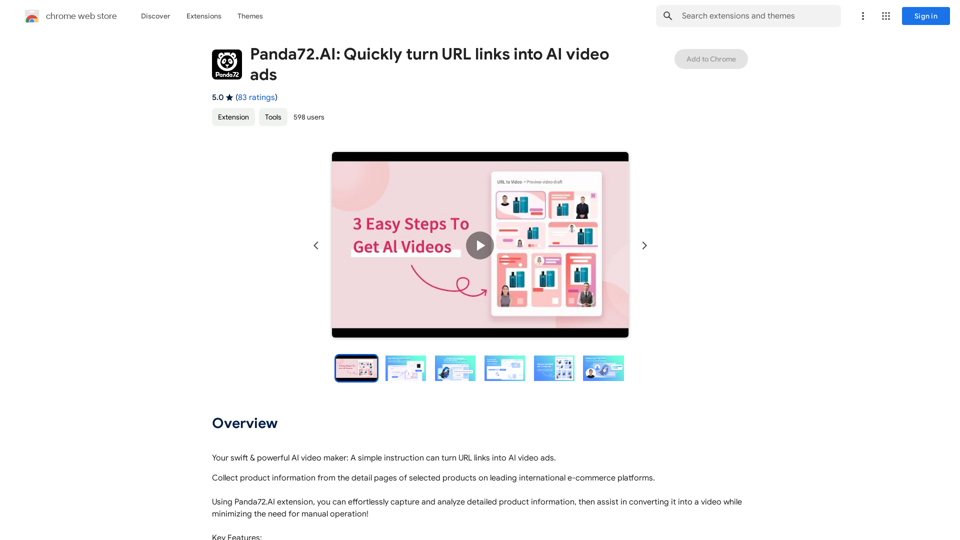
Your swift & powerful AI video maker: A simple instruction can turn URL links into AI video ads.
Visit Website
Panda72.AI: Quickly turn URL links into AI video ads
Visit Website

Introduction

Panda72.AI is an innovative AI-powered platform that transforms URL links into AI video ads. It offers advanced data capture and assisted video creation features, streamlining the process of generating high-quality product or service showcase videos. This tool is designed to enhance efficiency and simplify video ad creation for users across the globe.

Feature

Advanced Data Capture

Panda72.AI employs sophisticated data models to accurately identify and capture product information from URLs.

Assisted Video Creation

The platform streamlines the process of converting content into videos, minimizing manual intervention and saving time.

High Efficiency

Generate high-quality product or service showcase videos in just seconds, significantly speeding up the ad creation process.

Free Chrome Extension

Panda72.AI offers a completely free extension available for download from the Chrome Web Store, making it accessible to all users.

Strict Compliance

The platform adheres rigorously to regulations, ensuring user privacy protection and safeguarding rights.

Global Accessibility

Panda72.AI can be used in any country or region worldwide, making it a versatile tool for international users.

Search Engine Support

Currently supports Google, with plans to expand compatibility to more search engines in the future.

FAQ

How do I use Panda72.AI?

  1. Click "Add to Chrome" to add the extension to your browser toolbar.
  2. Open https://www.panda72.ai/
  3. Copy the product URL you want to analyze.
  4. Paste the URL into the feature bar on the website.
  5. Panda72.AI will automatically analyze the product information and generate a video.

Is Panda72.AI free to use?

Yes, the Panda72.AI extension is completely free to use.

Which search engines does Panda72.AI support?

Currently, Panda72.AI supports Google. There are plans to support more search engines in the future.

Why do link capture failures occur sometimes?

Link capture failures may happen on certain pages such as:

  • Gift card pages
  • Out-of-stock items
  • Products not available for international sales

If you encounter a failure, it's recommended to try again.

Latest Traffic Insights

  • Monthly Visits

    193.90 M

  • Bounce Rate

    56.27%

  • Pages Per Visit

    2.71

  • Time on Site(s)

    115.91

  • Global Rank

    -

  • Country Rank

    -

Recent Visits

Traffic Sources

  • Social Media:
    0.48%
  • Paid Referrals:
    0.55%
  • Email:
    0.15%
  • Referrals:
    12.81%
  • Search Engines:
    16.21%
  • Direct:
    69.81%
More Data

Related Websites

Chat-GPT PDF

What is Chat-GPT PDF?

Chat-GPT PDF is a tool that allows users to generate PDF files from Chat-GPT conversations. This innovative tool enables users to save and share their conversations in a more organized and visually appealing format.

How does Chat-GPT PDF work?

The process is simple and straightforward. Here's a step-by-step guide:

1. Copy the conversation: Copy the entire conversation from the Chat-GPT platform.
2. Paste the conversation: Paste the copied conversation into the Chat-GPT PDF tool.
3. Customize the layout: Customize the layout, font, and design of the PDF file according to your preferences.
4. Generate the PDF: Click the "Generate PDF" button to create a downloadable PDF file.

Features of Chat-GPT PDF

Chat-GPT PDF offers several features that make it an essential tool for users:

* Customizable layout: Customize the layout, font, and design of the PDF file to suit your needs.
* Easy sharing: Share the PDF file with others via email, social media, or messaging apps.
* Offline access: Access your conversations offline, even without an internet connection.
* Organization: Organize your conversations in a neat and tidy format, making it easier to review and reference.

Benefits of Chat-GPT PDF

The benefits of using Chat-GPT PDF are numerous:

* Improved productivity: Save time and increase productivity by having all your conversations in one place.
* Enhanced collaboration: Collaborate with others more effectively by sharing conversations in a clear and concise format.
* Better organization: Keep your conversations organized, making it easier to review and reference them later.

Conclusion

Chat-GPT PDF is a game-changer for anyone who uses Chat-GPT regularly. With its ease of use, customization options, and benefits, it's an essential tool for anyone looking to get the most out of their conversations.
View Detail

Chat-GPT PDF What is Chat-GPT PDF? Chat-GPT PDF is a tool that allows users to generate PDF files from Chat-GPT conversations. This innovative tool enables users to save and share their conversations in a more organized and visually appealing format. How does Chat-GPT PDF work? The process is simple and straightforward. Here's a step-by-step guide: 1. Copy the conversation: Copy the entire conversation from the Chat-GPT platform. 2. Paste the conversation: Paste the copied conversation into the Chat-GPT PDF tool. 3. Customize the layout: Customize the layout, font, and design of the PDF file according to your preferences. 4. Generate the PDF: Click the "Generate PDF" button to create a downloadable PDF file. Features of Chat-GPT PDF Chat-GPT PDF offers several features that make it an essential tool for users: * Customizable layout: Customize the layout, font, and design of the PDF file to suit your needs. * Easy sharing: Share the PDF file with others via email, social media, or messaging apps. * Offline access: Access your conversations offline, even without an internet connection. * Organization: Organize your conversations in a neat and tidy format, making it easier to review and reference. Benefits of Chat-GPT PDF The benefits of using Chat-GPT PDF are numerous: * Improved productivity: Save time and increase productivity by having all your conversations in one place. * Enhanced collaboration: Collaborate with others more effectively by sharing conversations in a clear and concise format. * Better organization: Keep your conversations organized, making it easier to review and reference them later. Conclusion Chat-GPT PDF is a game-changer for anyone who uses Chat-GPT regularly. With its ease of use, customization options, and benefits, it's an essential tool for anyone looking to get the most out of their conversations.

Chat-GPT PDF What is Chat-GPT PDF? Chat-GPT PDF is a tool that allows users to generate PDF files from Chat-GPT conversations. This innovative tool enables users to save and share their conversations in a more organized and visually appealing format. How does Chat-GPT PDF work? The process is simple and straightforward. Here's a step-by-step guide: 1. Copy the conversation: Copy the entire conversation from the Chat-GPT platform. 2. Paste the conversation: Paste the copied conversation into the Chat-GPT PDF tool. 3. Customize the layout: Customize the layout, font, and design of the PDF file according to your preferences. 4. Generate the PDF: Click the "Generate PDF" button to create a downloadable PDF file. Features of Chat-GPT PDF Chat-GPT PDF offers several features that make it an essential tool for users: * Customizable layout: Customize the layout, font, and design of the PDF file to suit your needs. * Easy sharing: Share the PDF file with others via email, social media, or messaging apps. * Offline access: Access your conversations offline, even without an internet connection. * Organization: Organize your conversations in a neat and tidy format, making it easier to review and reference. Benefits of Chat-GPT PDF The benefits of using Chat-GPT PDF are numerous: * Improved productivity: Save time and increase productivity by having all your conversations in one place. * Enhanced collaboration: Collaborate with others more effectively by sharing conversations in a clear and concise format. * Better organization: Keep your conversations organized, making it easier to review and reference them later. Conclusion Chat-GPT PDF is a game-changer for anyone who uses Chat-GPT regularly. With its ease of use, customization options, and benefits, it's an essential tool for anyone looking to get the most out of their conversations.

Exporting Chat History to PDF You can export your chat history with Chat-GPT to a PDF file using the following methods: #Method 1: Browser Print Function 1. Open your chat conversation with Chat-GPT in a web browser. 2. Press `Ctrl + P` (Windows) or `Cmd + P` (Mac) to open the print dialog box. 3. Select "Save as PDF" as the printer destination. 4. Choose a location to save the PDF file and set the file name. 5. Click "Save" to export the chat history to a PDF file. #Method 2: Online PDF Conversion Tools 1. Copy the entire chat conversation by pressing `Ctrl + A` (Windows) or `Cmd + A` (Mac) and then `Ctrl + C` (Windows) or `Cmd + C` (Mac). 2. Go to an online PDF conversion tool, such as SmallPDF or Convertio. 3. Paste the chat conversation into the conversion tool's text box. 4. Select the PDF format and click "Convert" to generate the PDF file. 5. Download the PDF file to your computer. #Method 3: Browser Extensions 1. Install a browser extension, such as Print Friendly & PDF or FireShot, that allows you to save web pages as PDF files. 2. Open your chat conversation with Chat-GPT in a web browser. 3. Click the browser extension's icon in the toolbar. 4. Select the "Save as PDF" option and choose a location to save the file. 5. Click "Save" to export the chat history to a PDF file. By following these methods, you can easily export your chat history with Chat-GPT to a PDF file for future reference or sharing.

193.90 M
Face Swap - FaceArt
View Detail

Face Swap - FaceArt

Face Swap - FaceArt

FaceArt is a powerful AI face swap plugin that utilizes AI technology to generate face swap images in one click!

193.90 M
Hexofy Scraper - Free Web Scraping + AI
View Detail

Hexofy Scraper - Free Web Scraping + AI

Hexofy Scraper - Free Web Scraping + AI

1-Click Data Capture & Web Scraping Tool Enhanced with AI

193.90 M
Homie.AI on the App Store
View Detail

Homie.AI on the App Store

Homie.AI on the App Store

Homie.AI is your go-to academic assistant powered by AI with the unique ability to answer all your questions, summarize books, and fact-check information, Homie is always here to help you with your academic needs.

124.77 M
Copilot: Your AI Assistant Powered By ChatGPT
View Detail

Copilot: Your AI Assistant Powered By ChatGPT

Copilot: Your AI Assistant Powered By ChatGPT

AI-powered productivity extension with personalized coaching using ChatGPT, Claude, and Gemini, plus rapid actions and AI-generated images.

193.90 M
AI Customer Service Assistant
View Detail

AI Customer Service Assistant

AI Customer Service Assistant

Your AI customer service assistant has the capabilities of AI replies, copywriting optimization, content summarization, and intelligent translation, driving improvements in customer service efficiency and quality.

193.90 M
Conduit Copilot - AI analyst for business
View Detail

Conduit Copilot - AI analyst for business

Conduit Copilot - AI analyst for business

Conduit is a Copilot AI for business owners. Think of it like a data analyst in a box, powered by AI.

193.90 M
Visual Programming | Bubble

Bubble is a web development platform that allows users to build web applications without coding. It uses a visual programming language that is based on dragging and dropping elements to create the application's logic.
View Detail

Visual Programming | Bubble Bubble is a web development platform that allows users to build web applications without coding. It uses a visual programming language that is based on dragging and dropping elements to create the application's logic.

Visual Programming | Bubble Bubble is a web development platform that allows users to build web applications without coding. It uses a visual programming language that is based on dragging and dropping elements to create the application's logic.

From first-time founders to experienced engineers, Bubble allows users to build, design, and launch apps in record speed – no code required.

0