Open-source RightAI Tools Directory
  • Discover AI
  • Submit
  • Startup
  • Blog
Open-source RightAI Tools Directory
Discover the best AI tools of 2025 with the RightAI Tools Directory!

Friend Links

AI Anime GeneratorToolsApp AI

Support

Tap4
Privacy policyTerms & ConditionsContact Us
Loading...
loading...

NovelMate

Your Ultimate Novel Translation Companion 📚
Visit Website
NovelMate
Visit Website

Introduction

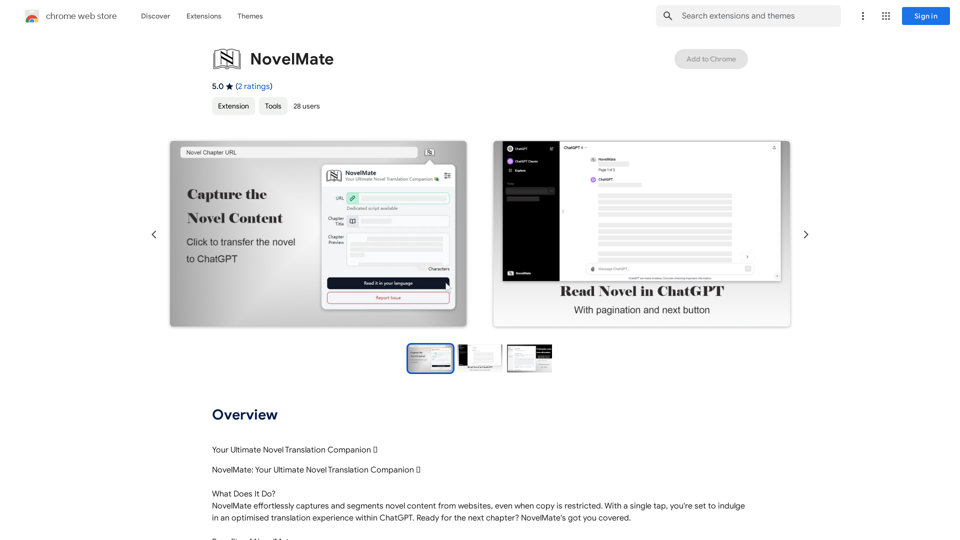
NovelMate is a browser extension designed to enhance the novel reading and translation experience. It captures and segments novel content from websites, even when copying is restricted, and seamlessly integrates with ChatGPT for optimized translation. This tool offers features like bypassing copy restrictions, managing token limits, and providing an optimal reading interface, making it an invaluable asset for avid readers and language learners.

Feature

Bypass Copy Restrictions

NovelMate effortlessly transfers content to ChatGPT, allowing users to read and translate novels without any restrictions, even from websites that prohibit copying.

Token Limit Management

The extension utilizes local storage and smart segmentation to ensure uninterrupted reading, effectively managing ChatGPT's token limits.

Optimal Reading Interface

NovelMate declutters the reading interface, focusing solely on novel content for an enhanced reading and translation experience.

Easy Next Chapter Navigation

The extension automatically loads the next chapter, facilitating a seamless reading experience across multiple chapters.

Personalized Reading Journey

Users can tailor their reading adventure, ensuring each chapter aligns with their preferences and tastes.

Free to Use

NovelMate is available as a free browser extension, with no subscription fees or hidden costs.

Compatibility

While optimized for ChatGPT, NovelMate is also compatible with other translation tools, offering flexibility to users.

FAQ

How does NovelMate work?

NovelMate captures and segments novel content from websites, even when copy is restricted. It then transfers the content to ChatGPT, allowing users to read and translate novels without any restrictions.

Will interacting with ChatGPT disrupt NovelMate?

No, users can engage with ChatGPT at any time and resume novel translations as desired without disrupting NovelMate's functionality.

What should I do if I encounter content policy alerts?

OpenAI has specific guidelines, and some content might not align with these policies. The developers are actively working on enhancements to address this issue. Users are advised to stay tuned for future updates.

Can I use NovelMate with other translation tools?

Yes, while NovelMate is optimized for use with ChatGPT, it is compatible with other translation tools as well.

Related Websites
MagicReply - AI Replies for Twitter
View Detail

MagicReply - AI Replies for Twitter

MagicReply - AI Replies for Twitter

Grow Your Twitter Account by Replying Using AI Are you tired of manually responding to tweets and struggling to grow your Twitter account? Do you want to increase your online presence and engage with your audience more efficiently? Look no further! This article will show you how to grow your Twitter account by replying using AI. What is AI-powered Twitter reply? AI-powered Twitter reply is a technology that uses artificial intelligence to automatically respond to tweets. This innovative tool analyzes the content of incoming tweets and generates a relevant response based on the context. With AI-powered Twitter reply, you can save time and effort while increasing your online engagement. Benefits of using AI-powered Twitter reply 1. Increased efficiency Manually responding to tweets can be time-consuming, especially if you have a large following. AI-powered Twitter reply automates the process, allowing you to focus on other important tasks. 2. Improved engagement AI-powered Twitter reply helps you respond to tweets quickly, which increases the chances of starting a conversation and building relationships with your followers. 3. Personalized responses AI-powered Twitter reply can be customized to fit your brand's voice and tone, ensuring that your responses are personalized and consistent. 4. Scalability As your Twitter account grows, AI-powered Twitter reply can handle a large volume of tweets, ensuring that you never miss a response. How to use AI-powered Twitter reply 1. Choose an AI-powered Twitter reply tool There are several AI-powered Twitter reply tools available, such as [Tool 1], [Tool 2], and [Tool 3]. Research and choose the one that best fits your needs. 2. Set up your AI-powered Twitter reply Once you've chosen a tool, set it up by connecting your Twitter account and customizing your responses. 3. Monitor and adjust Monitor your AI-powered Twitter reply's performance and adjust the settings as needed to ensure that your responses are relevant and engaging. Conclusion Growing your Twitter account requires consistent engagement and timely responses. AI-powered Twitter reply is a game-changer that can help you achieve this goal. By automating your responses, you can increase efficiency, improve engagement, and personalize your interactions. Try AI-powered Twitter reply today and watch your Twitter account thrive!

193.90 M
AI Assistant - ChatGPT and Gemini for Chrome
View Detail

AI Assistant - ChatGPT and Gemini for Chrome

AI Assistant - ChatGPT and Gemini for Chrome

Take your online search experience to new heights with this extension.

193.90 M
Article Summary with ChatGPT and Take Notes

This is a guide on how to use ChatGPT to summarize articles and take notes effectively. 

Step 1:  Provide ChatGPT with the Article

Copy and paste the full text of the article into the ChatGPT interface. 

Step 2:  Craft Your Prompt

Tell ChatGPT what you want it to do. Here are some examples:

* Summarize: "Please summarize this article in 200 words."
* Key Points: "What are the main points of this article?"
* Bullet Points: "Summarize the key findings of this article in bullet points."
* Notes: "Take notes on this article, focusing on the author's arguments and supporting evidence."

Step 3:  Review and Refine

ChatGPT will generate a summary, key points, bullet points, or notes based on your prompt. 

* Read carefully: Make sure the output accurately reflects the article's content.
* Edit as needed:  You can ask ChatGPT to rephrase sections or provide more detail.
* Add your own insights:  Don't just copy ChatGPT's output. Use it as a starting point and add your own thoughts, questions, and connections.

Tips for Effective Use:

* Be specific: The more specific your prompt, the better the output will be.
* Experiment with different prompts: Try various phrasing to see what works best.
* Use ChatGPT as a tool:  It's a powerful aid, but it's not a replacement for critical reading and thinking.
View Detail

Article Summary with ChatGPT and Take Notes This is a guide on how to use ChatGPT to summarize articles and take notes effectively. Step 1: Provide ChatGPT with the Article Copy and paste the full text of the article into the ChatGPT interface. Step 2: Craft Your Prompt Tell ChatGPT what you want it to do. Here are some examples: * Summarize: "Please summarize this article in 200 words." * Key Points: "What are the main points of this article?" * Bullet Points: "Summarize the key findings of this article in bullet points." * Notes: "Take notes on this article, focusing on the author's arguments and supporting evidence." Step 3: Review and Refine ChatGPT will generate a summary, key points, bullet points, or notes based on your prompt. * Read carefully: Make sure the output accurately reflects the article's content. * Edit as needed: You can ask ChatGPT to rephrase sections or provide more detail. * Add your own insights: Don't just copy ChatGPT's output. Use it as a starting point and add your own thoughts, questions, and connections. Tips for Effective Use: * Be specific: The more specific your prompt, the better the output will be. * Experiment with different prompts: Try various phrasing to see what works best. * Use ChatGPT as a tool: It's a powerful aid, but it's not a replacement for critical reading and thinking.

Article Summary with ChatGPT and Take Notes This is a guide on how to use ChatGPT to summarize articles and take notes effectively. Step 1: Provide ChatGPT with the Article Copy and paste the full text of the article into the ChatGPT interface. Step 2: Craft Your Prompt Tell ChatGPT what you want it to do. Here are some examples: * Summarize: "Please summarize this article in 200 words." * Key Points: "What are the main points of this article?" * Bullet Points: "Summarize the key findings of this article in bullet points." * Notes: "Take notes on this article, focusing on the author's arguments and supporting evidence." Step 3: Review and Refine ChatGPT will generate a summary, key points, bullet points, or notes based on your prompt. * Read carefully: Make sure the output accurately reflects the article's content. * Edit as needed: You can ask ChatGPT to rephrase sections or provide more detail. * Add your own insights: Don't just copy ChatGPT's output. Use it as a starting point and add your own thoughts, questions, and connections. Tips for Effective Use: * Be specific: The more specific your prompt, the better the output will be. * Experiment with different prompts: Try various phrasing to see what works best. * Use ChatGPT as a tool: It's a powerful aid, but it's not a replacement for critical reading and thinking.

I can do that! Please provide me with the URL of the webpage or article you'd like me to summarize. I'll do my best to create a concise and easy-to-understand summary for you.

193.90 M
Kayako Bot
View Detail

Kayako Bot

Kayako Bot

Kayako Bot

193.90 M
File Zen, a tool for AI-powered intelligent file organization and classification.
View Detail

File Zen, a tool for AI-powered intelligent file organization and classification.

File Zen, a tool for AI-powered intelligent file organization and classification.

FileNeatAI is a professional AI-powered file organization tool designed to streamline the process of categorizing and organizing text files on your computer. By leveraging advanced AI capabilities, FileNeatAI reads the content of each file within a specified folder and intelligently categorizes these files into different folders based on their content.

2.42 K
UMLGenius
View Detail

UMLGenius

UMLGenius

A Chrome extension for generating UML diagrams

193.90 M
Free AI Song Generator | Song.do
View Detail

Free AI Song Generator | Song.do

Free AI Song Generator | Song.do

The best free AI song generator: create songs and make music in the simplest way possible.

427.38 K
TubeInsights
View Detail

TubeInsights

TubeInsights

Boost your YouTube channel with automatic titles, descriptions, tags, and powerful media tools for effortless content improvement.

193.90 M