Open-source RightAI Tools Directory
  • Discover AI
  • Submit
  • Startup
  • Blog
Open-source RightAI Tools Directory
Discover the best AI tools of 2025 with the RightAI Tools Directory!

Friend Links

AI Anime GeneratorToolsApp AI

Support

Tap4
Privacy policyTerms & ConditionsContact Us
Loading...
loading...

Parental Search - Keep Your Kids Safe

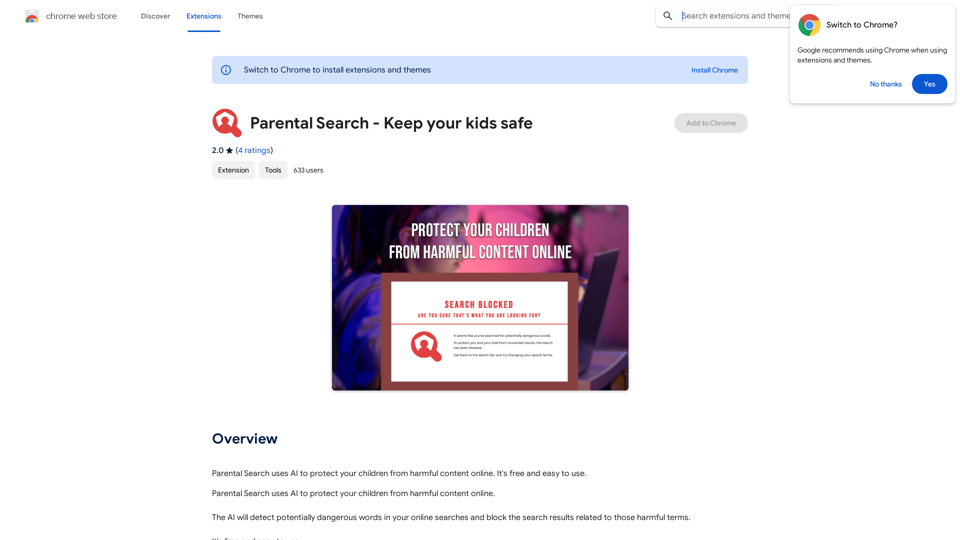
Parental Search uses AI to protect your children from harmful content online. It's free and easy to use.
Visit Website
Parental Search - Keep Your Kids Safe
Visit Website

Introduction

Parental Search is a free AI-powered browser extension designed to protect children from harmful online content. It operates seamlessly across major search engines like Google, Bing, and Yahoo, offering an easy-to-use solution for parents concerned about their children's online safety.

Feature

AI-Powered Content Detection

Parental Search utilizes advanced artificial intelligence to identify potentially dangerous words and phrases in online searches, providing real-time protection for children.

Multi-Platform Search Engine Support

The extension works across multiple search engines, including:

  • Google
  • Bing
  • Yahoo

This broad coverage ensures consistent protection regardless of the search platform used.

Automatic Content Blocking

When potentially harmful terms are detected, Parental Search automatically blocks related search results, preventing exposure to inappropriate content.

User-Friendly Interface

Designed with simplicity in mind, Parental Search offers an intuitive interface that's easy to set up and use, making it accessible for all parents regardless of their technical expertise.

Customizable Settings

Parents can tailor the extension's settings to their specific needs, allowing for a personalized approach to online safety:

  • Block specific websites
  • Add custom search terms to be filtered
  • Adjust sensitivity levels

Cross-Device Compatibility

Parental Search is compatible with all devices that use the Chrome browser, ensuring comprehensive protection across multiple devices.

Cost-Free Protection

As a free extension, Parental Search provides robust online safety features without any financial burden on families.

FAQ

How does Parental Search impact internet performance?

Parental Search is designed to be lightweight and efficient, ensuring that it doesn't slow down your internet connection or negatively impact browsing performance.

Can I monitor my child's online activity with Parental Search?

While Parental Search doesn't provide direct monitoring capabilities, it's recommended to regularly review your children's online activities in conjunction with using the extension for comprehensive online safety.

Is Parental Search available for browsers other than Chrome?

Currently, Parental Search is compatible with devices using the Chrome browser. Availability for other browsers is not specified in the provided information.

How often is Parental Search updated?

The information provided doesn't specify update frequency. However, as an AI-powered tool, it's likely that Parental Search receives regular updates to improve its detection capabilities and overall performance.

Related Websites
super memory
View Detail

super memory

super memory

An extension for https://supermemory.ai - an AI hub for all your bookmarks.

193.90 M
Get ChatGPT for Free with Google

You can now access ChatGPT, a powerful language model, for free with Google. Here's how:

Method 1: Google Colab

* Open Google Colab ([colab.research.google.com](http://colab.research.google.com))
* Create a new notebook
* Install the `transformers` library by running `!pip install transformers`
* Import the `transformers` library and load the ChatGPT model using `from transformers import AutoModelForCausalLM, AutoTokenizer; model = AutoModelForCausalLM.from_pretrained('chatgpt'); tokenizer = AutoTokenizer.from_pretrained('chatgpt')`
* Use the model to generate text using `input_text = "Your input here"; inputs = tokenizer.encode_plus(input_text, return_tensors='pt', max_length=1024, padding='max_length', truncation=True); output = model(inputs['input_ids'], attention_mask=inputs['attention_mask']); print(tokenizer.decode(output.logits[0], skip_special_tokens=True))`

Method 2: Google Apps Script

* Open Google Apps Script ([script.google.com](http://script.google.com))
* Create a new project
* Install the `transformers` library by running `npm install transformers`
* Import the `transformers` library and load the ChatGPT model using `const { AutoModelForCausalLM, AutoTokenizer } = require('transformers'); const model = new AutoModelForCausalLM('chatgpt'); const tokenizer = new AutoTokenizer('chatgpt');`
* Use the model to generate text using `const inputText = "Your input here"; const inputs = tokenizer.encodePlus(inputText, { return_tensors: 'pt', max_length: 1024, padding: 'max_length', truncation: true }); const output = model(inputs.inputIds, inputs.attentionMask); console.log(tokenizer.decode(output.logits[0], { skipSpecialTokens: true }));`

Note: These methods require some technical knowledge and may have limitations compared to the original ChatGPT model.
View Detail

Get ChatGPT for Free with Google You can now access ChatGPT, a powerful language model, for free with Google. Here's how: Method 1: Google Colab * Open Google Colab ([colab.research.google.com](http://colab.research.google.com)) * Create a new notebook * Install the `transformers` library by running `!pip install transformers` * Import the `transformers` library and load the ChatGPT model using `from transformers import AutoModelForCausalLM, AutoTokenizer; model = AutoModelForCausalLM.from_pretrained('chatgpt'); tokenizer = AutoTokenizer.from_pretrained('chatgpt')` * Use the model to generate text using `input_text = "Your input here"; inputs = tokenizer.encode_plus(input_text, return_tensors='pt', max_length=1024, padding='max_length', truncation=True); output = model(inputs['input_ids'], attention_mask=inputs['attention_mask']); print(tokenizer.decode(output.logits[0], skip_special_tokens=True))` Method 2: Google Apps Script * Open Google Apps Script ([script.google.com](http://script.google.com)) * Create a new project * Install the `transformers` library by running `npm install transformers` * Import the `transformers` library and load the ChatGPT model using `const { AutoModelForCausalLM, AutoTokenizer } = require('transformers'); const model = new AutoModelForCausalLM('chatgpt'); const tokenizer = new AutoTokenizer('chatgpt');` * Use the model to generate text using `const inputText = "Your input here"; const inputs = tokenizer.encodePlus(inputText, { return_tensors: 'pt', max_length: 1024, padding: 'max_length', truncation: true }); const output = model(inputs.inputIds, inputs.attentionMask); console.log(tokenizer.decode(output.logits[0], { skipSpecialTokens: true }));` Note: These methods require some technical knowledge and may have limitations compared to the original ChatGPT model.

Get ChatGPT for Free with Google You can now access ChatGPT, a powerful language model, for free with Google. Here's how: Method 1: Google Colab * Open Google Colab ([colab.research.google.com](http://colab.research.google.com)) * Create a new notebook * Install the `transformers` library by running `!pip install transformers` * Import the `transformers` library and load the ChatGPT model using `from transformers import AutoModelForCausalLM, AutoTokenizer; model = AutoModelForCausalLM.from_pretrained('chatgpt'); tokenizer = AutoTokenizer.from_pretrained('chatgpt')` * Use the model to generate text using `input_text = "Your input here"; inputs = tokenizer.encode_plus(input_text, return_tensors='pt', max_length=1024, padding='max_length', truncation=True); output = model(inputs['input_ids'], attention_mask=inputs['attention_mask']); print(tokenizer.decode(output.logits[0], skip_special_tokens=True))` Method 2: Google Apps Script * Open Google Apps Script ([script.google.com](http://script.google.com)) * Create a new project * Install the `transformers` library by running `npm install transformers` * Import the `transformers` library and load the ChatGPT model using `const { AutoModelForCausalLM, AutoTokenizer } = require('transformers'); const model = new AutoModelForCausalLM('chatgpt'); const tokenizer = new AutoTokenizer('chatgpt');` * Use the model to generate text using `const inputText = "Your input here"; const inputs = tokenizer.encodePlus(inputText, { return_tensors: 'pt', max_length: 1024, padding: 'max_length', truncation: true }); const output = model(inputs.inputIds, inputs.attentionMask); console.log(tokenizer.decode(output.logits[0], { skipSpecialTokens: true }));` Note: These methods require some technical knowledge and may have limitations compared to the original ChatGPT model.

How to Add ChatGPT to All Google Searches ===================================================== Step 1: Create a Custom Search Engine -------------------------------------- * Go to the [Google Custom Search Engine](https://cse.google.com/) website and sign in with your Google account. * Click on the "New Search Engine" button. * Fill in the required information, such as the name and description of your search engine. * Click on the "Create" button. Step 2: Add ChatGPT to the Search Engine ----------------------------------------- * In the "Setup" tab, click on the "Add" button next to "Sites to search". * Enter the following URL: `https://chat.openai.com/` * Click on the "Add" button. Step 3: Configure the Search Engine -------------------------------------- * In the "Setup" tab, click on the "Edit" button next to "Search engine keywords". * Add the following keywords: `ChatGPT` * Click on the "Save" button. Step 4: Get the Search Engine Code ------------------------------------- * In the "Setup" tab, click on the "Get code" button. * Copy the HTML code provided. Step 5: Add the Search Engine to Your Browser ------------------------------------------------ * Open your browser and go to the "Settings" or "Options" page. * Look for the "Search engine" or "Default search engine" option. * Click on the "Add" or "Manage search engines" button. * Paste the HTML code you copied earlier. * Click on the "Add" or "Save" button. You're Done! =============== Now, whenever you search on Google, ChatGPT will be included in the search results. You can also use the custom search engine URL provided by Google to search directly.

193.90 M
Ask.Medical on the App Store
View Detail

Ask.Medical on the App Store

Ask.Medical on the App Store

Introducing Ask.Medical, your AI-powered health assistant. Ask.Medical is a game-changer for doctors, patients, and society. Receive health recommendations and personalized guidance from a trusted and knowledgeable ally.

124.77 M
Horus
View Detail

Horus

Horus

Horus is your AI assistant for creating summaries, insights, and expanding knowledge.

193.90 M
Writeseed - AI Assistant
View Detail

Writeseed - AI Assistant

Writeseed - AI Assistant

Using AI on Every Website With the rapid advancement of technology, Artificial Intelligence (AI) has become an integral part of our daily lives. From virtual assistants to self-driving cars, AI is revolutionizing the way we live and work. One area where AI can have a significant impact is on websites. Imagine a website that can learn from your behavior, adapt to your needs, and provide personalized experiences. In this article, we'll explore the possibilities of using AI on every website. Enhanced User Experience AI can analyze user behavior, preferences, and interests to provide a tailored experience. For instance, an e-commerce website can use AI to recommend products based on a user's browsing history and purchase behavior. This can lead to increased customer satisfaction, loyalty, and ultimately, revenue. Improved Website Performance AI can help optimize website performance by analyzing user traffic patterns, identifying bottlenecks, and providing insights to improve loading times. This can result in higher search engine rankings, increased conversions, and a better overall user experience. Personalized Content AI-powered content generation can help create personalized content for users based on their interests, preferences, and behavior. This can include customized product recommendations, tailored blog posts, and even personalized email marketing campaigns. Enhanced Security AI-powered security systems can detect and prevent cyber threats in real-time, providing an additional layer of protection for websites and their users. This can include identifying and blocking malicious traffic, detecting phishing attempts, and preventing data breaches. Chatbots and Virtual Assistants AI-powered chatbots and virtual assistants can provide 24/7 customer support, helping users navigate websites, answer questions, and resolve issues. This can lead to increased customer satisfaction, reduced support queries, and improved overall user experience. The Future of Web Development As AI technology continues to evolve, we can expect to see even more innovative applications on websites. From AI-powered design tools to AI-driven website analytics, the possibilities are endless. The future of web development is exciting, and AI is at the forefront of this revolution. Conclusion Using AI on every website can have a transformative impact on the way we interact with the internet. From enhanced user experiences to improved website performance, personalized content, enhanced security, and chatbots, the benefits of AI are undeniable. As technology continues to advance, we can expect to see even more innovative applications of AI on websites. The future is exciting, and AI is leading the way.

193.90 M
MagicalAPI: YouTube SEO - Boost Your Channel with AI
View Detail

MagicalAPI: YouTube SEO - Boost Your Channel with AI

MagicalAPI: YouTube SEO - Boost Your Channel with AI

Your ultimate AI-powered tool for YouTube SEO and video optimization.

193.90 M
OpenGPTs
View Detail

OpenGPTs

OpenGPTs

OpenGPTs - Powerful GPTs Manager | Powerful GPT Manager

193.90 M
Empler AI | AI Workflows with GPT & More
View Detail

Empler AI | AI Workflows with GPT & More

Empler AI | AI Workflows with GPT & More

Next-Generation AI Tool For Better Outcomes.

193.90 M