Open-source RightAI Tools Directory
  • Discover AI
  • Submit
  • Startup
  • Blog
Open-source RightAI Tools Directory
Discover the best AI tools of 2025 with the RightAI Tools Directory!

Friend Links

AI Anime GeneratorToolsApp AI

Support

Tap4
Privacy policyTerms & ConditionsContact Us
Loading...
loading...

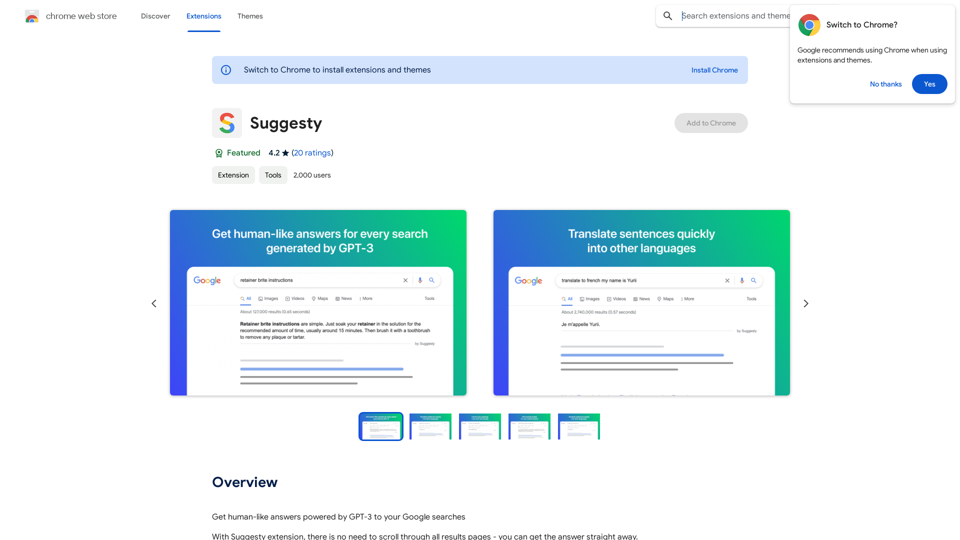
Suggesty Suggesty is a cutting-edge AI-powered tool designed to assist users in generating high-quality content quickly and efficiently.

Get human-like answers powered by GPT-3 to your Google searches
Visit Website
Suggesty

Suggesty is a cutting-edge AI-powered tool designed to assist users in generating high-quality content quickly and efficiently.
Visit Website

Introduction

Suggesty is a Chrome extension that leverages GPT-3 to provide human-like answers to Google searches. It offers instant responses to queries without the need to scroll through multiple search result pages. This tool enhances the search experience by integrating advanced AI capabilities directly into the Google search interface.

Feature

Instant AI-Powered Answers

Suggesty sends your Google request to GPT-3 and displays its answers directly on the Google page, providing quick and relevant information without leaving the search results.

Grammar Correction

Users can type "fix grammar" to correct their sentences, making it a useful tool for improving writing skills and ensuring error-free text.

Language Translation

Suggesty offers easy translation of text into various languages, facilitating multilingual communication and understanding.

Recipe Generation

The extension can create cocktail recipes based on the ingredients you have, showcasing its versatility beyond simple question-answering.

Versatile Query Handling

Suggesty can handle a wide range of requests, allowing users to type any question and receive an AI-generated answer powered by GPT-3.

Google Chrome Integration

As a Chrome extension, Suggesty seamlessly integrates with the Google search experience, enhancing the browser's functionality.

FAQ

How does Suggesty work?

Suggesty utilizes GPT-3 to generate answers to user questions. Upon installation, users can start by typing their questions in the search bar. The extension then sends the request to GPT-3 and displays the answer directly on the Google page.

What are the benefits of using Suggesty?

  • Instant access to AI-generated answers
  • Improvement of writing and grammar skills
  • Generation of ideas and inspiration through GPT-3

What are the limitations of Suggesty?

  • Exclusive compatibility with Google Chrome
  • Potential inaccuracies in GPT-3 generated answers
  • Not a replacement for human judgment and critical thinking

How can users maximize their use of Suggesty?

  • Utilize Suggesty for quick answers to questions
  • Experiment with various types of requests to explore GPT-3's capabilities
  • Leverage the tool to enhance writing and grammar skills

Related Websites
Homeworkify.im: The GPT-4o Powered Homeworkify Alternative
View Detail

Homeworkify.im: The GPT-4o Powered Homeworkify Alternative

Homeworkify.im: The GPT-4o Powered Homeworkify Alternative

Discover Homeworkify.im, the top homeworkify alternative offering free online AI-powered solutions. Upload text, images, or files for accurate and instant homework help across all subjects.

10.90 K
Viva Translate: Transcribe Google Meets & Browser Audio
View Detail

Viva Translate: Transcribe Google Meets & Browser Audio

Viva Translate: Transcribe Google Meets & Browser Audio

Transcribe and translate real-time video calls and more across 8 languages.

193.90 M
Liner | AI Copilot on Your Workspace, Powered by ChatGPT
View Detail

Liner | AI Copilot on Your Workspace, Powered by ChatGPT

Liner | AI Copilot on Your Workspace, Powered by ChatGPT

Try Liner. Boost productivity and optimize your workflow with AI Copilot by summarizing articles, generating code, and composing emails.

6.20 M
AgentForge
View Detail

AgentForge

AgentForge

Seamlessly build, deploy, and test AI apps with our fully integrated NextJS boilerplate.

997
Walle - AI Copilot ChatBot for ChatGPT
View Detail

Walle - AI Copilot ChatBot for ChatGPT

Walle - AI Copilot ChatBot for ChatGPT

Walle: Your All-in-One AI Assistant and Browser Extension

193.90 M
Luna - Your AI Assistant in Chrome
View Detail

Luna - Your AI Assistant in Chrome

Luna - Your AI Assistant in Chrome

ChatGPT for Chrome

193.90 M
Get ChatGPT for Free with Google

You can now access ChatGPT, a powerful language model, for free with Google. Here's how:

Method 1: Google Colab

* Open Google Colab ([colab.research.google.com](http://colab.research.google.com))
* Create a new notebook
* Install the `transformers` library by running `!pip install transformers`
* Import the `transformers` library and load the ChatGPT model using `from transformers import AutoModelForCausalLM, AutoTokenizer; model = AutoModelForCausalLM.from_pretrained('chatgpt'); tokenizer = AutoTokenizer.from_pretrained('chatgpt')`
* Use the model to generate text using `input_text = "Your input here"; inputs = tokenizer.encode_plus(input_text, return_tensors='pt', max_length=1024, padding='max_length', truncation=True); output = model(inputs['input_ids'], attention_mask=inputs['attention_mask']); print(tokenizer.decode(output.logits[0], skip_special_tokens=True))`

Method 2: Google Apps Script

* Open Google Apps Script ([script.google.com](http://script.google.com))
* Create a new project
* Install the `transformers` library by running `npm install transformers`
* Import the `transformers` library and load the ChatGPT model using `const { AutoModelForCausalLM, AutoTokenizer } = require('transformers'); const model = new AutoModelForCausalLM('chatgpt'); const tokenizer = new AutoTokenizer('chatgpt');`
* Use the model to generate text using `const inputText = "Your input here"; const inputs = tokenizer.encodePlus(inputText, { return_tensors: 'pt', max_length: 1024, padding: 'max_length', truncation: true }); const output = model(inputs.inputIds, inputs.attentionMask); console.log(tokenizer.decode(output.logits[0], { skipSpecialTokens: true }));`

Note: These methods require some technical knowledge and may have limitations compared to the original ChatGPT model.
View Detail

Get ChatGPT for Free with Google You can now access ChatGPT, a powerful language model, for free with Google. Here's how: Method 1: Google Colab * Open Google Colab ([colab.research.google.com](http://colab.research.google.com)) * Create a new notebook * Install the `transformers` library by running `!pip install transformers` * Import the `transformers` library and load the ChatGPT model using `from transformers import AutoModelForCausalLM, AutoTokenizer; model = AutoModelForCausalLM.from_pretrained('chatgpt'); tokenizer = AutoTokenizer.from_pretrained('chatgpt')` * Use the model to generate text using `input_text = "Your input here"; inputs = tokenizer.encode_plus(input_text, return_tensors='pt', max_length=1024, padding='max_length', truncation=True); output = model(inputs['input_ids'], attention_mask=inputs['attention_mask']); print(tokenizer.decode(output.logits[0], skip_special_tokens=True))` Method 2: Google Apps Script * Open Google Apps Script ([script.google.com](http://script.google.com)) * Create a new project * Install the `transformers` library by running `npm install transformers` * Import the `transformers` library and load the ChatGPT model using `const { AutoModelForCausalLM, AutoTokenizer } = require('transformers'); const model = new AutoModelForCausalLM('chatgpt'); const tokenizer = new AutoTokenizer('chatgpt');` * Use the model to generate text using `const inputText = "Your input here"; const inputs = tokenizer.encodePlus(inputText, { return_tensors: 'pt', max_length: 1024, padding: 'max_length', truncation: true }); const output = model(inputs.inputIds, inputs.attentionMask); console.log(tokenizer.decode(output.logits[0], { skipSpecialTokens: true }));` Note: These methods require some technical knowledge and may have limitations compared to the original ChatGPT model.

Get ChatGPT for Free with Google You can now access ChatGPT, a powerful language model, for free with Google. Here's how: Method 1: Google Colab * Open Google Colab ([colab.research.google.com](http://colab.research.google.com)) * Create a new notebook * Install the `transformers` library by running `!pip install transformers` * Import the `transformers` library and load the ChatGPT model using `from transformers import AutoModelForCausalLM, AutoTokenizer; model = AutoModelForCausalLM.from_pretrained('chatgpt'); tokenizer = AutoTokenizer.from_pretrained('chatgpt')` * Use the model to generate text using `input_text = "Your input here"; inputs = tokenizer.encode_plus(input_text, return_tensors='pt', max_length=1024, padding='max_length', truncation=True); output = model(inputs['input_ids'], attention_mask=inputs['attention_mask']); print(tokenizer.decode(output.logits[0], skip_special_tokens=True))` Method 2: Google Apps Script * Open Google Apps Script ([script.google.com](http://script.google.com)) * Create a new project * Install the `transformers` library by running `npm install transformers` * Import the `transformers` library and load the ChatGPT model using `const { AutoModelForCausalLM, AutoTokenizer } = require('transformers'); const model = new AutoModelForCausalLM('chatgpt'); const tokenizer = new AutoTokenizer('chatgpt');` * Use the model to generate text using `const inputText = "Your input here"; const inputs = tokenizer.encodePlus(inputText, { return_tensors: 'pt', max_length: 1024, padding: 'max_length', truncation: true }); const output = model(inputs.inputIds, inputs.attentionMask); console.log(tokenizer.decode(output.logits[0], { skipSpecialTokens: true }));` Note: These methods require some technical knowledge and may have limitations compared to the original ChatGPT model.

How to Add ChatGPT to All Google Searches ===================================================== Step 1: Create a Custom Search Engine -------------------------------------- * Go to the [Google Custom Search Engine](https://cse.google.com/) website and sign in with your Google account. * Click on the "New Search Engine" button. * Fill in the required information, such as the name and description of your search engine. * Click on the "Create" button. Step 2: Add ChatGPT to the Search Engine ----------------------------------------- * In the "Setup" tab, click on the "Add" button next to "Sites to search". * Enter the following URL: `https://chat.openai.com/` * Click on the "Add" button. Step 3: Configure the Search Engine -------------------------------------- * In the "Setup" tab, click on the "Edit" button next to "Search engine keywords". * Add the following keywords: `ChatGPT` * Click on the "Save" button. Step 4: Get the Search Engine Code ------------------------------------- * In the "Setup" tab, click on the "Get code" button. * Copy the HTML code provided. Step 5: Add the Search Engine to Your Browser ------------------------------------------------ * Open your browser and go to the "Settings" or "Options" page. * Look for the "Search engine" or "Default search engine" option. * Click on the "Add" or "Manage search engines" button. * Paste the HTML code you copied earlier. * Click on the "Add" or "Save" button. You're Done! =============== Now, whenever you search on Google, ChatGPT will be included in the search results. You can also use the custom search engine URL provided by Google to search directly.

193.90 M
AI Text Shortener | Precise Text Adjuster | WordLimiter
View Detail

AI Text Shortener | Precise Text Adjuster | WordLimiter

AI Text Shortener | Precise Text Adjuster | WordLimiter

WordLimit helps you to shorten your text precisely without losing key information and your unique writing style. Feel free to use it because it will never make your Human-Written content become AI-Written!

834