Clearscope is a leading content-first SEO platform that uses AI-powered technology to help businesses and content creators optimize their content for search engines. It analyzes and improves content relevance to user searches, ultimately increasing organic traffic. Clearscope offers a user-friendly interface, integrations with popular tools, and features like content inventory and real-time SERP monitoring to streamline the content optimization process.
Clearscope: The #1 Content-First SEO Platform
Clearscope is the leading content-first SEO platform that enables marketing teams to increase traffic by simplifying SEO and content optimization, keyword identification, workflow management, and content monitoring.

Introduction
Feature
AI-Powered Content Optimization
Clearscope's AI technology analyzes and provides recommendations to improve content relevance and search engine rankings.
Easy-to-Use Interface
The platform offers an intuitive interface, making it accessible for both beginners and experienced content creators.
Content Inventory Feature
This feature allows users to track and monitor changes in search engine results pages (SERPs) for their content.
Integration with Popular Tools
Clearscope integrates seamlessly with widely-used content creation tools:
| Tool | Integration Type |
|---|---|
| Google Docs | Add-on |
| WordPress | Plugin |
| Microsoft Word | Add-in (Web and Desktop) |
Competitive Query Ranking Assistance
The platform provides insights and recommendations to improve rankings for highly competitive search terms.
Real-Time SERP Monitoring
Users can keep track of SERP changes frequently, allowing for timely content adjustments.
FAQ
What makes Clearscope different from other SEO tools?
Clearscope is a content-first SEO platform that focuses on helping users create highly relevant content that ranks well in search engines. Its AI-powered technology and easy-to-use interface set it apart from other tools.
How does Clearscope help improve content rankings?
Clearscope provides valuable insights to help content rank better, especially for competitive queries. It offers recommendations and analysis to make content more relevant to user searches.
Is customer support available with Clearscope?
Yes, Clearscope provides free training from search experts and direct access to a responsive support team. Many customers praise the quality of Clearscope's customer support.
Related Websites

Unlock the power of AI with Task Hub AI. Learn from experts, collaborate with peers, and innovate with our AI community. Sign up now to turn your AI ideas into reality!
0
Stability Matrix CivitAI Integration This document outlines the integration of Stability Matrix into Civitai. What is Stability Matrix? Stability Matrix is a powerful tool for evaluating and comparing different AI models. It provides a comprehensive set of metrics to assess model performance across various tasks, including text generation, image generation, and code generation. Benefits of Integrating Stability Matrix into Civitai: * Enhanced Model Discovery: Users can easily identify high-performing models based on their desired tasks and preferences. * Improved Model Selection: The detailed metrics provided by Stability Matrix allow for informed decision-making when choosing a model for a specific project. * Community-Driven Evaluation: By leveraging the collective wisdom of the Civitai community, Stability Matrix fosters a transparent and collaborative approach to model evaluation. * Accelerated Model Development: Developers can use Stability Matrix to track the progress of their models and identify areas for improvement. Implementation Details: * Stability Matrix scores will be displayed alongside model descriptions on Civitai. * Users will be able to filter models based on their Stability Matrix scores. * The integration will initially focus on text generation and image generation models. Future Enhancements: * Expand support for additional model types, such as code generation models. * Implement interactive visualizations of Stability Matrix data. * Allow users to contribute their own model evaluations to the platform.
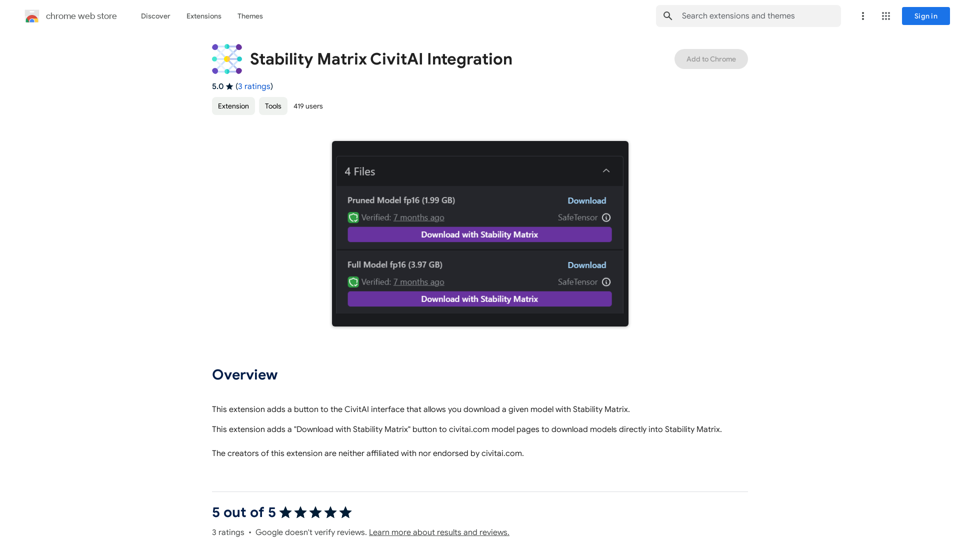
Stability Matrix CivitAI Integration This document outlines the integration of Stability Matrix into Civitai. What is Stability Matrix? Stability Matrix is a powerful tool for evaluating and comparing different AI models. It provides a comprehensive set of metrics to assess model performance across various tasks, including text generation, image generation, and code generation. Benefits of Integrating Stability Matrix into Civitai: * Enhanced Model Discovery: Users can easily identify high-performing models based on their desired tasks and preferences. * Improved Model Selection: The detailed metrics provided by Stability Matrix allow for informed decision-making when choosing a model for a specific project. * Community-Driven Evaluation: By leveraging the collective wisdom of the Civitai community, Stability Matrix fosters a transparent and collaborative approach to model evaluation. * Accelerated Model Development: Developers can use Stability Matrix to track the progress of their models and identify areas for improvement. Implementation Details: * Stability Matrix scores will be displayed alongside model descriptions on Civitai. * Users will be able to filter models based on their Stability Matrix scores. * The integration will initially focus on text generation and image generation models. Future Enhancements: * Expand support for additional model types, such as code generation models. * Implement interactive visualizations of Stability Matrix data. * Allow users to contribute their own model evaluations to the platform.This extension adds a button to the CivitAI interface that allows you to download a given model with Stability Matrix.
193.90 M


Panda72.AI: Quickly turn URL links into AI video ads
Panda72.AI: Quickly turn URL links into AI video adsYour swift & powerful AI video maker: A simple instruction can turn URL links into AI video ads.
193.90 M