Open-source RightAI Tools Directory
  • Discover AI
  • Submit
  • Startup
  • Blog
Open-source RightAI Tools Directory
Discover the best AI tools of 2025 with the RightAI Tools Directory!

Friend Links

AI Anime GeneratorToolsApp AI

Support

Tap4
Privacy policyTerms & ConditionsContact Us
Loading...
loading...

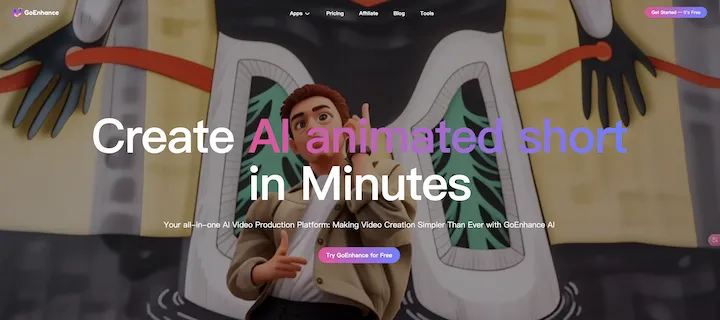
GoEnhance AI - Video to video, Image enhancer and upscaler

goenhance.ai is an AI-powered platform that specializes in enhancing and upscaling images and videos to high resolution
Visit Website
GoEnhance AI - Video to video, Image enhancer and upscaler
Visit Website

Introduction

goenhance.ai is an AI-powered platform that specializes in enhancing and upscaling images and videos to high resolution. It offers a variety of tools for creators, including image and video enhancement, video-to-video transformation, and AI art generation. The platform caters to professional photographers, digital artists, and casual users, providing advanced AI technologies to transform low-resolution visuals into stunning, detailed images and animations.

Feature

Image and Video Enhancement

Upscale and enhance images to extreme details, making them suitable for high-quality prints and digital displays. This feature allows users to transform low-resolution visuals into stunning, high-resolution images.

Video to Video Transformation

Convert videos into various animated styles, including anime and artistic filters. This tool enables users to create unique and visually appealing animations from their existing video content.

AI Art Generators

Create realistic photos, anime art, and other digital artwork from text prompts using advanced AI algorithms. This feature opens up a world of creative possibilities for users to generate custom artwork based on their descriptions.

Multiple AI Tools

goenhance.ai offers numerous AI tools, including:

  • Frame-to-frame video creation
  • Face swapping
  • Character animation from a single image
  • Various image enhancement options

User-Friendly Interface

Users can easily upload images or videos to the platform, select desired enhancement options, and generate results with a simple click. The intuitive design makes it accessible for both beginners and experienced creators.

Free Trial and Subscription Options

New users can explore the platform's capabilities with free trials. For those requiring extended access and additional features, affordable subscription plans are available.

FAQ

How can I maximize my use of goenhance.ai's AI services?

To maximize your use of goenhance.ai's AI services:

  1. Explore the daily free uses of various AI tools
  2. Experiment with different features to enhance your creative projects
  3. Consider subscribing to the platform for additional benefits and extended access beyond free usage limits

Will my information be used for your training data?

goenhance.ai prioritizes user privacy:

  • Personal data is not used for training purposes without consent
  • Users can delete their accounts at any time
  • All associated data will be removed from the platform upon account deletion

When would I need a goenhance.ai subscription?

Consider a goenhance.ai subscription if:

  • Free usage limits do not meet your needs
  • You rely heavily on AI tools for creative projects
  • You want extended access and additional features
  • You aim to enhance your overall experience on the platform

Latest Traffic Insights

  • Monthly Visits

    815.16 K

  • Bounce Rate

    31.55%

  • Pages Per Visit

    5.77

  • Time on Site(s)

    144.20

  • Global Rank

    46102

  • Country Rank

    India 14773

Recent Visits

Traffic Sources

  • Social Media:
    2.44%
  • Paid Referrals:
    0.60%
  • Email:
    0.08%
  • Referrals:
    6.80%
  • Search Engines:
    56.98%
  • Direct:
    33.09%
More Data

Related Websites

YouTube Transcript Generator
View Detail

YouTube Transcript Generator

YouTube Transcript Generator

Extract transcripts from any YouTube video instantly. Just paste the video URL to get accurate subtitles without having to watch the entire video.

7.45 K
Copilot for Microsoft 365 – Microsoft Adoption

Copilot for Microsoft 365 is a powerful AI assistant that helps you work smarter and faster across Microsoft 365 apps and services. It combines the power of large language models (LLMs) with your organization's data in the Microsoft Graph and Microsoft 365 apps to turn your words into the most powerful productivity tool on the planet.

Copilot is designed to help you:

• Unleash creativity
• Unlock productivity
• Uplevel skills

Copilot is built on Microsoft's comprehensive approach to security, compliance, and privacy. Copilot in Microsoft 365 apps and services:

• Does not use your data to train the underlying LLM
• Does not replace human ingenuity and judgment
• Is designed to keep humans in the loop

Copilot is currently available in Word, Excel, PowerPoint, Outlook, Teams, and more.

Getting Started with Copilot

To get started with Copilot, follow these steps:

1. Check availability: Ensure your organization has access to Copilot.
2. Learn the basics: Familiarize yourself with Copilot's capabilities and how to use it effectively.
3. Explore use cases: Discover how Copilot can help you in your specific role and tasks.
4. Practice and refine: Use Copilot regularly and refine your prompts for better results.
5. Share and collaborate: Collaborate with colleagues using Copilot and share best practices.

Best Practices for Using Copilot

1. Be specific in your prompts
2. Provide context for better results
3. Review and edit Copilot's output
4. Use Copilot as a starting point, not a final product
5. Experiment with different approaches
6. Stay informed about new features and updates

Copilot in Different Microsoft 365 Apps

• Word: Draft, edit, summarize, and rewrite content
• Excel: Analyze data, create formulas, and generate insights
• PowerPoint: Create presentations, design slides, and generate content
• Outlook: Compose emails, summarize threads, and manage your inbox
• Teams: Summarize meetings, generate action items, and create meeting notes

Responsible AI and Copilot

Microsoft is committed to developing AI systems responsibly. When using Copilot, keep in mind:

• AI-generated content may contain biases or inaccuracies
• Always review and verify Copilot's output
• Use your judgment and expertise alongside Copilot's suggestions
• Be aware of your organization's policies regarding AI use

Conclusion

Copilot for Microsoft 365 is a powerful tool that can significantly enhance your productivity and creativity. By understanding its capabilities, following best practices, and using it responsibly, you can make the most of this AI assistant in your daily work.
View Detail

Copilot for Microsoft 365 – Microsoft Adoption Copilot for Microsoft 365 is a powerful AI assistant that helps you work smarter and faster across Microsoft 365 apps and services. It combines the power of large language models (LLMs) with your organization's data in the Microsoft Graph and Microsoft 365 apps to turn your words into the most powerful productivity tool on the planet. Copilot is designed to help you: • Unleash creativity • Unlock productivity • Uplevel skills Copilot is built on Microsoft's comprehensive approach to security, compliance, and privacy. Copilot in Microsoft 365 apps and services: • Does not use your data to train the underlying LLM • Does not replace human ingenuity and judgment • Is designed to keep humans in the loop Copilot is currently available in Word, Excel, PowerPoint, Outlook, Teams, and more. Getting Started with Copilot To get started with Copilot, follow these steps: 1. Check availability: Ensure your organization has access to Copilot. 2. Learn the basics: Familiarize yourself with Copilot's capabilities and how to use it effectively. 3. Explore use cases: Discover how Copilot can help you in your specific role and tasks. 4. Practice and refine: Use Copilot regularly and refine your prompts for better results. 5. Share and collaborate: Collaborate with colleagues using Copilot and share best practices. Best Practices for Using Copilot 1. Be specific in your prompts 2. Provide context for better results 3. Review and edit Copilot's output 4. Use Copilot as a starting point, not a final product 5. Experiment with different approaches 6. Stay informed about new features and updates Copilot in Different Microsoft 365 Apps • Word: Draft, edit, summarize, and rewrite content • Excel: Analyze data, create formulas, and generate insights • PowerPoint: Create presentations, design slides, and generate content • Outlook: Compose emails, summarize threads, and manage your inbox • Teams: Summarize meetings, generate action items, and create meeting notes Responsible AI and Copilot Microsoft is committed to developing AI systems responsibly. When using Copilot, keep in mind: • AI-generated content may contain biases or inaccuracies • Always review and verify Copilot's output • Use your judgment and expertise alongside Copilot's suggestions • Be aware of your organization's policies regarding AI use Conclusion Copilot for Microsoft 365 is a powerful tool that can significantly enhance your productivity and creativity. By understanding its capabilities, following best practices, and using it responsibly, you can make the most of this AI assistant in your daily work.

Copilot for Microsoft 365 – Microsoft Adoption Copilot for Microsoft 365 is a powerful AI assistant that helps you work smarter and faster across Microsoft 365 apps and services. It combines the power of large language models (LLMs) with your organization's data in the Microsoft Graph and Microsoft 365 apps to turn your words into the most powerful productivity tool on the planet. Copilot is designed to help you: • Unleash creativity • Unlock productivity • Uplevel skills Copilot is built on Microsoft's comprehensive approach to security, compliance, and privacy. Copilot in Microsoft 365 apps and services: • Does not use your data to train the underlying LLM • Does not replace human ingenuity and judgment • Is designed to keep humans in the loop Copilot is currently available in Word, Excel, PowerPoint, Outlook, Teams, and more. Getting Started with Copilot To get started with Copilot, follow these steps: 1. Check availability: Ensure your organization has access to Copilot. 2. Learn the basics: Familiarize yourself with Copilot's capabilities and how to use it effectively. 3. Explore use cases: Discover how Copilot can help you in your specific role and tasks. 4. Practice and refine: Use Copilot regularly and refine your prompts for better results. 5. Share and collaborate: Collaborate with colleagues using Copilot and share best practices. Best Practices for Using Copilot 1. Be specific in your prompts 2. Provide context for better results 3. Review and edit Copilot's output 4. Use Copilot as a starting point, not a final product 5. Experiment with different approaches 6. Stay informed about new features and updates Copilot in Different Microsoft 365 Apps • Word: Draft, edit, summarize, and rewrite content • Excel: Analyze data, create formulas, and generate insights • PowerPoint: Create presentations, design slides, and generate content • Outlook: Compose emails, summarize threads, and manage your inbox • Teams: Summarize meetings, generate action items, and create meeting notes Responsible AI and Copilot Microsoft is committed to developing AI systems responsibly. When using Copilot, keep in mind: • AI-generated content may contain biases or inaccuracies • Always review and verify Copilot's output • Use your judgment and expertise alongside Copilot's suggestions • Be aware of your organization's policies regarding AI use Conclusion Copilot for Microsoft 365 is a powerful tool that can significantly enhance your productivity and creativity. By understanding its capabilities, following best practices, and using it responsibly, you can make the most of this AI assistant in your daily work.

Microsoft Copilot combines the power of large language models (LLMs) with your organization's data to turn your words into one of the most powerful productivity tools on the planet.

608.60 K
CVBee.ai: AI-Powered Online CV Maker | Resume Builder & CV Optimization
View Detail

CVBee.ai: AI-Powered Online CV Maker | Resume Builder & CV Optimization

CVBee.ai: AI-Powered Online CV Maker | Resume Builder & CV Optimization

CVBee.ai is an AI-powered online CV maker that helps you create, optimize, and refine professional resumes. Whether you're a job seeker or an experienced professional, CVBee.ai ensures your CV is ATS-friendly and perfectly structured.

0
Adaptive Planning EPM Software | Workday US
View Detail

Adaptive Planning EPM Software | Workday US

Adaptive Planning EPM Software | Workday US

Drive enterprise-wide business planning with Workday Adaptive Planning Cloud. Our EPM platform helps organizations plan smarter, report faster, and analyze better.

511.80 K
metastory · Empowering Product Owner with AI
View Detail

metastory · Empowering Product Owner with AI

metastory · Empowering Product Owner with AI

Fastest tool for requirements gathering

309
Reclaim – AI Calendar for Work and Life
View Detail

Reclaim – AI Calendar for Work and Life

Reclaim – AI Calendar for Work and Life

Reclaim is an AI-powered app that creates 40% more time for teams by automatically scheduling tasks, habits, meetings, and breaks — available for free on Google Calendar and Outlook Calendar.

1.06 M
BrightEdge - Enterprise SEO Platform | Content Marketing Solution
View Detail

BrightEdge - Enterprise SEO Platform | Content Marketing Solution

BrightEdge - Enterprise SEO Platform | Content Marketing Solution

BrightEdge is the premier SEO solution and content performance marketing platform, assisting over 1,700 clients in increasing their organic traffic. Headquartered in San Mateo, CA, BrightEdge has offices in New York, Seattle, Chicago, Cleveland, Tokyo, Sydney, and London. Get in touch with us for an SEO demonstration today.

167.78 K
Legal Analytics by Lex Machina
View Detail

Legal Analytics by Lex Machina

Legal Analytics by Lex Machina

Lex Machina provides Legal Analytics to law firms and companies, enabling them to craft successful strategies, win cases, and close business.

21.45 K