Open-source RightAI Tools Directory
  • Discover AI
  • Submit
  • Startup
  • Blog
Open-source RightAI Tools Directory
Discover the best AI tools of 2025 with the RightAI Tools Directory!

Friend Links

AI Anime GeneratorToolsApp AI

Support

Tap4
Privacy policyTerms & ConditionsContact Us
Loading...
loading...

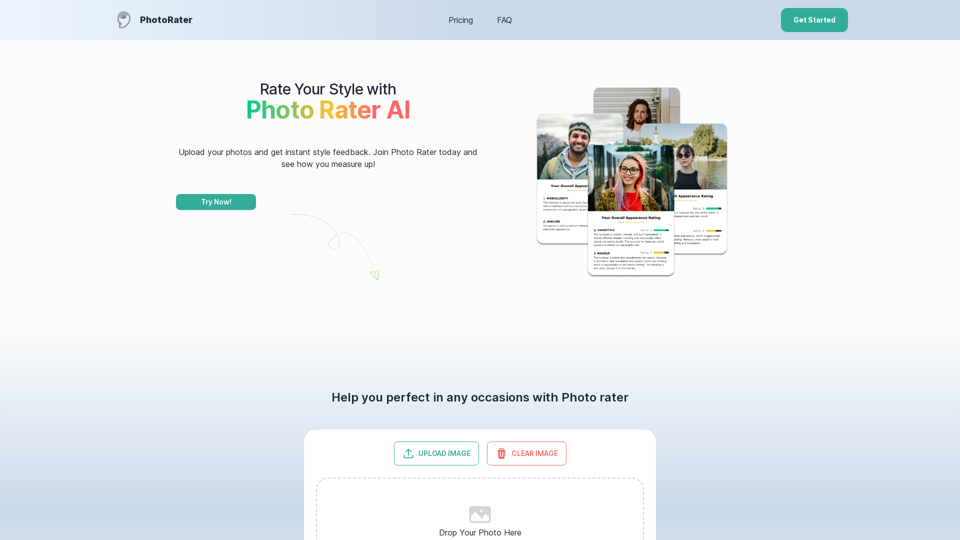
PhotoRater - AI-powered photo rating app for any occasion.

Discover the secret to looking your best on any occasion with PhotoRater, the ultimate AI photo rater. Whether you need an image rater for fashion advice or a photo rating AI to boost your social media presence, PhotoRater has you covered.
Visit Website
PhotoRater - AI-powered photo rating app for any occasion.
Visit Website

Introduction

PhotoRater is an AI-powered photo rating application designed to enhance users' style and confidence. It provides comprehensive image analysis, offering detailed ratings and personalized suggestions for various types of photos, from casual snapshots to professional images. The app aims to help users improve their appearance and make informed decisions about their style choices.

Feature

Comprehensive Image Rater

  • Analyzes all types of images
  • Provides detailed ratings and suggestions
  • Tailored to specific user needs

Personalized Feedback

  • Offers specific tips to enhance style
  • Customized advice based on unique features
  • Actionable and relevant suggestions

Versatile Looks Rater

  • Instant ratings for any occasion
  • Helps choose best outfits and styles
  • Suitable for job interviews, dates, casual outings

User-Friendly Process

  1. Upload photos
  2. Receive instant AI feedback
  3. Improve look based on suggestions

Pricing Options

PlanFeaturesPrice
FreeBasic analysis and feedback$0
PremiumDetailed reports, personalized improvement plansSubscription required

FAQ

What is PhotoRater?

PhotoRater is an AI-driven website where users can upload photos and receive comprehensive analysis of their appearance, including style, facial features, and overall presentation.

How does the AI judge photos?

The AI utilizes advanced image recognition algorithms to evaluate various aspects of appearance, including dressing style, hairstyle, facial expressions, and overall presentation.

Is user data safe with PhotoRater?

Yes, PhotoRater prioritizes user privacy and security. All photos and personal information are processed securely to ensure data protection.

How can PhotoRater improve online presence?

By understanding PhotoRater's rating system, users can select images that highlight their best features, potentially enhancing their attractiveness on social media and dating platforms.

Latest Traffic Insights

  • Monthly Visits

    15.79 K

  • Bounce Rate

    31.28%

  • Pages Per Visit

    3.32

  • Time on Site(s)

    111.70

  • Global Rank

    1257807

  • Country Rank

    India 121040

Recent Visits

Traffic Sources

  • Social Media:
    8.36%
  • Paid Referrals:
    1.31%
  • Email:
    0.06%
  • Referrals:
    6.17%
  • Search Engines:
    42.36%
  • Direct:
    41.73%
More Data

Related Websites

Recorditor: Record your browser activity.
View Detail

Recorditor: Record your browser activity.

Recorditor: Record your browser activity.

Record, write down, and shorten web browser activities for simple how-to guides and sharing information.

193.90 M
Buyers List Builder
View Detail

Buyers List Builder

Buyers List Builder

Build a Cash Buyer List Fast and Easy

193.90 M
ChatGPT on Google
View Detail

ChatGPT on Google

ChatGPT on Google

Use Google to access ChatGPT and see the AI chatbot's answers next to regular search results.

193.90 M
Text to Voice Generator
==========================

A text-to-voice generator, also known as a text-to-speech (TTS) system, is a software that converts written text into a spoken voice output. This technology has been widely used in various applications, including virtual assistants, audiobooks, and language learning platforms.

How it Works
---------------

The process of generating voice from text involves several steps:

1. Text Analysis: The input text is analyzed to identify the language, syntax, and semantics.
2. Phonetic Transcription: The text is converted into a phonetic transcription, which represents the sounds of the spoken language.
3. Prosody Generation: The phonetic transcription is then used to generate the prosody, or rhythm and intonation, of the spoken voice.
4. Waveform Generation: The prosody and phonetic transcription are combined to generate the audio waveform, which is the final spoken voice output.

Types of Text-to-Voice Generators
-----------------------------------

There are two main types of text-to-voice generators:

Rule-Based Systems

These systems use a set of predefined rules to generate the spoken voice output. They are often limited in their ability to produce natural-sounding voices and may sound robotic.

Machine Learning-Based Systems

These systems use machine learning algorithms to learn from large datasets of spoken voices and generate more natural-sounding voices. They are often more advanced and can produce high-quality voice outputs.

Applications of Text-to-Voice Generators
-----------------------------------------

Text-to-voice generators have a wide range of applications, including:

Virtual Assistants

Virtual assistants, such as Siri and Alexa, use text-to-voice generators to respond to user queries.

Audiobooks

Text-to-voice generators can be used to create audiobooks from written texts, making it easier for people to access written content.

Language Learning

Language learning platforms use text-to-voice generators to provide pronunciation guidance and practice exercises for learners.

Accessibility

Text-to-voice generators can be used to assist people with disabilities, such as visual impairments, by providing an auditory interface to written content.
View Detail

Text to Voice Generator ========================== A text-to-voice generator, also known as a text-to-speech (TTS) system, is a software that converts written text into a spoken voice output. This technology has been widely used in various applications, including virtual assistants, audiobooks, and language learning platforms. How it Works --------------- The process of generating voice from text involves several steps: 1. Text Analysis: The input text is analyzed to identify the language, syntax, and semantics. 2. Phonetic Transcription: The text is converted into a phonetic transcription, which represents the sounds of the spoken language. 3. Prosody Generation: The phonetic transcription is then used to generate the prosody, or rhythm and intonation, of the spoken voice. 4. Waveform Generation: The prosody and phonetic transcription are combined to generate the audio waveform, which is the final spoken voice output. Types of Text-to-Voice Generators ----------------------------------- There are two main types of text-to-voice generators: Rule-Based Systems These systems use a set of predefined rules to generate the spoken voice output. They are often limited in their ability to produce natural-sounding voices and may sound robotic. Machine Learning-Based Systems These systems use machine learning algorithms to learn from large datasets of spoken voices and generate more natural-sounding voices. They are often more advanced and can produce high-quality voice outputs. Applications of Text-to-Voice Generators ----------------------------------------- Text-to-voice generators have a wide range of applications, including: Virtual Assistants Virtual assistants, such as Siri and Alexa, use text-to-voice generators to respond to user queries. Audiobooks Text-to-voice generators can be used to create audiobooks from written texts, making it easier for people to access written content. Language Learning Language learning platforms use text-to-voice generators to provide pronunciation guidance and practice exercises for learners. Accessibility Text-to-voice generators can be used to assist people with disabilities, such as visual impairments, by providing an auditory interface to written content.

Text to Voice Generator ========================== A text-to-voice generator, also known as a text-to-speech (TTS) system, is a software that converts written text into a spoken voice output. This technology has been widely used in various applications, including virtual assistants, audiobooks, and language learning platforms. How it Works --------------- The process of generating voice from text involves several steps: 1. Text Analysis: The input text is analyzed to identify the language, syntax, and semantics. 2. Phonetic Transcription: The text is converted into a phonetic transcription, which represents the sounds of the spoken language. 3. Prosody Generation: The phonetic transcription is then used to generate the prosody, or rhythm and intonation, of the spoken voice. 4. Waveform Generation: The prosody and phonetic transcription are combined to generate the audio waveform, which is the final spoken voice output. Types of Text-to-Voice Generators ----------------------------------- There are two main types of text-to-voice generators: Rule-Based Systems These systems use a set of predefined rules to generate the spoken voice output. They are often limited in their ability to produce natural-sounding voices and may sound robotic. Machine Learning-Based Systems These systems use machine learning algorithms to learn from large datasets of spoken voices and generate more natural-sounding voices. They are often more advanced and can produce high-quality voice outputs. Applications of Text-to-Voice Generators ----------------------------------------- Text-to-voice generators have a wide range of applications, including: Virtual Assistants Virtual assistants, such as Siri and Alexa, use text-to-voice generators to respond to user queries. Audiobooks Text-to-voice generators can be used to create audiobooks from written texts, making it easier for people to access written content. Language Learning Language learning platforms use text-to-voice generators to provide pronunciation guidance and practice exercises for learners. Accessibility Text-to-voice generators can be used to assist people with disabilities, such as visual impairments, by providing an auditory interface to written content.

Generate Voice from Text on Any Web Page With the advancement of technology, it is now possible to generate voice from text on any web page. This feature is particularly useful for people who prefer listening to content rather than reading it. Here's how you can do it: #Method 1: Using Browser Extension You can use a browser extension like Read Aloud or SpeakIt! to generate voice from text on any web page. These extensions are available for both Google Chrome and Mozilla Firefox browsers. #Method 2: Using Online Tools There are several online tools available that can convert text to speech. Some popular tools include NaturalReader, Voice Dream Reader, and Google Text-to-Speech. You can copy and paste the text from any web page into these tools to generate voice. #Method 3: Using Screen Reader If you are using a Windows operating system, you can use the built-in Narrator screen reader to generate voice from text on any web page. For Mac users, you can use VoiceOver. By using any of these methods, you can easily generate voice from text on any web page and enjoy a more convenient and accessible reading experience.

193.90 M
Physna Nexus+
View Detail

Physna Nexus+

Physna Nexus+

Physna Nexus+ is a tool that improves Unity Asset Manager by adding search features powered by Physna.

193.90 M
FluxAI.art: Flux.1 AI Image Generator Free Online
View Detail

FluxAI.art: Flux.1 AI Image Generator Free Online

FluxAI.art: Flux.1 AI Image Generator Free Online

Transform text into images with Flux.1, the cutting-edge AI image generator by Black Forest Labs. Experience unparalleled image quality and prompt adherence to creative projects with Flux.1 [pro], Flux.1 [dev], and Flux.1 [schnell].

540.55 K
Super Time Travel - Explore the Past... and the Future
View Detail

Super Time Travel - Explore the Past... and the Future

Super Time Travel - Explore the Past... and the Future

Super Time Travel lets you upload your photos and see them transformed to any past or future year. Experience your images as they would appear in any historical era or future setting with the magic of AI.

0
Free AI Image Generator | Prompt Generator and AI Image Creator
View Detail

Free AI Image Generator | Prompt Generator and AI Image Creator

Free AI Image Generator | Prompt Generator and AI Image Creator

Picture AI is an amazing AI image generator and image editor. It generates prompts for you and then creates images that meet your needs with AI.

100