RightAI工具目錄
  • 發現AI
  • 提交
  • 启动项目
  • 博客
RightAI工具目錄
發現2025年最佳AI工具,盡在RightAI工具目錄!

友情鏈接

AI Anime GeneratorToolsApp AI

支持

Tap4
隱私政策條款和條件聯繫我們
Loading...
加載中...

ChatBot AI - ChatGPT & Claude & Bard & Bing

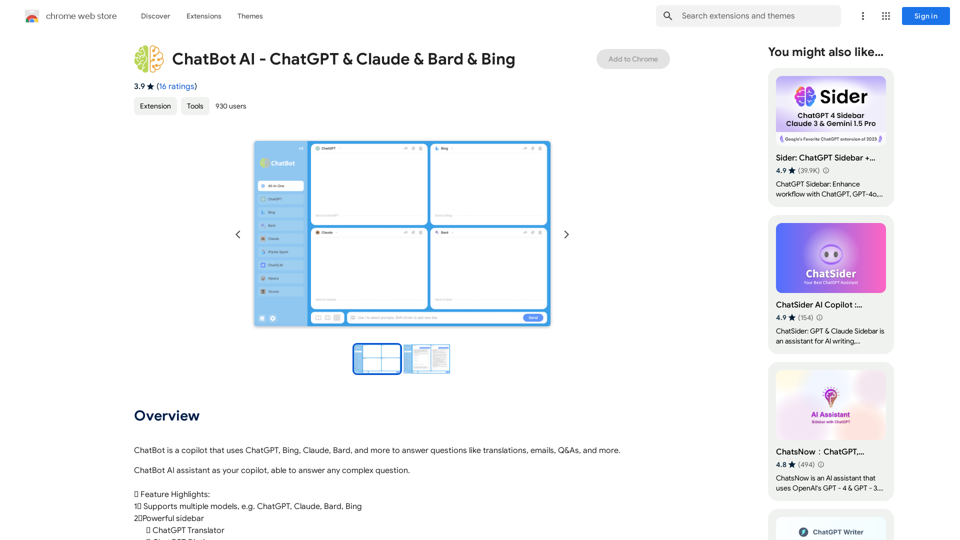
ChatBot 是一個使用 ChatGPT、Bing、Claude、Bard 等的copilot,可以回答翻譯、電子郵件、Q&A 等問題。
訪問網站

ChatBot AI - ChatGPT & Claude & Bard & Bing
訪問網站

介紹

ChatBot AI 是一個多功能的 AI 助手,利用多種語言模型,包括 ChatGPT、Bing、Claude 和 Bard,為各種問題提供全面的答案。這個強大的工具可以處理複雜的查詢,協助翻譯、撰寫電子郵件和各種其他任務,使其成為尋求 AI 支援的用戶的寶貴助手。

功能

多重 AI 模型支援

ChatBot AI 整合了幾個領先的 AI 模型:

  • ChatGPT
  • Claude
  • Bard
  • Bing

這種多樣化的模型範圍確保用戶能夠獲得最適合其特定需求的 AI。

強大的側邊欄功能

側邊欄提供了多種有用的功能:

  • ChatGPT 翻譯器
  • ChatGPT 字典
  • 語法檢查
  • 可自訂提示

這些工具增強了用戶體驗,並為各種任務提供額外支援。

靈活的存取選項

用戶可以通過多種方法輕鬆存取 ChatBot AI:

  • ChatGPT API 金鑰
  • GPT-3.5
  • GPT-4
  • Claude API 金鑰
  • iFlytek

這種靈活性確保用戶可以無縫連接到他們偏好的 AI 模型。

可自訂的用戶界面

ChatBot AI 提供個性化的視覺體驗:

  • 支援深色/淺色模式
  • 多種顏色調整選項

這些功能允許用戶根據自己的偏好和工作環境定制界面。

增強的回應頁面

ChatGPT、Claude 和 Bard 的回應頁面包括幾個有用的功能:

  • Markdown 渲染
  • 代碼高亮
  • 停止生成回應的選項
  • 將回應複製到剪貼板的功能

這些功能改善了 AI 生成內容的可讀性和用戶互動。

快速操作功能

ChatBot AI 提供便捷的工具,可即時操作文本:

  • 翻譯任何網頁上的文本
  • 改寫任何網頁上的文本

這項功能通過允許用戶快速修改文本而無需離開當前網頁,提高了生產力。

常見問題

你計劃在未來添加更多 AI 模型嗎?

ChatBot AI 致力於跟上 AI 技術的最新發展。以下是您可以期待的:

  • 持續更新以保持與 ChatGPT 的同步
  • 在未來的 GPT 版本(如 GPT-5)可用時迅速支援
  • 持續探索專門的 AI 功能,例如:
    • Excel-ChatGPT 整合
    • SQL-ChatGPT 功能
    • Mini-ChatGPT 功能
  • 持續監控並可能整合 Claude、Bard 和其他 AI 模型的進展

ChatBot AI 背後的團隊致力於擴展其功能並納入新興的 AI 技術,確保用戶始終能夠獲得最先進的 AI 協助。
相關網站

標籤盒
查看詳情

標籤盒

標籤盒

知識管理的新方法!像將貼紙貼在重要筆記上一樣,為您的資訊推薦最合適的標籤。

193.90 M
Carol - ChatGPT for Chrome
查看詳情

Carol - ChatGPT for Chrome

Carol - ChatGPT for Chrome

ChatGPT for Chrome

193.90 M
Plant Identifier: App Store
查看詳情

Plant Identifier: App Store

Plant Identifier: App Store

使用您的攝影機或照片,快速通過 AI 識別植物。 完美適合園丁、自然愛好者和任何對周圍植物感到好奇的人。 功能…

124.77 M
SoBrief.com:全球最大的書籍摘要網站
查看詳情

SoBrief.com:全球最大的書籍摘要網站

SoBrief.com:全球最大的書籍摘要網站

探索73,530本免費非小說類書籍摘要,附帶音頻。每本書10分鐘內12個關鍵要點。比其他網站多10倍的書籍。涵蓋各種可想像的主題。

1.14 M
ChatGPT 至 Markdown 加
查看詳情

ChatGPT 至 Markdown 加

ChatGPT 至 Markdown 加

```markdown ChatGPT Chat History You: Export chat history from ChatGPT website to normal format as Markdown, which can be opened via typora exactly. ChatGPT: ```markdown ChatGPT Chat History You: Export chat history from ChatGPT website to normal format as Markdown, which can be opened via typora exactly. ChatGPT: I can help you with that! Unfortunately, there's no direct way to export your chat history from the ChatGPT website in a format that's perfectly compatible with Typora. The website doesn't offer a dedicated download feature for chat logs. However, you can manually copy and paste your conversation into a Markdown file. Here's how: 1. Go to the ChatGPT website and log in to your account. 2. Navigate to the conversation you want to export. 3. Select all the text in the conversation window. 4. Copy the selected text (Ctrl+C or Cmd+C). 5. Open a new Markdown file in Typora. 6. Paste the copied text into the Typora file (Ctrl+V or Cmd+V). Keep in mind that this method might not preserve all formatting elements perfectly, especially if your conversation includes special characters or code blocks. ```

193.90 M
語音轉文字
查看詳情

語音轉文字

語音轉文字

將您的語音或影片快速轉換為文字或字幕。自動轉錄您的會議、訪談、講座至文字...

193.90 M
#. SkillSpot.ai
查看詳情

#. SkillSpot.ai

#. SkillSpot.ai

Discover SkillSpot.ai,一個人工智慧驅動的招聘解決方案,正在改變招聘景觀。體驗人工智慧指導的職位列表、智能人工智慧驅動的候選人篩選和詳細的虛擬面試。使用我們先進的人工智慧工具,擁抱人才收購中的效率和精確性。今天預訂演示!

1.24 K
ChatGPT 助理 - 智能搜尋
查看詳情

ChatGPT 助理 - 智能搜尋

ChatGPT 助理 - 智能搜尋

將 OpenAI ChatGPT 整合到您的搜尋引擎! 使用 Chat GPT 助手函數,在任何網站上存取 ChatGPT。

193.90 M