Open-source RightAI Tools Directory
  • Discover AI
  • Submit
  • Startup
  • Blog
Open-source RightAI Tools Directory
Discover the best AI tools of 2025 with the RightAI Tools Directory!

Friend Links

AI Anime GeneratorToolsApp AI

Support

Tap4
Privacy policyTerms & ConditionsContact Us
Loading...
loading...

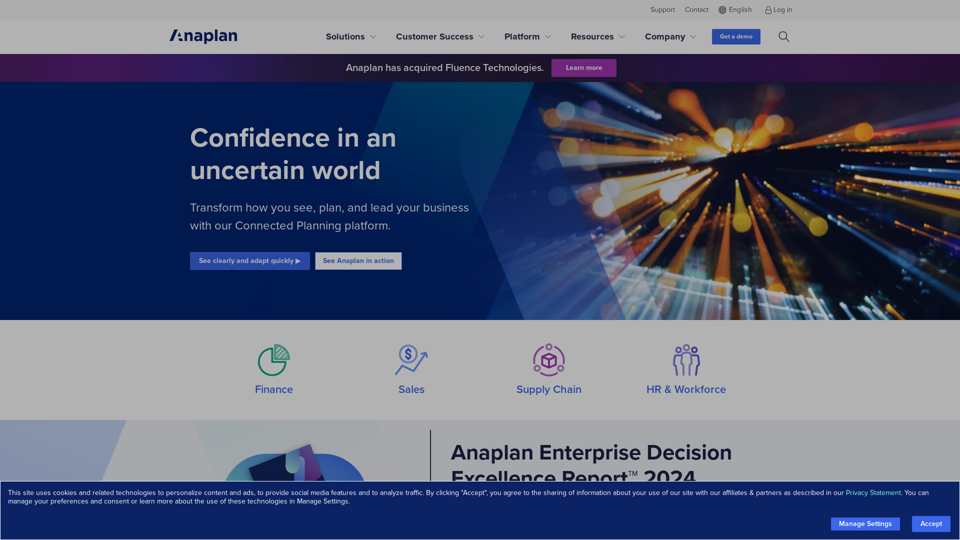
Drive Business Performance With Planning Software | Anaplan

See, plan, and lead financial, supply chain, and sales strategies that drive business performance using the Anaplan connected planning platform.
Visit Website
Drive Business Performance With Planning Software | Anaplan
Visit Website

Introduction

Anaplan is a cloud-based planning and performance management platform designed to help businesses drive performance through connected planning. It enables organizations to see clearly, plan effectively, and lead with confidence in uncertain business environments. The platform offers connected planning across various business functions, industry-specific solutions, AI-powered intelligence, and enterprise-grade security and scalability.

Feature

Connected Planning Across Functions

Anaplan provides integrated planning capabilities for finance, sales, supply chain, and HR functions, allowing for a holistic approach to business management.

Industry-Specific Solutions

The platform offers tailored solutions for various sectors including consumer goods, financial services, manufacturing, and retail, ensuring relevance to specific industry needs.

AI-Powered Intelligence

Anaplan leverages artificial intelligence to provide predictive insights and recommendations, enhancing decision-making capabilities.

Extensible Platform

The system integrates seamlessly with existing business systems, creating a unified planning ecosystem.

Real-Time Scenario Modeling

Users can build and customize planning models, run what-if scenarios, and get a comprehensive view of business performance in real-time.

Collaborative Planning

Anaplan facilitates cross-functional collaboration, improving alignment between strategy and execution across the organization.

Customizable Dashboards

The platform offers customizable reporting and dashboard features, allowing users to visualize data in the most relevant way for their needs.

Enterprise-Grade Security

Anaplan ensures data protection with robust security measures, making it suitable for large-scale enterprise use.

FAQ

Is Anaplan suitable for small businesses?

Anaplan is primarily designed for mid-size to large enterprises with complex planning needs. Small businesses may find other planning tools more suitable.

Does Anaplan offer a free trial?

Anaplan does not offer a free trial, but interested organizations can request a personalized demo.

How long does it take to implement Anaplan?

Implementation time varies based on the scope and complexity of the use case. Simple implementations can be done in weeks, while more complex ones may take several months.

Can Anaplan integrate with other business systems?

Yes, Anaplan offers extensive integration capabilities with ERP, CRM, HR, and other enterprise systems through APIs and pre-built connectors.

What kind of support does Anaplan provide?

Anaplan offers various support options including a Support Center, Community forums, documentation, and direct customer support for paying customers.

Latest Traffic Insights

  • Monthly Visits

    1.03 M

  • Bounce Rate

    43.53%

  • Pages Per Visit

    6.52

  • Time on Site(s)

    460.17

  • Global Rank

    47333

  • Country Rank

    United States 20050

Recent Visits

Traffic Sources

  • Social Media:
    1.15%
  • Paid Referrals:
    1.15%
  • Email:
    0.09%
  • Referrals:
    6.61%
  • Search Engines:
    32.83%
  • Direct:
    58.16%
More Data

Related Websites

Where ideas transform into websites
View Detail

Where ideas transform into websites

Where ideas transform into websites

Scene is where web designers race through the complete web design process, from concept to launch. In a single take. 🎬

5.81 K
Pineapple Builder - AI Website Builder for Businesses
View Detail

Pineapple Builder - AI Website Builder for Businesses

Pineapple Builder - AI Website Builder for Businesses

Don't have the time or resources to build a website? With AI-driven tools, you can create a stunning website for your business with just one click! Our AI-Powered solutions include blog platforms, newsletter forms, payment processing and more - everything you need to take your business from idea to reality.

47.27 K
Quist AI
View Detail

Quist AI

Quist AI

Quist, your AI-powered employee for data-driven success

744
Finden - Echtzeit-Einblicke mit KI
View Detail

Finden - Echtzeit-Einblicke mit KI

Finden - Echtzeit-Einblicke mit KI

Finden is an AI-powered tool that helps you manage, analyze, and extract insights from your data.

1.66 K
Copilot for Microsoft 365 – Microsoft Adoption

Copilot for Microsoft 365 is a powerful AI assistant that helps you work smarter and faster across Microsoft 365 apps and services. It combines the power of large language models (LLMs) with your organization's data in the Microsoft Graph and Microsoft 365 apps to turn your words into the most powerful productivity tool on the planet.

Copilot is designed to help you:

• Unleash creativity
• Unlock productivity
• Uplevel skills

Copilot is built on Microsoft's comprehensive approach to security, compliance, and privacy. Copilot in Microsoft 365 apps and services:

• Does not use your data to train the underlying LLM
• Does not replace human ingenuity and judgment
• Is designed to keep humans in the loop

Copilot is currently available in Word, Excel, PowerPoint, Outlook, Teams, and more.

Getting Started with Copilot

To get started with Copilot, follow these steps:

1. Check availability: Ensure your organization has access to Copilot.
2. Learn the basics: Familiarize yourself with Copilot's capabilities and how to use it effectively.
3. Explore use cases: Discover how Copilot can help you in your specific role and tasks.
4. Practice and refine: Use Copilot regularly and refine your prompts for better results.
5. Share and collaborate: Collaborate with colleagues using Copilot and share best practices.

Best Practices for Using Copilot

1. Be specific in your prompts
2. Provide context for better results
3. Review and edit Copilot's output
4. Use Copilot as a starting point, not a final product
5. Experiment with different approaches
6. Stay informed about new features and updates

Copilot in Different Microsoft 365 Apps

• Word: Draft, edit, summarize, and rewrite content
• Excel: Analyze data, create formulas, and generate insights
• PowerPoint: Create presentations, design slides, and generate content
• Outlook: Compose emails, summarize threads, and manage your inbox
• Teams: Summarize meetings, generate action items, and create meeting notes

Responsible AI and Copilot

Microsoft is committed to developing AI systems responsibly. When using Copilot, keep in mind:

• AI-generated content may contain biases or inaccuracies
• Always review and verify Copilot's output
• Use your judgment and expertise alongside Copilot's suggestions
• Be aware of your organization's policies regarding AI use

Conclusion

Copilot for Microsoft 365 is a powerful tool that can significantly enhance your productivity and creativity. By understanding its capabilities, following best practices, and using it responsibly, you can make the most of this AI assistant in your daily work.
View Detail

Copilot for Microsoft 365 – Microsoft Adoption Copilot for Microsoft 365 is a powerful AI assistant that helps you work smarter and faster across Microsoft 365 apps and services. It combines the power of large language models (LLMs) with your organization's data in the Microsoft Graph and Microsoft 365 apps to turn your words into the most powerful productivity tool on the planet. Copilot is designed to help you: • Unleash creativity • Unlock productivity • Uplevel skills Copilot is built on Microsoft's comprehensive approach to security, compliance, and privacy. Copilot in Microsoft 365 apps and services: • Does not use your data to train the underlying LLM • Does not replace human ingenuity and judgment • Is designed to keep humans in the loop Copilot is currently available in Word, Excel, PowerPoint, Outlook, Teams, and more. Getting Started with Copilot To get started with Copilot, follow these steps: 1. Check availability: Ensure your organization has access to Copilot. 2. Learn the basics: Familiarize yourself with Copilot's capabilities and how to use it effectively. 3. Explore use cases: Discover how Copilot can help you in your specific role and tasks. 4. Practice and refine: Use Copilot regularly and refine your prompts for better results. 5. Share and collaborate: Collaborate with colleagues using Copilot and share best practices. Best Practices for Using Copilot 1. Be specific in your prompts 2. Provide context for better results 3. Review and edit Copilot's output 4. Use Copilot as a starting point, not a final product 5. Experiment with different approaches 6. Stay informed about new features and updates Copilot in Different Microsoft 365 Apps • Word: Draft, edit, summarize, and rewrite content • Excel: Analyze data, create formulas, and generate insights • PowerPoint: Create presentations, design slides, and generate content • Outlook: Compose emails, summarize threads, and manage your inbox • Teams: Summarize meetings, generate action items, and create meeting notes Responsible AI and Copilot Microsoft is committed to developing AI systems responsibly. When using Copilot, keep in mind: • AI-generated content may contain biases or inaccuracies • Always review and verify Copilot's output • Use your judgment and expertise alongside Copilot's suggestions • Be aware of your organization's policies regarding AI use Conclusion Copilot for Microsoft 365 is a powerful tool that can significantly enhance your productivity and creativity. By understanding its capabilities, following best practices, and using it responsibly, you can make the most of this AI assistant in your daily work.

Copilot for Microsoft 365 – Microsoft Adoption Copilot for Microsoft 365 is a powerful AI assistant that helps you work smarter and faster across Microsoft 365 apps and services. It combines the power of large language models (LLMs) with your organization's data in the Microsoft Graph and Microsoft 365 apps to turn your words into the most powerful productivity tool on the planet. Copilot is designed to help you: • Unleash creativity • Unlock productivity • Uplevel skills Copilot is built on Microsoft's comprehensive approach to security, compliance, and privacy. Copilot in Microsoft 365 apps and services: • Does not use your data to train the underlying LLM • Does not replace human ingenuity and judgment • Is designed to keep humans in the loop Copilot is currently available in Word, Excel, PowerPoint, Outlook, Teams, and more. Getting Started with Copilot To get started with Copilot, follow these steps: 1. Check availability: Ensure your organization has access to Copilot. 2. Learn the basics: Familiarize yourself with Copilot's capabilities and how to use it effectively. 3. Explore use cases: Discover how Copilot can help you in your specific role and tasks. 4. Practice and refine: Use Copilot regularly and refine your prompts for better results. 5. Share and collaborate: Collaborate with colleagues using Copilot and share best practices. Best Practices for Using Copilot 1. Be specific in your prompts 2. Provide context for better results 3. Review and edit Copilot's output 4. Use Copilot as a starting point, not a final product 5. Experiment with different approaches 6. Stay informed about new features and updates Copilot in Different Microsoft 365 Apps • Word: Draft, edit, summarize, and rewrite content • Excel: Analyze data, create formulas, and generate insights • PowerPoint: Create presentations, design slides, and generate content • Outlook: Compose emails, summarize threads, and manage your inbox • Teams: Summarize meetings, generate action items, and create meeting notes Responsible AI and Copilot Microsoft is committed to developing AI systems responsibly. When using Copilot, keep in mind: • AI-generated content may contain biases or inaccuracies • Always review and verify Copilot's output • Use your judgment and expertise alongside Copilot's suggestions • Be aware of your organization's policies regarding AI use Conclusion Copilot for Microsoft 365 is a powerful tool that can significantly enhance your productivity and creativity. By understanding its capabilities, following best practices, and using it responsibly, you can make the most of this AI assistant in your daily work.

Microsoft Copilot combines the power of large language models (LLMs) with your organization's data to turn your words into one of the most powerful productivity tools on the planet.

608.60 K
Gong - Revenue Intelligence Platform
View Detail

Gong - Revenue Intelligence Platform

Gong - Revenue Intelligence Platform

Gong captures customer interactions and then delivers insights at scale, enabling teams to make decisions based on data rather than opinions.

1.95 M
Translation tool for professionals | SYSTRAN
View Detail

Translation tool for professionals | SYSTRAN

Translation tool for professionals | SYSTRAN

Translate texts, documents and much more in over 55 languages with SYSTRAN's fully secure professional translation solutions. API & CAT Tool integration

314.63 K
Recap | AI-Driven Summaries and Visual Insights Instantly
View Detail

Recap | AI-Driven Summaries and Visual Insights Instantly

Recap | AI-Driven Summaries and Visual Insights Instantly

Recap, an AI platform, transforms complex information into concise summaries and intuitive visuals, such as mind maps, timelines, and tables, enhancing productivity and saving time by extracting key details from various sources. |Recap

2.37 K