Open-source RightAI Tools Directory
  • Discover AI
  • Submit
  • Startup
  • Blog
Open-source RightAI Tools Directory
Discover the best AI tools of 2025 with the RightAI Tools Directory!

Friend Links

AI Anime GeneratorToolsApp AI

Support

Tap4
Privacy policyTerms & ConditionsContact Us
Loading...
loading...

BigJpg AI

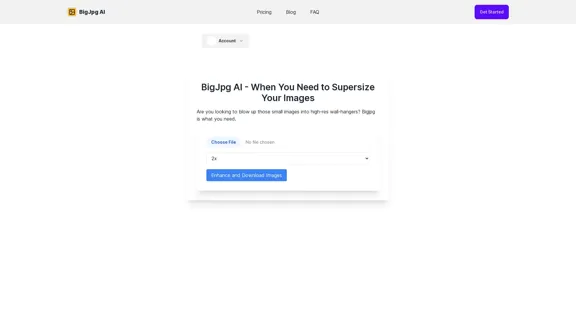
BigJPG AI: The excellent image upscaler. It enlarges photos beyond limits, delivering crystal-clear results. User-friendly BigJPG creates print-quality enlargements.
Visit Website
BigJpg AI
Visit Website

Introduction

BigJpg AI is an advanced image enlargement tool that uses artificial intelligence to upscale images while maintaining high quality. It allows users to enlarge images up to 16 times their original size without significant loss of detail, making it ideal for various applications such as creating large prints, enhancing graphics for high-resolution displays, and extracting maximum detail from scientific images.

Feature

One-Click Image Upscaling

BigJpg AI simplifies the image enlargement process with a single-click operation, eliminating the need for complex Photoshop tasks and saving time for users.

High-Quality Enlargement

The AI-powered tool maintains image quality even at extreme enlargements, keeping images sharp up to 1600% (16x) larger than the original.

Multiple File Format Support

BigJpg supports various file formats including:

  • JPG
  • PNG
  • GIF
  • BMP

Customizable Enlargement Options

Users can choose from preset enlargement options (2x, 4x, 8x, 16x) or set custom dimensions to suit their specific needs.

Batch Processing

The tool offers batch image upscaling capabilities, allowing users to process multiple images simultaneously.

Flexible Pricing Plans

BigJpg AI offers different pricing tiers to cater to various user needs:

PlanPriceFeatures
Free$0Up to 8x enlargement, basic features
Starter$9.99/monthUp to 16x enlargement, unlimited usage, batch processing

24/7 Customer Support

Premium users benefit from round-the-clock email support for any queries or issues.

FAQ

What sets BigJpg AI apart from other image enlargers?

BigJpg AI uses advanced machine learning to analyze and enhance image details at massive scales, maintaining image quality up to 1600% enlargement, far beyond the capabilities of most other image resizers.

How long does the image processing take?

Most images are processed in under a minute, though larger or more complex images may take a few minutes to complete.

Is there a limit on upscaling dimensions?

No, BigJpg AI allows users to upscale images to virtually any size they need.

What are some common use cases for BigJpg AI?

Common applications include:

  • Enlarging photos for large print media
  • Upscaling graphics and icons for high-resolution screens
  • Creating super high-definition images from small files
  • Extracting maximum detail from telescopic or microscope images

What is the refund policy?

BigJpg AI offers a 14-day refund policy. Users can request a refund within this period by contacting customer support via email.

Related Websites
MarketingAI: You don't need more features. You need marketing.
View Detail

MarketingAI: You don't need more features. You need marketing.

MarketingAI: You don't need more features. You need marketing.

Get a 15-page marketing action plan tailored to your SaaS business, including a step-by-step guide on acquiring users and a projected return on investment (ROI).

0
PhotoFuse AI - Your personal AI photographer always with you.
View Detail

PhotoFuse AI - Your personal AI photographer always with you.

PhotoFuse AI - Your personal AI photographer always with you.

Your personal AI photographer in your pocket

1.81 K
IC Light v2
View Detail

IC Light v2

IC Light v2

IC-Light is a project to manipulate the illumination of images. IC-Light V2 is a series of Flux-based IC-Light models with 16ch VAE and native high resolution.

0
Iconopedia
View Detail

Iconopedia

Iconopedia

Generate Stunning Images with AI Let's explore the world of AI-powered image generation and unleash your creativity! What is AI Image Generation? AI image generation uses artificial intelligence algorithms to create images from text descriptions, known as "prompts." How Does it Work? These powerful models, trained on massive datasets of images and text, learn the relationships between words and visual concepts. When you provide a prompt, the AI interprets it and generates a corresponding image. Benefits of AI Image Generation: * Effortless Creativity: Bring your ideas to life without needing artistic skills. * Endless Possibilities: Explore unique concepts and styles with ease. * Rapid Prototyping: Quickly visualize designs and concepts. * Personalized Content: Create custom images tailored to your needs. Popular AI Image Generators: * DALL-E 2: Known for its photorealistic and imaginative results. * Midjourney: Creates artistic and dreamlike images. * Stable Diffusion: Open-source and highly customizable. * Craiyon (formerly DALL-E mini): A free and accessible option. Tips for Generating Stunning Images: * Be Specific: Provide clear and detailed prompts. * Use Descriptive Language: Include adjectives, nouns, and verbs to guide the AI. * Experiment with Styles: Explore different artistic styles and aesthetics. * Iterate and Refine: Adjust your prompts and settings to achieve your desired outcome. Let your imagination run wild and discover the incredible potential of AI image generation!

0
Image Describer - Free AI Image Description Tool, Allowing Every Image to Communicate
View Detail

Image Describer - Free AI Image Description Tool, Allowing Every Image to Communicate

Image Describer - Free AI Image Description Tool, Allowing Every Image to Communicate

Image Descriptor is a free AI tool that identifies and describes the contents of images. Generate accurate, detailed image descriptions effortlessly.

5.16 K
Journey ArtPrompt with Midjourney

This guide will walk you through creating stunning artwork using Midjourney, a powerful AI art generator. 

1. Accessing Midjourney

* You'll need a Discord account to use Midjourney. 
* Join the official Midjourney server: [https://discord.gg/midjourney](https://discord.gg/midjourney)

2. Understanding the Basics

* `/imagine` Command: This is the core command for generating images.
* Prompt:  A text description of the artwork you want to create. Be specific and descriptive!
* Parameters: Options that control aspects like image size, aspect ratio, and style.

3. Crafting Your Journey Prompt

Think about the story you want to tell with your artwork.  

* Setting: Where does your journey take place? (e.g., a mystical forest, a futuristic city, a desolate wasteland)
* Characters: Who is on this journey? (e.g., a lone traveler, a group of adventurers, mythical creatures)
* Mood: What feeling do you want to evoke? (e.g., adventurous, mysterious, hopeful, melancholic)
* Style: What artistic style appeals to you? (e.g., photorealistic, painterly, abstract)

4. Putting it Together

Combine these elements into a clear and concise prompt. 

Example:

`/imagine A lone traveler journeys through a mystical forest at sunset, bathed in golden light. The path ahead is shrouded in mist, hinting at unknown wonders. Style: painterly, ethereal`

5. Experiment and Refine

* Midjourney is all about experimentation! Try different prompts, parameters, and styles.
* Use the "upscale" command to enlarge your favorite images and reveal more detail.
* Don't be afraid to iterate and refine your prompts based on the results.
View Detail

Journey ArtPrompt with Midjourney This guide will walk you through creating stunning artwork using Midjourney, a powerful AI art generator. 1. Accessing Midjourney * You'll need a Discord account to use Midjourney. * Join the official Midjourney server: [https://discord.gg/midjourney](https://discord.gg/midjourney) 2. Understanding the Basics * `/imagine` Command: This is the core command for generating images. * Prompt: A text description of the artwork you want to create. Be specific and descriptive! * Parameters: Options that control aspects like image size, aspect ratio, and style. 3. Crafting Your Journey Prompt Think about the story you want to tell with your artwork. * Setting: Where does your journey take place? (e.g., a mystical forest, a futuristic city, a desolate wasteland) * Characters: Who is on this journey? (e.g., a lone traveler, a group of adventurers, mythical creatures) * Mood: What feeling do you want to evoke? (e.g., adventurous, mysterious, hopeful, melancholic) * Style: What artistic style appeals to you? (e.g., photorealistic, painterly, abstract) 4. Putting it Together Combine these elements into a clear and concise prompt. Example: `/imagine A lone traveler journeys through a mystical forest at sunset, bathed in golden light. The path ahead is shrouded in mist, hinting at unknown wonders. Style: painterly, ethereal` 5. Experiment and Refine * Midjourney is all about experimentation! Try different prompts, parameters, and styles. * Use the "upscale" command to enlarge your favorite images and reveal more detail. * Don't be afraid to iterate and refine your prompts based on the results.

Journey ArtPrompt with Midjourney This guide will walk you through creating stunning artwork using Midjourney, a powerful AI art generator. 1. Accessing Midjourney * You'll need a Discord account to use Midjourney. * Join the official Midjourney server: [https://discord.gg/midjourney](https://discord.gg/midjourney) 2. Understanding the Basics * `/imagine` Command: This is the core command for generating images. * Prompt: A text description of the artwork you want to create. Be specific and descriptive! * Parameters: Options that control aspects like image size, aspect ratio, and style. 3. Crafting Your Journey Prompt Think about the story you want to tell with your artwork. * Setting: Where does your journey take place? (e.g., a mystical forest, a futuristic city, a desolate wasteland) * Characters: Who is on this journey? (e.g., a lone traveler, a group of adventurers, mythical creatures) * Mood: What feeling do you want to evoke? (e.g., adventurous, mysterious, hopeful, melancholic) * Style: What artistic style appeals to you? (e.g., photorealistic, painterly, abstract) 4. Putting it Together Combine these elements into a clear and concise prompt. Example: `/imagine A lone traveler journeys through a mystical forest at sunset, bathed in golden light. The path ahead is shrouded in mist, hinting at unknown wonders. Style: painterly, ethereal` 5. Experiment and Refine * Midjourney is all about experimentation! Try different prompts, parameters, and styles. * Use the "upscale" command to enlarge your favorite images and reveal more detail. * Don't be afraid to iterate and refine your prompts based on the results.

New backgrounds with Midjourney on new tabs

193.90 M
Chrome Web Store
View Detail

Chrome Web Store

Chrome Web Store

Enhance your browser with new features and customize your browsing experience.

193.90 M
FLUX.1 AI: Advanced Text-to-Image Generation Model
View Detail

FLUX.1 AI: Advanced Text-to-Image Generation Model

FLUX.1 AI: Advanced Text-to-Image Generation Model

Experience the next level of image synthesis with FLUX.1 AI. Our cutting-edge AI technology creates stunning, diverse, and highly detailed images from text prompts.

152