Open-source RightAI Tools Directory
  • Discover AI
  • Submit
  • Startup
  • Blog
Open-source RightAI Tools Directory
Discover the best AI tools of 2025 with the RightAI Tools Directory!

Friend Links

AI Anime GeneratorToolsApp AI

Support

Tap4
Privacy policyTerms & ConditionsContact Us
Loading...
loading...

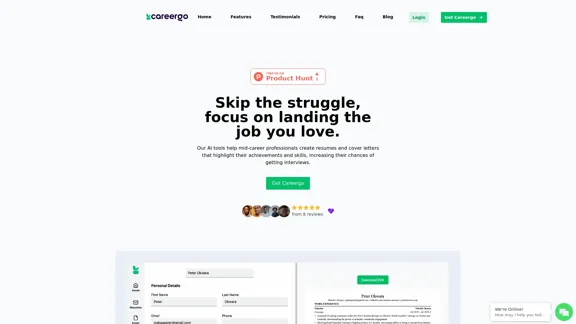
AI Resume and Cover Letter Builder

Skip the struggle, concentrate on securing the job you're passionate about
Visit Website
AI Resume and Cover Letter Builder
Visit Website

Introduction

Careergo is an AI-powered resume and cover letter builder designed for mid-career professionals. It offers an affordable, efficient solution to create tailored, eye-catching resumes and cover letters, increasing the chances of landing interviews and dream jobs. Careergo streamlines the job application process, replacing expensive career coaches and time-consuming manual writing with AI-powered suggestions and organization.

Feature

AI Resume Builder

Leverage artificial intelligence to craft winning resumes that highlight your career milestones and skills. This feature increases your chances of landing your dream job by creating tailored, professional resumes in minutes.

AI Cover Letter Generator

Tell your story effectively with a well-crafted cover letter. This feature is particularly useful for those who don't have time to manage their job applications, providing AI-powered assistance in creating compelling cover letters.

ATS-Friendly Resumes

Careergo ensures that the resumes created are compatible with Applicant Tracking Systems (ATS), improving your chances of getting past initial screening processes.

Tailored Job Applications

The AI tool customizes each resume and cover letter for specific job applications, moving away from the one-size-fits-all approach to increase your chances of success.

Affordable Pricing

Careergo offers a cost-effective alternative to expensive career coaches. Users can access the AI Resume Builder and AI Cover Letter generator for a day at a discounted rate of 300 KES, with no subscription required.

All-in-One Organization

Keep all your job applications organized in one place, eliminating the hassle of scattered applications and improving your job search efficiency.

FAQ

What services does Careergo offer?

Careergo offers AI-powered resume and cover letter building services, designed to help mid-career professionals create tailored, professional job application documents.

How does the AI assist in creating resumes and cover letters?

The AI analyzes your career information and the job requirements to generate tailored, professional resumes and cover letters that highlight your achievements and skills effectively.

Are the resumes created by Careergo ATS-friendly?

Yes, Careergo ensures that the resumes created are compatible with Applicant Tracking Systems (ATS), improving your chances of getting past initial screening processes.

What is the cost of Careergo's service and how can I pay?

Careergo offers a one-day access to its AI Resume Builder and AI Cover Letter generator for 300 KES (discounted from 600 KES). Payment methods are not specified in the given information.

Is Careergo a one-time purchase or a subscription?

Based on the pricing information provided, Careergo offers a one-time purchase option for one-day access to its services, with no subscriptions mentioned.

Latest Traffic Insights

  • Monthly Visits

    1.35 K

  • Bounce Rate

    59.67%

  • Pages Per Visit

    1.65

  • Time on Site(s)

    20.55

  • Global Rank

    10845049

  • Country Rank

    United States 3429958

Recent Visits

Traffic Sources

  • Social Media:
    1.62%
  • Paid Referrals:
    0.24%
  • Email:
    0.03%
  • Referrals:
    2.10%
  • Search Engines:
    89.19%
  • Direct:
    6.68%
More Data

Related Websites

Web Scraping Tool & Free Web Crawlers | Octoparse
View Detail

Web Scraping Tool & Free Web Crawlers | Octoparse

Web Scraping Tool & Free Web Crawlers | Octoparse

Web scraping simplified. Gather information from any website in minutes using our code-free web crawler. Obtain the essential data to propel your business forward. Begin at no cost today!

309.69 K
NinjaChat - All-in-One AI Assistant
View Detail

NinjaChat - All-in-One AI Assistant

NinjaChat - All-in-One AI Assistant

Here is the translation in English: Access GPT-4, Claude, Gemini, and more. Chat, analyze PDFs, generate images - all in one platform.

88.60 K
Gamma
View Detail

Gamma

Gamma

Made with Gamma. A new medium for presenting ideas, powered by AI.

28.16 M
Copilot for Microsoft 365 – Microsoft Adoption

Copilot for Microsoft 365 is a powerful AI assistant that helps you work smarter and faster across Microsoft 365 apps and services. It combines the power of large language models (LLMs) with your organization's data in the Microsoft Graph and Microsoft 365 apps to turn your words into the most powerful productivity tool on the planet.

Copilot is designed to help you:

• Unleash creativity
• Unlock productivity
• Uplevel skills

Copilot is built on Microsoft's comprehensive approach to security, compliance, and privacy. Copilot in Microsoft 365 apps and services:

• Does not use your data to train the underlying LLM
• Does not replace human ingenuity and judgment
• Is designed to keep humans in the loop

Copilot is currently available in Word, Excel, PowerPoint, Outlook, Teams, and more.

Getting Started with Copilot

To get started with Copilot, follow these steps:

1. Check availability: Ensure your organization has access to Copilot.
2. Learn the basics: Familiarize yourself with Copilot's capabilities and how to use it effectively.
3. Explore use cases: Discover how Copilot can help you in your specific role and tasks.
4. Practice and refine: Use Copilot regularly and refine your prompts for better results.
5. Share and collaborate: Collaborate with colleagues using Copilot and share best practices.

Best Practices for Using Copilot

1. Be specific in your prompts
2. Provide context for better results
3. Review and edit Copilot's output
4. Use Copilot as a starting point, not a final product
5. Experiment with different approaches
6. Stay informed about new features and updates

Copilot in Different Microsoft 365 Apps

• Word: Draft, edit, summarize, and rewrite content
• Excel: Analyze data, create formulas, and generate insights
• PowerPoint: Create presentations, design slides, and generate content
• Outlook: Compose emails, summarize threads, and manage your inbox
• Teams: Summarize meetings, generate action items, and create meeting notes

Responsible AI and Copilot

Microsoft is committed to developing AI systems responsibly. When using Copilot, keep in mind:

• AI-generated content may contain biases or inaccuracies
• Always review and verify Copilot's output
• Use your judgment and expertise alongside Copilot's suggestions
• Be aware of your organization's policies regarding AI use

Conclusion

Copilot for Microsoft 365 is a powerful tool that can significantly enhance your productivity and creativity. By understanding its capabilities, following best practices, and using it responsibly, you can make the most of this AI assistant in your daily work.
View Detail

Copilot for Microsoft 365 – Microsoft Adoption Copilot for Microsoft 365 is a powerful AI assistant that helps you work smarter and faster across Microsoft 365 apps and services. It combines the power of large language models (LLMs) with your organization's data in the Microsoft Graph and Microsoft 365 apps to turn your words into the most powerful productivity tool on the planet. Copilot is designed to help you: • Unleash creativity • Unlock productivity • Uplevel skills Copilot is built on Microsoft's comprehensive approach to security, compliance, and privacy. Copilot in Microsoft 365 apps and services: • Does not use your data to train the underlying LLM • Does not replace human ingenuity and judgment • Is designed to keep humans in the loop Copilot is currently available in Word, Excel, PowerPoint, Outlook, Teams, and more. Getting Started with Copilot To get started with Copilot, follow these steps: 1. Check availability: Ensure your organization has access to Copilot. 2. Learn the basics: Familiarize yourself with Copilot's capabilities and how to use it effectively. 3. Explore use cases: Discover how Copilot can help you in your specific role and tasks. 4. Practice and refine: Use Copilot regularly and refine your prompts for better results. 5. Share and collaborate: Collaborate with colleagues using Copilot and share best practices. Best Practices for Using Copilot 1. Be specific in your prompts 2. Provide context for better results 3. Review and edit Copilot's output 4. Use Copilot as a starting point, not a final product 5. Experiment with different approaches 6. Stay informed about new features and updates Copilot in Different Microsoft 365 Apps • Word: Draft, edit, summarize, and rewrite content • Excel: Analyze data, create formulas, and generate insights • PowerPoint: Create presentations, design slides, and generate content • Outlook: Compose emails, summarize threads, and manage your inbox • Teams: Summarize meetings, generate action items, and create meeting notes Responsible AI and Copilot Microsoft is committed to developing AI systems responsibly. When using Copilot, keep in mind: • AI-generated content may contain biases or inaccuracies • Always review and verify Copilot's output • Use your judgment and expertise alongside Copilot's suggestions • Be aware of your organization's policies regarding AI use Conclusion Copilot for Microsoft 365 is a powerful tool that can significantly enhance your productivity and creativity. By understanding its capabilities, following best practices, and using it responsibly, you can make the most of this AI assistant in your daily work.

Copilot for Microsoft 365 – Microsoft Adoption Copilot for Microsoft 365 is a powerful AI assistant that helps you work smarter and faster across Microsoft 365 apps and services. It combines the power of large language models (LLMs) with your organization's data in the Microsoft Graph and Microsoft 365 apps to turn your words into the most powerful productivity tool on the planet. Copilot is designed to help you: • Unleash creativity • Unlock productivity • Uplevel skills Copilot is built on Microsoft's comprehensive approach to security, compliance, and privacy. Copilot in Microsoft 365 apps and services: • Does not use your data to train the underlying LLM • Does not replace human ingenuity and judgment • Is designed to keep humans in the loop Copilot is currently available in Word, Excel, PowerPoint, Outlook, Teams, and more. Getting Started with Copilot To get started with Copilot, follow these steps: 1. Check availability: Ensure your organization has access to Copilot. 2. Learn the basics: Familiarize yourself with Copilot's capabilities and how to use it effectively. 3. Explore use cases: Discover how Copilot can help you in your specific role and tasks. 4. Practice and refine: Use Copilot regularly and refine your prompts for better results. 5. Share and collaborate: Collaborate with colleagues using Copilot and share best practices. Best Practices for Using Copilot 1. Be specific in your prompts 2. Provide context for better results 3. Review and edit Copilot's output 4. Use Copilot as a starting point, not a final product 5. Experiment with different approaches 6. Stay informed about new features and updates Copilot in Different Microsoft 365 Apps • Word: Draft, edit, summarize, and rewrite content • Excel: Analyze data, create formulas, and generate insights • PowerPoint: Create presentations, design slides, and generate content • Outlook: Compose emails, summarize threads, and manage your inbox • Teams: Summarize meetings, generate action items, and create meeting notes Responsible AI and Copilot Microsoft is committed to developing AI systems responsibly. When using Copilot, keep in mind: • AI-generated content may contain biases or inaccuracies • Always review and verify Copilot's output • Use your judgment and expertise alongside Copilot's suggestions • Be aware of your organization's policies regarding AI use Conclusion Copilot for Microsoft 365 is a powerful tool that can significantly enhance your productivity and creativity. By understanding its capabilities, following best practices, and using it responsibly, you can make the most of this AI assistant in your daily work.

Microsoft Copilot combines the power of large language models (LLMs) with your organization's data to turn your words into one of the most powerful productivity tools on the planet.

608.60 K
ClearAI
View Detail

ClearAI

ClearAI

Explore PDFs with AI-Powered chat

0
Open Multiple URLs
View Detail

Open Multiple URLs

Open Multiple URLs

Multiple URL Opener is a free online tool to open multiple URLs simultaneously.

0
terrific.tools - Free Online Tools
View Detail

terrific.tools - Free Online Tools

terrific.tools - Free Online Tools

A modern collection of free, browser-based tools for everyone. Transform images, convert audio, format code, and much more.

52.91 K
Alter | AI for Your Whole Workday
View Detail

Alter | AI for Your Whole Workday

Alter | AI for Your Whole Workday

Alter: The seamless AI that enhances your Mac. Bypass the chat, perform instant actions across all applications. Boost your productivity by 10 times with full privacy control.

19.74 K