Open-source RightAI Tools Directory
  • Discover AI
  • Submit
  • Startup
  • Blog
Open-source RightAI Tools Directory
Discover the best AI tools of 2025 with the RightAI Tools Directory!

Friend Links

AI Anime GeneratorToolsApp AI

Support

Tap4
Privacy policyTerms & ConditionsContact Us
Loading...
loading...

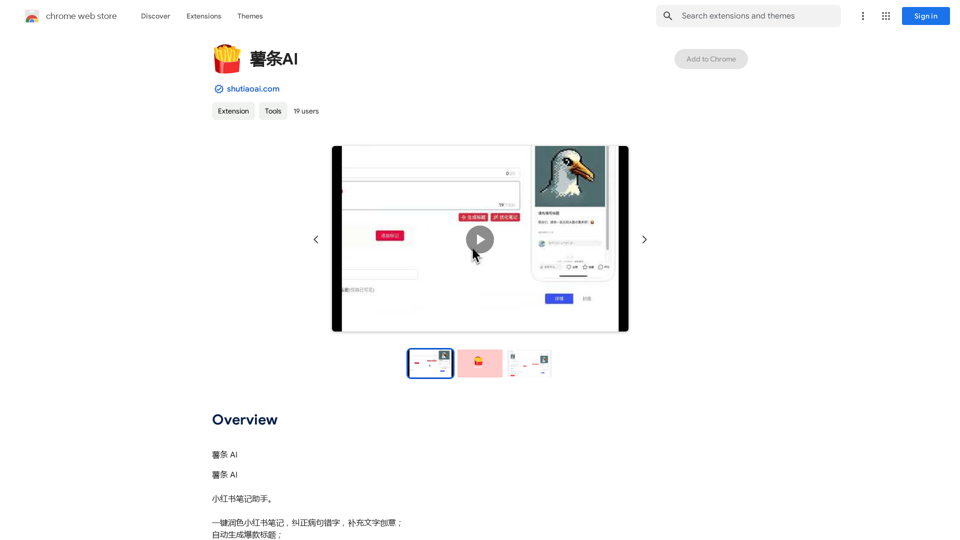
French Fry AI

French Fry AI
Visit Website
French Fry AI
Visit Website

Introduction

Shutiao AI is an innovative AI-driven platform that offers a wide range of AI technologies to enhance writing, communication, and content creation. It provides tools for text generation, image understanding, and document analysis, catering to various user needs. With features like one-key beautification for Little Red Book notes, automatic grammar correction, and explosive title generation, Shutiao AI aims to improve productivity, efficiency, and creativity for its users.

Feature

Comprehensive AI Toolkit

Shutiao AI offers a diverse set of AI-powered tools, including:

  • Text generation
  • Image understanding
  • Document analysis
  • Grammar correction
  • Creative content filling

One-Key Beautification for Little Red Book Notes

This feature allows users to quickly enhance their Little Red Book (Xiaohongshu) posts, making them more attractive and engaging.

Automatic Grammar Correction

Shutiao AI helps users improve their writing by automatically identifying and correcting grammatical errors.

Explosive Title Generation

Create attention-grabbing titles for your content with the help of AI, increasing the chances of your posts going viral.

Flexible Pricing Plans

Shutiao AI offers various pricing options:

  • Free plan for basic features
  • Paid plans for advanced functionalities

User-Friendly Interface

The platform is designed to be easily accessible, allowing users to quickly leverage AI tools for their writing and communication needs.

FAQ

What types of content can Shutiao AI help create?

Shutiao AI can assist in creating various types of content, including:

  • Social media posts (especially for Little Red Book)
  • Articles and blog posts
  • Marketing copy
  • Titles and headlines

Is Shutiao AI suitable for non-professional writers?

Yes, Shutiao AI is designed to be user-friendly and accessible to both professional and non-professional writers. Its tools can help improve writing skills and boost creativity for users at all levels.

Can Shutiao AI help with languages other than Chinese?

While the platform seems to focus on Chinese content (given the Little Red Book feature), it's best to check their official website for information on supported languages.

How does Shutiao AI ensure the quality of AI-generated content?

Shutiao AI likely uses advanced natural language processing algorithms to generate high-quality content. However, it's always recommended for users to review and refine the AI-generated content to ensure it meets their specific needs and standards.

Are there any limitations to using the free plan of Shutiao AI?

The free plan of Shutiao AI may have limitations in terms of available features or usage quotas. For detailed information on plan limitations, it's best to visit their official website at https://shutiaoai.com.

Latest Traffic Insights

  • Monthly Visits

    193.90 M

  • Bounce Rate

    56.27%

  • Pages Per Visit

    2.71

  • Time on Site(s)

    115.91

  • Global Rank

    -

  • Country Rank

    -

Recent Visits

Traffic Sources

  • Social Media:
    0.48%
  • Paid Referrals:
    0.55%
  • Email:
    0.15%
  • Referrals:
    12.81%
  • Search Engines:
    16.21%
  • Direct:
    69.81%
More Data

Related Websites

Get ChatGPT for Free with Google

You can now access ChatGPT, a powerful language model, for free with Google. Here's how:

Method 1: Google Colab

* Open Google Colab ([colab.research.google.com](http://colab.research.google.com))
* Create a new notebook
* Install the `transformers` library by running `!pip install transformers`
* Import the `transformers` library and load the ChatGPT model using `from transformers import AutoModelForCausalLM, AutoTokenizer; model = AutoModelForCausalLM.from_pretrained('chatgpt'); tokenizer = AutoTokenizer.from_pretrained('chatgpt')`
* Use the model to generate text using `input_text = "Your input here"; inputs = tokenizer.encode_plus(input_text, return_tensors='pt', max_length=1024, padding='max_length', truncation=True); output = model(inputs['input_ids'], attention_mask=inputs['attention_mask']); print(tokenizer.decode(output.logits[0], skip_special_tokens=True))`

Method 2: Google Apps Script

* Open Google Apps Script ([script.google.com](http://script.google.com))
* Create a new project
* Install the `transformers` library by running `npm install transformers`
* Import the `transformers` library and load the ChatGPT model using `const { AutoModelForCausalLM, AutoTokenizer } = require('transformers'); const model = new AutoModelForCausalLM('chatgpt'); const tokenizer = new AutoTokenizer('chatgpt');`
* Use the model to generate text using `const inputText = "Your input here"; const inputs = tokenizer.encodePlus(inputText, { return_tensors: 'pt', max_length: 1024, padding: 'max_length', truncation: true }); const output = model(inputs.inputIds, inputs.attentionMask); console.log(tokenizer.decode(output.logits[0], { skipSpecialTokens: true }));`

Note: These methods require some technical knowledge and may have limitations compared to the original ChatGPT model.
View Detail

Get ChatGPT for Free with Google You can now access ChatGPT, a powerful language model, for free with Google. Here's how: Method 1: Google Colab * Open Google Colab ([colab.research.google.com](http://colab.research.google.com)) * Create a new notebook * Install the `transformers` library by running `!pip install transformers` * Import the `transformers` library and load the ChatGPT model using `from transformers import AutoModelForCausalLM, AutoTokenizer; model = AutoModelForCausalLM.from_pretrained('chatgpt'); tokenizer = AutoTokenizer.from_pretrained('chatgpt')` * Use the model to generate text using `input_text = "Your input here"; inputs = tokenizer.encode_plus(input_text, return_tensors='pt', max_length=1024, padding='max_length', truncation=True); output = model(inputs['input_ids'], attention_mask=inputs['attention_mask']); print(tokenizer.decode(output.logits[0], skip_special_tokens=True))` Method 2: Google Apps Script * Open Google Apps Script ([script.google.com](http://script.google.com)) * Create a new project * Install the `transformers` library by running `npm install transformers` * Import the `transformers` library and load the ChatGPT model using `const { AutoModelForCausalLM, AutoTokenizer } = require('transformers'); const model = new AutoModelForCausalLM('chatgpt'); const tokenizer = new AutoTokenizer('chatgpt');` * Use the model to generate text using `const inputText = "Your input here"; const inputs = tokenizer.encodePlus(inputText, { return_tensors: 'pt', max_length: 1024, padding: 'max_length', truncation: true }); const output = model(inputs.inputIds, inputs.attentionMask); console.log(tokenizer.decode(output.logits[0], { skipSpecialTokens: true }));` Note: These methods require some technical knowledge and may have limitations compared to the original ChatGPT model.

Get ChatGPT for Free with Google You can now access ChatGPT, a powerful language model, for free with Google. Here's how: Method 1: Google Colab * Open Google Colab ([colab.research.google.com](http://colab.research.google.com)) * Create a new notebook * Install the `transformers` library by running `!pip install transformers` * Import the `transformers` library and load the ChatGPT model using `from transformers import AutoModelForCausalLM, AutoTokenizer; model = AutoModelForCausalLM.from_pretrained('chatgpt'); tokenizer = AutoTokenizer.from_pretrained('chatgpt')` * Use the model to generate text using `input_text = "Your input here"; inputs = tokenizer.encode_plus(input_text, return_tensors='pt', max_length=1024, padding='max_length', truncation=True); output = model(inputs['input_ids'], attention_mask=inputs['attention_mask']); print(tokenizer.decode(output.logits[0], skip_special_tokens=True))` Method 2: Google Apps Script * Open Google Apps Script ([script.google.com](http://script.google.com)) * Create a new project * Install the `transformers` library by running `npm install transformers` * Import the `transformers` library and load the ChatGPT model using `const { AutoModelForCausalLM, AutoTokenizer } = require('transformers'); const model = new AutoModelForCausalLM('chatgpt'); const tokenizer = new AutoTokenizer('chatgpt');` * Use the model to generate text using `const inputText = "Your input here"; const inputs = tokenizer.encodePlus(inputText, { return_tensors: 'pt', max_length: 1024, padding: 'max_length', truncation: true }); const output = model(inputs.inputIds, inputs.attentionMask); console.log(tokenizer.decode(output.logits[0], { skipSpecialTokens: true }));` Note: These methods require some technical knowledge and may have limitations compared to the original ChatGPT model.

How to Add ChatGPT to All Google Searches ===================================================== Step 1: Create a Custom Search Engine -------------------------------------- * Go to the [Google Custom Search Engine](https://cse.google.com/) website and sign in with your Google account. * Click on the "New Search Engine" button. * Fill in the required information, such as the name and description of your search engine. * Click on the "Create" button. Step 2: Add ChatGPT to the Search Engine ----------------------------------------- * In the "Setup" tab, click on the "Add" button next to "Sites to search". * Enter the following URL: `https://chat.openai.com/` * Click on the "Add" button. Step 3: Configure the Search Engine -------------------------------------- * In the "Setup" tab, click on the "Edit" button next to "Search engine keywords". * Add the following keywords: `ChatGPT` * Click on the "Save" button. Step 4: Get the Search Engine Code ------------------------------------- * In the "Setup" tab, click on the "Get code" button. * Copy the HTML code provided. Step 5: Add the Search Engine to Your Browser ------------------------------------------------ * Open your browser and go to the "Settings" or "Options" page. * Look for the "Search engine" or "Default search engine" option. * Click on the "Add" or "Manage search engines" button. * Paste the HTML code you copied earlier. * Click on the "Add" or "Save" button. You're Done! =============== Now, whenever you search on Google, ChatGPT will be included in the search results. You can also use the custom search engine URL provided by Google to search directly.

193.90 M
AI Prompt Manager
View Detail

AI Prompt Manager

AI Prompt Manager

AI Prompt Manager: Store and manage GPT prompts. Sleek user interface, easy search and sharing. Maximize the potential of GPT.

193.90 M
ChatGPT Snippet Saver

This is a simple tool to save snippets from your ChatGPT conversations. 

How to Use:

1.  Copy the text snippet you want to save from your ChatGPT conversation.
2.  Paste the text into the input box below.
3.  Click the "Save Snippet" button.

Your snippet will be saved to your local storage. You can access your saved snippets later by clicking the "View Saved Snippets" button.
View Detail

ChatGPT Snippet Saver This is a simple tool to save snippets from your ChatGPT conversations. How to Use: 1. Copy the text snippet you want to save from your ChatGPT conversation. 2. Paste the text into the input box below. 3. Click the "Save Snippet" button. Your snippet will be saved to your local storage. You can access your saved snippets later by clicking the "View Saved Snippets" button.

ChatGPT Snippet Saver This is a simple tool to save snippets from your ChatGPT conversations. How to Use: 1. Copy the text snippet you want to save from your ChatGPT conversation. 2. Paste the text into the input box below. 3. Click the "Save Snippet" button. Your snippet will be saved to your local storage. You can access your saved snippets later by clicking the "View Saved Snippets" button.

GPT Snippet Saver - Save Your Favorite ChatGPT Conversations Revolutionize how you gather and organize information from ChatGPT! - Effortlessly capture and store your most valuable ChatGPT interactions. - Organize your saved conversations by topic, date, or any custom tag. - Easily search and retrieve specific snippets from your saved history. - Share your favorite ChatGPT insights with others. - Never lose track of a brilliant idea or helpful response again.

193.90 M
AISPEED for ChatGPT

What is AISPEED?

AISPEED is a powerful AI assistant designed to enhance your ChatGPT experience.

Key Features:

* Faster Response Times: Experience significantly reduced wait times for ChatGPT responses.
* Improved Accuracy: Benefit from enhanced accuracy and fluency in ChatGPT's generated text.
* Personalized Settings: Customize your ChatGPT experience with tailored settings to suit your needs.
* Multi-Modal Support: Interact with ChatGPT using text, voice, and even images.
* Seamless Integration: AISPEED integrates seamlessly with various platforms and applications.

How AISPEED Works:

AISPEED leverages advanced AI algorithms and techniques to optimize ChatGPT's performance. It accelerates response generation, refines text quality, and enables new interaction modes.

Benefits:

* Increased Productivity: Get faster answers and complete tasks more efficiently.
* Enhanced Creativity: Explore new ideas and generate more creative content.
* Improved Communication: Engage in more natural and meaningful conversations.
* Expanded Capabilities: Unlock the full potential of ChatGPT with advanced features.
View Detail

AISPEED for ChatGPT What is AISPEED? AISPEED is a powerful AI assistant designed to enhance your ChatGPT experience. Key Features: * Faster Response Times: Experience significantly reduced wait times for ChatGPT responses. * Improved Accuracy: Benefit from enhanced accuracy and fluency in ChatGPT's generated text. * Personalized Settings: Customize your ChatGPT experience with tailored settings to suit your needs. * Multi-Modal Support: Interact with ChatGPT using text, voice, and even images. * Seamless Integration: AISPEED integrates seamlessly with various platforms and applications. How AISPEED Works: AISPEED leverages advanced AI algorithms and techniques to optimize ChatGPT's performance. It accelerates response generation, refines text quality, and enables new interaction modes. Benefits: * Increased Productivity: Get faster answers and complete tasks more efficiently. * Enhanced Creativity: Explore new ideas and generate more creative content. * Improved Communication: Engage in more natural and meaningful conversations. * Expanded Capabilities: Unlock the full potential of ChatGPT with advanced features.

AISPEED for ChatGPT What is AISPEED? AISPEED is a powerful AI assistant designed to enhance your ChatGPT experience. Key Features: * Faster Response Times: Experience significantly reduced wait times for ChatGPT responses. * Improved Accuracy: Benefit from enhanced accuracy and fluency in ChatGPT's generated text. * Personalized Settings: Customize your ChatGPT experience with tailored settings to suit your needs. * Multi-Modal Support: Interact with ChatGPT using text, voice, and even images. * Seamless Integration: AISPEED integrates seamlessly with various platforms and applications. How AISPEED Works: AISPEED leverages advanced AI algorithms and techniques to optimize ChatGPT's performance. It accelerates response generation, refines text quality, and enables new interaction modes. Benefits: * Increased Productivity: Get faster answers and complete tasks more efficiently. * Enhanced Creativity: Explore new ideas and generate more creative content. * Improved Communication: Engage in more natural and meaningful conversations. * Expanded Capabilities: Unlock the full potential of ChatGPT with advanced features.

Provides a number of custom prompts to help you use ChatGPT effectively and efficiently.

193.90 M
A.I. Amazon Listing Optimizer
View Detail

A.I. Amazon Listing Optimizer

A.I. Amazon Listing Optimizer

Experience our AI-Powered Amazon Listing Optimizer for e-commerce success. Maximize sales potential with optimized product listings.

193.90 M
Ai5 - The AI Art Newsletter
View Detail

Ai5 - The AI Art Newsletter

Ai5 - The AI Art Newsletter

Ai5 is your go-to twice-weekly email outlining the most important events happening in generative AI. Stay informed, get smarter, and be entertained with Ai5.

0
Pluto.AI on the App Store
View Detail

Pluto.AI on the App Store

Pluto.AI on the App Store

Pluto.AI is your ultimate AI teacher, offering a unique blend of knowledge and assistance. With its cutting-edge technology, Pluto.AI stands out as your go-to assistant for learning and growth.

124.77 M
Influencer Tools for Amazon Influencers

This guide explores essential tools to help Amazon influencers succeed.

1. Content Creation Tools:

* Canva: Design eye-catching graphics, videos, and social media posts.
* Lumen5: Create engaging videos from blog posts or scripts.
* InShot: Edit and enhance videos for mobile devices.

2. Product Research Tools:

* Jungle Scout: Analyze product trends, competition, and sales data.
* Helium 10:  Discover profitable products, track keywords, and optimize listings.
* Viral Launch:  Identify trending products and conduct market research.

3. Social Media Management Tools:

* Buffer: Schedule and manage social media posts across multiple platforms.
* Hootsuite: Monitor brand mentions, engage with followers, and track social media performance.
* Later: Plan and visualize Instagram content.

4. Analytics and Tracking Tools:

* Amazon Influencer Program Dashboard: Track your performance, earnings, and audience engagement.
* Google Analytics: Monitor website traffic and user behavior.
* UTM Parameters: Track the effectiveness of your marketing campaigns.

5. Email Marketing Tools:

* Mailchimp: Create and send email newsletters to your subscribers.
* ConvertKit: Build an email list and automate your marketing workflows.
* Klaviyo:  Segment your audience and personalize email campaigns.
View Detail

Influencer Tools for Amazon Influencers This guide explores essential tools to help Amazon influencers succeed. 1. Content Creation Tools: * Canva: Design eye-catching graphics, videos, and social media posts. * Lumen5: Create engaging videos from blog posts or scripts. * InShot: Edit and enhance videos for mobile devices. 2. Product Research Tools: * Jungle Scout: Analyze product trends, competition, and sales data. * Helium 10: Discover profitable products, track keywords, and optimize listings. * Viral Launch: Identify trending products and conduct market research. 3. Social Media Management Tools: * Buffer: Schedule and manage social media posts across multiple platforms. * Hootsuite: Monitor brand mentions, engage with followers, and track social media performance. * Later: Plan and visualize Instagram content. 4. Analytics and Tracking Tools: * Amazon Influencer Program Dashboard: Track your performance, earnings, and audience engagement. * Google Analytics: Monitor website traffic and user behavior. * UTM Parameters: Track the effectiveness of your marketing campaigns. 5. Email Marketing Tools: * Mailchimp: Create and send email newsletters to your subscribers. * ConvertKit: Build an email list and automate your marketing workflows. * Klaviyo: Segment your audience and personalize email campaigns.

Influencer Tools for Amazon Influencers This guide explores essential tools to help Amazon influencers succeed. 1. Content Creation Tools: * Canva: Design eye-catching graphics, videos, and social media posts. * Lumen5: Create engaging videos from blog posts or scripts. * InShot: Edit and enhance videos for mobile devices. 2. Product Research Tools: * Jungle Scout: Analyze product trends, competition, and sales data. * Helium 10: Discover profitable products, track keywords, and optimize listings. * Viral Launch: Identify trending products and conduct market research. 3. Social Media Management Tools: * Buffer: Schedule and manage social media posts across multiple platforms. * Hootsuite: Monitor brand mentions, engage with followers, and track social media performance. * Later: Plan and visualize Instagram content. 4. Analytics and Tracking Tools: * Amazon Influencer Program Dashboard: Track your performance, earnings, and audience engagement. * Google Analytics: Monitor website traffic and user behavior. * UTM Parameters: Track the effectiveness of your marketing campaigns. 5. Email Marketing Tools: * Mailchimp: Create and send email newsletters to your subscribers. * ConvertKit: Build an email list and automate your marketing workflows. * Klaviyo: Segment your audience and personalize email campaigns.

Tools to help influencers grow their audience and influence.

193.90 M