Open-source RightAI Tools Directory
  • Discover AI
  • Submit
  • Startup
  • Blog
Open-source RightAI Tools Directory
Discover the best AI tools of 2025 with the RightAI Tools Directory!

Friend Links

AI Anime GeneratorToolsApp AI

Support

Tap4
Privacy policyTerms & ConditionsContact Us
Loading...
loading...

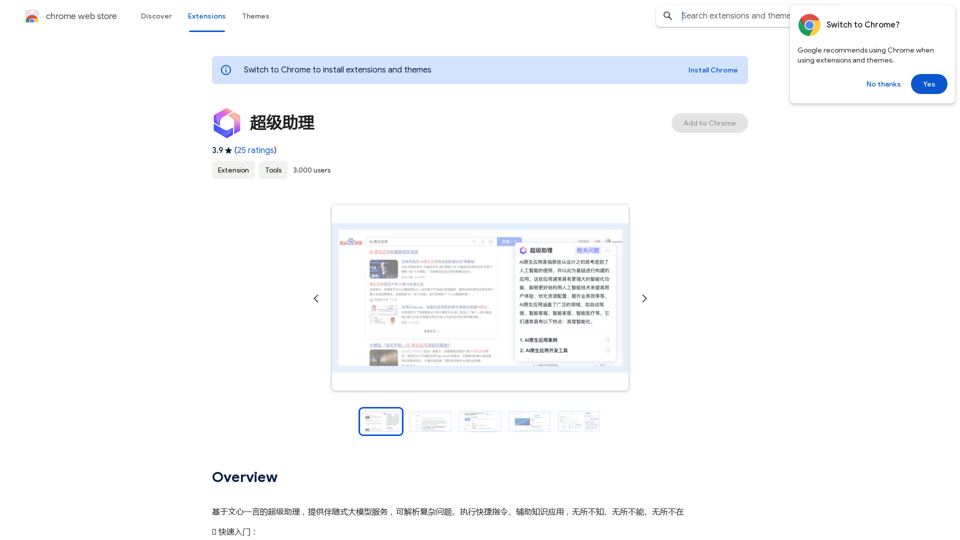
Super Assistant

A super assistant based on Wenxin Yiyan, providing companion-style large model services. It can parse complex questions, execute quick commands, and assist with knowledge applications. It knows everything, can do everything, and is everywhere.
Visit Website
Super Assistant
Visit Website

Introduction

SuperAgent is an AI-powered browser extension designed to enhance web browsing efficiency. It offers a comprehensive suite of features including advanced search capabilities, translation services, content summarization, and access to various AI-driven tools and models. This extension aims to streamline web navigation and information processing for users across different languages and content types.

Feature

Enhanced Search Functionality

SuperAgent utilizes AI technology to improve search results, providing more accurate answers and suggesting related questions. This feature helps users find relevant information quickly and efficiently.

Multi-Language Translation

The extension offers translation capabilities for web pages, PDFs, and eBooks across multiple languages. This feature breaks down language barriers, allowing users to access and understand content from around the world.

Content Summarization

SuperAgent can summarize lengthy web pages, articles, and documents. This feature enables users to quickly grasp the main points of extensive content, saving time and improving comprehension.

AI-Powered Tools

The extension provides access to a variety of AI-driven tools, including:

  • OCR (Optical Character Recognition) technology
  • PDF immersion reading
  • Other advanced AI-powered functionalities

Easy Installation and Access

Users can easily add SuperAgent to their Chrome browser and access its features through the toolbar icon. The extension requires login with a Baidu account or Baidu Cloud account for authentication.

FAQ

What is the relationship between SuperAgent and Wenxin One Sentence?

SuperAgent is built upon the AI model of Wenxin One Sentence, offering similar features and capabilities. It leverages the power of this established AI technology to provide its range of services.

Will SuperAgent support more models in the future?

Yes, SuperAgent is committed to continuous improvement. The development team plans to explore and integrate additional AI models and features in future updates, expanding the extension's capabilities.

How can users get support or provide feedback?

Users can contact the SuperAgent team at [email protected] for any questions, feedback, or support needs. The team welcomes user input to help improve the extension and ensure users get the most out of SuperAgent's features.

Related Websites

AI Voice Over for YouTube 

This is a guide to using AI voice over for your YouTube videos. 

Why Use AI Voice Over?

* Cost-Effective: AI voice over is much cheaper than hiring a professional voice actor.
* Time-Saving: You can generate voice over quickly and easily, without needing to schedule recording sessions.
* Variety of Voices: Choose from a wide range of AI voices, including male, female, and even robotic voices.
* Accessibility: Make your videos accessible to viewers who are deaf or hard of hearing by adding captions generated by AI.

How to Use AI Voice Over

1. Choose a Platform: There are many different platforms that offer AI voice over services, such as:
    * Google Cloud Text-to-Speech
    * Amazon Polly
    * Microsoft Azure Text to Speech
    * Murf.ai
    * NaturalReader
2. Write Your Script:  Write a clear and concise script for your video.
3. Upload Your Script:  Upload your script to the chosen platform.
4. Select a Voice: Choose the voice that best suits your video.
5. Adjust Settings:  Adjust settings such as speed, pitch, and volume.
6. Generate Voice Over:  Click the "Generate" button to create your voice over.
7. Download and Edit: Download the generated voice over file and edit it as needed.
8. Add to Your Video:  Add the voice over to your YouTube video.

Tips for Using AI Voice Over

* Use Natural Language:  Write your script as if you were speaking naturally.
* Vary Your Tone:  Use different tones of voice to keep your viewers engaged.
* Add Pauses:  Include pauses in your script to allow viewers to process information.
* Proofread Carefully:  Always proofread your script before generating the voice over.
* Experiment:  Try different voices, settings, and styles to find what works best for you.
View Detail

AI Voice Over for YouTube This is a guide to using AI voice over for your YouTube videos. Why Use AI Voice Over? * Cost-Effective: AI voice over is much cheaper than hiring a professional voice actor. * Time-Saving: You can generate voice over quickly and easily, without needing to schedule recording sessions. * Variety of Voices: Choose from a wide range of AI voices, including male, female, and even robotic voices. * Accessibility: Make your videos accessible to viewers who are deaf or hard of hearing by adding captions generated by AI. How to Use AI Voice Over 1. Choose a Platform: There are many different platforms that offer AI voice over services, such as: * Google Cloud Text-to-Speech * Amazon Polly * Microsoft Azure Text to Speech * Murf.ai * NaturalReader 2. Write Your Script: Write a clear and concise script for your video. 3. Upload Your Script: Upload your script to the chosen platform. 4. Select a Voice: Choose the voice that best suits your video. 5. Adjust Settings: Adjust settings such as speed, pitch, and volume. 6. Generate Voice Over: Click the "Generate" button to create your voice over. 7. Download and Edit: Download the generated voice over file and edit it as needed. 8. Add to Your Video: Add the voice over to your YouTube video. Tips for Using AI Voice Over * Use Natural Language: Write your script as if you were speaking naturally. * Vary Your Tone: Use different tones of voice to keep your viewers engaged. * Add Pauses: Include pauses in your script to allow viewers to process information. * Proofread Carefully: Always proofread your script before generating the voice over. * Experiment: Try different voices, settings, and styles to find what works best for you.

AI Voice Over for YouTube This is a guide to using AI voice over for your YouTube videos. Why Use AI Voice Over? * Cost-Effective: AI voice over is much cheaper than hiring a professional voice actor. * Time-Saving: You can generate voice over quickly and easily, without needing to schedule recording sessions. * Variety of Voices: Choose from a wide range of AI voices, including male, female, and even robotic voices. * Accessibility: Make your videos accessible to viewers who are deaf or hard of hearing by adding captions generated by AI. How to Use AI Voice Over 1. Choose a Platform: There are many different platforms that offer AI voice over services, such as: * Google Cloud Text-to-Speech * Amazon Polly * Microsoft Azure Text to Speech * Murf.ai * NaturalReader 2. Write Your Script: Write a clear and concise script for your video. 3. Upload Your Script: Upload your script to the chosen platform. 4. Select a Voice: Choose the voice that best suits your video. 5. Adjust Settings: Adjust settings such as speed, pitch, and volume. 6. Generate Voice Over: Click the "Generate" button to create your voice over. 7. Download and Edit: Download the generated voice over file and edit it as needed. 8. Add to Your Video: Add the voice over to your YouTube video. Tips for Using AI Voice Over * Use Natural Language: Write your script as if you were speaking naturally. * Vary Your Tone: Use different tones of voice to keep your viewers engaged. * Add Pauses: Include pauses in your script to allow viewers to process information. * Proofread Carefully: Always proofread your script before generating the voice over. * Experiment: Try different voices, settings, and styles to find what works best for you.

Watch foreign language YouTube videos in your own language.

193.90 M
UndetectableGPT.ai: Bypass GPTZero with Undetectable AI Humanizer Free Online
View Detail

UndetectableGPT.ai: Bypass GPTZero with Undetectable AI Humanizer Free Online

UndetectableGPT.ai: Bypass GPTZero with Undetectable AI Humanizer Free Online

Transform AI-generated content with our undetectable AI humanizer and rewriter. Make AI text undetectable and bypass AI checkers like GPTZero and ZeroGPT using undetectable AI free online tools. Perfect for creating undetecable GPT content.

1.66 K
Leisure
View Detail

Leisure

Leisure

Your personal librarian for the internet

193.90 M
Website Optimizer AI
View Detail

Website Optimizer AI

Website Optimizer AI

Improve your website's text with AI. Simply click on any text on a website and receive AI-powered suggestions for making it better.

193.90 M
AI Localizer - Easily Translate Your Project Code
View Detail

AI Localizer - Easily Translate Your Project Code

AI Localizer - Easily Translate Your Project Code

Seamlessly add localized translations to your Xcode projects. Add up to 37 languages to your app automatically, using the power of AI.

210.21 K
Curatio on the App Store
View Detail

Curatio on the App Store

Curatio on the App Store

Filter your SMS messages using the latest innovations on AI: - Curatio categorizes every new SMS message without any previous instructions. - Curatio filters every unwanted SMS, such as spam or promotional messages, to keep your inbox clean and organized.

124.77 M
Copy.ai
View Detail

Copy.ai

Copy.ai

Use Artificial Intelligence to write better SEO content.

193.90 M
WhatToTextAi
===============

WhatToTextAi is an AI-powered texting assistant that helps you come up with the perfect response to any situation.
View Detail

WhatToTextAi =============== WhatToTextAi is an AI-powered texting assistant that helps you come up with the perfect response to any situation.

WhatToTextAi =============== WhatToTextAi is an AI-powered texting assistant that helps you come up with the perfect response to any situation.

Overcome texting anxiety with WhatToText AI. Get personalized, human-like replies for any situation in seconds. Improve your English texting skills and build deeper connections. Perfect for non-native speakers and anyone looking to enhance their messaging game.

0