Open-source RightAI Tools Directory
  • Discover AI
  • Submit
  • Startup
  • Blog
Open-source RightAI Tools Directory
Discover the best AI tools of 2025 with the RightAI Tools Directory!

Friend Links

AI Anime GeneratorToolsApp AI

Support

Tap4
Privacy policyTerms & ConditionsContact Us
Loading...
loading...

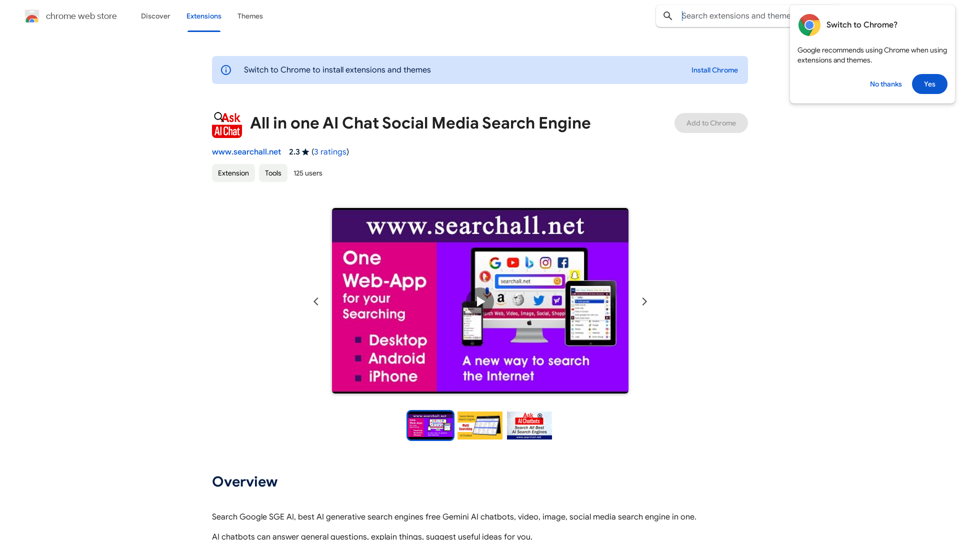
All-in-One AI Chat Social Media Search Engine

Search Google SGE AI, best free AI generative search engines, Gemini AI chatbots, video, image, and social media search engine all in one.
Visit Website
All-in-One AI Chat Social Media Search Engine
Visit Website

Introduction

SearchAll is an AI-powered search engine offering a comprehensive search experience across multiple platforms. It integrates various search capabilities including traditional search engines, AI chatbots, video, image, and social media searches. SearchAll provides access to advanced AI technologies such as ChatGPT, GPT-4o, and Dalle3 for generating text, images, and more, making it a versatile tool for diverse search needs.

Feature

Advanced AI Search Engines

SearchAll utilizes artificial intelligence and natural language processing to provide human-like conversations and answers to user queries.

AI Chatbots

A range of AI chatbots are available to answer general questions, provide explanations, and suggest useful ideas.

Image and Video Search

Users can search for images and videos across various platforms, including social media and video sharing sites.

Social Media Search

SearchAll enables searching for specific content, people, or topics on social media platforms.

Free Extension

SearchAll is available as a free Chrome extension, accessible to all users without subscription or payment.

AI-Powered Tools

The platform offers access to advanced AI technologies like ChatGPT, GPT-4o, and Dalle3 for generating text, images, and more.

Customizable Search

Advanced search options allow users to customize their search results for more accurate findings.

FAQ

How do I start using SearchAll?

  1. Install the SearchAll extension from the Chrome Web Store
  2. Click on the SearchAll icon in your browser toolbar to access the search engine
  3. Enter your query in the search bar and press Enter to view results
  4. Explore the various AI-powered tools available for text and image generation

What are some helpful tips for using SearchAll effectively?

  1. Use specific keywords to get more accurate search results
  2. Explore the AI-powered tools for generating text, images, and more
  3. Utilize the advanced search options to customize your search results

Is SearchAll a paid service?

SearchAll is a free extension that can be used without any subscription or payment. However, more advanced features or extended access may be available through a subscription.

Related Websites
Searchable ChatGPT: Search GPT Conversation History

With the rapid development of artificial intelligence technology, ChatGPT has become an essential tool for people to communicate and interact with AI. However, as the conversation history grows, it becomes increasingly difficult to find specific conversations or topics. To address this issue, we propose the concept of Searchable ChatGPT, which enables users to search their GPT conversation history efficiently.

Key Features

1. Keyword Search

Users can input specific keywords or phrases to search for relevant conversations in their chat history. The system will then display a list of conversations that match the search criteria, allowing users to quickly find the information they need.

2. Contextual Search

In addition to keyword search, users can also search for conversations based on context. For example, they can search for conversations related to a specific topic, such as "travel" or "cooking." The system will then display a list of conversations that are relevant to the specified context.

3. Conversation Filtering

To further refine the search results, users can apply filters to narrow down the list of conversations. For instance, they can filter conversations by date, time, or even the emotions expressed during the conversation.

4. Conversation Analytics

Searchable ChatGPT also provides users with conversation analytics, which offer insights into their conversation patterns and preferences. This feature can help users identify areas for improvement and optimize their communication with ChatGPT.

Benefits

1. Improved Productivity

Searchable ChatGPT saves users time and effort by allowing them to quickly find specific conversations or topics in their chat history.

2. Enhanced User Experience

By providing users with a more efficient way to search and analyze their conversations, Searchable ChatGPT enhances the overall user experience and encourages more effective communication with ChatGPT.

3. Better Decision Making

With access to conversation analytics, users can make more informed decisions by identifying patterns and trends in their conversations with ChatGPT.

Conclusion

Searchable ChatGPT is a powerful tool that revolutionizes the way users interact with ChatGPT. By providing a robust search function, contextual search, conversation filtering, and conversation analytics, Searchable ChatGPT improves productivity, enhances the user experience, and enables better decision making.
View Detail

Searchable ChatGPT: Search GPT Conversation History With the rapid development of artificial intelligence technology, ChatGPT has become an essential tool for people to communicate and interact with AI. However, as the conversation history grows, it becomes increasingly difficult to find specific conversations or topics. To address this issue, we propose the concept of Searchable ChatGPT, which enables users to search their GPT conversation history efficiently. Key Features 1. Keyword Search Users can input specific keywords or phrases to search for relevant conversations in their chat history. The system will then display a list of conversations that match the search criteria, allowing users to quickly find the information they need. 2. Contextual Search In addition to keyword search, users can also search for conversations based on context. For example, they can search for conversations related to a specific topic, such as "travel" or "cooking." The system will then display a list of conversations that are relevant to the specified context. 3. Conversation Filtering To further refine the search results, users can apply filters to narrow down the list of conversations. For instance, they can filter conversations by date, time, or even the emotions expressed during the conversation. 4. Conversation Analytics Searchable ChatGPT also provides users with conversation analytics, which offer insights into their conversation patterns and preferences. This feature can help users identify areas for improvement and optimize their communication with ChatGPT. Benefits 1. Improved Productivity Searchable ChatGPT saves users time and effort by allowing them to quickly find specific conversations or topics in their chat history. 2. Enhanced User Experience By providing users with a more efficient way to search and analyze their conversations, Searchable ChatGPT enhances the overall user experience and encourages more effective communication with ChatGPT. 3. Better Decision Making With access to conversation analytics, users can make more informed decisions by identifying patterns and trends in their conversations with ChatGPT. Conclusion Searchable ChatGPT is a powerful tool that revolutionizes the way users interact with ChatGPT. By providing a robust search function, contextual search, conversation filtering, and conversation analytics, Searchable ChatGPT improves productivity, enhances the user experience, and enables better decision making.

Searchable ChatGPT: Search GPT Conversation History With the rapid development of artificial intelligence technology, ChatGPT has become an essential tool for people to communicate and interact with AI. However, as the conversation history grows, it becomes increasingly difficult to find specific conversations or topics. To address this issue, we propose the concept of Searchable ChatGPT, which enables users to search their GPT conversation history efficiently. Key Features 1. Keyword Search Users can input specific keywords or phrases to search for relevant conversations in their chat history. The system will then display a list of conversations that match the search criteria, allowing users to quickly find the information they need. 2. Contextual Search In addition to keyword search, users can also search for conversations based on context. For example, they can search for conversations related to a specific topic, such as "travel" or "cooking." The system will then display a list of conversations that are relevant to the specified context. 3. Conversation Filtering To further refine the search results, users can apply filters to narrow down the list of conversations. For instance, they can filter conversations by date, time, or even the emotions expressed during the conversation. 4. Conversation Analytics Searchable ChatGPT also provides users with conversation analytics, which offer insights into their conversation patterns and preferences. This feature can help users identify areas for improvement and optimize their communication with ChatGPT. Benefits 1. Improved Productivity Searchable ChatGPT saves users time and effort by allowing them to quickly find specific conversations or topics in their chat history. 2. Enhanced User Experience By providing users with a more efficient way to search and analyze their conversations, Searchable ChatGPT enhances the overall user experience and encourages more effective communication with ChatGPT. 3. Better Decision Making With access to conversation analytics, users can make more informed decisions by identifying patterns and trends in their conversations with ChatGPT. Conclusion Searchable ChatGPT is a powerful tool that revolutionizes the way users interact with ChatGPT. By providing a robust search function, contextual search, conversation filtering, and conversation analytics, Searchable ChatGPT improves productivity, enhances the user experience, and enables better decision making.

Search ChatGPT conversation history instantly. Fully local and private. Press sidebar button or hotkey

193.90 M
Moonidea 

AI-powered SaaS idea generation using Reddit threads.
View Detail

Moonidea AI-powered SaaS idea generation using Reddit threads.

Moonidea AI-powered SaaS idea generation using Reddit threads.

Moonidea is an AI-powered software-as-a-service (SaaS) idea generation platform. It uses Reddit discussions to find real-world problems that could be solved by creating a new SaaS product.

0
Chrome Web Store
View Detail

Chrome Web Store

Chrome Web Store

Enhance your browser with new features and customize your browsing experience.

193.90 M
AICAPN - Your new AI parrot assistant
View Detail

AICAPN - Your new AI parrot assistant

AICAPN - Your new AI parrot assistant

Ahoy, AICAPN is the ultimate browser buddy! Smooth sailing and hearty humor guaranteed from yours truly, Steve.

193.90 M
Re:GPT β€” AI-Powered Email Assistant
View Detail

Re:GPT β€” AI-Powered Email Assistant

Re:GPT β€” AI-Powered Email Assistant

OpenAI ChatGPT integration for Gmail & Outlook β€” Automatically fill in email replies and harness the power of GPT to compose high-quality emails at a faster pace.

193.90 M
Real-Time Video & Audio Translation
View Detail

Real-Time Video & Audio Translation

Real-Time Video & Audio Translation

AI-powered real-time translation for any video, meeting, or live-stream across 100+ languages.

193.90 M
Discord Translator
View Detail

Discord Translator

Discord Translator

Translate Messages in Discord ============================= What is the "Translate" feature in Discord? The "Translate" feature in Discord allows users to translate messages in real-time, making it easier for people who speak different languages to communicate with each other. How to use the "Translate" feature in Discord? #1. Enable the "Translate" feature To enable the "Translate" feature, you need to go to the "User Settings" and click on the "Language" tab. Then, toggle the switch next to "Translator" to the "On" position. #2. Set your preferred language After enabling the "Translate" feature, you need to set your preferred language. You can do this by clicking on the "Language" dropdown menu and selecting your preferred language from the list. #3. Translate messages Once you've set your preferred language, you can start translating messages. To translate a message, simply hover over the message and click on the "Translate" button that appears. #4. View translated messages After clicking the "Translate" button, the message will be translated into your preferred language. You can view the translated message below the original message. Benefits of the "Translate" feature in Discord The "Translate" feature in Discord has several benefits, including: * Improved communication: The "Translate" feature helps to break down language barriers, making it easier for people who speak different languages to communicate with each other. * Increased accessibility: The "Translate" feature makes Discord more accessible to people who may not speak the dominant language of a server or community. * Enhanced collaboration: The "Translate" feature enables people to collaborate more effectively, even if they speak different languages.

193.90 M
Grow Your OnlyFans Agency - Supercreator Tools for OnlyFans
View Detail

Grow Your OnlyFans Agency - Supercreator Tools for OnlyFans

Grow Your OnlyFans Agency - Supercreator Tools for OnlyFans

CRM tools and automation bots for OnlyFans management agencies. Improve your chat interactions and promotions, and upsell more pay-per-view (PPV) content with the OnlyFans extension.

248.97 K