Open-source RightAI Tools Directory
  • Discover AI
  • Submit
  • Startup
  • Blog
Open-source RightAI Tools Directory
Discover the best AI tools of 2025 with the RightAI Tools Directory!

Friend Links

AI Anime GeneratorToolsApp AI

Support

Tap4
Privacy policyTerms & ConditionsContact Us
Loading...
loading...

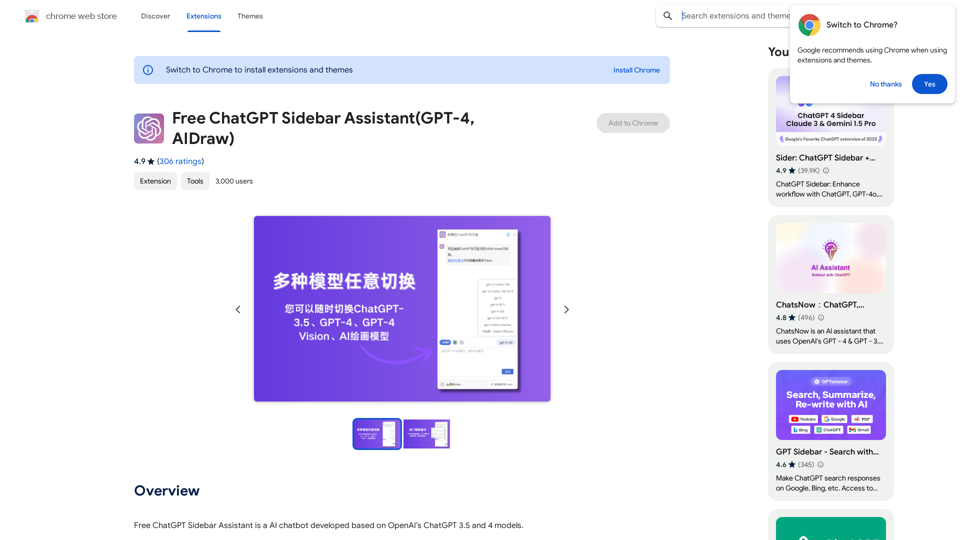
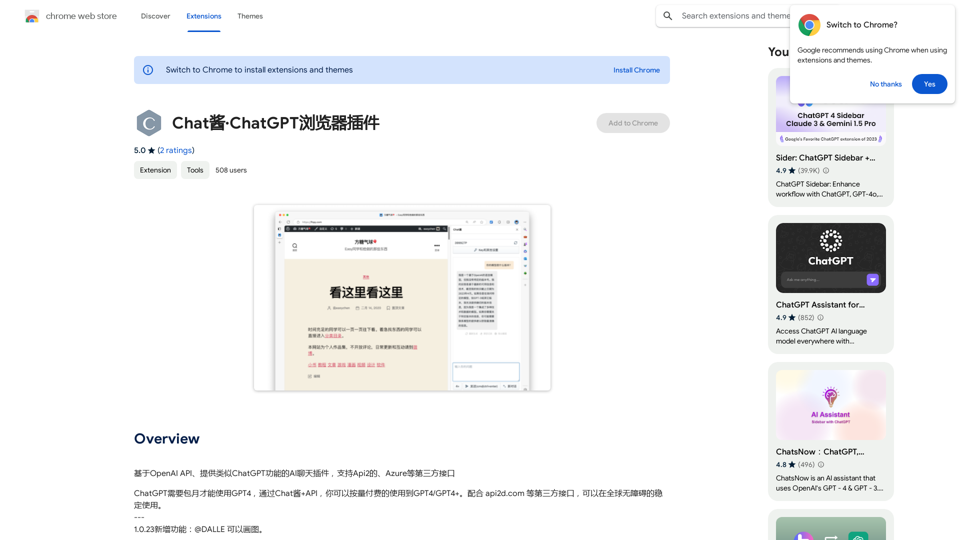
ChatGPT Browser Extension

An AI chat plugin similar to ChatGPT, based on the OpenAI API, that supports third-party interfaces like Api2 and Azure.
Visit Website
ChatGPT Browser Extension
Visit Website

Introduction

Chat Sauce · ChatGPT Browser Plugin is a free browser extension that brings AI chat functionality similar to ChatGPT directly to your browser. Powered by the OpenAI API, it supports API2 and Azure, allowing users worldwide to access advanced AI models like GPT-4 and GPT-4+ without requiring a subscription. This plugin offers a seamless and accessible way to integrate AI-powered conversations into your daily browsing experience.

Feature

AI-Powered Chat Functionality

Chat Sauce · ChatGPT Browser Plugin leverages the OpenAI API to provide ChatGPT-like conversational abilities directly in your browser.

Access to Advanced AI Models

Users can access GPT-4 and GPT-4+ models without the need for a subscription, thanks to the plugin's support for API2 and Azure.

Global Accessibility

The plugin can be used worldwide without any restrictions or obstacles, ensuring a seamless experience for users regardless of their location.

Free to Use

Chat Sauce · ChatGPT Browser Plugin is completely free, with no hidden costs or subscription fees.

Easy Installation and Use

Simply install the browser extension and start chatting with the AI model immediately, integrating effortlessly into your workflow.

FAQ

What is Chat Sauce · ChatGPT Browser Plugin?

Chat Sauce · ChatGPT Browser Plugin is a free browser extension that provides AI chat functionality similar to ChatGPT, powered by the OpenAI API. It supports API2 and Azure, allowing users to access advanced AI models like GPT-4 and GPT-4+ without a subscription.

How much does Chat Sauce · ChatGPT Browser Plugin cost?

Chat Sauce · ChatGPT Browser Plugin is completely free to use, with no subscription fees or hidden costs.

Can I use Chat Sauce · ChatGPT Browser Plugin globally?

Yes, Chat Sauce · ChatGPT Browser Plugin can be used globally without any obstacles or restrictions.

How do I get started with Chat Sauce · ChatGPT Browser Plugin?

To start using Chat Sauce · ChatGPT Browser Plugin, simply install the browser extension and begin chatting with the AI model. It's designed for easy integration into your daily browsing experience.

Are there any tips for using Chat Sauce · ChatGPT Browser Plugin?

Here are some helpful tips:

  1. Review the developer's privacy policy to understand data usage.
  2. Use the extension responsibly and in compliance with the terms of service.
  3. Experiment with different AI models and features to optimize your experience.

Related Websites
DeckBird
View Detail

DeckBird

DeckBird

DeckBird.ai is the number one presentation sharing tool, turning presentations into an AI sales and marketing assistant.

193.90 M
Knowz AI Search Engine: A New Era of Online Searching Experience
View Detail

Knowz AI Search Engine: A New Era of Online Searching Experience

Knowz AI Search Engine: A New Era of Online Searching Experience

Discover the power of Knowz, a free AI search designed to deliver fast, accurate, and clutter-free answers, revolutionizing your online searches.

270
jKeywording | Stock Photo Keyword Generator
View Detail

jKeywording | Stock Photo Keyword Generator

jKeywording | Stock Photo Keyword Generator

Adds a right-click menu to images, allowing users to easily add keywords to stock photos on websites like Alamy and Getty.

193.90 M
SwiftSubmit
View Detail

SwiftSubmit

SwiftSubmit

Streamline job applications with our AI extension! Apply to more roles by automatically filling out forms and cover letters in seconds.

193.90 M
FatfoxTab New Tab Page
View Detail

FatfoxTab New Tab Page

FatfoxTab New Tab Page

FatfoxTab, a new tab page, provides an all-around online experience covering gaming, office, and entertainment scenarios. With advanced language models, it's easy to get started and use, offering a vast array of websites, card-style apps, dynamic wallpapers, and a customizable user interface, all at your fingertips. It's a must-have browser plugin for building your personalized learning and working platform.

193.90 M
AI Voice Over for YouTube 

This is a guide to using AI voice over for your YouTube videos. 

Why Use AI Voice Over?

* Cost-Effective: AI voice over is much cheaper than hiring a professional voice actor.
* Time-Saving: You can generate voice over quickly and easily, without needing to schedule recording sessions.
* Variety of Voices: Choose from a wide range of AI voices, including male, female, and even robotic voices.
* Accessibility: Make your videos accessible to viewers who are deaf or hard of hearing by adding captions generated by AI.

How to Use AI Voice Over

1. Choose a Platform: There are many different platforms that offer AI voice over services, such as:
    * Google Cloud Text-to-Speech
    * Amazon Polly
    * Microsoft Azure Text to Speech
    * Murf.ai
    * NaturalReader
2. Write Your Script:  Write a clear and concise script for your video.
3. Upload Your Script:  Upload your script to the chosen platform.
4. Select a Voice: Choose the voice that best suits your video.
5. Adjust Settings:  Adjust settings such as speed, pitch, and volume.
6. Generate Voice Over:  Click the "Generate" button to create your voice over.
7. Download and Edit: Download the generated voice over file and edit it as needed.
8. Add to Your Video:  Add the voice over to your YouTube video.

Tips for Using AI Voice Over

* Use Natural Language:  Write your script as if you were speaking naturally.
* Vary Your Tone:  Use different tones of voice to keep your viewers engaged.
* Add Pauses:  Include pauses in your script to allow viewers to process information.
* Proofread Carefully:  Always proofread your script before generating the voice over.
* Experiment:  Try different voices, settings, and styles to find what works best for you.
View Detail

AI Voice Over for YouTube This is a guide to using AI voice over for your YouTube videos. Why Use AI Voice Over? * Cost-Effective: AI voice over is much cheaper than hiring a professional voice actor. * Time-Saving: You can generate voice over quickly and easily, without needing to schedule recording sessions. * Variety of Voices: Choose from a wide range of AI voices, including male, female, and even robotic voices. * Accessibility: Make your videos accessible to viewers who are deaf or hard of hearing by adding captions generated by AI. How to Use AI Voice Over 1. Choose a Platform: There are many different platforms that offer AI voice over services, such as: * Google Cloud Text-to-Speech * Amazon Polly * Microsoft Azure Text to Speech * Murf.ai * NaturalReader 2. Write Your Script: Write a clear and concise script for your video. 3. Upload Your Script: Upload your script to the chosen platform. 4. Select a Voice: Choose the voice that best suits your video. 5. Adjust Settings: Adjust settings such as speed, pitch, and volume. 6. Generate Voice Over: Click the "Generate" button to create your voice over. 7. Download and Edit: Download the generated voice over file and edit it as needed. 8. Add to Your Video: Add the voice over to your YouTube video. Tips for Using AI Voice Over * Use Natural Language: Write your script as if you were speaking naturally. * Vary Your Tone: Use different tones of voice to keep your viewers engaged. * Add Pauses: Include pauses in your script to allow viewers to process information. * Proofread Carefully: Always proofread your script before generating the voice over. * Experiment: Try different voices, settings, and styles to find what works best for you.

AI Voice Over for YouTube This is a guide to using AI voice over for your YouTube videos. Why Use AI Voice Over? * Cost-Effective: AI voice over is much cheaper than hiring a professional voice actor. * Time-Saving: You can generate voice over quickly and easily, without needing to schedule recording sessions. * Variety of Voices: Choose from a wide range of AI voices, including male, female, and even robotic voices. * Accessibility: Make your videos accessible to viewers who are deaf or hard of hearing by adding captions generated by AI. How to Use AI Voice Over 1. Choose a Platform: There are many different platforms that offer AI voice over services, such as: * Google Cloud Text-to-Speech * Amazon Polly * Microsoft Azure Text to Speech * Murf.ai * NaturalReader 2. Write Your Script: Write a clear and concise script for your video. 3. Upload Your Script: Upload your script to the chosen platform. 4. Select a Voice: Choose the voice that best suits your video. 5. Adjust Settings: Adjust settings such as speed, pitch, and volume. 6. Generate Voice Over: Click the "Generate" button to create your voice over. 7. Download and Edit: Download the generated voice over file and edit it as needed. 8. Add to Your Video: Add the voice over to your YouTube video. Tips for Using AI Voice Over * Use Natural Language: Write your script as if you were speaking naturally. * Vary Your Tone: Use different tones of voice to keep your viewers engaged. * Add Pauses: Include pauses in your script to allow viewers to process information. * Proofread Carefully: Always proofread your script before generating the voice over. * Experiment: Try different voices, settings, and styles to find what works best for you.

Watch foreign language YouTube videos in your own language.

193.90 M
ChatGPT Hero
View Detail

ChatGPT Hero

ChatGPT Hero

The ChatGPT Hero extension gives you a collection of ChatGPT prompt templates to make it simple to write great prompts.

193.90 M
Overcome Copilot AI Message Limit, Export Chats to JSON File: TopicsGPT

This is a tool to help you work around the message limit in Copilot AI and export your conversations to a JSON file. 

Here's how it works:

* Extend Your Conversations: TopicsGPT allows you to continue your conversations with Copilot AI beyond the usual message limit. 

* Save Your History: Export your entire chat history with Copilot AI as a structured JSON file. This makes it easy to review past interactions, analyze your conversations, or even use the data for other purposes.

Benefits:

* No More Interruptions: Keep your creative flow going without worrying about hitting the message limit.
* Organized Data:  Have a clear and organized record of your conversations with Copilot AI.
* Flexibility: Use the exported JSON data for your own projects or analysis. 


Let me know if you have any questions!
View Detail

Overcome Copilot AI Message Limit, Export Chats to JSON File: TopicsGPT This is a tool to help you work around the message limit in Copilot AI and export your conversations to a JSON file. Here's how it works: * Extend Your Conversations: TopicsGPT allows you to continue your conversations with Copilot AI beyond the usual message limit. * Save Your History: Export your entire chat history with Copilot AI as a structured JSON file. This makes it easy to review past interactions, analyze your conversations, or even use the data for other purposes. Benefits: * No More Interruptions: Keep your creative flow going without worrying about hitting the message limit. * Organized Data: Have a clear and organized record of your conversations with Copilot AI. * Flexibility: Use the exported JSON data for your own projects or analysis. Let me know if you have any questions!

Overcome Copilot AI Message Limit, Export Chats to JSON File: TopicsGPT This is a tool to help you work around the message limit in Copilot AI and export your conversations to a JSON file. Here's how it works: * Extend Your Conversations: TopicsGPT allows you to continue your conversations with Copilot AI beyond the usual message limit. * Save Your History: Export your entire chat history with Copilot AI as a structured JSON file. This makes it easy to review past interactions, analyze your conversations, or even use the data for other purposes. Benefits: * No More Interruptions: Keep your creative flow going without worrying about hitting the message limit. * Organized Data: Have a clear and organized record of your conversations with Copilot AI. * Flexibility: Use the exported JSON data for your own projects or analysis. Let me know if you have any questions!

Bypass Copilot's Message Limit and Move Conversations * Get around the message limit in Microsoft's Copilot: Find ways to exceed the character or message count restrictions within Copilot. * Transfer conversations to new chats: Move existing conversations from one chat space to another. Export AI Chat Histories * Download chat history from any AI platform: Save your conversations with various AI systems as JSON files.

193.90 M