Open-source RightAI Tools Directory
  • Discover AI
  • Submit
  • Startup
  • Blog
Open-source RightAI Tools Directory
Discover the best AI tools of 2025 with the RightAI Tools Directory!

Friend Links

AI Anime GeneratorToolsApp AI

Support

Tap4
Privacy policyTerms & ConditionsContact Us
Loading...
loading...

Kayako Bot

Kayako Bot
Visit Website
Kayako Bot
Visit Website

Introduction

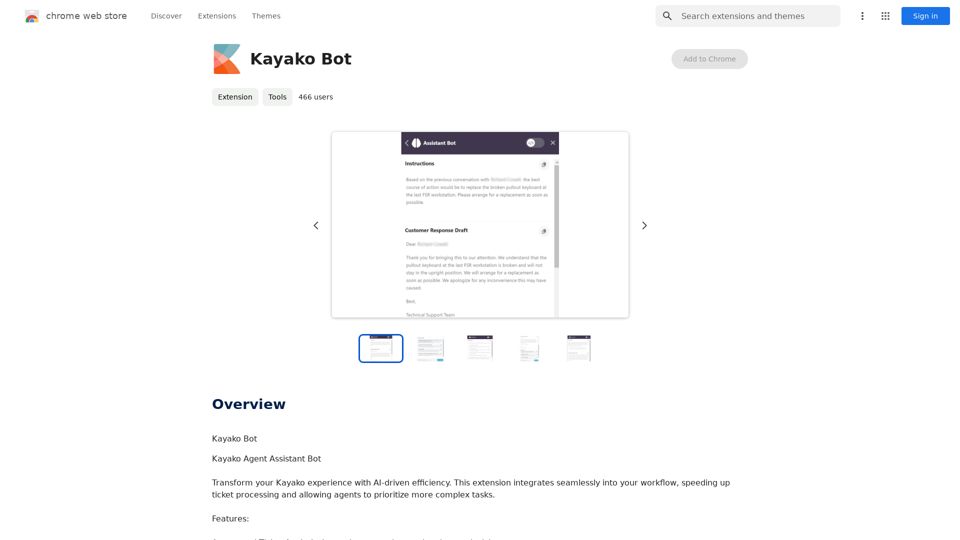
Kayako Bot is an AI-powered extension designed to enhance the Kayako support experience. It seamlessly integrates into existing workflows, accelerating ticket processing and allowing support agents to focus on more complex tasks. This innovative tool offers automated ticket analysis, smart recommendations, draft responses, and guided assistance, making it an invaluable asset for support teams looking to improve efficiency and customer satisfaction.

Feature

Automated Ticket Analysis

  • Instantly summarizes and comprehends ticket content
  • Streamlines the initial assessment process

Smart Recommendations

  • Suggests solutions based on historical cases and knowledge base
  • Improves response accuracy and consistency

Draft Responses

  • Auto-generates customer responses for basic queries
  • Reduces response time for common issues

Guided Assistance

  • Provides step-by-step solutions for complicated issues
  • Enhances problem-solving capabilities of support agents

Free Extension with Limitations

  • No cost to use, but with certain restrictions
  • Does not support multimedia content
  • Average response time of approximately 90 seconds

Versatile Application

  • Handles a wide range of tickets, from self-service queries to complex problems
  • Ideal for onboarding and cross-training new agents

FAQ

What are the main benefits of using Kayako Bot?

  • Improves support efficiency
  • Allows agents to focus on complex tasks
  • Speeds up ticket processing
  • Enhances customer satisfaction

Is Kayako Bot suitable for all industries?

No, Kayako Bot is not suitable for high-compliance industries due to its limitations and automated nature.

What are the limitations of Kayako Bot?

  • Does not support multimedia content
  • Average response time is around 90 seconds
  • May not be suitable for complex or sensitive inquiries

How can Kayako Bot assist in agent training?

Kayako Bot is great for onboarding and cross-training new agents by providing guided assistance and smart recommendations based on historical cases and knowledge base.

Related Websites

Article Summary with ChatGPT and Take Notes

This is a guide on how to use ChatGPT to summarize articles and take notes effectively. 

Step 1:  Provide ChatGPT with the Article

Copy and paste the full text of the article into the ChatGPT interface. 

Step 2:  Craft Your Prompt

Tell ChatGPT what you want it to do. Here are some examples:

* Summarize: "Please summarize this article in 200 words."
* Key Points: "What are the main points of this article?"
* Bullet Points: "Summarize the key findings of this article in bullet points."
* Notes: "Take notes on this article, focusing on the author's arguments and supporting evidence."

Step 3:  Review and Refine

ChatGPT will generate a summary, key points, bullet points, or notes based on your prompt. 

* Read carefully: Make sure the output accurately reflects the article's content.
* Edit as needed:  You can ask ChatGPT to rephrase sections or provide more detail.
* Add your own insights:  Don't just copy ChatGPT's output. Use it as a starting point and add your own thoughts, questions, and connections.

Tips for Effective Use:

* Be specific: The more specific your prompt, the better the output will be.
* Experiment with different prompts: Try various phrasing to see what works best.
* Use ChatGPT as a tool:  It's a powerful aid, but it's not a replacement for critical reading and thinking.
View Detail

Article Summary with ChatGPT and Take Notes This is a guide on how to use ChatGPT to summarize articles and take notes effectively. Step 1: Provide ChatGPT with the Article Copy and paste the full text of the article into the ChatGPT interface. Step 2: Craft Your Prompt Tell ChatGPT what you want it to do. Here are some examples: * Summarize: "Please summarize this article in 200 words." * Key Points: "What are the main points of this article?" * Bullet Points: "Summarize the key findings of this article in bullet points." * Notes: "Take notes on this article, focusing on the author's arguments and supporting evidence." Step 3: Review and Refine ChatGPT will generate a summary, key points, bullet points, or notes based on your prompt. * Read carefully: Make sure the output accurately reflects the article's content. * Edit as needed: You can ask ChatGPT to rephrase sections or provide more detail. * Add your own insights: Don't just copy ChatGPT's output. Use it as a starting point and add your own thoughts, questions, and connections. Tips for Effective Use: * Be specific: The more specific your prompt, the better the output will be. * Experiment with different prompts: Try various phrasing to see what works best. * Use ChatGPT as a tool: It's a powerful aid, but it's not a replacement for critical reading and thinking.

Article Summary with ChatGPT and Take Notes This is a guide on how to use ChatGPT to summarize articles and take notes effectively. Step 1: Provide ChatGPT with the Article Copy and paste the full text of the article into the ChatGPT interface. Step 2: Craft Your Prompt Tell ChatGPT what you want it to do. Here are some examples: * Summarize: "Please summarize this article in 200 words." * Key Points: "What are the main points of this article?" * Bullet Points: "Summarize the key findings of this article in bullet points." * Notes: "Take notes on this article, focusing on the author's arguments and supporting evidence." Step 3: Review and Refine ChatGPT will generate a summary, key points, bullet points, or notes based on your prompt. * Read carefully: Make sure the output accurately reflects the article's content. * Edit as needed: You can ask ChatGPT to rephrase sections or provide more detail. * Add your own insights: Don't just copy ChatGPT's output. Use it as a starting point and add your own thoughts, questions, and connections. Tips for Effective Use: * Be specific: The more specific your prompt, the better the output will be. * Experiment with different prompts: Try various phrasing to see what works best. * Use ChatGPT as a tool: It's a powerful aid, but it's not a replacement for critical reading and thinking.

I can do that! Please provide me with the URL of the webpage or article you'd like me to summarize. I'll do my best to create a concise and easy-to-understand summary for you.

193.90 M
U-Publish Seller Finder
View Detail

U-Publish Seller Finder

U-Publish Seller Finder

U-Publish Seller Finder

193.90 M
iVu.AI - Intelligent Search Engine Powered by Artificial Intelligence - iVu.AI
View Detail

iVu.AI - Intelligent Search Engine Powered by Artificial Intelligence - iVu.AI

iVu.AI - Intelligent Search Engine Powered by Artificial Intelligence - iVu.AI

An AI-powered search engine

0
LinkedIn AI Result Booster
View Detail

LinkedIn AI Result Booster

LinkedIn AI Result Booster

Handle Objections. Smart Follow-ups. Personalized Invites. Boost your LinkedIn prospecting with Salee and get booked meetings!

193.90 M
The all-in-one Audio AI platform. The ultimate solution for Audio Transcription, Speech-To-Text, Audio Pen, Text-To-Speech, Video Dubbing, Live Stream Captioning.
View Detail

The all-in-one Audio AI platform. The ultimate solution for Audio Transcription, Speech-To-Text, Audio Pen, Text-To-Speech, Video Dubbing, Live Stream Captioning.

The all-in-one Audio AI platform. The ultimate solution for Audio Transcription, Speech-To-Text, Audio Pen, Text-To-Speech, Video Dubbing, Live Stream Captioning.

The all-in-one Audio AI platform. The ultimate solution for Audio Transcription, Speech-To-Text, Audio Pen, Text-To-Speech, Video Dubbing, Live Stream Caption

0
AMISSU
View Detail

AMISSU

AMISSU

AMIS Schedule Unitizer: Automatic Schedule Planner for University Class Enrollment

193.90 M
mymap.ai: Mapping Ideas That Change the World
View Detail

mymap.ai: Mapping Ideas That Change the World

mymap.ai: Mapping Ideas That Change the World

MyMap transforms your textual concepts into visual representations such as mind maps and presentations through a straightforward chat interface. It's perfect for students, educators, and professionals, requiring no design expertise. This tool saves you time by enabling effortless, collaborative visual creation.

1.04 M
Copysense AI

Copysense AI is an innovative artificial intelligence technology designed to detect and prevent copyright infringement.
View Detail

Copysense AI Copysense AI is an innovative artificial intelligence technology designed to detect and prevent copyright infringement.

Copysense AI Copysense AI is an innovative artificial intelligence technology designed to detect and prevent copyright infringement.

Copysense AI is the Generative AI platform for crafting factually accurate, on-brand content with real-time data, generating images, voiceovers, and content from YouTube and URLs.

0