Open-source RightAI Tools Directory
  • Discover AI
  • Submit
  • Startup
  • Blog
Open-source RightAI Tools Directory
Discover the best AI tools of 2025 with the RightAI Tools Directory!

Friend Links

AI Anime GeneratorToolsApp AI

Support

Tap4
Privacy policyTerms & ConditionsContact Us
Loading...
loading...

Reviewer Recommender

Reviewer Recommender
Visit Website
Reviewer Recommender
Visit Website

Introduction

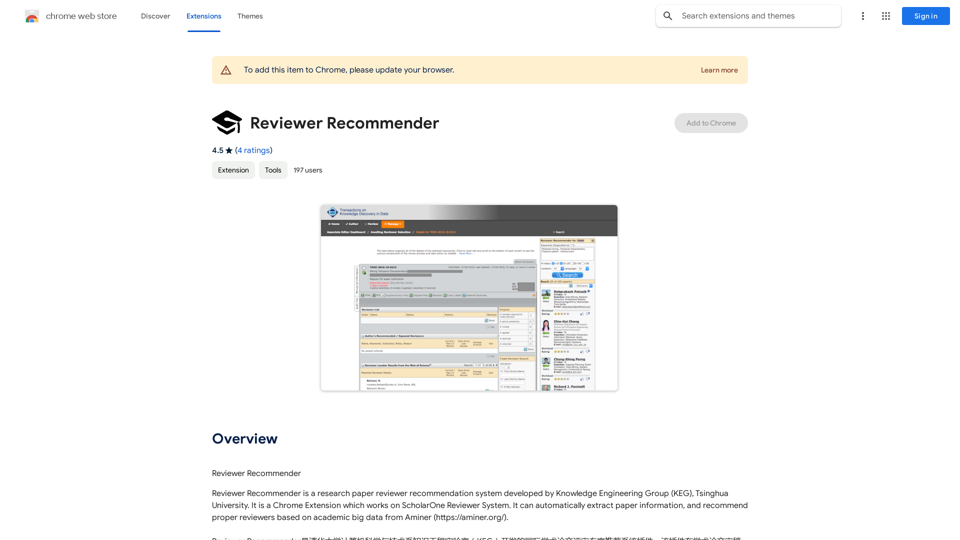
Reviewer Recommender is a Chrome Extension developed by the Knowledge Engineering Group (KEG) at Tsinghua University. It integrates with the ScholarOne Reviewer System to automate the process of recommending reviewers for research papers. By leveraging academic big data from Aminer, this tool streamlines the reviewer selection process for journal editors and academic institutions.

Feature

Automatic Paper Information Extraction

The extension seamlessly extracts paper information, including author details, directly from the ScholarOne Reviewer System. This feature eliminates manual data entry and reduces the potential for errors.

Intelligent Reviewer Recommendation

Utilizing Aminer's extensive academic database, Reviewer Recommender suggests the most appropriate reviewers for each paper. This data-driven approach ensures a more efficient and accurate reviewer selection process.

ScholarOne Integration

Designed specifically for the ScholarOne Reviewer System, this extension seamlessly integrates into existing workflows, enhancing productivity without disrupting established processes.

User-Friendly Interface

As a Chrome Extension, Reviewer Recommender offers a simple and intuitive user experience. It can be easily installed from the Chrome Web Store and used immediately with minimal setup.

Cost-Effective Solution

Reviewer Recommender is available as a free extension, making it an accessible tool for academic institutions and journal editors of all sizes.

FAQ

Is Reviewer Recommender a paid extension?

No, Reviewer Recommender is completely free to use. There are no subscription fees or hidden costs associated with the extension.

How does Reviewer Recommender work?

Reviewer Recommender utilizes academic big data from Aminer to analyze paper information and recommend suitable reviewers. It automatically extracts paper details from ScholarOne and uses this information to suggest the most appropriate reviewers based on their expertise and research areas.

Can I use Reviewer Recommender with other reviewer systems?

No, Reviewer Recommender is specifically designed to work with the ScholarOne Reviewer System. It is not compatible with other reviewer systems at this time.

Latest Traffic Insights

  • Monthly Visits

    193.90 M

  • Bounce Rate

    56.27%

  • Pages Per Visit

    2.71

  • Time on Site(s)

    115.91

  • Global Rank

    -

  • Country Rank

    -

Recent Visits

Traffic Sources

  • Social Media:
    0.48%
  • Paid Referrals:
    0.55%
  • Email:
    0.15%
  • Referrals:
    12.81%
  • Search Engines:
    16.21%
  • Direct:
    69.81%
More Data

Related Websites

AI Job Interviewer - InterviewMe
View Detail

AI Job Interviewer - InterviewMe

AI Job Interviewer - InterviewMe

Ace your next job interview and get hired faster. AI Job Interview Role-Play.

0
AiJobSaga
View Detail

AiJobSaga

AiJobSaga

Craft personalized applications & gain AI-powered insights to land your dream job with AIJobSaga.

0
Talkative
View Detail

Talkative

Talkative

Chat with Web-LLM Models in the Browser You can interact with Web-LLM models directly in your web browser without requiring any additional setup or installation. This allows you to easily experiment with and explore the capabilities of these models. Getting Started To get started, simply open a web browser and navigate to the Web-LLM model's website or platform. Once you're on the website, you can usually find a chat interface or text input field where you can enter your prompts or questions. How it Works When you enter a prompt or question, the Web-LLM model processes your input and generates a response. This response is then displayed in the chat interface or output field, allowing you to read and interact with the model's output. Benefits The benefits of chatting with Web-LLM models in the browser include: * Convenience: No need to install any software or set up any development environments. * Accessibility: Anyone with a web browser can interact with the model, regardless of their technical expertise. * Ease of use: The chat interface provides a user-friendly way to interact with the model, making it easy to experiment and explore its capabilities. Use Cases Some potential use cases for chatting with Web-LLM models in the browser include: * Research and development: Quickly experiment with different models and prompts to explore their capabilities and limitations. * Education and learning: Use the chat interface to teach students about AI and language models, or to provide interactive learning experiences. * Creative writing and ideation: Use the model as a tool to generate ideas, write stories, or create poetry. Overall, chatting with Web-LLM models in the browser provides a convenient and accessible way to interact with these powerful language models, and can be a valuable tool for a wide range of applications.

2.59 K
Summify: Summarize YouTube and Web Content 

This is a tool that can summarize videos from YouTube and web pages.
View Detail

Summify: Summarize YouTube and Web Content This is a tool that can summarize videos from YouTube and web pages.

Summify: Summarize YouTube and Web Content This is a tool that can summarize videos from YouTube and web pages.

Quickly get the main points of websites and YouTube videos.

193.90 M
Token Counter for ChatGPT 

This tool helps you count the number of tokens in your text input.

How to Use:

1. Paste your text into the input box.
2. Click the "Count Tokens" button.
3. The number of tokens will be displayed below the input box.

What is a Token?

A token is the basic unit of text that ChatGPT processes. 

It can be a word, part of a word, or a punctuation mark.


Example:

Input Text: Hello, world!

Token Count: 4
View Detail

Token Counter for ChatGPT This tool helps you count the number of tokens in your text input. How to Use: 1. Paste your text into the input box. 2. Click the "Count Tokens" button. 3. The number of tokens will be displayed below the input box. What is a Token? A token is the basic unit of text that ChatGPT processes. It can be a word, part of a word, or a punctuation mark. Example: Input Text: Hello, world! Token Count: 4

Token Counter for ChatGPT This tool helps you count the number of tokens in your text input. How to Use: 1. Paste your text into the input box. 2. Click the "Count Tokens" button. 3. The number of tokens will be displayed below the input box. What is a Token? A token is the basic unit of text that ChatGPT processes. It can be a word, part of a word, or a punctuation mark. Example: Input Text: Hello, world! Token Count: 4

110

193.90 M
Chatgpt PDF
===============

Ask your PDF
----------------
View Detail

Chatgpt PDF =============== Ask your PDF ----------------

Chatgpt PDF =============== Ask your PDF ----------------

Ask Your PDF AI Chapdf: Best AI Summarizer Plugin Powered by GPT Summarize Text and Have a Chat with Any PDF Pro Summary Generator

193.90 M
AI Assistant - ChatGPT and Gemini for Chrome
View Detail

AI Assistant - ChatGPT and Gemini for Chrome

AI Assistant - ChatGPT and Gemini for Chrome

Take your online search experience to new heights with this extension.

193.90 M
Receipt & Invoice Capture, Match, Categorize
View Detail

Receipt & Invoice Capture, Match, Categorize

Receipt & Invoice Capture, Match, Categorize

Automatically manage your expenses by taking pictures of your receipts and invoices online. They will then be automatically matched with transactions on any of your credit cards or bank accounts!

193.90 M