Open-source RightAI Tools Directory
  • Discover AI
  • Submit
  • Startup
  • Blog
Open-source RightAI Tools Directory
Discover the best AI tools of 2025 with the RightAI Tools Directory!

Friend Links

AI Anime GeneratorToolsApp AI

Support

Tap4
Privacy policyTerms & ConditionsContact Us
Loading...
loading...

VMX – Powered by LotLinx

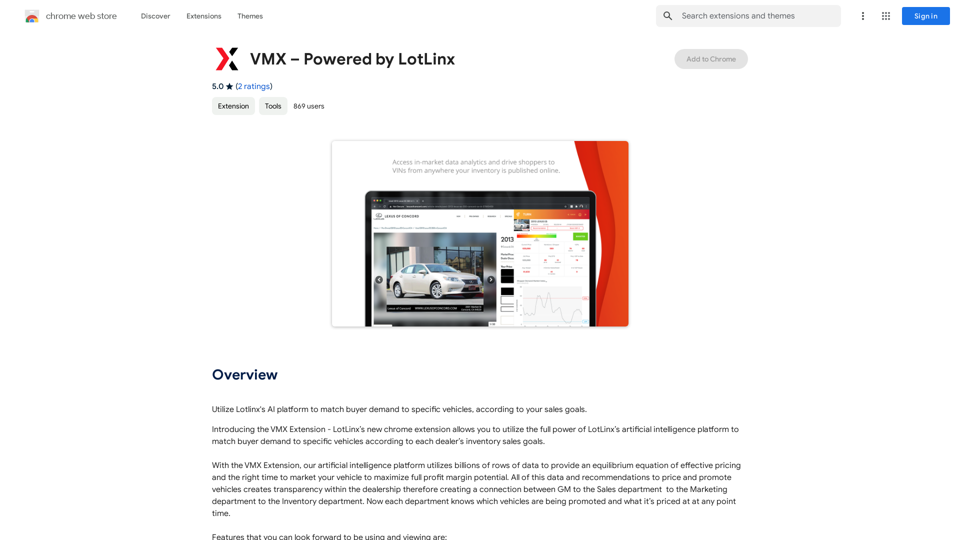
Utilize Lotlinx's AI platform to match buyer demand to specific vehicles, according to your sales goals.
Visit Website
VMX – Powered by LotLinx
Visit Website

Introduction

VMX is a Chrome extension powered by LotLinx, an AI-driven platform for the automotive industry. It leverages billions of data points to optimize vehicle pricing and marketing timing, aiming to maximize profit margins for dealerships. VMX offers a suite of features designed to enhance vehicle sales strategies through data-driven insights and AI-powered recommendations.

Feature

AI-Powered Boosting

VMX's AI platform recommends optimal times to promote vehicles, a feature called "Boost". This function utilizes LotLinx's machine learning omnichannel platform to drive potential buyers to Vehicle Detail Pages (VDPs).

Intelligent Price Recommendation

The extension provides price recommendations based on LotLinx's proprietary shopper and market data. This feature allows dealers to compare their current listing prices with AI-suggested prices, offering a competitive edge beyond simple discounting.

Shopper Demand Analysis

VMX includes a proprietary Shopper Demand Market Index, displaying the number of shoppers and rated demand in the dealer's market area for specific vehicles. This data is presented in an easy-to-understand graph showing high or low demand.

VDP and Price Correlation

A graph feature correlates Google Analytics VDP data with pricing information, providing insights into the relationship between a vehicle's price and its VDP views over time.

Third-Party Listing Integration

VMX compiles badges and rankings from major listing portals (CarGurus, Autotrader, and Cars.com) for each vehicle, offering context on current pricing in relation to these platforms.

FAQ

What is the primary purpose of VMX?

VMX is designed to help automotive dealers optimize their vehicle pricing and marketing strategies using AI-driven insights and recommendations.

How does the Boosting feature work?

The Boosting feature uses AI to recommend the best times to promote a vehicle, effectively advertising it through LotLinx's platform to drive potential buyers to the dealer's VDPs.

Can VMX help with pricing strategies?

Yes, VMX offers a Price Recommendation feature that compares current listing prices with AI-suggested prices based on market data and shopper demand.

Does VMX provide information on market demand?

VMX includes a Shopper Demand Market Index that shows the number of shoppers and rated demand for specific vehicles in the dealer's market area.

How does VMX integrate with third-party listing sites?

VMX compiles badges and rankings from CarGurus, Autotrader, and Cars.com, providing context on how a vehicle's current price compares on these platforms.

Latest Traffic Insights

  • Monthly Visits

    193.90 M

  • Bounce Rate

    56.27%

  • Pages Per Visit

    2.71

  • Time on Site(s)

    115.91

  • Global Rank

    -

  • Country Rank

    -

Recent Visits

Traffic Sources

  • Social Media:
    0.48%
  • Paid Referrals:
    0.55%
  • Email:
    0.15%
  • Referrals:
    12.81%
  • Search Engines:
    16.21%
  • Direct:
    69.81%
More Data

Related Websites

PicMa Photo Enhancer - One Click AI Photo Quality Enhancer
View Detail

PicMa Photo Enhancer - One Click AI Photo Quality Enhancer

PicMa Photo Enhancer - One Click AI Photo Quality Enhancer

PicMa AI enhances photo resolution and image quality. Unblur, restore old photos, and colorize black and white images instantly. Try our tool for free.

65.77 K
Arbi - Amazon FBA Analyser. ChatGPT Built-In
View Detail

Arbi - Amazon FBA Analyser. ChatGPT Built-In

Arbi - Amazon FBA Analyser. ChatGPT Built-In

Analyze Amazon products with the help of a powerful AI assistant. Features include a profit calculator, Keepa charts, and more.

193.90 M
Launch Your App in Days, Not Weeks | ShipAppFast
View Detail

Launch Your App in Days, Not Weeks | ShipAppFast

Launch Your App in Days, Not Weeks | ShipAppFast

The Swift boilerplate with all the necessary elements to bring your product to customers. From concept to production in just 5 minutes.

0
InstaApply
View Detail

InstaApply

InstaApply

Maximize your job search on LinkedIn. Apply to hundreds of jobs quickly and easily, unlocking your career potential.

193.90 M
Youdao Smart Translation
View Detail

Youdao Smart Translation

Youdao Smart Translation

【Youdao Lingdong Translation】Using Youdao's large translation model, the top choice for immersive web translation tools! Real-time contrast translation: Turn any web page into a contrast. Image translation: Easily extract text from images. Instant translation input box: Enter Chinese and easily convert to English.

193.90 M
FLUX.1 AI: Advanced Text-to-Image Generation Model
View Detail

FLUX.1 AI: Advanced Text-to-Image Generation Model

FLUX.1 AI: Advanced Text-to-Image Generation Model

Experience the next level of image synthesis with FLUX.1 AI. Our cutting-edge AI technology creates stunning, diverse, and highly detailed images from text prompts.

152
LivePortrait AI: Create Amazing AI Portrait Animation in Minutes
View Detail

LivePortrait AI: Create Amazing AI Portrait Animation in Minutes

LivePortrait AI: Create Amazing AI Portrait Animation in Minutes

LivePortrait AI uses advanced technology to create stunning AI portrait animation. Upload your photo and watch it come to life with realistic movements and expressions.

0
Text to Voice Generator
==========================

A text-to-voice generator, also known as a text-to-speech (TTS) system, is a software that converts written text into a spoken voice output. This technology has been widely used in various applications, including virtual assistants, audiobooks, and language learning platforms.

How it Works
---------------

The process of generating voice from text involves several steps:

1. Text Analysis: The input text is analyzed to identify the language, syntax, and semantics.
2. Phonetic Transcription: The text is converted into a phonetic transcription, which represents the sounds of the spoken language.
3. Prosody Generation: The phonetic transcription is then used to generate the prosody, or rhythm and intonation, of the spoken voice.
4. Waveform Generation: The prosody and phonetic transcription are combined to generate the audio waveform, which is the final spoken voice output.

Types of Text-to-Voice Generators
-----------------------------------

There are two main types of text-to-voice generators:

Rule-Based Systems

These systems use a set of predefined rules to generate the spoken voice output. They are often limited in their ability to produce natural-sounding voices and may sound robotic.

Machine Learning-Based Systems

These systems use machine learning algorithms to learn from large datasets of spoken voices and generate more natural-sounding voices. They are often more advanced and can produce high-quality voice outputs.

Applications of Text-to-Voice Generators
-----------------------------------------

Text-to-voice generators have a wide range of applications, including:

Virtual Assistants

Virtual assistants, such as Siri and Alexa, use text-to-voice generators to respond to user queries.

Audiobooks

Text-to-voice generators can be used to create audiobooks from written texts, making it easier for people to access written content.

Language Learning

Language learning platforms use text-to-voice generators to provide pronunciation guidance and practice exercises for learners.

Accessibility

Text-to-voice generators can be used to assist people with disabilities, such as visual impairments, by providing an auditory interface to written content.
View Detail

Text to Voice Generator ========================== A text-to-voice generator, also known as a text-to-speech (TTS) system, is a software that converts written text into a spoken voice output. This technology has been widely used in various applications, including virtual assistants, audiobooks, and language learning platforms. How it Works --------------- The process of generating voice from text involves several steps: 1. Text Analysis: The input text is analyzed to identify the language, syntax, and semantics. 2. Phonetic Transcription: The text is converted into a phonetic transcription, which represents the sounds of the spoken language. 3. Prosody Generation: The phonetic transcription is then used to generate the prosody, or rhythm and intonation, of the spoken voice. 4. Waveform Generation: The prosody and phonetic transcription are combined to generate the audio waveform, which is the final spoken voice output. Types of Text-to-Voice Generators ----------------------------------- There are two main types of text-to-voice generators: Rule-Based Systems These systems use a set of predefined rules to generate the spoken voice output. They are often limited in their ability to produce natural-sounding voices and may sound robotic. Machine Learning-Based Systems These systems use machine learning algorithms to learn from large datasets of spoken voices and generate more natural-sounding voices. They are often more advanced and can produce high-quality voice outputs. Applications of Text-to-Voice Generators ----------------------------------------- Text-to-voice generators have a wide range of applications, including: Virtual Assistants Virtual assistants, such as Siri and Alexa, use text-to-voice generators to respond to user queries. Audiobooks Text-to-voice generators can be used to create audiobooks from written texts, making it easier for people to access written content. Language Learning Language learning platforms use text-to-voice generators to provide pronunciation guidance and practice exercises for learners. Accessibility Text-to-voice generators can be used to assist people with disabilities, such as visual impairments, by providing an auditory interface to written content.

Text to Voice Generator ========================== A text-to-voice generator, also known as a text-to-speech (TTS) system, is a software that converts written text into a spoken voice output. This technology has been widely used in various applications, including virtual assistants, audiobooks, and language learning platforms. How it Works --------------- The process of generating voice from text involves several steps: 1. Text Analysis: The input text is analyzed to identify the language, syntax, and semantics. 2. Phonetic Transcription: The text is converted into a phonetic transcription, which represents the sounds of the spoken language. 3. Prosody Generation: The phonetic transcription is then used to generate the prosody, or rhythm and intonation, of the spoken voice. 4. Waveform Generation: The prosody and phonetic transcription are combined to generate the audio waveform, which is the final spoken voice output. Types of Text-to-Voice Generators ----------------------------------- There are two main types of text-to-voice generators: Rule-Based Systems These systems use a set of predefined rules to generate the spoken voice output. They are often limited in their ability to produce natural-sounding voices and may sound robotic. Machine Learning-Based Systems These systems use machine learning algorithms to learn from large datasets of spoken voices and generate more natural-sounding voices. They are often more advanced and can produce high-quality voice outputs. Applications of Text-to-Voice Generators ----------------------------------------- Text-to-voice generators have a wide range of applications, including: Virtual Assistants Virtual assistants, such as Siri and Alexa, use text-to-voice generators to respond to user queries. Audiobooks Text-to-voice generators can be used to create audiobooks from written texts, making it easier for people to access written content. Language Learning Language learning platforms use text-to-voice generators to provide pronunciation guidance and practice exercises for learners. Accessibility Text-to-voice generators can be used to assist people with disabilities, such as visual impairments, by providing an auditory interface to written content.

Generate Voice from Text on Any Web Page With the advancement of technology, it is now possible to generate voice from text on any web page. This feature is particularly useful for people who prefer listening to content rather than reading it. Here's how you can do it: #Method 1: Using Browser Extension You can use a browser extension like Read Aloud or SpeakIt! to generate voice from text on any web page. These extensions are available for both Google Chrome and Mozilla Firefox browsers. #Method 2: Using Online Tools There are several online tools available that can convert text to speech. Some popular tools include NaturalReader, Voice Dream Reader, and Google Text-to-Speech. You can copy and paste the text from any web page into these tools to generate voice. #Method 3: Using Screen Reader If you are using a Windows operating system, you can use the built-in Narrator screen reader to generate voice from text on any web page. For Mac users, you can use VoiceOver. By using any of these methods, you can easily generate voice from text on any web page and enjoy a more convenient and accessible reading experience.

193.90 M