Open-source RightAI Tools Directory
  • Discover AI
  • Submit
  • Startup
  • Blog
Open-source RightAI Tools Directory
Discover the best AI tools of 2025 with the RightAI Tools Directory!

Friend Links

AI Anime GeneratorToolsApp AI

Support

Tap4
Privacy policyTerms & ConditionsContact Us
Loading...
loading...

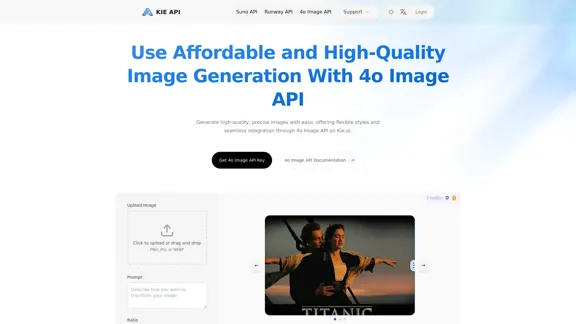
Kie.ai's 4o Image API: Cost-effective, Reliable, and Very Accurate AI Image Creation

Kie.ai’s 4o Image API offers affordable, stable, and highly accurate AI image generation, enabling creators to easily produce high-quality visuals. It provides reliable and efficient solutions for various creative projects, including text-to-image and image-to-image transformations, as well as a range of visual styles.
Visit Website
Kie.ai's 4o Image API: Cost-effective, Reliable, and Very Accurate AI Image Creation
Visit Website

Introduction

Kie.ai’s 4o Image API provides affordable, stable, and highly accurate AI image generation. Users can easily generate high-quality images with flexible styles and seamless integration. The API supports various use cases, including design, documentation, and visual communication, making it a versatile tool for developers and creatives alike.

Feature

  1. Image-to-Image Generation

    Kie.ai’s 4o Image API allows users to upload an image and generate a new version based on specific requirements. This feature is useful for style transfer, content enhancement, and iterative design adjustments.

  2. Text-to-Image Generation

    Users can create high-quality images from text descriptions, making it easy to generate custom visuals for marketing, education, or creative projects.

  3. Affordable and Scalable

    The API is designed to be accessible for teams of all sizes, offering flexible and transparent pricing to accommodate various project needs.

  4. Accurate Text Rendering

    The API excels at rendering clear and correctly placed text in images, ideal for creating visual content that requires readable text output.

  5. High-Fidelity Results

    Kie.ai’s API can follow complex prompts with precision, handling multi-element scenes and specific object placements while maintaining visual coherence.

  6. Reliable Visual Consistency

    Built on the OpenAI image generation API, Kie.ai ensures consistent image output across multiple iterations, which is essential for branding and design workflows.

  7. Flexible Visual Styles

    The API supports a wide range of visual styles, allowing users to match their brand’s tone and design goals.

How to Use?

  1. Visit the Kie.ai website and log in to your account.
  2. Access the 4o Image API documentation for integration guidelines.
  3. Use the provided code examples to implement image generation in your application.
  4. Experiment with different prompts to explore the capabilities of the API.
  5. Take advantage of the free trial to test the API before committing to a paid plan.

FAQ

What makes Kie.ai's 4o Image API unique?

Kie.ai's 4o Image API offers advanced image generation capabilities powered by GPT-4o, integrating seamless image-to-image and text-to-image generation features.

What is the pricing for Kie.ai's GPT4o Image Generation API?

Kie.ai offers flexible and transparent pricing based on usage, suitable for startups, enterprises, and individual developers.

How can Kie.ai’s GPT-4o Image API improve your creative workflow?

The API streamlines creative processes, allowing users to quickly turn sketches or descriptions into professional visuals, enhancing productivity and design quality.

What are the ethical guidelines for using Kie.ai's OpenAI image API?

Kie.ai encourages responsible content generation, avoiding harmful or inappropriate imagery and ensuring compliance with legal and social standards.

Can Kie.ai’s 4o Image API handle high-concurrency requests?

Yes, the API is designed to handle high-concurrency requests efficiently, ensuring fast response times for multiple image generation tasks.

How fast is the image generation process with Kie.ai’s GPT-4o Image API?

Images are generated in just a few seconds to a minute, depending on the complexity of the prompt.

Price

Kie.ai offers a free trial for the 4o Image API, allowing users to explore its capabilities before committing to a paid plan.

The price is for reference only, please refer to the latest official data for actual information.

Evaluation

  1. Kie.ai’s 4o Image API demonstrates strong capabilities in generating high-quality images from both text and existing images, making it a valuable tool for various creative applications.
  2. The API's flexibility in visual styles and accurate text rendering enhances its usability for marketing and design purposes.
  3. However, users may encounter limitations with highly complex prompts that require intricate details, which could affect the output quality.
  4. Overall, Kie.ai's 4o Image API is a powerful solution for image generation, but users should familiarize themselves with its capabilities to maximize its potential in their projects.

Latest Traffic Insights

  • Monthly Visits

    356.51 K

  • Bounce Rate

    38.76%

  • Pages Per Visit

    4.39

  • Time on Site(s)

    270.43

  • Global Rank

    110492

  • Country Rank

    United States 94914

Recent Visits

Traffic Sources

  • Social Media:
    6.73%
  • Paid Referrals:
    1.08%
  • Email:
    0.15%
  • Referrals:
    13.40%
  • Search Engines:
    27.30%
  • Direct:
    51.32%
More Data

Related Websites

Odyssey: Imagine. Create. Automate.
View Detail

Odyssey: Imagine. Create. Automate.

Odyssey: Imagine. Create. Automate.

Odyssey is a native Mac app for creating remarkable art, getting work done, and automating repetitive tasks with the power of AI.

12.13 K
AI Christmas Photo Generator | The Best Christmas AI Generator
View Detail

AI Christmas Photo Generator | The Best Christmas AI Generator

AI Christmas Photo Generator | The Best Christmas AI Generator

Don't wait in line for your Christmas photos this holiday season. Just upload a couple of selfies and let the holiday magic begin 💫

295
Best AI Writer, Content Generator & Copywriting Assistant | Easy-Peasy.AI
View Detail

Best AI Writer, Content Generator & Copywriting Assistant | Easy-Peasy.AI

Best AI Writer, Content Generator & Copywriting Assistant | Easy-Peasy.AI

Your One-Stop Solution for Content Creation, Image Crafting, Audio Generation, and AI Transcription.

1.14 M
4o Image API: Affordable, Stable, and Versatile AI Image Generation
View Detail

4o Image API: Affordable, Stable, and Versatile AI Image Generation

4o Image API: Affordable, Stable, and Versatile AI Image Generation

4oimageapi.io’s 4o Image API provides affordable, stable, and accurate AI image generation, allowing creators to easily produce high-quality visuals. With features such as text-to-image and image-to-image transformations, along with a variety of artistic styles, it offers dependable and effective tools for creative projects.

0
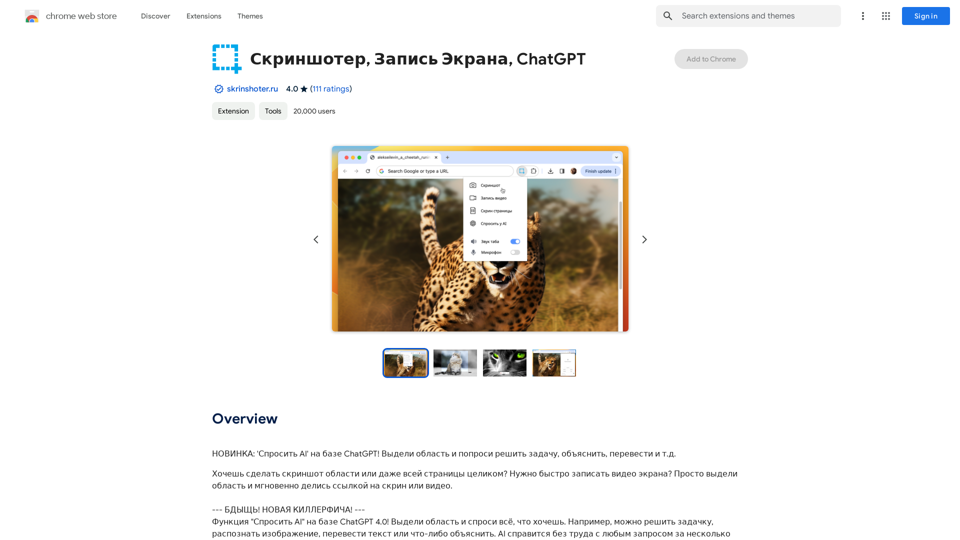
ScreenRedact on the Mac App Store

#Description
ScreenRedact is a powerful and easy-to-use screenshot editing tool that allows you to quickly and easily remove sensitive information from your screenshots. With its intuitive interface and advanced features, ScreenRedact is the perfect solution for anyone who needs to share screenshots online or with others.

#Features
* Easy to use: ScreenRedact's intuitive interface makes it easy to get started, even if you're not tech-savvy.
* Advanced editing tools: ScreenRedact offers a range of advanced editing tools, including blur, pixelate, and redact, to help you remove sensitive information from your screenshots.
* Customizable: ScreenRedact allows you to customize the appearance of your redactions, including the color, opacity, and style.
* Support for multiple file formats: ScreenRedact supports a range of file formats, including JPEG, PNG, and TIFF.
* Share easily: ScreenRedact makes it easy to share your edited screenshots with others, either by saving them to your computer or sharing them directly to social media or email.

#What's New
* Improved performance: ScreenRedact is now faster and more efficient, making it easier to edit your screenshots.
* New editing tools: ScreenRedact now includes new editing tools, including a magic wand and a lasso tool, to make it even easier to remove sensitive information from your screenshots.
* Enhanced customization options: ScreenRedact now offers even more customization options, including the ability to change the color and opacity of your redactions.

#Ratings and Reviews
* 4.5/5 stars: ScreenRedact has an average rating of 4.5 out of 5 stars on the Mac App Store.
* "Easy to use and effective": One reviewer praised ScreenRedact's ease of use and effectiveness, saying "I was able to quickly and easily remove sensitive information from my screenshots."
* "A must-have for anyone who shares screenshots online": Another reviewer called ScreenRedact "a must-have for anyone who shares screenshots online," citing its ease of use and advanced features.
View Detail

ScreenRedact on the Mac App Store #Description ScreenRedact is a powerful and easy-to-use screenshot editing tool that allows you to quickly and easily remove sensitive information from your screenshots. With its intuitive interface and advanced features, ScreenRedact is the perfect solution for anyone who needs to share screenshots online or with others. #Features * Easy to use: ScreenRedact's intuitive interface makes it easy to get started, even if you're not tech-savvy. * Advanced editing tools: ScreenRedact offers a range of advanced editing tools, including blur, pixelate, and redact, to help you remove sensitive information from your screenshots. * Customizable: ScreenRedact allows you to customize the appearance of your redactions, including the color, opacity, and style. * Support for multiple file formats: ScreenRedact supports a range of file formats, including JPEG, PNG, and TIFF. * Share easily: ScreenRedact makes it easy to share your edited screenshots with others, either by saving them to your computer or sharing them directly to social media or email. #What's New * Improved performance: ScreenRedact is now faster and more efficient, making it easier to edit your screenshots. * New editing tools: ScreenRedact now includes new editing tools, including a magic wand and a lasso tool, to make it even easier to remove sensitive information from your screenshots. * Enhanced customization options: ScreenRedact now offers even more customization options, including the ability to change the color and opacity of your redactions. #Ratings and Reviews * 4.5/5 stars: ScreenRedact has an average rating of 4.5 out of 5 stars on the Mac App Store. * "Easy to use and effective": One reviewer praised ScreenRedact's ease of use and effectiveness, saying "I was able to quickly and easily remove sensitive information from my screenshots." * "A must-have for anyone who shares screenshots online": Another reviewer called ScreenRedact "a must-have for anyone who shares screenshots online," citing its ease of use and advanced features.

ScreenRedact on the Mac App Store #Description ScreenRedact is a powerful and easy-to-use screenshot editing tool that allows you to quickly and easily remove sensitive information from your screenshots. With its intuitive interface and advanced features, ScreenRedact is the perfect solution for anyone who needs to share screenshots online or with others. #Features * Easy to use: ScreenRedact's intuitive interface makes it easy to get started, even if you're not tech-savvy. * Advanced editing tools: ScreenRedact offers a range of advanced editing tools, including blur, pixelate, and redact, to help you remove sensitive information from your screenshots. * Customizable: ScreenRedact allows you to customize the appearance of your redactions, including the color, opacity, and style. * Support for multiple file formats: ScreenRedact supports a range of file formats, including JPEG, PNG, and TIFF. * Share easily: ScreenRedact makes it easy to share your edited screenshots with others, either by saving them to your computer or sharing them directly to social media or email. #What's New * Improved performance: ScreenRedact is now faster and more efficient, making it easier to edit your screenshots. * New editing tools: ScreenRedact now includes new editing tools, including a magic wand and a lasso tool, to make it even easier to remove sensitive information from your screenshots. * Enhanced customization options: ScreenRedact now offers even more customization options, including the ability to change the color and opacity of your redactions. #Ratings and Reviews * 4.5/5 stars: ScreenRedact has an average rating of 4.5 out of 5 stars on the Mac App Store. * "Easy to use and effective": One reviewer praised ScreenRedact's ease of use and effectiveness, saying "I was able to quickly and easily remove sensitive information from my screenshots." * "A must-have for anyone who shares screenshots online": Another reviewer called ScreenRedact "a must-have for anyone who shares screenshots online," citing its ease of use and advanced features.

ScreenRedact allows you to remove sensitive text from an image by utilizing Apple's on-device machine learning model, which identifies text within an image and enables you to redact it with ease.

124.77 M
Recorditor: Record your browser activity.
View Detail

Recorditor: Record your browser activity.

Recorditor: Record your browser activity.

Record, write down, and shorten web browser activities for simple how-to guides and sharing information.

193.90 M
ImageKit AI for media delivery and management | ImageKit.io
View Detail

ImageKit AI for media delivery and management | ImageKit.io

ImageKit AI for media delivery and management | ImageKit.io

Leverage AI and Generative AI to transform media processing and digital asset management at scale with ImageKit AI.

1.06 M
It's not possible to directly "save" ChatGPT or DALL·E-3 into Notion. 

ChatGPT and DALL·E-3 are powerful AI models developed by OpenAI. They are not physical files that can be downloaded and stored. 

Think of them like online services you access through an internet connection. You can interact with them, get outputs from them, and even use their outputs in Notion, but you can't "save" the models themselves. 


Let me know if you'd like to explore ways to integrate ChatGPT or DALL·E-3 outputs into your Notion workspace!
View Detail

It's not possible to directly "save" ChatGPT or DALL·E-3 into Notion. ChatGPT and DALL·E-3 are powerful AI models developed by OpenAI. They are not physical files that can be downloaded and stored. Think of them like online services you access through an internet connection. You can interact with them, get outputs from them, and even use their outputs in Notion, but you can't "save" the models themselves. Let me know if you'd like to explore ways to integrate ChatGPT or DALL·E-3 outputs into your Notion workspace!

It's not possible to directly "save" ChatGPT or DALL·E-3 into Notion. ChatGPT and DALL·E-3 are powerful AI models developed by OpenAI. They are not physical files that can be downloaded and stored. Think of them like online services you access through an internet connection. You can interact with them, get outputs from them, and even use their outputs in Notion, but you can't "save" the models themselves. Let me know if you'd like to explore ways to integrate ChatGPT or DALL·E-3 outputs into your Notion workspace!

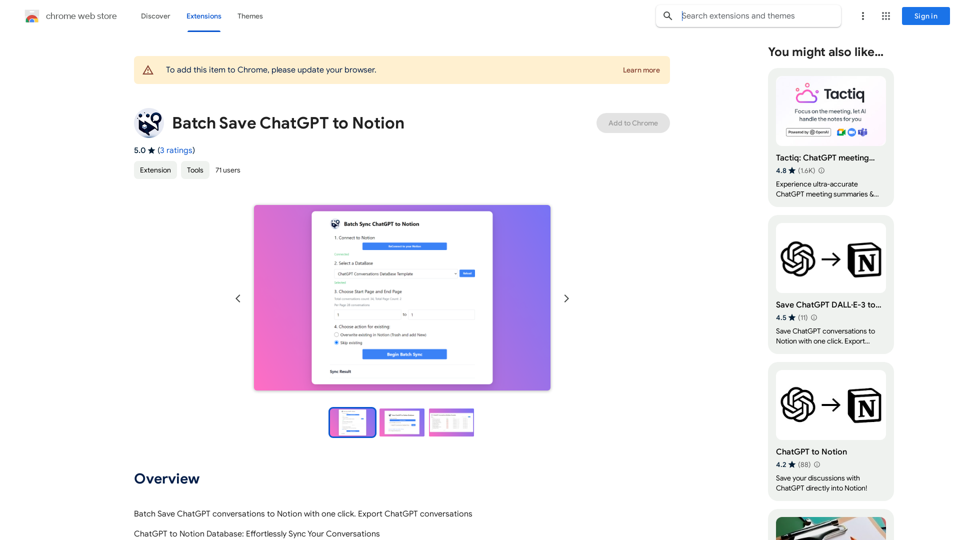
Save ChatGPT conversations to Notion with one click. Export ChatGPT conversations.

193.90 M