Open-source RightAI Tools Directory
  • Discover AI
  • Submit
  • Startup
  • Blog
Open-source RightAI Tools Directory
Discover the best AI tools of 2025 with the RightAI Tools Directory!

Friend Links

AI Anime GeneratorToolsApp AI

Support

Tap4
Privacy policyTerms & ConditionsContact Us
Loading...
loading...

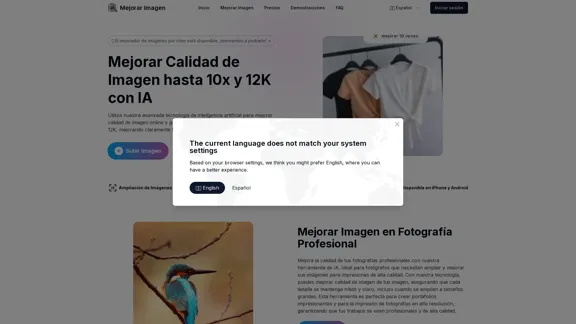
Enhance Image Quality up to 10x and 12K with AI | Improve Image

Here is the English translation: With AI, enlarge images up to 10 times and 12K resolution in seconds, to improve image quality and make your images sharper and more realistic | Enhance Image
Visit Website
Enhance Image Quality up to 10x and 12K with AI | Improve Image
Visit Website

Introduction

Mejorar Imagen is an online tool that uses advanced AI technology to enhance image quality for free. It allows users to upscale images up to 10 times and achieve resolutions of up to 12K, significantly improving sharpness and clarity.

Feature

  1. Image Upscaling

    • Enlarge images up to 10 times their original size
    • Achieve resolutions of up to 12K
  2. AI-Powered Enhancement

    • Utilizes advanced AI algorithms to intelligently add pixels
    • Improves image sharpness and clarity
  3. Multi-Platform Compatibility

    • Available on iPhone and Android devices
    • Accessible through web browsers
  4. Versatile Applications

    • Professional Photography: Enhance images for high-quality prints
    • Graphic Design: Create high-resolution images for various projects
    • Social Media: Improve image quality for better engagement
  5. User-Friendly Process

    1. Upload image
    2. Choose enhancement level
    3. Process image
    4. Download enhanced image
  6. Supported Formats

    • Compatible with JPG, JPEG, PNG, WEBP, BMP
  7. Quick Processing

    • Enhances images in seconds, depending on size and resolution
  8. PDF Support

    • Capable of enhancing images within PDF files

How to Use?

  1. For best results, start with the highest quality original image available.

  2. Experiment with different enhancement levels to find the optimal balance between size and quality.

  3. When enhancing old photos, consider adjusting contrast and color after upscaling for better results.

  4. For social media, consider the platform's recommended image sizes when upscaling.

  5. Always download your enhanced images promptly, as they are only stored on the server for one hour.

FAQ

Q: Is it really free to improve image quality? A: Yes, the tool offers a limited number of free image enhancements. Additional credits can be obtained for more and higher-level improvements.

Q: What is the maximum image enlargement and resolution possible? A: Images can be enlarged up to 10 times. The maximum supported size is 12000x12000 pixels (12K).

Q: How does the AI improve image quality? A: The AI uses advanced algorithms to intelligently add pixels, increasing resolution and improving image sharpness.

Q: Can I improve the quality of images in a PDF? A: Yes, the tool can enhance images contained in PDF files.

Q: How long does it take to improve an image's quality? A: Processing time varies depending on image size and resolution but generally takes only a few seconds.

Q: Is it safe to upload my images to the platform? A: Yes, the platform takes security seriously and ensures all uploaded images are protected.

Price

The website does not provide specific pricing information. It mentions that there are free image enhancements available, with the option to obtain additional credits for more improvements.

The price is for reference only, please refer to the latest official data for actual information.

Evaluation

  1. Mejorar Imagen offers a powerful and accessible solution for image enhancement, catering to both casual users and professionals across various fields.

  2. The ability to upscale images up to 10x and achieve 12K resolution is impressive and sets it apart from many free online tools.

  3. The multi-platform compatibility and support for various image formats, including PDFs, enhance its versatility and user-friendliness.

  4. While the tool offers free enhancements, the lack of clear pricing information for additional credits could be a point of improvement for transparency.

  5. The temporary storage of enhanced images (one hour) is a potential limitation, although it likely helps with server management and user privacy.

  6. The AI-powered enhancement technology seems promising, but without seeing actual results, it's difficult to fully assess the quality of the output compared to other professional image editing software.

Related Websites
GPT Israel Assistant - Personal GPT Assistant Israel
View Detail

GPT Israel Assistant - Personal GPT Assistant Israel

GPT Israel Assistant - Personal GPT Assistant Israel

Unique add-on that enables managing conversations in chat for free, quickly, and without ads, on the Israeli community website of ChatGPT. Take advantage of shortcuts to leading websites.

193.90 M
Course Decode
View Detail

Course Decode

Course Decode

Here is the translation into English: See which degrees are actually used by their graduates. Based on analysis of 349,996 LinkedIn profiles.

0
Komiko | Create Comics and Webtoons with AI
View Detail

Komiko | Create Comics and Webtoons with AI

Komiko | Create Comics and Webtoons with AI

Bring your stories to life with AI. Create captivating comics, webtoon, and visual stories. Design original characters and dive into limitless story worlds.

743.50 K
ChatMoney, ChatMoney AI, AI Monetization, CodeMood, CodeMood AI, AI Chat, AI Knowledge Base, AI Painting, ChatMoney was born for AI monetization.
View Detail

ChatMoney, ChatMoney AI, AI Monetization, CodeMood, CodeMood AI, AI Chat, AI Knowledge Base, AI Painting, ChatMoney was born for AI monetization.

ChatMoney, ChatMoney AI, AI Monetization, CodeMood, CodeMood AI, AI Chat, AI Knowledge Base, AI Painting, ChatMoney was born for AI monetization.

Here is the translation in English, keeping the original format: ChatMoney, ChatMoneyAI, CodeMore AI, CodeMore, AI Source Code, ChatAI, ChatWork, Intelligent Chat System, Knowledge Base System, Painting System, Stable Diffusion, Midjourney, AI Chat, AI Knowledge Base, AI Painting, AI System.

0
Flux AI Image Generator: The Future of Creative Visualization
View Detail

Flux AI Image Generator: The Future of Creative Visualization

Flux AI Image Generator: The Future of Creative Visualization

Explore the boundless possibilities of Flux AI, the leading AI image generator that converts your textual descriptions into breathtaking, one-of-a-kind visuals.

0
ScreenRedact on the Mac App Store

#Description
ScreenRedact is a powerful and easy-to-use screenshot editing tool that allows you to quickly and easily remove sensitive information from your screenshots. With its intuitive interface and advanced features, ScreenRedact is the perfect solution for anyone who needs to share screenshots online or with others.

#Features
* Easy to use: ScreenRedact's intuitive interface makes it easy to get started, even if you're not tech-savvy.
* Advanced editing tools: ScreenRedact offers a range of advanced editing tools, including blur, pixelate, and redact, to help you remove sensitive information from your screenshots.
* Customizable: ScreenRedact allows you to customize the appearance of your redactions, including the color, opacity, and style.
* Support for multiple file formats: ScreenRedact supports a range of file formats, including JPEG, PNG, and TIFF.
* Share easily: ScreenRedact makes it easy to share your edited screenshots with others, either by saving them to your computer or sharing them directly to social media or email.

#What's New
* Improved performance: ScreenRedact is now faster and more efficient, making it easier to edit your screenshots.
* New editing tools: ScreenRedact now includes new editing tools, including a magic wand and a lasso tool, to make it even easier to remove sensitive information from your screenshots.
* Enhanced customization options: ScreenRedact now offers even more customization options, including the ability to change the color and opacity of your redactions.

#Ratings and Reviews
* 4.5/5 stars: ScreenRedact has an average rating of 4.5 out of 5 stars on the Mac App Store.
* "Easy to use and effective": One reviewer praised ScreenRedact's ease of use and effectiveness, saying "I was able to quickly and easily remove sensitive information from my screenshots."
* "A must-have for anyone who shares screenshots online": Another reviewer called ScreenRedact "a must-have for anyone who shares screenshots online," citing its ease of use and advanced features.
View Detail

ScreenRedact on the Mac App Store #Description ScreenRedact is a powerful and easy-to-use screenshot editing tool that allows you to quickly and easily remove sensitive information from your screenshots. With its intuitive interface and advanced features, ScreenRedact is the perfect solution for anyone who needs to share screenshots online or with others. #Features * Easy to use: ScreenRedact's intuitive interface makes it easy to get started, even if you're not tech-savvy. * Advanced editing tools: ScreenRedact offers a range of advanced editing tools, including blur, pixelate, and redact, to help you remove sensitive information from your screenshots. * Customizable: ScreenRedact allows you to customize the appearance of your redactions, including the color, opacity, and style. * Support for multiple file formats: ScreenRedact supports a range of file formats, including JPEG, PNG, and TIFF. * Share easily: ScreenRedact makes it easy to share your edited screenshots with others, either by saving them to your computer or sharing them directly to social media or email. #What's New * Improved performance: ScreenRedact is now faster and more efficient, making it easier to edit your screenshots. * New editing tools: ScreenRedact now includes new editing tools, including a magic wand and a lasso tool, to make it even easier to remove sensitive information from your screenshots. * Enhanced customization options: ScreenRedact now offers even more customization options, including the ability to change the color and opacity of your redactions. #Ratings and Reviews * 4.5/5 stars: ScreenRedact has an average rating of 4.5 out of 5 stars on the Mac App Store. * "Easy to use and effective": One reviewer praised ScreenRedact's ease of use and effectiveness, saying "I was able to quickly and easily remove sensitive information from my screenshots." * "A must-have for anyone who shares screenshots online": Another reviewer called ScreenRedact "a must-have for anyone who shares screenshots online," citing its ease of use and advanced features.

ScreenRedact on the Mac App Store #Description ScreenRedact is a powerful and easy-to-use screenshot editing tool that allows you to quickly and easily remove sensitive information from your screenshots. With its intuitive interface and advanced features, ScreenRedact is the perfect solution for anyone who needs to share screenshots online or with others. #Features * Easy to use: ScreenRedact's intuitive interface makes it easy to get started, even if you're not tech-savvy. * Advanced editing tools: ScreenRedact offers a range of advanced editing tools, including blur, pixelate, and redact, to help you remove sensitive information from your screenshots. * Customizable: ScreenRedact allows you to customize the appearance of your redactions, including the color, opacity, and style. * Support for multiple file formats: ScreenRedact supports a range of file formats, including JPEG, PNG, and TIFF. * Share easily: ScreenRedact makes it easy to share your edited screenshots with others, either by saving them to your computer or sharing them directly to social media or email. #What's New * Improved performance: ScreenRedact is now faster and more efficient, making it easier to edit your screenshots. * New editing tools: ScreenRedact now includes new editing tools, including a magic wand and a lasso tool, to make it even easier to remove sensitive information from your screenshots. * Enhanced customization options: ScreenRedact now offers even more customization options, including the ability to change the color and opacity of your redactions. #Ratings and Reviews * 4.5/5 stars: ScreenRedact has an average rating of 4.5 out of 5 stars on the Mac App Store. * "Easy to use and effective": One reviewer praised ScreenRedact's ease of use and effectiveness, saying "I was able to quickly and easily remove sensitive information from my screenshots." * "A must-have for anyone who shares screenshots online": Another reviewer called ScreenRedact "a must-have for anyone who shares screenshots online," citing its ease of use and advanced features.

ScreenRedact allows you to remove sensitive text from an image by utilizing Apple's on-device machine learning model, which identifies text within an image and enables you to redact it with ease.

124.77 M
Dressplay
View Detail

Dressplay

Dressplay

Dressplay

0
Text To Speech Online 鉂わ笍 FREE UNLIMITED
View Detail

Text To Speech Online 鉂わ笍 FREE UNLIMITED

Text To Speech Online 鉂わ笍 FREE UNLIMITED

Text To Speech Online Free Unlimited. Service with natural sounding voices. Convert any text into MP3 audio file and download on your Mobile or PC..

67.62 K